3:01

Beyond AI Meeting Notes: Meet the New Tana
Tana · Productivity · Jun 2026
Resend · Apr 2026 · 1:23 · AI-annotated
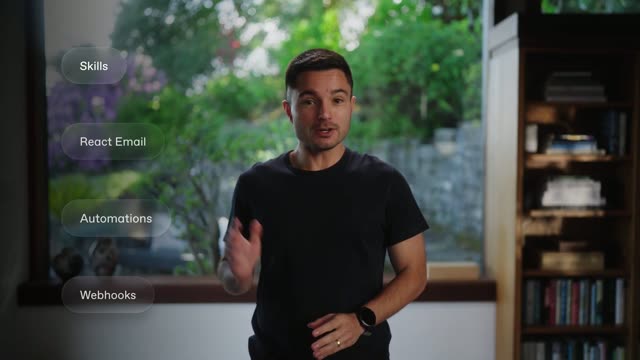
Resend’s 1:23 launch film runs 34 scenes, about 2.5 s each. The product is on screen from the first frame and 4 features are revealed, with social proof. The call to action lands at 1:13 (88% in), over a voiceover. The video is built as a presenter led launch that alternates live action, code cards, and interface demos on a fast, beat matched cut rhythm. Its signature moves are simple overlay graphics over the room and crisp full screen UI reveals.
Is this your launch? to your site or press kit.
Tana · Productivity · Jun 2026
Resend · Developer tools · Apr 2026
Subscribfy · Jun 2026
A bearded man in a cream long-sleeve shirt and round glasses stands in a bright room, a wooden bookshelf behind one shoulder and a window of green foliage behind the other. He gestures with open hands while talking. A white lower-third names him.
On-screen text: “Chris Pennington”, “DX Engineer”
Camera: Push in
A bespectacled man in a cream sweater stands left of frame in a sunlit room, gesturing as he talks. A dark rounded code card on the right crossfades from Tailwind JSX into an HTML table snippet.
On-screen text: “Chris Pennington”, “DX Engineer”
Camera: Static
A bearded man in glasses and a cream sweater stands centered between a wooden bookshelf and a sunlit window, speaking to camera and gesturing with open hands. The medium shot is locked off; he shifts weight and moves his hands in rhythm with his speech.
On-screen text: “三”
Camera: Static
A bearded man in clear-framed glasses and a cream sweater speaks in a medium close-up, raising his hands to gesture. He is framed left of center against a soft-focus green window backdrop.
Camera: Static
A bearded man in clear glasses speaks by a sunlit window, then a hard cut to a dark card with a large outlined RESEND wordmark under the line RESEND BRINGS TO YOU and above THE Open Source EMAIL EDITOR.
On-screen text: “RESEND BRINGS TO YOU”, “RESEND”, “THE Open Source EMAIL EDITOR”, “NO. 7777 NEW FUTURE FEATURES”, “THE FIGURE WAS BUILT FOR RESEND RESEND 20 24”
Camera: Static
A dark title card holds a large white-outlined REACT LIVE EMAIL wordmark in the center, with a blue glow pulsing behind it and fading out. Small letter-spaced caps read RESEND BRINGS TO YOU above and THE OpenSource EMAIL EDITOR below, flanked by small corner labels.
On-screen text: “RESEND BRINGS TO YOU”, “REACT LIVE EMAIL”, “THE OpenSource EMAIL EDITOR”, “NO. 7777 NEW FUTURE FEATURES”, “THIS FEATURE WAS BUILT FOR RESEND RESEND 2026”
Techniques: Light sweep
Camera: Static
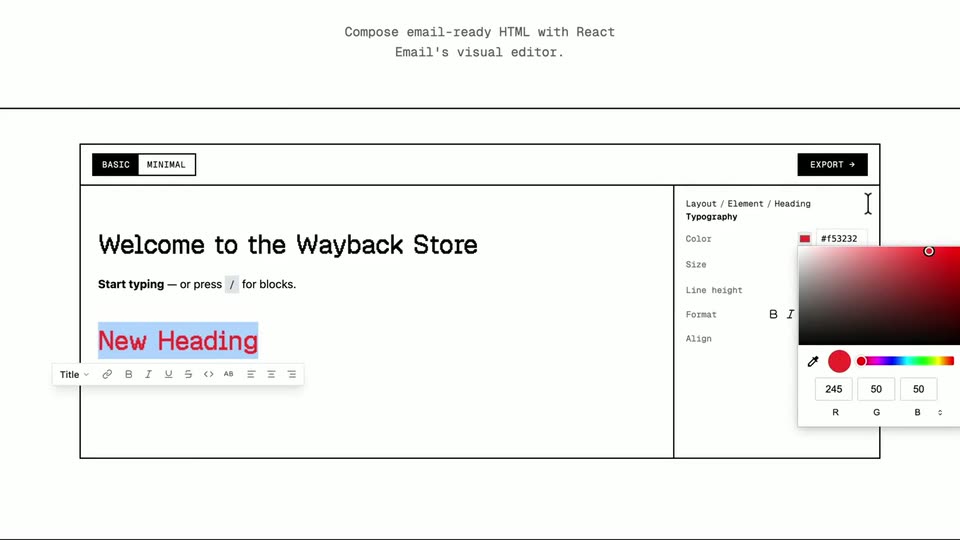
A cursor demos the Email Builder: it opens the slash menu to insert a heading, types “New Heading”, selects it and recolors it red via the typography panel, then scrolls down to the generated HTML code.
Techniques: Cursor demo, UI zoom
Camera: Push in
A static close-up of an editor interface. The top pane shows a preview with a red heading beside a properties panel listing width, padding and rounded values. Below, a code pane under HTML and Plain Text tabs displays raw HTML markup. The frame holds without motion.
Camera: Static
A bearded man in round glasses and a cream sweater stands centered in a sunlit room, hands clasped, speaking to camera. A wooden bookshelf sits left, a window with green foliage right. The locked-off medium shot holds still as he talks.
On-screen text: “三”
Camera: Static
A man with short brown hair, a beard and clear-framed glasses, wearing a cream sweatshirt, stands in a sunlit room and speaks while looking off to the right. A blurred green garden fills the background through a window. He turns his head slightly and smiles.
Camera: Static
A bearded man in glasses and a cream sweater stands in a sunlit room, gesturing with open hands between a wooden bookshelf and a window framing green foliage.
Camera: Static
A man in a white sweater stands in a sunlit room with a wooden bookshelf and a window, gesturing slowly with his hands. Over the window a dashed panel labeled Core fades in, then fills with six white formatting icons in a two-by-three grid.
On-screen text: “Core”
Camera: Static
A monospace headline sits above a white email editor canvas. The caret types /h, opening a dark dropdown of block options with H1 Heading highlighted. A right sidebar lists Typography, Padding, Background, Border, and a BASIC/MINIMAL toggle plus EXPORT button top the canvas.
On-screen text: “Compose email-ready HTML with React”, “Email's visual editor.”
Techniques: Cursor demo
Camera: Static
A dark editor window frames a white email canvas with a store welcome heading. A slash command opens a small block dropdown, then a new heading is typed as a cursor blinks. A right-hand panel lists heading, typography and padding controls.
On-screen text: “with React Email's visual editor.”
Techniques: Cursor demo
Camera: Static
A beige screen shows the React Email visual editor panel. The white canvas holds a 'Welcome to the Wayback Store' heading and a prompt line, while a new heading types out letter by letter with a blinking caret. A sidebar lists Typography, Padding, Background and Border.
On-screen text: “with React Email's visual editor.”
Camera: Static
A man in a cream sweater stands in a room with a wooden bookshelf and a window, gesturing as he speaks. On the right, a Core grid of six rounded icons sits over the window, and an Extensions row of three icons fades in below it.
On-screen text: “Core”, “Extensions”
Camera: Static
A bearded man in clear-framed glasses and a cream waffle-knit sweater speaks in a medium close-up, his head tilted slightly downward. Soft daylight lights his face against a window of blurred green foliage behind him.
Camera: Static
A dark code editor fills the frame while lines type themselves into an extensions array: ImageExtension, SocialPostExtension, then ChartExtension, each landing with a blinking caret. At the end the code cross-dissolves into a presenter standing by a window.
Techniques: Cursor demo
Camera: Static
A man in a white sweater and round glasses stands in a sunlit room, speaking to the camera in front of a wooden bookshelf and a window with green foliage. He gestures with open palms as he talks.
Camera: Static
A bearded man in clear-framed glasses and a cream sweater talks in front of a sunlit window with blurred greenery. The shot dims as a dark Templates gallery of email cards fades in as an overlay across the frame.
Camera: Static
A dark templates gallery fills the screen and slowly zooms in as a cursor glides across the email preview cards. Near the end a black panel wipes in from the left with a loading spinner, and the title THE WORK BEHIND THE WORDS fades in at the bottom.
On-screen text: “THE WORK BEHIND THE WORDS”, “More from the GitHub team”
Techniques: UI zoom, Cursor demo
Camera: Push in
A centered dark modal scales up into a full panel, its preview switching from a password card to a green abstract graphic labeled Monthly roundup. The backdrop lightens from a dim templates grid to flat gray while the white caption THE WORK BEHIND THE WORK and its subtitle fade out.
On-screen text: “THE WORK BEHIND THE WORK”, “Here from the Dither team.”
Techniques: UI zoom
Camera: Static
A locked-off view of a document editor: a black toolbar reads 'product-update.tsx' above a white page on a light gray canvas, showing a green dithered collage header, the heading 'Monthly roundup', and body copy. The frame holds still.
On-screen text: “8”, “THE WORK BEHIND”, “Here from the Dither team.”
Camera: Static
A flat light-gray interface shows a welcome page: a 3D white sphere rests on a gray field with a soft shadow, above the bold two-line headline 'Welcome to Barebones' and the small line 'Thanks for joining us', framed by a dark top toolbar with a file name and view icons.
Camera: Static
A dark email template fills the frame inside a preview bar showing the file name and device toggles. A dithered black-and-white photo of a mountain road carries an open white dropdown with four option rows, the third checked. A large white headline sits below.
Camera: Static
A dark maroon email confirmation screen sits static in frame, with a white serif headline, confirmation copy, a track link, and two product rows with small square thumbnails.
Camera: Static
A code editor window titled welcome.tsx shows a live preview of an email template on a light background. A dark banner and a Halo logo sit above the bold headline, with a silver smart ring render below. The view holds static.
Camera: Static
A code editor window frames a white canvas holding a dark maroon card. The card shows a close-up photo of a freckled face with a green eye and a cream drop on the cheek, with a small atom icon in the top corner. The frame stays locked off.
Camera: Static
A code editor window holds a static view of a rendered email template. The email shows a logo, the label Product update, a bold headline, body copy, a black View in dashboard button, and a gray 3D sphere image below. The top bar reads product-update.tsx with device icons.
Camera: Static
A man with glasses and a beard in a cream long-sleeve shirt stands centered in a sunlit room, speaking to the camera. A wooden bookshelf with books and small vases sits to his left; a window with green foliage fills the right. Medium shot, static framing.
Camera: Static
A wall of circular contributor avatars in a tight grid scrolls slowly over a black background. The outer rows fade to black at the edges, and the grid keeps drifting as the field of faces moves.
Camera: Pan
A bearded man in a cream sweater and round glasses stands center frame, speaking and gesturing with both hands. A wooden bookshelf sits to his left and a window with green foliage to his right. The camera holds a static medium shot.
Camera: Static
A smiling man in a cream sweater gestures with both hands in front of wooden shelves and a leafy window, the white Resend wordmark centered over his chest. The locked-off frame darkens steadily toward black.
On-screen text: “Resend”
Techniques: Kinetic type
Camera: Static
The white Resend wordmark sits centered on a near-black field with faint diagonal streaks, scales slightly, then fades to black.
On-screen text: “Resend”
Techniques: Kinetic type
Camera: Static