
0:54
Explore
00:00:00 / 01:35:29
- Length
- 1:35
- Scenes
- 48 · 2.0 s avg
- Product on screen
- 0:02
- Features shown
- 6
- Call to action
- 1:20 · 84%
- Voiceover
- Yes
- Views
- 678K on YouTube
as of November 25, 2026
Apple’s 1:35 launch film runs 48 scenes, about 2.0 s each. The product shows up at 0:02 and 6 features are revealed, with social proof. The call to action lands at 1:20 (84% in), over a voiceover. The video is a fast montage of feature vignettes, each opened by a 3D metallic keyword that the light sweep ignites, then cut to a tight iPhone demo isolated on black. Pacing is quick with short cuts, and the signature moves are the lens-flare text reveal, the pointing hand, and the glowing Apple logo bookends.
Footage neededEstimated needs: 4 capture groups — your screens or recordings · 1 official logo — reused across the film · 3 filmed passages — shoot, supply or replace · 2 graphic passages — draw or supply · 10 3D passages — build or supply
Is this your launch? to your site or press kit.
More like this


Similar soundtrack
Films whose music sounds like this one, voice left out
1:07

Deploy (YC F26) - The Generalist Robot Deployment Company
Deploy · Modern electronic and orchestral corporate score
1:48
Caroline Clark - Frontier AI has solved math. Science. Coding. But it still hasn’t sol
Arcade · Upbeat electronic, modern orchestral
1:14

GodHands Launch Video (YC F26)
GodHands · Electronic, Orchestral
Apple’s next big step for Siri and iPhone, scene by scene
· 48 scenes as text
01 · Hook · 0:00–0:00
On a black field, thin vertical blue and orange light streaks flare, then the word COMING scales in at center as a bright beam of light sweeps behind the middle letters.
On-screen text: “COMING”
Techniques: Kinetic type, Light sweep
Camera: Static
02 · Hook · 0:00–0:02
Bold white sans-serif words appear one after another on a black background, each line replaced by the next. A bright lens-flare glow blooms behind the letters and a thin horizontal light streak sweeps across them.
On-screen text: “COMING”, “TO A POCKET”, “NEAR YOU”
Techniques: Kinetic type, Light sweep
Camera: Static
03 · Product intro · 0:02–0:05
An iPhone home screen sits centered on black, then the camera pushes in on the top of the display. A multicolored glow fills the Dynamic Island while the Weather and Calendar widgets stay in frame.
Techniques: UI zoom
Camera: Push in
04 · Product intro · 0:05–0:07
A glowing iridescent wave sits centered on a black field, its bands of blue, orange and red light breathing and shifting shape. A faint circular halo frames it at the start, then the glow narrows into a soft mound as the colors ripple.
Camera: Pull out
05 · Feature reveal · 0:07–0:09
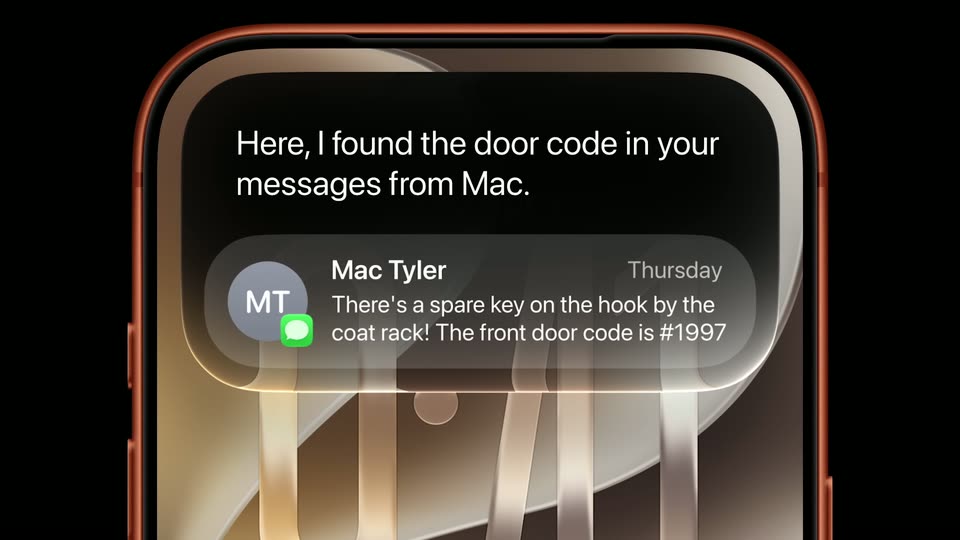
A close-up of an orange-framed phone lock screen. A Siri notification fades in at the top, reading 'Here, I found the door code in your messages from Mac,' above a message card from Mac Tyler showing a spare key note and the front door code #1997.
Camera: Static
06 · Feature reveal · 0:09–0:10
A close-up of an iPhone lock screen on a black background. A Siri suggestion bubble reads about a door code, then a message notification from Mac Tyler slides up, then the suggestion swaps to a weather forecast and a San Francisco weather widget fades in.
Camera: Static
07 · Feature reveal · 0:10–0:11
Close-up of the iPhone screen on a black background. A white Siri message about the Sunday tennis lesson sits above a blue San Francisco weather card showing 63°, Sunny. The card settles slightly into place over the dark wallpaper.
Camera: Static
08 · Feature reveal · 0:11–0:12
A close-up of an iPhone screen shows a weather notification and a blue San Francisco card that clear away, revealing the lock screen with the time 10:41 and the black Dynamic Island.
Camera: Static
09 · Feature reveal · 0:12–0:13
A copper-framed device screen on a black background shows a map card with a Memoji pin over Ocean Beach, San Francisco, and the status line “Alex is about 2 miles away.” The shot holds with a slow push-in on the map.
Techniques: 3D mockup, UI zoom
Camera: Static
10 · Feature reveal · 0:13–0:14
A copper-framed phone sits in 3D perspective on a black field, its screen showing a map card with a person's avatar pin. The line 'Alex is about 2 miles away.' heads the card. The map drifts slowly and a green ring pulses around the pin.
Techniques: 3D mockup
Camera: Static
11 · Feature reveal · 0:14–0:16
Close-up of an orange-framed phone on black, its lock screen visible. A rounded card fades to dark over the top, revealing white text about the Golden Gate Bridge, the middle line scaling in.
Techniques: 3D mockup
Camera: Static
12 · Feature reveal · 0:16–0:18
A full iPhone sits centered on black, then the view zooms into the home screen so the app grid fills the frame. A thumb enters from the bottom and presses the Siri icon, the tap dimming the surrounding icons.
On-screen text: “The Golden Gate Bridge is painted”, “in a color officially known as”, “International Orange.”
Techniques: UI zoom, Kinetic type
Camera: Push in
13 · Feature reveal · 0:18–0:20
A copper-framed iPhone floats on black, tilted in 3D at first. Its screen morphs from a grid of app icons into a vertical stack of content cards, then the phone rotates to a flat front view.
Techniques: 3D mockup, Morph
Camera: Pull out
14 · Feature reveal · 0:20–0:20
A copper-framed iPhone floats centered on a black background, its screen filled with a two-column feed of article cards. The device tilts gently in 3D space, the screen content shifting with the angle.
Techniques: 3D mockup
Camera: Static
15 · Feature reveal · 0:20–0:25
A front-facing phone on black shows the camera app over a bowl of pho. A white swirl scans the soup, the shutter turns to a cancel X, and a loading bar slides up. The view zooms into the screen, blurring into a nutrition facts list.
Techniques: UI zoom
Camera: Push in
16 · Feature reveal · 0:25–0:28
A close-up of a phone's nutrition list with a loading spinner at the top, the rows scrolling up, then the camera zooms out to show the whole phone on black, its screen now a Siri chat with a message bubble and a Working indicator.
Techniques: UI zoom
Camera: Push in
17 · Feature reveal · 0:28–0:32
A copper-framed iPhone sits centered on black as Siri's answer about Brazil versus Morocco party dishes streams in, finishing with a heading and two photo cards. The shot cuts to a pointing hand beside the caption SIRI IS GIVING MAIN CHARACTER ENERGY.
On-screen text: “SIRI IS GIVING MAIN CHARACTER ENERGY”
Camera: Static
18 · Social proof · 0:32–0:36
A three-line quote sits centered on a black background. A hand enters from the left and touches the first line, then the text brightens from left to right. A second hand enters from the bottom and points at the closing word.
On-screen text: ““SIRI IS GIVING MAIN CHARACTER ENERGY””
Techniques: Light sweep
Camera: Static
19 · Social proof · 0:36–0:37
On a black field, a two-part quote sits in white sans-serif while a bright glow highlights the left phrase and the right phrase stays dim. A pointing hand rises from the bottom right, gesturing toward the text.
On-screen text: “”
Camera: Static
20 · Social proof · 0:37–0:39
On a black background, a two-line white quote is lit from left to right by a moving glow, then a thumbs-up hand pops into the lower left corner.
On-screen text: ““PUTS THE PERSONAL IN PERSONAL ASSISTANT””
Techniques: Light sweep
Camera: Static
21 · Social proof · 0:39–0:40
On a black background, a white quote reads “Puts the personal in personal assistant,” with a thumbs-up hand at the lower left. A bright glint sweeps the right letters, then the whole line lights up as the hand drops out.
On-screen text: ““PUTS THE PERSONAL IN PERSONAL ASSISTANT””
Techniques: Light sweep
Camera: Pull out
22 · Feature reveal · 0:40–0:41
On a black field, bold white words NEXT, GENERATION and APPLE scale in one after another, each crossed by a glowing curved light streak. Thin vertical lines and radiating beams flicker in the dark, and a small caption sits below.
On-screen text: “NEXT”, “GENERATION”, “APPLE”, “PUTS THE PERSONAL IN”, “PERSONAL ASSISTANT”
Techniques: Kinetic type, Light sweep
Camera: Pull out
23 · Feature reveal · 0:41–0:42
On a black background, the word APPLE glows in white while a light sweep crosses it, set over the large dark outlined word INTELLIGENCE. APPLE scales away as INTELLIGENCE flares bright, then settles into a locked-off dark outline with faint blue and orange edges.
On-screen text: “GENERATION”, “APPLE”, “INTELLIGENCE”
Techniques: Kinetic type, Light sweep
Camera: Pull out
24 · Feature reveal · 0:42–0:43
A vertical photo of a young man on an orange chair by a sunlit window. A soft colored blur covering the frame dissolves, and the image reframes into a tighter, cleaner crop of the same shot.
On-screen text: “INTELLIGENCE”
Techniques: Morph
Camera: Static
25 · Feature reveal · 0:43–0:44
A vertical portrait of a woman in a grassy field widens as the photo extends past its original frame, blurred edges filling in. A white rule-of-thirds grid overlays the image while the black side bars shrink.
Camera: Static
26 · Feature reveal · 0:44–0:47
A person in a green sweater balances a blue ball on a finger on a grassy hill under a clear blue sky, holding a yellow and blue ball in the other hand. Glitchy duplicate figures and floating orbs fade out, leaving a clean single shot.
Camera: Static
27 · Feature reveal · 0:47–0:50
A swarm of orange monarch butterflies floats through a 3D field against dark trees and a pale sky. The frame slowly pushes in while wings at different depths drift at different speeds, the far ones blurred.
Techniques: Parallax
Camera: Push in
28 · Feature reveal · 0:50–0:52
A copper-framed smartphone sits centered on a black background, its screen showing an incoming call from Yaya. The contact poster fills the display with a photo of a white-haired woman in a pink jacket crouched on a skateboard under a blue sky. The answer bar and clock scale gently.
Camera: Static
29 · Feature reveal · 0:52–0:53
An orange titanium iPhone sits centered on a black background, front-facing, showing the lock screen with a paper-cut Mount Fuji wallpaper, a red sun and blue waves. The device holds a locked-off frame with a subtle scale, the 9:41 clock and Wed Apr 1 date resting on the orange sky.
Camera: Static
30 · Feature reveal · 0:53–0:54
A dark rounded app icon, showing a moonlit mountain scene in a glowing circle with a smaller bubble at its base, sits centered on a black background and scales in gently before holding still.
Camera: Static
31 · Feature reveal · 0:54–0:56
Close-up of a copper-framed iPhone on black showing a card feed. The hamburger button glints orange as a white filter sheet slides down from the top, blurring the cards behind and listing categories with counts.
Techniques: 3D mockup, Light sweep
Camera: Push in
32 · Feature reveal · 0:56–0:58
The word ORGANIZED in bold 3D sans-serif sits centered on black, scaling up as a beam of light sweeps left to right, turning the letters from dim gray to bright white with a warm edge.
On-screen text: “ORGANIZED”
Techniques: Kinetic type, Light sweep
Camera: Pull out
33 · Feature reveal · 0:58–1:00
A large word ORGANIZED scales up on a black field. A close-up of the bottom of an iPhone lock screen holds still as a Notify Me notification banner for Old Bones Summer Camp slides into place over the dark wallpaper.
On-screen text: “ORGANIZED”
Techniques: Kinetic type
Camera: Static
34 · Feature reveal · 1:00–1:01
A yellow sleeping face emoji with a blue Zz hovers at center on black. Behind it, the word PROTECTED materializes in large 3D metallic letters with glowing orange edges, then holds still as the emoji bobs gently.
On-screen text: “PROTECTED”
Techniques: Kinetic type
Camera: Static
35 · Feature reveal · 1:01–1:03
The word PROTECTED in bold 3D chrome letters sits centered on a black background. A band of light glows across the middle letters, casting a warm orange edge below and a cool blue rim above, while the outer letters fade into shadow. The frame stays locked off.
On-screen text: “PROTECTED”
Techniques: Light sweep
Camera: Static
36 · Feature reveal · 1:03–1:04
Black background, locked-off frame: the word PROTECTED in dark metallic 3D letters is crossed by a thin horizontal light beam, then the word becomes AUTOMATICALLY in white 3D letters, glowing on the left and fading to black on the right.
On-screen text: “PROTECTED”, “AUTOMATICALLY”
Techniques: Kinetic type, Light sweep
Camera: Static
37 · Feature reveal · 1:04–1:04
The word AUTOMATICALLY sits in large, metallic gray letters on a black background. A bright white light sweep moves from left to right across the text, briefly illuminating the letters.
On-screen text: “AUTOMATICALLY”
Techniques: Light sweep
Camera: Static
38 · Feature reveal · 1:04–1:06
A 3D iPhone mockup on a black background shows the white Security settings page. A fingertip taps the blue Fix 5 Passwords button, which switches to a Cancel button as the action processes.
Techniques: 3D mockup
Camera: Static
39 · Feature reveal · 1:06–1:10
A bronze iPhone floats centered on black, its lock screen showing 9:41. A white-gloved hand slides in from the lower right, a bare hand follows and taps the screen, then the Apple logo fades in over the wallpaper.
Techniques: 3D mockup
Camera: Pull out
40 · Feature reveal · 1:10–1:16
A white Apple logo centered on black gains a gray shackle that closes into a padlock over its top. The mark fades out and the dark embossed words YOUR DATA fade in on black.
On-screen text: “YOUR DATA”
Techniques: Morph
Camera: Static
41 · Feature reveal · 1:16–1:18
Silver 3D type cycles through “YOUR DATA”, “STAYS”, “PROTECTED” on a black field, each word struck by a bright light sweep, the Apple logo settling in the lower right.
On-screen text: “YOUR DATA”, “STAYS”, “PROTECTED”
Techniques: Kinetic type, Light sweep
Camera: Static
42 · Other · 1:18–1:19
A hand points at a scrolling list of white text on a black background. The text moves upward as the hand tracks a specific line.
On-screen text: “PROTECTED”
Techniques: Kinetic type
Camera: Pan
43 · Other · 1:19–1:20
A dense list of white all-caps feature lines scrolls upward on a black background, lines overlapping and fading as they pass. A pointing hand enters from the left at the start, taps the list, and exits as the scroll continues.
Techniques: Kinetic type
Camera: Pan
44 · CTA · 1:20–1:21
A gray list of feature updates on black fades out as a large 3D metallic headline scales in, then a light sweep glints across the letters.
On-screen text: “COMING TO AN IPHONE NEAR YOU”
Techniques: Kinetic type, Light sweep
Camera: Pull out
45 · CTA · 1:21–1:24
Three lines of 3D silver text sit on a black background and scale down over the clip. A beam of light sweeps across the metallic letters from left to right as they shrink.
On-screen text: “COMING”, “TO AN iPHONE”, “NEAR YOU”
Techniques: Kinetic type, Light sweep
Camera: Pull out
46 · Outro · 1:24–1:25
On black, the headline scales up over a dark Apple logo whose glowing contour traces and fills white. As the logo completes, the headline fades out, leaving the lit mark and a small disclaimer line at the bottom.
On-screen text: “COMING”, “TO AN IPHONE”, “NEAR YOU”, “iOS 27 coming this fall. Siri AI will be available in beta later this year, in English to start. Siri AI will not be initially available in the EU on iOS and i”
Techniques: Kinetic type, Light sweep, Masking
Camera: Static
47 · Outro · 1:25–1:28
A white Apple logo glows at the center of a black frame, its warm halo softening as the clip holds. A two-line gray disclaimer stays locked along the bottom edge.
On-screen text: “iOS 27 coming this fall. Siri AI will be available in beta later this year, in English to start. Siri AI will not be initially available in the EU on iOS and iP”, “Apple Intelligence features require an eligible device with device and Siri language set to the same supported language.”
Camera: Static
48 · Outro · 1:28–1:35
A black sign-off card holds the Apple logo with a small legal line about Apple Intelligence language requirements. The frame is locked and still for the full duration, with no motion or camera move.
On-screen text: “and iPadOS. Apple Intelligence features require an eligible device with device and Siri language set to the same supported language.”
Camera: Static