0:39
Best Motion Graphics Brand Video for AI Platform | ChatGPT by OpenAI
OpenAI · AI · Mar 2026
GodHands · Oct 2026 · 1:14 · AI-annotated · YC Fall 2026
A dark live-action hook and a gray 3D flat-lay problem build the stakes, then the product is named and its loop is demoed with a chessboard metaphor and a line-graph 'living knowledge' motif. The video closes on a cream logo card after a rapid run of single-claim benefit shots.
OpenAI · AI · Mar 2026
Runway · AI · Sep 2026
ElevenLabs · AI · Sep 2026
A pair of hands types on a laptop lit by a warm desk lamp in a dark room. Centered white headline text builds word by word, starting with “Every” and adding “company”.
On-screen text: “Every company”, “runs”
Techniques: Kinetic type
Camera: Static
A 3D laptop screen shows a row of colorful app icons as the camera flies past them, the caption runs on held centered. The screen fades to a dark mountain wallpaper and No system fully builds word by word at the top left.
On-screen text: “runs on”, “No system fully”
Techniques: 3D mockup, Kinetic type
Camera: Static
A dark screen-recording toolbar floats over an Earth-from-space backdrop in a locked-off frame. A cursor hovers the screen icon as a 'Record Entire Screen' tooltip fades in, while the white headline 'No system' holds at left.
On-screen text: “No system”
Techniques: Cursor demo
Camera: Static
A dark rounded screen-recording toolbar floats over an orbital view of Earth. A cursor clicks through the icons as a tooltip pops up, while the headline 'No system fully captures' sits above the bar.
On-screen text: “No system fully captures”
Techniques: Cursor demo
Camera: Static
A tight close-up of a laptop screen showing a Trello board, the address bar reading trello.com and the top toolbar in view. The shot starts soft and racks into focus on the upper half, holding a locked-off frame with shallow depth of field.
On-screen text: “fully captures”
Camera: Static
A hand types on a white keyboard in close-up, then the view pulls back to a browser window on an Operations hub page. A bold black headline stays centered throughout.
On-screen text: “the work people do,”
Camera: Pan
A browser window with a row of tabs is shown in close-up. A large bold black headline reads over the page while the tab row and a dark toolbar shift beneath it; the text remains still and locked to the frame.
On-screen text: “the work people do,”, “how they do it”
Camera: Static
Close-up of hands typing on a silver MacBook from an over-the-shoulder angle, cutting to a hand resting on a black keyboard. White lowercase captions sit over the footage, first reading “how they do it”, then “the”.
On-screen text: “how they do it”, “the”
Camera: Static
Top-down shot of hands typing on a laptop, with floating key labels drifting in 3D space, then a close-up of hands flipping through a stack of papers. White words read across the frame in sync with the voiceover.
On-screen text: “the”, “decisions”, “they”
Camera: Static
A static white caption, the decisions they make, holds across the frame while the footage dissolves from a hand holding a phone to two people's hands resting on an open notebook at a desk.
On-screen text: “the decisions they make”
Camera: Static
A direct message view shows a contact header and a question about an onboarding checklist. The interface dims as the contact switches to Sanya Wilson and large white text, “the people they ask,” appears centered over the screen.
On-screen text: “the decisions they make”, “the people they ask.”
Camera: Static
A dark desk in top-down view fades in from black, an open empty cardboard box centered among office items: a coffee cup, pens, a stapler, glasses, a notebook, and an ID badge. The flat-lay holds still.
Camera: Static
Top-down 3D desk scene: scattered office items (paper, pens, glasses, coffee cup, succulent, photo frame, notebook, badge) fly into an open cardboard box, the flaps close, and a paper label reading “Goes with them” appears. White overlay words appear word by word in sync with the voiceover.
On-screen text: “Then”, “someone”, “leaves”, “and that”, “knowledge”, “Goes with them”
Techniques: Kinetic type
Camera: Static
The view widens from a close-up of a tan envelope labeled “Goes with them” to a full clipboard with a handwritten “Support handover” note, two hands resting on its edges, as a large white headline “Cue the handovers,” appears.
On-screen text: “Cue the handovers,”
Techniques: Kinetic type
Camera: Push in
Top-down desk shot. A hand lifts the top sheet of a paper stack to reveal the next sheet, then a calendar, in sequence. White bold phrases appear over the papers in sync with the lift.
On-screen text: “Cue the handovers,”, “SOPs”, “Weeks”
Techniques: Kinetic type
Camera: Pan
A wall calendar for October 2026 with days crossed out in red sits on a plain gray wall. Bold dark text forms across the center reading “Spent Reconstructing,” then “how” slides in to its left.
On-screen text: “Spent Reconstructing”, “how”
Techniques: Kinetic type
Camera: Pull out
A flat wall calendar for October 2026, most days crossed out in red, cuts to a top-down desk of checklists, memos and a green sticky note. Bold white words build a line across the frame, 'how' giving way to 'AI agents gets done'.
On-screen text: “how”, “AI agents gets”, “done”
Techniques: Kinetic type
Camera: Static
Top-down view of a paper workflow board: yellow and green sticky notes plus a dashed approver box on a gray desk beside a pen. The board scales down to reveal the full layout under a centered white headline.
On-screen text: “AI agents face”, “the same problem.”
Techniques: Kinetic type
Camera: Static
Top-down shot of a printed workflow sheet on a gray desk: four sticky-note steps, two checked, a dashed APPROVER box, and one stamped NOT SENT, with a pen at the right. The white headline 'the same problem.' fades in over the center.
On-screen text: “the same problem.”
Techniques: Kinetic type
Camera: Static
Two rows of tilted cards sit in 3D perspective on a gray background. The top row morphs from web pages into employee ID badges with photos, the bottom row stays as web pages, while white headline text swaps from 'they know the internet' to 'they not your company'.
On-screen text: “they know”, “the internet”, “not your company”
Techniques: 3D mockup, Morph, Kinetic type
Camera: Pan
Three slightly tilted employee ID badges with headshots, names, titles, and barcodes rest on a plain gray background. Large white text reads “But,” in the top left and “not your company” along the bottom.
On-screen text: “But,”, “not your company”
Camera: Static
On a black void, tangled-line human figures appear in sequence: one seated at a laptop, one standing with a tablet, one walking to a table to place a box. The active figure glows white, then dims to purple as the next takes over.
On-screen text: “GodHands”, “changes”, “that”
Techniques: Particles, Kinetic type
Camera: Static
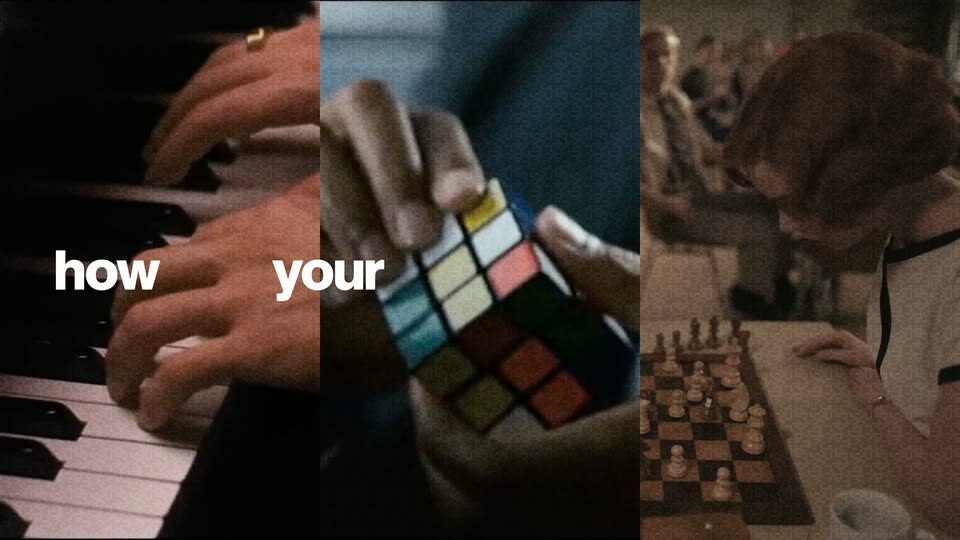
Three vertical live-action panels fill the frame: hands on piano keys, hands turning a Rubik's cube, and a person at a chessboard. White words 'It', 'how' and 'learns' pop into the panels, then the panels fade to black.
On-screen text: “It”, “learns”, “how”, “that”, “changes”
Techniques: Split screen, Kinetic type
Camera: Static
Three vertical live-action clips play side by side: hands on a piano, hands turning a Rubik's cube, a woman at a chessboard. Lowercase white words flash in and out across the panels, spelling a sentence in sync with the voiceover.
On-screen text: “how”, “your”, “team”, “works”, “by”, “observing”, “real”
Techniques: Split screen, Kinetic type
Camera: Static
Three vertical live-action panels show hands typing on a laptop, handling cards, and moving chess pieces. Bold white words real, tasks, then across sit centered over each panel.
On-screen text: “real”, “tasks”, “across”
Techniques: Split screen
Camera: Static
Three grainy vertical panels show hands typing on a laptop, a laptop screen with a desktop app, and a hand on a mouse. White words 'real', 'tasks', 'across' sit in each panel, then 'Desktop apps' appears centered across the middle.
On-screen text: “real”, “tasks”, “across”, “Desktop apps”
Techniques: Split screen, Kinetic type
Camera: Static
A chessboard on the left as a white knight glides F3 to E5 on a purple path, retreats to D3 on a gold path, then captures a black knight on B4. Three cards labeled Context, Decisions, Edge cases stack on the right, each linked by a line to the board.
On-screen text: “capturing”, “Context”, “Decisions”, “Edge cases”
Camera: Static
A glowing purple and amber line network draws itself on black, forming a hexagonal graph with node chips and step labels Observe, Check, Choose, Act under the title GodHands · Living knowledge. The caption It turns that experience stays fixed in the lower left.
On-screen text: “It turns that experience”, “GodHands · Living knowledge”
Techniques: Masking
Camera: Static
On black, a gold and violet line graph with four numbered nodes, Observe, Check, Choose, Act, and a retry loop sits below a centered title. A dark chessboard with pieces slides in from the left, pushing the graph to the right.
On-screen text: “GodHands · Living knowledge”, “It turns that experience”
Camera: Static
A dark product screen shows a chessboard left and a knowledge panel right. A gold line ties the white knight to the Observe node of a four-step timeline; a purple pulse runs to Check, then the panel reflows into a move list as rows appear with each piece move.
Techniques: Light sweep
Camera: Static
A black frame holds the white text “No integrations” centered and static for the full shot, a locked-off title card with no motion.
On-screen text: “No integrations”
Camera: Static
A week calendar view fills from a few colored interview blocks to a fully packed grid as the camera holds still. Large overlay words read across the middle, the middle word shifting from gray to orange and the last word dropping in blue.
On-screen text: “No endless interviews”
Camera: Static
Three purple wireframe figures on black: a seated worker at a laptop, a standing figure holding a tablet, and a figure at a desk handing a box to a glowing figure walking away. 'Knowledge' sits under the first figure; 'when people leave' stacks in on the right.
On-screen text: “Knowledge”, “when”, “people”, “leave”
Camera: Static
Three go-karts race on a 3D rendered track while purple “Old employee” and dark “New hire” labels track them, the new hires closing the gap. Headlines “New hires,” “get up to speed,” and “faster” pop in to match the voiceover.
On-screen text: “New hires”, “Old employee”, “New hire”, “get up to speed”, “faster”
Techniques: Kinetic type
Camera: Static
A dark flow diagram links a request card to a GoodHands agent node and two action cards. A context card fades in above, the ticket card expands into a form that fills in and confirms with a checkmark, as big words agents, work, smarter, pop in and out.
On-screen text: “agents”, “work”, “smarter,”
Techniques: Kinetic type, Morph, Cursor demo
Camera: Static
A dark flow diagram fades in: three request nodes feed three repeated step cards, then the cards merge into one Saved playbook node. Connection lines glow blue and the pending statuses flip to green checkmarks. Bold white headline text builds word by word at top and bottom.
On-screen text: “and businesses can”, “The same preparation, repeated.”, “reduce operational costs.”
Techniques: Kinetic type, Morph
Camera: Static
On a cream background, a blue-purple gradient hand mark scales up at center as the black serif wordmark appears beside it. The gray tagline fades in below, then three columns of founder credits fade in along the bottom edge.
On-screen text: “The operational brain for your company.”, “Sai Vamshi Batchu”, “Built by IIT graduates,”, “Aditya Bommakanti”, “CEO”, “HFT Engineers, AI Researchers”, “CTO”
Camera: Static