0:57

AI Lip Sync, Dubbing & Video Translation Demo | SyncMonster
SyncMonster.AI · Sep 2025
Anything’s 0:24 launch film runs 11 scenes, about 2.2 s each. The product is on screen from the first frame. There is no explicit call to action. The video is a short product tour built on a clean white stage: a frosted title card hands off to a phone mockup that scales in, tilts and rotates through five app interfaces, then closes on a blurred-settle wordmark. Its signature moves are 3D device tilts, staggered element scale-ins and soft blur wipes, all held at a steady mid-tempo pace.
Is this your launch? to your site or press kit.
On a plain white background, the black headline Introducing scales up from a small gray fragment. A soft white pill with a drop shadow slides rightward across the word, blurring the letters as it passes, and the line blurs out at the end.
On-screen text: “Introducing”
Techniques: Kinetic type
Camera: Static
A teal sky with pink cumulus clouds framing the edges. A frosted, semi-transparent Liquid Glass title sits centered, then fades away, and the word Introducing scales up in the middle of the frame.
On-screen text: “Liquid Glass”, “Introducing”
Techniques: Kinetic type
Camera: Static
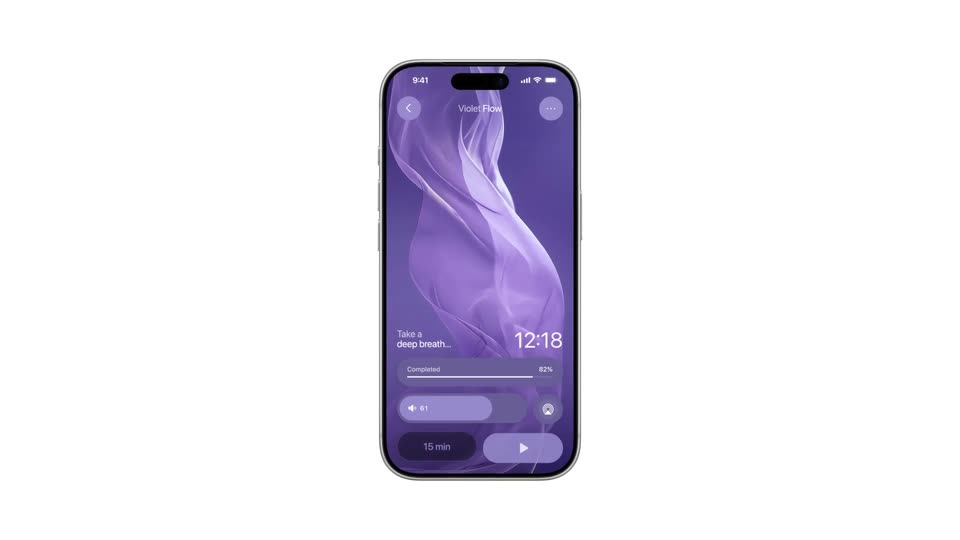
A silver phone mockup scales up at center on a white background, its screen showing a purple silk wallpaper. The session title slides in at the top, and the timer, progress bar and playback controls rise into view at the bottom.
Techniques: 3D mockup
Camera: Static
A phone mockup on white shows a purple meditation app; a hand cursor types a prompt and clicks the send button. The view zooms into the screen as the controls turn into outlined glass pills, play becomes pause, and the timer ticks 12:18 to 12:21, then the phone fades out.
Techniques: Cursor demo, UI zoom, Morph
Camera: Pull out
A white smartphone mockup fades in at center, angled in 3D perspective with a soft reflection on the right. Its screen shows a weather app: a blue sky header with the temperature, a search bar, a daily forecast row, and two info cards below.
Techniques: 3D mockup
Camera: Static
A silver iPhone floats in 3D perspective on a light gray backdrop, turning from a slight angle to face the camera as its weather app scrolls down: the large 20° readout gives way to the hourly forecast, a temperature curve, and Sunset and UV Index cards.
Techniques: 3D mockup
Camera: Pull out
Three phone screens sit side by side on a white background, the center one in focus showing a weather app with a sunny sky, temperature and forecast, while a maps screen and a banking screen appear at the left and right edges. The left screen's distance ticks down.
Techniques: Split screen
Camera: Pull out
Three iPhone mockups sit side by side on white, each showing a different app: AR turn-by-turn navigation, a weather dashboard, and a wallet balance with transactions. The devices then tilt and overlap, fanning into a staggered 3D stack that rotates toward the camera.
Techniques: 3D mockup
Camera: Pull out
A silver smartphone mockup rotates from an angled, mirrored position to face front, revealing an AR navigation screen: a street corridor, a turn-left banner, distance and arrival time, and a red Exit button.
Techniques: 3D mockup
Camera: Static
A smartphone floats in 3D perspective on a plain white background. Its screen shows a navigation app with a live camera view of a building corridor, a turn-left banner at the top, and distance and arrival panels at the bottom. The device eases gently backward.
Techniques: 3D mockup
Camera: Static
The wordmark 'Anything' sits centered on a plain white background. The first half 'Any' is set in an italic serif and the second half 'thing' in a thin sans-serif; a brief horizontal motion blur settles into a sharp, static lock-up.
On-screen text: “Anything”
Camera: Static