0:47
Explore
We created the world’s best captcha. The first captcha that is: free for companies, pays you to solve it, impossible to bot, and instead of showing you images of random traffic lights, you’re shown… | Avi Patel
Kled · 0:46 · AI-annotated
- Length
- 0:46
- Scenes
- 21 · 2.2 s avg
- Product on screen
- 0:00
- Features shown
- 1
- Voiceover
- No
00:00:00 / 00:46:22
- Length
- 0:46
- Scenes
- 21 · 2.2 s avg
- Product on screen
- 0:00
- Features shown
- 1
- Voiceover
- No
Kled’s 0:46 launch film runs 21 scenes, about 2.2 s each. The product is on screen from the first frame and 1 feature is revealed. There is no explicit call to action. The video is one continuous UI montage: the ufdp panel is introduced over a travel site, then the camera rides through wallet connection, video CAPTCHA solving and a wall of identical popups, before collapsing into a ring of windows and a line-drawn logo. Pacing is mid-tempo with hard cuts between panel states, and the signature moves are scaling browser frames, rolling balance digits and a central YES/NO toggle flipping across a grid of sites.
No filming indicatedEstimated needs: 7 capture groups — your screens or recordings · 1 official logo — reused across the film · 1 3D passage — build or supply
Is this your launch? to your site or press kit.
More like this



We created the world’s best captcha. The first captcha that is: free for companies, pays you to solve it, impossible to bot, and instead of showing you images of random traffic lights, you’re shown… | Avi Patel, scene by scene
· 21 scenes as text
01 · Product intro · 0:00–0:03
A browser window with the Airbnb homepage scales up from the center until it fills the frame, then a dark rounded panel fades in over the listing grid. Its keyhole icon shifts to the corner as the letters ufdp and a CAPTCHA caption appear, while the listings behind dim.
On-screen text: “ufdp”, “CAPTCHA powered by kleido”
Techniques: UI zoom
Camera: Push in
02 · Demo · 0:03–0:04
Over a blurred grid of hotel listing cards, a dark rounded CAPTCHA panel scales up at the center, then divides into two side-by-side panels: a question tracker on the left and an eye-icon instruction screen on the right.
Techniques: Morph
Camera: Static
03 · Demo · 0:04–0:06
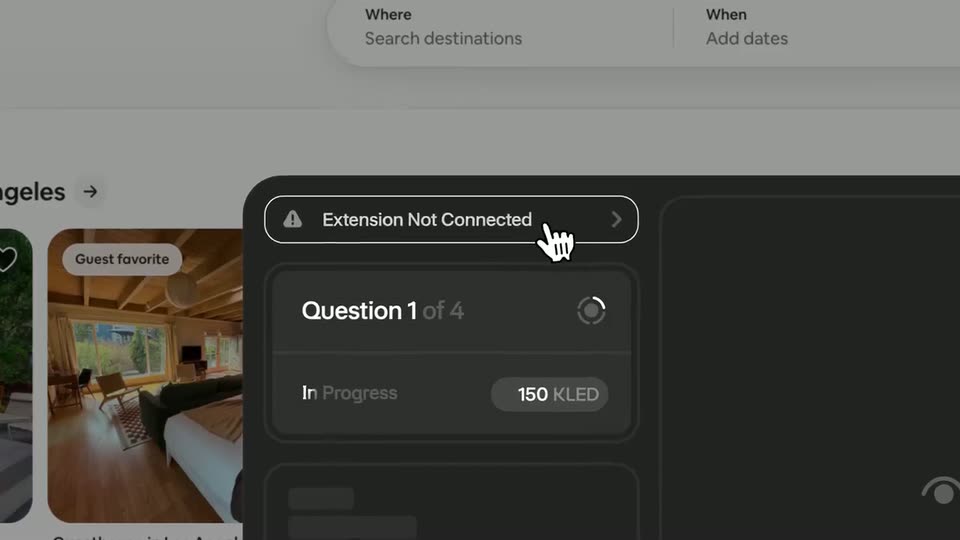
A dark extension panel floats over a blurred travel listing page. The frame zooms in on the panel's top section, and a hand cursor glides to hover the Extension Not Connected bar. The adjacent panel holds a headphone icon and a two-line caption.
Techniques: UI zoom, Cursor demo
Camera: Push in
04 · Feature reveal · 0:06–0:06
A dark card showing a warning icon and a hand cursor slides left out of frame, exposing a property listing grid on the left beside a wallet connection panel on the right.
Techniques: Cursor demo, Split screen
Camera: Pan
05 · Feature reveal · 0:06–0:07
A dark wallet panel floats over a dimmed webpage, showing a masked balance and a white Connect Wallet button. A cursor glides to the button and turns into a hand pointer as the panel drifts upward.
Techniques: Cursor demo
Camera: Push in
06 · Feature reveal · 0:07–0:08
A dark wallet-connection screen shows a wallet icon, the caption “Connect your wallet to see your balance,” and a light “Connect Wallet” button. A white cartoon hand cursor hovers over the button while the top line and button scale up slightly.
Techniques: Cursor demo
Camera: Static
07 · Feature reveal · 0:08–0:09
A dark wallet panel zooms in over a dimmed app while the balance rolls up from $90.93 to $120.44. A white 150% Cash Boost pill pops in next to the trust score and a cursor hovers over it.
On-screen text: “Connect your wallet to”, “see your balance”, “Connect Wallet”
Techniques: UI zoom, Cursor demo
Camera: Pull out
08 · Demo · 0:09–0:10
A browser window shows a listings page behind a dark verification dialog that plays a clip of hands holding a phone over a desk and poses a yes or no question. A phone dashboard with a dollar balance sits to the right, where a cursor hovers over a boost button.
Techniques: Cursor demo
Camera: Pull out
09 · Demo · 0:10–0:14
A dark CAPTCHA-validation popup sits over a dimmed Airbnb page, a video clip of hands plays inside it and a cursor clicks the Yes button. The question and clip swap to a second task as the cursor clicks Yes again, while a side panel tallies earnings.
Techniques: Cursor demo
Camera: Pull out
10 · Demo · 0:14–0:16
A dark wallet card holds the right side over a blurred light app screen that drifts slowly left. The balance and trust score digits roll in place while the card stays fixed.
Techniques: Parallax
Camera: Pan
11 · Demo · 0:16–0:18
A grid of browser windows, each carrying the same dark popup with a piano video and a yes-or-no question, zooms out from a close row to dozens of sites. A cursor hovers the No button. A two-tone toggle bar labeled YES and NO appears at center.
On-screen text: “YES”, “NO”
Techniques: UI zoom
Camera: Pull out
12 · Demo · 0:18–0:20
A grid of browser windows, each carrying the same dark notification card with a cycling clip, fills the frame. In the center, a large toggle labeled YES and NO slides its knob from left to right as the red track fills.
On-screen text: “YES”, “NO”
Camera: Static
13 · Demo · 0:20–0:22
A grid of website mockups, each overlaid with the same dark video panel, fills the frame. A central toggle marked YES and NO slides from the right to the left, its red fill shifting to gray.
Camera: Static
14 · Demo · 0:22–0:25
A grid of app windows, each showing the same dark video card, fills the frame while a central toggle labeled YES and NO flips, its knob sliding right and the track turning red as the camera pulls back to a tilted 3D view.
On-screen text: “YES”, “NO”
Techniques: 3D mockup
Camera: Push in
15 · Demo · 0:25–0:25
A wall of tinted browser window mockups fills the frame around a black YES/NO toggle. The view pushes in on the grid as the toggle flips to NO and the windows fade to grayscale, sharpening one central window.
On-screen text: “YES”, “NO”
Techniques: UI zoom
Camera: Push in
16 · Demo · 0:25–0:31
A dark CAPTCHA modal overlays an Airbnb page; a cursor taps the tiles showing hands, each gaining a checkmark, then the frame cuts to a wall of browser windows around a black bar where a toggle marked YES and NO slides in.
On-screen text: “YES”, “NO”
Techniques: Cursor demo, Kinetic type
Camera: Pull out
17 · Demo · 0:31–0:34
A dark rewards panel sits on the right of a browser window over a dimmed news page. A verification-success modal closes, then the balance and trust-score figures count upward while the page content shifts horizontally behind the panel.
Camera: Pull out
18 · Outro · 0:34–0:34
A central dashboard browser window recedes as a ring of tilted browser windows assembles around an empty center, each frame showing a different web page in 3D perspective on a light gray field.
Techniques: 3D mockup
Camera: Pull out
19 · Outro · 0:34–0:35
A circular loop of flat browser windows, each showing a different website layout, drifts slowly around an empty center against a light gray backdrop.
Camera: Pan
20 · Outro · 0:35–0:36
A ring of browser windows, each showing the dark product panel over a different website, rotates on a light gray field. The circle flattens into a wide ellipse and two gray line icons, a key and a house with a keyhole, fade into the empty center.
Camera: Static
21 · Outro · 0:36–0:46
A thin black line drawing of a horizontal bar and rounded hexagon morphs at center on a light gray field, then resolves into the bold ufdp.ai wordmark with a gray Powered by Kled line beneath, then cuts to the centered tagline The world's best captcha. Get paid to solve.
On-screen text: “ufdp.ai”, “Powered by Kled”, “The world's best captcha.”, “Get paid to solve.”
Techniques: Morph, Kinetic type
Camera: Static