0:20
Explore
Kled AI - We created the world’s best captcha. The first captcha that is: free
Kled · Apr 2026 · 0:46 · Full motion · AI-annotated
- Length
- 0:46
- Scenes
- 18 · 2.6 s avg
- Product on screen
- 0:00
- Features shown
- 1
- Call to action
- 0:36 · 78%
- Voiceover
- No
- Views
- 1M on X
as of November 15, 2026
00:00:00 / 00:46:22
- Length
- 0:46
- Scenes
- 18 · 2.6 s avg
- Product on screen
- 0:00
- Features shown
- 1
- Call to action
- 0:36 · 78%
- Voiceover
- No
- Views
- 1M on X
as of November 15, 2026
Kled’s 0:46 launch film runs 18 scenes, about 2.6 s each. The product is on screen from the first frame and 1 feature is revealed. The call to action lands at 0:36 (78% in). The video is one continuous interface tour: a dark CAPTCHA card drops onto real browser pages, then the camera pulls back through tilted 3D grids of those pages to show the product at scale. Its signature moves are the morphing key-and-lock mark, slow push-and-pull camera on floating mockups, and a white hand cursor driving every click.
No filming indicatedEstimated needs: 3 capture groups — your screens or recordings · 1 official logo — reused across the film · 5 3D passages — build or supply
Is this your launch? to your site or press kit.
More like this
2:22

Introducing Playground
Nothing · Hardware · Oct 2025
0:45

Introducing SFX v3
ElevenLabs · AI · Oct 2026
Kled AI - We created the world’s best captcha. The first captcha that is: free, scene by scene
· 18 scenes as text
01 · Product intro · 0:00–0:03
An Airbnb listings page scrolls inside a browser frame while a dark rounded panel with a keyhole icon drops to the center, morphing into the ufdp logo. The frame zooms in and a CAPTCHA panel with instructions slides over the home cards.
Techniques: UI zoom, Morph
Camera: Push in
02 · Product intro · 0:03–0:05
A dark CAPTCHA modal floats over a blurred grid of property listings. The frame zooms in on the top of the panel as a cursor hovers the 'Extension Not Connected' banner, which picks up a white outline.
Techniques: UI zoom, Cursor demo
Camera: Push in
03 · Product intro · 0:05–0:06
A dark extension popup scales in over a dimmed travel listing page. The popup shows a warning banner reading Extension Not Connected with a hand cursor hovering over it, and a Question 1 of 4 card with a loading spinner and a 150 KLED pill.
Techniques: Cursor demo
Camera: Pan
04 · Feature reveal · 0:06–0:07
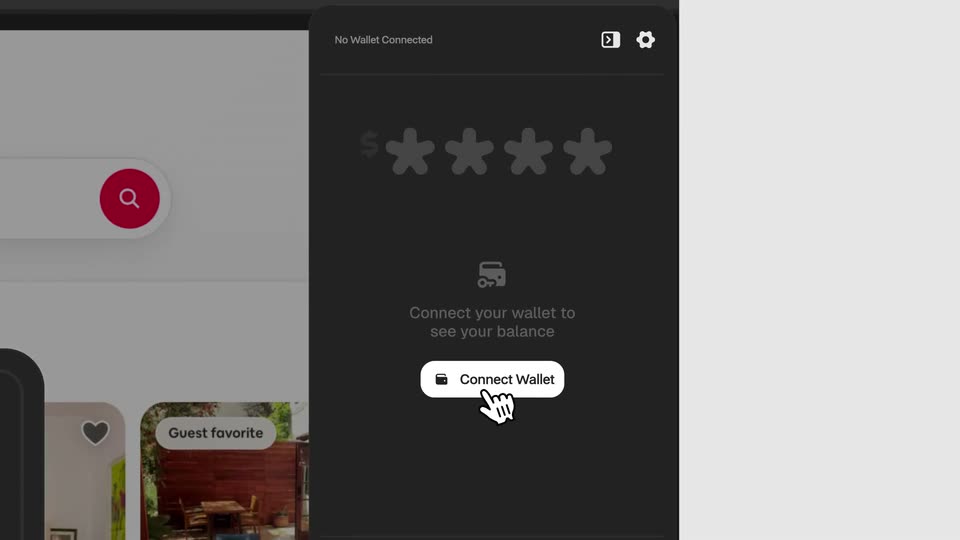
A dark wallet panel overlays a white property listing page. The masked asterisk balance and the connect prompt scale in, while a cursor arrow hovers on the white Connect Wallet button. The left page shows listing cards and a red search button.
Techniques: Cursor demo
Camera: Push in
05 · Feature reveal · 0:07–0:08
A dark wallet-connect screen: a gray wallet icon, the heading and a light pill button labeled Connect Wallet scale up and brighten into place, while a white hand cursor hovers over the button.
Techniques: Kinetic type
Camera: Static
06 · Feature reveal · 0:08–0:09
A dark wallet panel floats over a website, its balance, trust score and a 150% Cash Boost pill settling into place as a white cursor moves and clicks. A scaling headline and a Connect Wallet button appear over the panel.
On-screen text: “Connect your wallet to”, “see your balance”, “Connect Wallet”
Techniques: Kinetic type, Cursor demo
Camera: Pull out
07 · Feature reveal · 0:09–0:10
A dark validation modal overlays an Airbnb listing grid, its video preview showing two hands. To the right, a balance panel lists earnings and a cursor hovers over the cash-boost toggle. The caption “see your balance” scales up over the panel.
On-screen text: “see your balance”
Techniques: Kinetic type, Cursor demo
Camera: Pull out
08 · Demo · 0:10–0:14
A dimmed Airbnb page sits behind a dark validation modal that cycles through yes-or-no questions and short first-person hand videos. A hand cursor moves between the No and Yes buttons and clicks them. A task-earnings panel with a dollar balance stays fixed at the right edge.
Techniques: Cursor demo
Camera: Pull out
09 · Demo · 0:14–0:14
A dark validation modal sits centered over a blurred travel website. Inside, a first-person bicycle video plays beside the prompt about washing dishes, and a hand cursor hovers over the Yes button.
Techniques: Cursor demo
Camera: Static
10 · Demo · 0:14–0:16
A tight crop on a dark balance card pulls back to reveal a 3D grid of floating interface screens, the card centered among dashboards and article pages tilted in perspective.
Techniques: 3D mockup, Parallax
Camera: Pan
11 · Demo · 0:16–0:25
A grid of browser windows, each with the same dark survey modal and video, fills the frame as the camera pulls back. A black YES/NO slider bar appears in the center; its knob moves between YES and NO, switching the modal video, then the view zooms in on the bar.
On-screen text: “YES”, “NO”
Techniques: UI zoom
Camera: Push in
12 · Demo · 0:25–0:30
A screen recording shows a dark CAPTCHA modal layered over the Airbnb site. A cursor taps tiles in a 3x3 grid that contain hands, a checkmark pops on each pick, then it clicks Submit as the frame zooms out to reveal the browser window.
Techniques: Cursor demo, UI zoom
Camera: Pull out
13 · Demo · 0:30–0:31
A wall of browser and app screens in green and maroon tones fills the frame. A dark pill with a red toggle, labeled YES and NO, sits centered and eases into place while the background grid drifts at a different speed.
Techniques: Parallax
Camera: Pull out
14 · Demo · 0:31–0:32
A tilted browser window over a music news page, a dark Genius verification card centered on it. The camera pushes in and straightens, framing the card with its Verification Successful heading, reward and trust score rows, and a white Continue button.
Techniques: 3D mockup, UI zoom
Camera: Static
15 · Demo · 0:32–0:34
A dark wallet panel in 3D perspective overlays a news page showing a black-and-white photo of a man in a vest. The balance and trust score figures tick upward, then the panel rotates and scales down toward the right, exposing a lime header bar behind it.
Techniques: 3D mockup
Camera: Pull out
16 · Demo · 0:34–0:35
A tight, tilted stack of browser-window mockups, each showing a different dashboard or storefront, fans outward into an oval ring, leaving the center empty. The spread happens quickly over the sub-second clip.
Techniques: 3D mockup
Camera: Pull out
17 · Demo · 0:35–0:36
A ring of tilted browser windows spins in 3D, then the windows fly apart to the frame edges. Two gray line icons, a key and a shield with a keyhole, fade into the empty center.
Techniques: 3D mockup
Camera: Pan
18 · CTA · 0:36–0:46
A thin line icon of a key and a hexagonal lock sits small and centered on a light gray field. The key slides into the hexagon, merging into one outline, then gives way to the bold wordmark with a smaller gray subline. A two-line tagline holds to the end.
On-screen text: “ufdp.ai”, “Powered by Kled”, “The world's best captcha.”, “Get paid to solve.”
Techniques: Morph
Camera: Static