3:23


Meet the all new Codex Cloud
OpenAI · AI · Sep 2026
Airtable · Sep 2016 · 1:50 · Full motion · AI-annotated
Airtable’s 1:50 launch film runs 19 scenes, about 5.8 s each. The product is on screen from the first frame and 4 features are revealed. There is no explicit call to action; a voiceover carries the film. The video is a rapid montage of flat 2D interface mockups floating on a solid blue field, each feature announced by the voiceover and demonstrated through cursor-driven interactions. Its signature moves are motion-blurred slides, zooms and rack-focus transitions between windows, with the Airtable cube logo bookending the piece on white.
Is this your launch? to your site or press kit.
OpenAI · AI · Sep 2026
Anthropic · AI · Jun 2024
Films whose music sounds like this one, voice left out
OpenAI · Upbeat corporate tech explainer
DJI · Corporate Electronic
Google · Electronic
Airtable's cube logo sits centered on white; flat icons pop in around it, red shapes left, blue smiley right, yellow bulb above. A green spreadsheet interface then slides up from below to fill the lower frame.
Camera: Pan
A green spreadsheet window titled Pacific Records sits flat on a blue field. A cursor clicks a row checkbox, then edits the status cell, which opens a dropdown while the header shows saving and saved, then the window blurs out fast.
Techniques: Cursor demo, Speed ramp
Camera: Pan
A white phone on a blue background shows a packing list; the list scrolls up, the Polar Bear Deterrent row opens into a detail view with a photo, then the phone slides left as a red spreadsheet slides in.
Camera: Pan
A red-topped browser window for a 'Rocket Launch to Saturn' calendar floats on a flat blue field, racking from heavy blur to sharp focus. It shows a July 2016 grid with task chips and a right-hand records list, a cursor resting on the 17th.
Techniques: Cursor demo
Camera: Pan
A flat calendar interface on a blue background. A cursor confirms a new task on the 17th, then drags an entry from the 19th to the 27th as a save status appears in the header. The screen slides down to reveal a blue variant of the app.
Techniques: Cursor demo
Camera: Pan
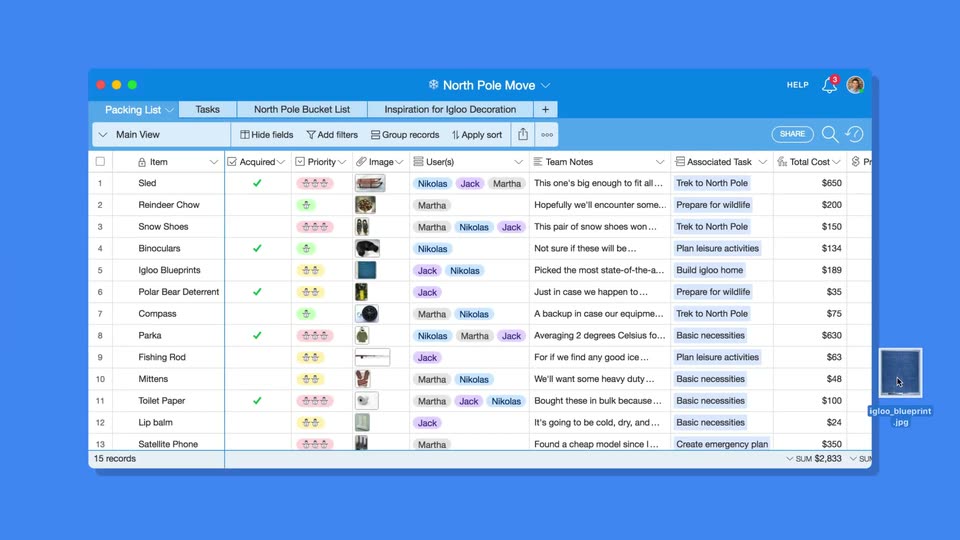
A database window titled North Pole Move sits on a blue field. The view zooms into the left columns, pans across the table, then a cursor drags a file thumbnail from the right edge into the Image column, dropping it on the Igloo Blueprints row.
Techniques: UI zoom, Cursor demo
Camera: Pan
A database grid on a blue background. A cursor clicks the Group records button, a dropdown of fields opens, and the rows animate into High, Medium and Low Priority groups while the view scrolls through each section.
Techniques: Cursor demo
Camera: Pan
A red-headered dashboard slides horizontally across a blue background, showing a records list with colored labels on the left and a July 2016 calendar grid on the right. The two panels pan past each other in a blurred swipe, demonstrating the app's different views.
Techniques: Split screen
Camera: Pan
A red-headed calendar view of a space mission project fills the screen. A cursor drags the Install Webb Telescope card from the right panel onto the 19th, dropping it into the grid. The window then blurs and slides left out of frame.
Techniques: Cursor demo
Camera: Pan
A browser window with a red header slides in from the right onto a blue background, showing a grid of space-task cards with photos and checkboxes. A cursor drags cards to reorder them, then the view scrolls down. The window slides left as a second dark window enters.
Techniques: Cursor demo
Camera: Pan
A tilted browser mockup on a blue background straightens into a flat view of a space blog, its rocket-launch hero reading “To infinity and beyond”, then the page scrolls to a grid of mission objective cards, and the window spins out of frame with motion blur.
Techniques: 3D mockup, Speed ramp
Camera: Pan
A browser window mockup on a blue background shows an Airtable form titled Official Astronaut Application. It sharpens from a soft blur, scrolls down through the applicant, resume and role fields, and the cursor clicks the blue Submit button.
Techniques: Cursor demo
Camera: Pan
A flat browser window loading airtable.com on a blue field whips left with motion blur, revealing a second window holding a contact form with a Submit button.
Camera: Pull out
Two flat browser windows sit on a blue field: a white Airtable confirmation form left, a red applicant table right. The table window fades from ghosted to solid and gains a sixth row, then the view zooms into it as the form slides off.
Techniques: UI zoom
Camera: Pan
A red Airtable window on a blue background lists astronaut applicants in a table. A cursor clicks the stage cell of the last row, opening a dropdown of status options, then moves left to hover the expand icon, which pops a small tooltip.
Techniques: Cursor demo
Camera: Static
An Airtable record panel for Buzz Lightyear sits on a blue background. The cursor types @ in the comment box, a mention list with two names drops down, and Gina Williams is picked. The desktop view then blurs and pulls back as a phone slides in from the right.
Techniques: Cursor demo
Camera: Push in
Side by side on a blue background, a desktop record view and a white phone display the same applicant record. A comment is typed in the desktop feed; once posted, the identical comment appears in the phone's feed.
Techniques: Split screen
Camera: Push in
A white iPhone on a blue background shows a mobile app chat. A caret types a comment over the keyboard, which switches rows, then the sent message appears as a blue bubble. The frame wipes to white and the Airtable logo blurs in at the bottom.
Techniques: Cursor demo, Masking
Camera: Static
The Airtable lockup, a three-color isometric cube icon beside the dark gray wordmark, sits centered on a white field. It settles from a brief motion blur at the start, then holds still for the rest of the clip.
Camera: Static