3:23

Meet the all new Codex Cloud
OpenAI · AI · Sep 2026
QuiverAI · Sep 2026 · 0:43 · AI-annotated
QuiverAI’s 0:43 launch film runs 31 scenes, about 1.4 s each. The product is on screen from the first frame and 3 features are revealed. There is no explicit call to action; a voiceover carries the film. Off-white canvas with a soft blue palette, a clean grotesque for headlines and a monospace tag, cut fast at about 49 cuts per minute. The structure is a product title card, a montage of generated asset types, a model-upgrade reveal with vector-editor demos, real-world and feature-board showcases, then a tagline and logo sign-off; signature moves are the split-screen comparisons, the selection box that bolds a word, and the bezier path with anchor points that ties every vector demo together.
Is this your launch? to your site or press kit.
OpenAI · AI · Sep 2026
ElevenLabs · AI · Oct 2026
Airtable · Productivity · Sep 2016
A pale grid background holds a dotted blue feline at left, a wireframe wheelchair at upper right, and a small pixel-art landscape at lower right. A blue wash lifts to reveal the centered headline.
On-screen text: “Arrow 2.0 is live”
Camera: Static
A flat split composition: light blue line-art icons (tools, helmet, bus, train, traffic light, car) draw in on a cream left panel, while a white menu window with red, yellow, green dots lists Travel, Public Transport, E-Mobility, Routes and Settings on a blue right panel. A small monospace tag sits bottom left.
On-screen text: “[Arrow 2.0]”
Techniques: Split screen
Camera: Static
A split screen: left, a teal dot-matrix arrow draws itself across a light gray field with a small caption at the bottom; right, a 3D desktop view shows a blue whale app icon between red and yellow icons.
On-screen text: “[Arrow 2.0]”
Techniques: Split screen, 3D mockup
Camera: Static
A split screen compares a blue line-art technical drawing of an espresso machine on the left with a hand holding the same diagram printed on a page on the right. The left panel stays static while the page tilts slightly in the hand.
On-screen text: “Arrow 2.0”
Techniques: Split screen
Camera: Static
A vertical list of gray category names scrolls up on a light background. A blue selection box with corner handles highlights each word, which turns bold dark navy. Illustrations and icons pop into the corners: a woman, a pink padlock, a bird, a chair, pictograms, an isometric farm, a watch.
On-screen text: “Wordmarks”, “Assembly Diagrams”, “Illustrations”, “Icons”, “Technical Drawings”, “Typography”, “Pictograms”
Techniques: Kinetic type
Camera: Pan
A blurred design canvas scrolls a list of labels, Icons, Technical Drawings, Typography, Pictograms, with a selection box around the last two and a blue bezier path with anchor points. The view blurs into a soft blue field as a rounded chip reading Arrow 2.0 settles in the center.
On-screen text: “Illustrations”, “Icons”, “Technical Drawings”, “Typography”, “Pictograms”, “Arrow 2.0”
Techniques: Kinetic type
Camera: Static
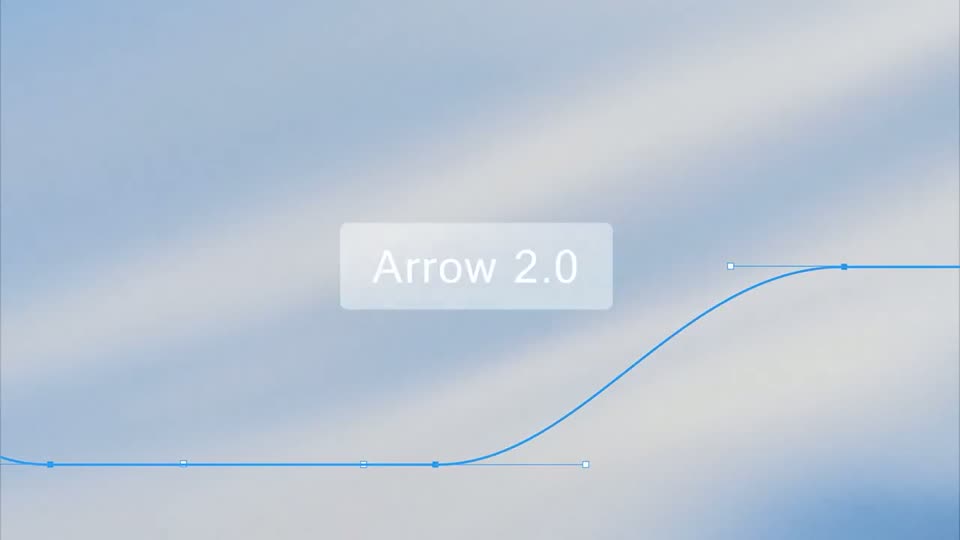
A blue bezier path with visible anchor points sweeps across a soft sky background, its double stroke collapsing into a single line. A translucent pill labeled Arrow 2.0 holds center, shifting from pale to dark over the shot.
On-screen text: “Arrow 2.0”
Camera: Push in
A dark rounded code panel sits centered over a pale blue Bezier wireframe sketch of a bird. SVG source lines type and scroll upward inside the panel, filling it from a few lines to a full block of CSS classes.
On-screen text: “Arrow 2.0”
Techniques: Kinetic type
Camera: Static
A flat vector illustration of a curly-haired person with blue glasses and a pencil behind the ear, on a light blue field of thin wireframe lines. A dark rectangle of scrolling SVG code overlays the center, then vanishes to leave the figure.
Camera: Static
A flat vector-editor screen sits on a light dotted grid. Blue Bezier curves with square anchor points fill the canvas, then the view zooms onto large serif letter outlines being traced, and finally rests on a single smooth S-curve. A slim left panel and a bottom toolbar frame the work.
Techniques: UI zoom
Camera: Pull out
A light canvas with a faint dot grid shows thin gray vector paths with anchor dots that fade out, leaving a small blue wavy stroke on the left. Instruction text appears top right and a Create Artwork button fades in at the bottom left.
Camera: Pull out
A white canvas shows a blue running dog silhouette with a wavy line trailing behind it. A row of four dog frames then appears across the canvas, the last one filling with light blue, demonstrating the running animation.
Camera: Static
A black silhouette of a running dog rests on a light grey card. The card then falls away, exposing a fibrous off-white paper texture behind it, while the dog's legs shift through a short running cycle.
Camera: Static
A tight close-up of a white sneaker bearing a black running-dog emblem crossfades into a white fabric panel showing the same emblem beside a black H letter.
Camera: Static
A black silhouette of a dog mid-stride sits centered on a light, grainy paper background, framed by a thin white border like a printed card. The image holds still with no motion.
Camera: Static
A blue leaping horse logo on a cream panel dissolves into the same logo on a white cap, a white mug handle at the left edge.
Techniques: Morph
Camera: Static
A close-up of a phone screen shows a black panther logo on a white textured background. A diagonal wipe reveals the same logo embroidered in black thread on gray fabric held by a hand.
Techniques: Masking
Camera: Pull out
A flat illustration of a man in a blue jacket holding a red cup and a blueprint scales up at center on a cream paper background, thin diagonal lines framing the corners. Bold black ARROW 220 drops in lower left as a tagline types out beneath it.
On-screen text: “ARROW 220”, “Bringing Creativ”
Techniques: Kinetic type
Camera: Static
A flat feature board on a textured gray background. The view opens on the Typography callout with a vector whale showing blue anchor points, then pulls back to reveal the Illustrations callout on the right, a large blue outlined LL letterform, a right arrow, and two cards of a person and a robot.
On-screen text: “Typography”, “QuiverAI helps you create custom vector letterforms and fonts, from experimental display types to functional UI typography. Adjust weight, contrast, and charact”, “Illustrations”, “Generate fully vector illustrations that can be edited, recolored, or adapted across contexts. UI, marketing, or product flows.”
Camera: Pull out
A flat grid of small logos, icons and illustration thumbnails sits on an off-white field. Thin gray lines draw themselves across the layout, forming an oval and a diagonal frame around the assets.
Camera: Pull out
A close-up of a white prompt panel on a dotted canvas, with a yellow generated image at the right edge. A thumbnail of a golden bowl with plants sits under a 'Generated' label, and a prompt types out in the input field before the view scrolls up to show 'Preparing the paths...' at the top.
Camera: Pull out
A close-up of a chat interface: on the left, a prompt label switches from “Wrapping the Beaters...” to “Shaping the Beaters...” above a static caption, while a vase thumbnail and a large flat illustration on the right update in place, the dark flower spikes blooming into yellow fan shapes.
Techniques: Morph
Camera: Static
A product interface fills the frame, locked off. A left column of square thumbnails swaps to new vase illustrations, and the large right preview updates to the matching image on a colored background. A bottom row holds a plus icon and an up-arrow button.
On-screen text: “create variations in this style with different motifs”
Camera: Static
A flat app gallery showing a fruit illustration cross-dissolves into a postage stamp of the same artwork on crumpled paper, the stamp's lettering scaling in as the left panel fades out.
On-screen text: “Arrow Collectors”, “forma”, “85¢”
Camera: Static
A perforated postage stamp with a red field, a floral vase illustration and a blue Oakland postmark sits on a cream paper texture. The stamp scales in, carrying the serif line Arrow Collectors and the bold forma 85ø at its base.
On-screen text: “Arrow Collectors”, “forma”, “85ø”
Camera: Static
A crossfade dissolves a cracked, orange-vase stamp into a blue stamp with a stylized colorful bouquet in a pink vase, on a cream textured background. The new stamp scales in slightly while “Arrow Collectors” and “forma 85ø” sit at the bottom.
On-screen text: “Arrow Collectors”, “forma”, “85ø”
Camera: Static
A flat stamp illustration with a red vase and pink and purple leaves on a green field rests on a cream surface beside a wood panel. The Arrow Collectors label scales in.
Camera: Static
Gray status lines with a small arrow icon cycle on an off-white field, then the centered headline “The Creativity was always yours” fades in as small illustration thumbnails, a face sketch, an icon grid and a green MANTA mark pop in around it.
On-screen text: “Preparing the paths...”, “Shaping the Béziers...”, “Warming up the canvas...”, “The Creativity was always yours”, “MANTA”
Techniques: Kinetic type
Camera: Static
Plain off-white background. The line “The creativity was always yours” resolves from a soft blur, “always” in italic serif. It is replaced by “We are just here to help bring it to life”, the italic phrase sliding in from the right, then the line fades out.
On-screen text: “The creativity was always yours”, “MANTA”, “We are just here to help bring it to life”
Techniques: Kinetic type
Camera: Static
A faint gray tagline sits centered on a pale off-white background, then fades out as the dark QuiverAI icon and wordmark settle into the center as the sign-off.
On-screen text: “We are just here to help bring it to life”
Camera: Static
The QuiverAI wordmark and its dark rounded-square icon sit centered on a plain off-white field. The frame stays locked off and the logo holds still for the full shot.
Camera: Static