1:05

Introducing Zapier Tables
Zapier · Productivity · May 2023
Google · Dec 2013 · 1:21 · AI-annotated
Google’s 1:21 launch film runs 17 scenes, about 4.8 s each. The product is on screen from the first frame and 5 features are revealed. The call to action lands at 1:11 (87% in), over a voiceover. The video is a chain of color-coded title cards, each opening a feature block (green intro, coral speed, green filter, yellow formulas, blue offline) that is then shown in a short UI or motion-graphics demo, ending on a typed URL. Signature moves are the focus-rack logo reveal, split-screen collaboration, stacking function tiles, and dashed sync lines, all cut at a brisk, even rhythm on flat tiled-glyph backgrounds.
Is this your launch? to your site or press kit.
Zapier · Productivity · May 2023
Pomerado · B2B · Oct 2026
A green field of faint spreadsheet icons starts out of focus and racks sharp, resolving the centered Google Sheets logo and white wordmark. The frame stays locked and the pattern holds still as the focus settles.
On-screen text: “Google Sheets”
Camera: Pull out
A green field of faint spreadsheet icons holds the white Google Sheets logo and wordmark at center. A tilted white grid of empty cells sweeps in from the left, its column headers D to G angling across the top as it partly covers the logo.
On-screen text: “Google Sheets”
Techniques: 3D mockup
Camera: Pan
The camera pulls back from a tilted close-up of the green-and-white grid to the full empty Toy Drive spreadsheet, reframes on the toolbar icons, then a tight column of numbers scrolls past in a rapid loop.
Techniques: UI zoom
Camera: Pull out
A red rocket icon with a white outline sits centered above the white headline “Speed Improvements” on a coral background patterned with faint spreadsheet glyphs. The frame holds locked-off with no motion.
On-screen text: “Speed Improvements”
Camera: Static
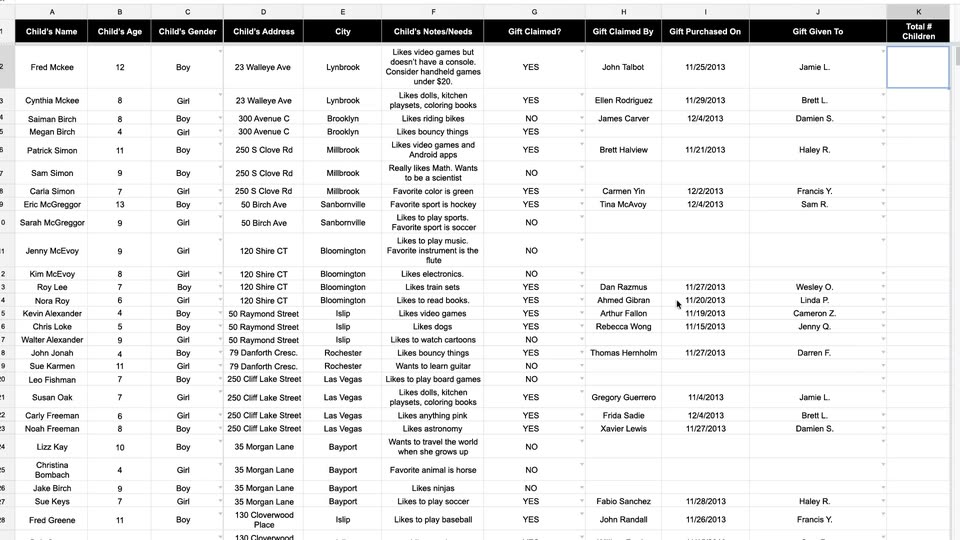
A wide spreadsheet of child gift data scrolls rapidly down through dozens of rows, then the view reframes onto the rightmost column. A cursor types a COUNT formula, a function dropdown opens, and the cell resolves to 1000.
Techniques: UI zoom, Cursor demo
Camera: Push in
A green field of faint spreadsheet icons (charts, grids, arrows) fills the frame. Two tilted green document icons with white grid lines scale up in the center, settling above the static white label “Filter views”.
On-screen text: “Filter views”
Camera: Static
A close-up of a Google Sheets toolbar zooms out as a cursor opens the filter menu, then the view splits into two collaborators who scroll and change a NO cell to YES together.
Techniques: UI zoom, Cursor demo, Split screen
Camera: Pull out
A yellow background covered in a repeating grid of faint white line icons scrolls slowly downward while a large white sigma symbol with an amber fill and drop shadow holds center above the white caption Formulas made easy.
On-screen text: “Formulas made easy”
Camera: Static
A spreadsheet cell under the maroon 'Total Gifts Unclaimed' header is selected. The user types a COUNTIF formula; an autocomplete list and a syntax help card appear below the cell. The mouse cursor clicks the Learn more link, and the view cuts to a full help article.
Techniques: Cursor demo
Camera: Pan
A flat yellow field carries a faint repeating grid of white spreadsheet icons. Centered white bold text reads “20 new functions” and holds still for the full shot.
On-screen text: “20 new functions”
Camera: Static
On an orange field patterned with faint spreadsheet icons, the white headline “20 new functions” sits centered, then gives way to a white card holding the orange word “AVERAGEIF”. The swap is a quick cut, holding the function name in the middle of the frame.
On-screen text: “20 new functions”, “AVERAGEIF”
Techniques: Kinetic type
Camera: Push in
A mustard background tiled with faint white spreadsheet icons. White cards stack one by one in the center, each carrying a formula name: AVERAGEIF, SUMIFS, COUNTIFS, AVERAGEIFS, then a gray ribbon with WEEKNUM slides in below.
On-screen text: “AVERAGEIF”, “SUMIFS”, “COUNTIFS”, “AVERAGEIFS”, “WEEKNUM”
Techniques: Kinetic type
Camera: Static
Three columns of white tiles bearing amber function names (AVERAGEIF, SUMIFS, TYPE) fly in from the edges with a slight 3D tilt and settle into a flat grid on a yellow field patterned with faint white chart icons.
On-screen text: “AVERAGEIF”, “SUMIFS”, “COUNTIFS”, “AVERAGEIFS”, “WEEKNUM”, “TIMEVALUE”, “LOOKUP”, “WORKDAY.INTL”, “PERCENTRANK.EXC”, “PERCENTRANK.INC', 'ISMAIL', 'ISURL', 'RANK', 'RANK.EQ', 'DELTA', 'TDIST', 'TYPE', 'CLEAN', 'ARRAY_CONSTRAIN', 'ARRAY_LITERAL', 'ARRAY_ROW', 'SEARCHB', 'FINDB', ”
Techniques: Kinetic type
Camera: Pull out
On a blue field of small white data icons, a Wi-Fi symbol sits above a green spreadsheet icon labeled Offline. The arcs pulse white and dark blue, the spreadsheet fades to gray, then the group shrinks and rises as a robot and a checkmark icon slide in.
On-screen text: “Offline”
Camera: Pull out
A train, a house and an airplane icon, each with a green spreadsheet badge, sit on a blue field of faint white spreadsheet glyphs. The Wi-Fi arcs above a central document turn white, the document turns green, and dashed lines draw from it to the three icons.
Camera: Static
A green spreadsheet icon with a white outline and drop shadow scales down from a large cropped state to a centered position over a green background patterned with faint white spreadsheet glyphs. The white caption Learn more sits below the icon.
On-screen text: “Learn more”
Camera: Pull out
A green backdrop with a faint repeating pattern of spreadsheet icons holds the Google Sheets logo centered. Below it, the static line “Learn more” sits while the URL “at g.co/newsheets” types in letter by letter, then the scene fades to black.
On-screen text: “Learn more”, “at g.co/newsheets”
Techniques: Kinetic type
Camera: Static