4:25


BrowserBook YC Demo
Kilvin · B2B · Dec 2025
Aina’s 1:31 launch film runs 19 scenes, about 4.8 s each. The product is on screen from the first frame and 4 features are revealed. There is no explicit call to action; a voiceover carries the film. The video is a guided screen-recording tour that opens on a static product hero, then presents one feature at a time (contextual shortcuts, custom scripts, calendar, meeting controls) with voiceover announcements and slow zooms into the Dune app. Pacing is steady at about 85 bpm with long holds, and the signature move is cutting between the live hand pressing the wooden keypad and the Mac interface.
Is this your launch? to your site or press kit.
Kilvin · B2B · Dec 2025
Ergo · B2B · Jan 2026
Spline · Design · Oct 2026
Films whose music sounds like this one, voice left out
Cal.com · Upbeat electronic
Oki Home · Electronic
Akai Professional · Electronic
A website hero renders the Dune keypad in 3D, half-buried in golden sand, with a headline and body copy to its left. A narrow left panel plays live footage of a finger pressing the same keypad mounted on a laptop. The frame holds static.
Techniques: 3D mockup, Split screen
Camera: Static
A Mac desktop runs the Doon app, its right pane showing a 3D render of a phone's internal camera module that multiplies into two, then three diagonal copies. A left panel displays a wooden control unit with round buttons, a slider and a green power icon, while the cursor clicks the menu bar.
Techniques: 3D mockup, Cursor demo
Camera: Push in
A Dune menu bar popover floats over a dark laptop render with a wooden key module. The cursor opens a gear menu, the view cuts to a full preferences window, and the cursor clicks app icons, swapping shortcuts to Comment, Build, Run.
Techniques: Cursor demo
Camera: Pull out
A flat macOS window titled Dune shows a shortcut form on a black background with a laptop edge and circuit board. A cursor moves across fields as a green-on-black code block fills in, then a Share popup pops up over the app icon row and disappears.
Techniques: Cursor demo
Camera: Static
A macOS screen recording shows the Dune app behind an iMessage task list, while a finger presses a button on the wooden hardware panel at left. A Yes/No/Dismiss notification pops up, the cursor clicks Yes, and a dark Things Today window opens with the tasks added.
Techniques: UI zoom, Cursor demo
Camera: Push in
Screen recording of the Dune app on macOS, showing the Applications tab with a rendered button device at left. A cursor clicks Run Script in a settings panel, then selects Shell Script next to a black code block.
Techniques: Cursor demo
Camera: Push in
A macOS settings window titled Dune fills the frame, showing a shortcut form with a shell script and a row of app icons. The window then scales down to float over the dark desktop, where a Calendar icon in the dock is highlighted with a tooltip.
Camera: Pull out
A Mac screen shows the Calendar day view with a floating Join/Dismiss prompt; the camera zooms to the prompt as the cursor hovers Join. A finger presses the middle button of a three-button device on the desk, and the prompt swaps to Ask OpenClaw and Close.
Techniques: UI zoom, Cursor demo
Camera: Push in
A dark Zoom meeting window on a Mac desktop zooms in on the left edge, where three pill labels, Ask OpenClaw, Unmute and Video On, grow larger. A cursor hovers over the Video On toggle, then the view pulls back to the bottom toolbar and dock.
Techniques: UI zoom, Cursor demo
Camera: Push in
A laptop on a wooden desk shows a dark Zoom meeting window with a small circular video of a man centered on black. The bottom toolbar collapses, then the view pulls back to reveal a desktop tiled with several open app windows.
Techniques: UI zoom
Camera: Static
A fixed macOS desktop crowded with overlapping app windows, a laptop on the left edge and a dock below. A blue focus ring and a small tooltip appear around the bottom-right window, marking it as the active one while the cursor hovers over it.
Techniques: Cursor demo
Camera: Static
Locked-off shot of a laptop on a desk showing the Dune landing page, with the physical three-button keypad on a wooden panel at left. The page heading slides in over the sandy product render, and a finger presses the bottom hardware button.
Camera: Push in
A split frame pairs a filmed three-button keypad on a desk with a Mac screen showing the mirage Dune website. A finger presses the bottom key, which glows amber, as the browser's left sidebar collapses and the hero text shifts left.
Techniques: Split screen
Camera: Static
A dark Zoom meeting window fills a macOS desktop, partly covered by a Dune control panel; the panel slides away, leaving a single participant avatar centered on the black screen, with the cursor resting below.
Camera: Static
A dark Zoom meeting window fills the screen, a small circular video tile of a man centered; a black panel with three round buttons rests on a wooden desk at left. The cursor drifts over the canvas while Unmute and Ask OpenClaw labels flash by the mic button.
Techniques: Cursor demo
Camera: Static
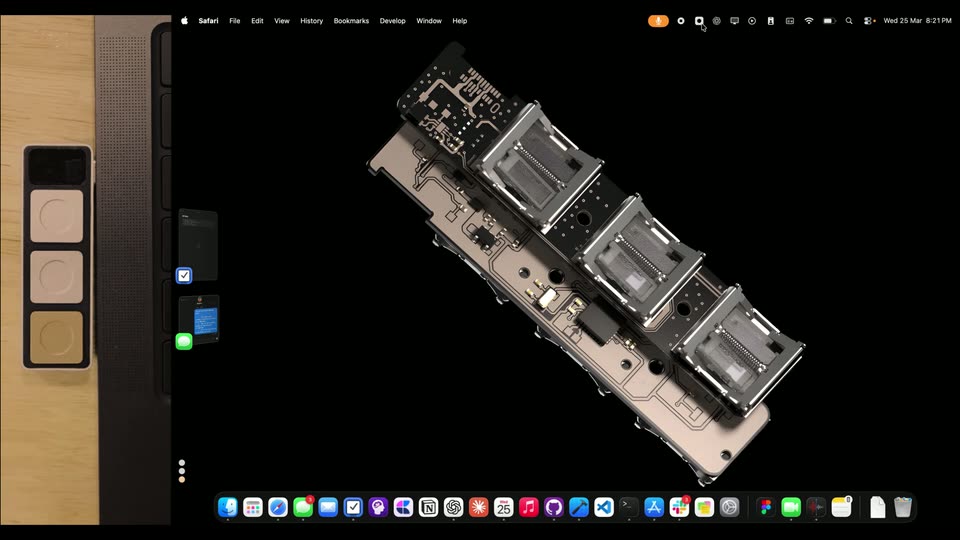
A macOS desktop stays locked on a black canvas where a disassembled phone body floats in 3D, its gold circuit board and three camera modules angled diagonally. A wooden control panel and a column of app cards line the left edge, the dock rests at the bottom.
Techniques: 3D mockup
Camera: Static
A macOS desktop shows a Dune preferences window centered on black, with a 3D iPhone triple-camera module rotating at an angle to the right. A strip of app icons and a button panel line the left edge; the dock runs along the bottom and a cursor drifts near it.
Techniques: 3D mockup, Cursor demo
Camera: Static
A macOS desktop displays the Dune preferences window, with an Applications tab, a row of app icons, and a vertical button module tagged Ask OpenClaw and Screenshot. The window zooms in on the add button, then eases back to full frame as the cursor drifts.
Techniques: UI zoom, Cursor demo
Camera: Pull out
A locked-off black frame holds for the full beat; the small static captions 'Dune' and '25' sit on the screen without motion.
On-screen text: “Dune”, “25”
Camera: Static