2:05

Space intelligence for all: Constellation Space
Constellation Space · B2B · Nov 2026
Akai Professional · Nov 2026 · 4:12 · AI-annotated
Akai Professional’s 4:12 launch film runs 60 scenes, about 4.2 s each. The product is on screen from the first frame and 6 features are revealed. The call to action lands at 3:47 (90% in), over a voiceover. The video alternates a locked-off presenter in a cluttered studio with tight handheld close-ups of the MPC touchscreen and DAW screens, punctuated by full-screen red glitch title cards on black. Pacing is steady at about 85 bpm with a cut every few seconds, and the signature moves are the stretched-glitch red type, the white corner feature labels, and the finger-tap hardware demos.
Is this your launch? to your site or press kit.
Constellation Space · B2B · Nov 2026
Poth Labs · B2B · Jul 2026
Films whose music sounds like this one, voice left out
Tavus · Electronic
Donkey · Electronic
Oki Home · Electronic
A red bold title reading MPC 3.11 SNEAK PEEK pops into the center of a black frame with a stretched glitch flicker, then fades out, leaving the small red AKAI PROFESSIONAL logo centered at the bottom.
On-screen text: “MPC 3.11”, “SNEAK PEEK”, “AKAI”, “PROFESSIONAL”
Techniques: Kinetic type
Camera: Static
A bald man in glasses and a yellow tee speaks to a locked-off camera in a studio lined with keyboards and a colorful patchwork quilt. A dark gray lower-third box with his name, Pete Goodliffe, sits in the lower left for the first few seconds.
On-screen text: “Pete Goodliffe”
Camera: Static
A red headline reads NEW FEATURES centered on a black background. The type scales up into place, holds for a beat, then fades out to black while the frame stays locked.
On-screen text: “NEW FEATURES”
Techniques: Kinetic type
Camera: Static
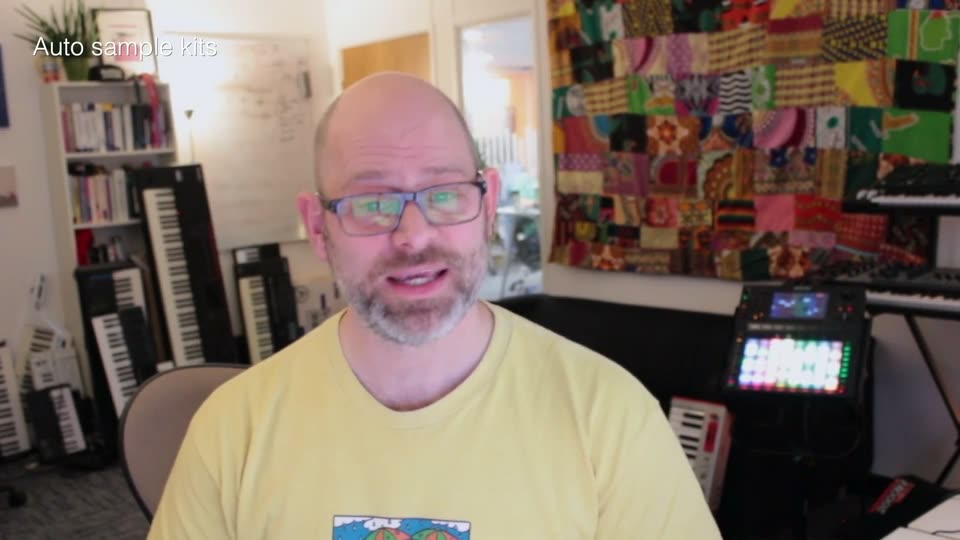
A bald man in glasses and a yellow shirt sits in a music studio, talking to camera amid keyboards and a patchwork quilt. A white label, 'Auto sample kits,' appears top left and holds.
On-screen text: “Auto sample kits”
Camera: Static
A dark Process Sample modal is centered over a blurred app background, holding a Function dropdown set to Auto Sample Kit, a row of five waveform icons, an arrow, and a 2x2 pad grid. A white headline Auto sample kits sits top-left. The frame is locked off and static.
On-screen text: “Auto sample kits”
Camera: Static
A dark settings panel titled Auto Sample Kit scrolls down past source and generation options to two red checkmarks, then cuts to a bald man with glasses in a studio lined with keyboards.
Camera: Pan
A bald man with glasses and a yellow t-shirt talks to the camera in a music studio. Stacked keyboards line the left wall and a colorful patchwork quilt hangs on the right; a drum machine glows beside him. He shifts his head slightly as he speaks.
Camera: Static
A touchscreen on a hardware music controller fills the frame at an angle, showing an Auto Sample Kit dialog. A finger taps the DO IT button, and the screen cuts to a progress dialog sampling a drum kit. Warm desk lighting, slight handheld drift.
Camera: Static
A tilted close-up frames a 4x4 grid of backlit pads on a hardware controller, green and red borders glowing. A finger enters from the top right and taps the pads one by one. The screen and faders behind stay out of focus.
Camera: Static
A close-up of a hardware touchscreen shows an Auto Sample Kit dialog with a dropdown set to pad corners and position morphs. A hand enters and taps the screen near the checkboxes while the device's physical knobs sit below.
Camera: Push in
A finger taps the synth's touchscreen, selecting 'Pad corners, press position morphs (MPC)' in the Similar Sounds menu. The right side shows an arrangement view at 128 BPM with a DO IT button. The camera holds a tight, slightly drifting close-up.
Techniques: Cursor demo
Camera: Push in
A bald man with glasses and a gray beard, in a yellow t-shirt, speaks directly to the camera. He sits in a studio with keyboards, a bookshelf, and a multicolored patchwork quilt on the wall. The shot is a steady medium close-up.
Camera: Static
A close-up of an MPC touchscreen at an angle shows a function grid; a finger taps the PITCH TO MIDI tile and the display switches to a settings panel. The camera eases in on the screen. A white caption reads Pitch-to-MIDI top-left.
On-screen text: “Pitch-to-MIDI”
Techniques: UI zoom
Camera: Push in
A bald man with glasses and a gray beard, wearing a yellow t-shirt, talks to the camera in a music studio lined with keyboards and a multicolored wall quilt. The label Pitch-to-MIDI stays fixed in the top left corner.
On-screen text: “Pitch-to-MIDI”
Camera: Static
Static close-up of an Akai MPC XL touchscreen on a cable-cluttered desk. The pitch-to-MIDI plugin dialog fills the screen; a MODE menu listing Monophonic and Polyphonic slides in over the waveform, then retracts, and a finger enters to tap the sensitivity slider.
On-screen text: “Pitch-to-MIDI”
Camera: Static
A bald man with glasses and a gray beard in a yellow t-shirt sits in a music studio, talking to the camera. Keyboards line the left wall, a colorful patchwork quilt hangs right, and a device with a lit screen sits beside him. The shot is static, chest-up framing.
Camera: Static
A dark grid of labeled app icons fills the screen, with a top toolbar showing a SYNC Off toggle and status meters. A white circular outline pops around the audio waveform icon in the toolbar, marking the audio input selection.
Camera: Static
A dark settings modal titled Pitch to MIDI Settings sits centered over a blurred DAW background. A red outline highlights the Input Channel field reading Input 1, the Enable checkbox is ticked, and the Sensitivity slider shows 100%. The frame holds steady on the panel.
Camera: Static
A close-up of a music controller's touchscreen shows a pitch-to-MIDI settings menu as a hand in a dark sleeve taps the enable checkbox and the input channel field. The device's lit knobs and pads fill the lower frame.
Camera: Static
Close-up of a hardware synth's touchscreen showing a pitch-to-MIDI settings panel. A hand enters from the right and taps the right edge of the screen. Illuminated knobs and backlit pads fill the lower frame, with cables blurred behind.
Camera: Static
A hand in a dark sleeve taps the touchscreen of an MPC XL, moving between the source type and vocal range fields of a pitch-to-MIDI settings panel. The device's backlit pads and knobs fill the lower frame, with cables blurred in the background.
Camera: Static
A bald man with glasses and a gray beard in a yellow t-shirt faces the camera and speaks in a music studio. Behind him stand keyboards, a bookshelf, a whiteboard, and a colorful patchwork quilt; a hardware unit with a lit color screen sits at his right.
Camera: Static
A close-up of an MPC touchscreen displays a MIDI input list with rows for Keyboard, Pads, MPC, and USB MIDI ports. A hand with green nail polish enters from the right and points at the rows, tracing the list. The glossy screen reflects the room.
Camera: Static
A man with glasses and a yellow shirt sits centered in a studio, speaking to the camera. Behind him, shelves of keyboards and a colorful patchwork quilt fill the walls, with a lit device screen to his right.
Camera: Static
A dark DAW interface fills the frame, its top toolbar showing transport, tempo and a pitch-to-MIDI readout that steps through notes. The camera zooms in on the toolbar as the note value changes from D3 to A3.
Techniques: UI zoom
Camera: Push in
A bald man with glasses and a gray beard in a yellow t-shirt sits in a music studio, talking to the camera. Behind him, stacked keyboards and bookshelves fill the left wall, a colorful patchwork textile hangs right, and an MPC pad controller glows on a stand.
Camera: Static
On a black background, two lines of red bold text scale up in the center, hold for a beat, then fade out to black.
On-screen text: “PLATFORM”, “UPDATES”
Techniques: Kinetic type
Camera: Static
A bald man with glasses and a yellow t-shirt sits in a studio lined with keyboards, speaking to camera and gesturing with his hands. A headline reading PLATFORM UPDATES scales in over the locked-off shot.
On-screen text: “PLATFORM”, “UPDATES”
Techniques: Kinetic type
Camera: Static
A tight close-up of a GitHub organization page on a monitor pulls back to reveal the full browser window, framing the inMusic Brands profile and a two-column grid of popular repositories.
Techniques: UI zoom
Camera: Pull out
A bald man with glasses and a yellow t-shirt sits in a studio lined with keyboards and a colorful patchwork quilt. He faces the camera, speaking and gesturing with both hands, then lowers them. Static medium shot.
Camera: Static
A tilted browser window on a blue doodle background scrolls down a GitHub repository page, from the file list to the README with a flow diagram, while a white two-line caption appears at the top right.
On-screen text: “MPC Plugin SDK”, “for desktop OS”
Techniques: 3D mockup
Camera: Pan
A bald man with glasses and a yellow t-shirt sits in a studio lined with keyboards and a colorful patchwork wall, talking to camera and gesturing with his hands. A small white caption stays in the top-right corner.
On-screen text: “MPC Plugin SDK”, “for desktop OS”
Camera: Static
A hardware MPC with a lit 4x4 pad grid and a color screen showing a step sequencer sits on a desk. The camera tilts up to reveal a monitor behind it running the desktop software with the same project.
Camera: Pan
A bald man with glasses and a gray beard in a yellow t-shirt sits in a studio lined with keyboards and a colorful patchwork quilt. He speaks to the camera, then raises both hands to gesture mid-sentence. The camera stays locked off.
Camera: Static
A close-up of an MPC hardware touchscreen displays a plugin editor with a track list and parameter fields. A finger enters from below and taps the velocity area, the on-screen content holding steady.
On-screen text: “MPC Plugin SDK UI skills”
Camera: Static
A finger taps and swipes the touchscreen of an MPC hardware controller, the on-screen interface shifting from a sequence list to a red waveform view. The close-up sits on a desk with cables and a monitor behind, a white caption held top-left.
On-screen text: “MPC Plugin SDK UI skills”
Camera: Static
A hand taps the touchscreen of an MPC hardware unit, switching tabs on a plugin interface. Knobs, sliders and a waveform fill the screen as the finger presses the bottom menu, while white overlay text sits top left.
On-screen text: “MPC Plugin SDK UI skills”
Camera: Static
Close-up of a hardware synth touchscreen showing rows of labeled knobs and a bottom tab bar. A ringed finger taps the VOICE tab, then moves to TONE. A white overlay caption sits in the top-left corner.
On-screen text: “MPC Plugin SDK UI skills”
Camera: Static
Close-up of a hand on a hardware controller's touchscreen. The index finger taps the TONE tab, then slides to the TEXTURE tab, and the screen swaps its rows of knobs from the Tone panel to the Texture panel.
Camera: Static
A close-up of a tablet screen showing a felt piano plugin with knobs and a string graphic. A finger taps and drags across the interface, adjusting parameters. The shot holds steady on the device in a workshop setting.
On-screen text: “MPC Plugin SDK”, “MPC Presets”
Techniques: Cursor demo
Camera: Static
A finger taps a tablet, opening the preset browser of a music app. The left list grows from two rows to six, then a FELT submenu slides in with a back arrow. Handheld close-up, slight shake, white caption fixed top-left.
On-screen text: “MPC Plugin SDK”, “MPC Presets”
Techniques: Cursor demo
Camera: Static
A hand enters from the bottom right and turns a grey knob on the Akai MPC Sample hardware, which sits on a white desk beside a laptop. The device screen glows yellow. Two white caption lines sit in the top left corner.
On-screen text: “MPC Plugin SDK”, “MPC Sample support”
Camera: Static
A bald man with glasses and a gray beard, wearing a yellow t-shirt, sits in a studio lined with keyboards and a colorful patchwork quilt. He faces the camera and speaks, his expression shifting as he talks. The frame is a locked-off medium close-up.
Camera: Static
A bold red MPC SDK title fades in at the center of a black screen, holds still, then fades to black as a dim room with a seated figure barely emerges.
On-screen text: “MPC SDK”, “288”
Camera: Static
A bald man with glasses and a gray beard, wearing a yellow t-shirt, sits centered in a room lined with keyboards and a colorful patchwork quilt, speaking directly to the camera in a static medium close-up.
On-screen text: “88”
Camera: Static
A tight shot of the MPC SDK heading in a README preview on a monitor pulls back to reveal the full display, angled and reflecting light. The editor is split between a syntax-highlighted markdown file on the left and the rendered document on the right.
Techniques: UI zoom
Camera: Pull out
A bald man with glasses and a yellow t-shirt sits in a studio crowded with keyboards and a colorful patchwork quilt, talking to the camera. An MPC controller with a lit grid sits at his right. The shot stays fixed while he shifts his gaze and smiles.
Camera: Static
A locked-off close-up of an MPC controller on a desk. Its screen shows a pink gradient with 'Looking for computer', a computer icon, a row of dots cycling as a loader, and a STANDALONE button; a monitor behind plays a video.
Camera: Static
A bald man with glasses and a gray beard in a yellow t-shirt sits in a studio lined with keyboards and a colorful quilt, talking to camera. He glances down and gestures as he speaks, with an MPC showing a lit grid screen at his right.
Camera: Static
Handheld close-up of the device's color screen, soft at first, then racks focus while panning across a display settings page with thumbnails, a Main display tile, and a Brightness slider. A blue glare sits on the glass, and the clip ends on a cut to a bearded presenter in a yellow shirt.
Camera: Pull out
A bald man with glasses and a gray beard in a yellow t-shirt sits in a music studio and speaks to the camera. Stacked keyboards stand to his left, a colorful patchwork quilt on the right, a hardware unit with a glowing screen beside him. The camera stays locked off.
Camera: Static
A close, angled shot of an MPC touchscreen lists the Enhancements settings with red checkmarks. A ringed finger enters from the right and taps rows, toggling options such as Windows SMB File Share and Developer Panel. Hardware knobs sit at the lower left.
Techniques: Cursor demo
Camera: Static
A tilted close-up of the MPC touchscreen shows the Enhancements settings list with red checkmarks. A finger enters from the right and taps a row, flipping a checkbox on. The device body and a hardware button sit at the left edge.
Camera: Static
A close-up of an MPC device screen shows a Windows SMB file share dialog; a finger taps the OK button. The shot cuts to a bald man in a yellow shirt speaking to camera in a room lined with keyboards.
Camera: Static
A bald man with glasses and a grey beard in a yellow t-shirt sits in a music studio, talking to the camera. Keyboards, a whiteboard and a colorful patchwork quilt fill the background. The locked-off medium shot holds while he speaks and makes small hand gestures.
Camera: Static
Close-up of an Akai MPC XL. Its screen shows a synth plugin with waveforms, then switches to a piano roll with orange note clips. A hand enters from the right and taps the bottom of the screen. The camera holds still on the angled hardware.
Techniques: Cursor demo
Camera: Static
A hand taps and slides across the touchscreen of a Korg MPC XL hardware sequencer, adjusting orange clip lanes on a blue grid. The device sits on a desk amid tangled cables, with backlit knobs and pads below. The camera stays locked off.
Camera: Static
A hand taps the touchscreen of an Akai MPC XL, dragging across the orange step-sequencer grid, then withdraws. The hardware sits on a cluttered desk, its pads glowing green and red, knobs and a mini keyboard visible. The camera stays locked off.
Camera: Static
A bald man with glasses and a grey beard in a yellow t-shirt sits in a studio lined with keyboards and a patchwork quilt. He speaks to the camera in a locked-off medium close-up, raising his hands to gesture mid-sentence.
Camera: Static
The frame holds on a solid black background for the full duration of the clip. No text, logo, or motion appears; the screen remains empty and dark throughout.
Camera: Static