1:39
Explore
00:00:00 / 00:37:07
- Length
- 0:37
- Scenes
- 17 · 2.2 s avg
- Product on screen
- 0:00
- Features shown
- 2
- Call to action
- 0:28 · 77%
- Voiceover
- Yes
- Views
- 1K on YouTube
as of November 28, 2026
Aina’s 0:37 launch film runs 17 scenes, about 2.2 s each. The product is on screen from the first frame and 2 features are revealed. The call to action lands at 0:28 (77% in), over a voiceover. The video alternates live-action product shots, clean UI screen recordings, and 3D renders, moving from a spotlighted hand reveal through two feature demos to a backlit closing. Pacing is steady at about eight cuts per minute, driven by word-by-word text reveals, cursor-driven zooms into interface panels, and a warm orange color shift for the finale.
Footage neededEstimated needs: 2 capture groups — your screens or recordings · 1 official logo — reused across the film · 3 filmed passages — shoot, supply or replace · 1 3D passage — build or supply
Is this your launch? to your site or press kit.
More like this
0:54


Introducing the Sales Chat for Microsoft 365
Microsoft · AI · Mar 2025
0:55
Cohere - Introducing North Automations Use plain language to design automated
North Automations · Jul 2026
Similar soundtrack
Films whose music sounds like this one, voice left out
1:01

1:16

Hyperagent - We're launching Sizzle: the agent that creates demo videos for everyt
Hyperagent · Upbeat electronic
0:40

Introducing the first creative agent for Commerce
Pletor · Modern funk and Latin-infused electronic dance music
Dune 2.0 - We Put Claude Inside a Mac Keypad, scene by scene
· 17 scenes as text
01 · Product intro · 0:00–0:02
On black, a small horizontal icon of three rounded squares and a dark tab sits left of center. To its right, a sentence types in word by word, the last word rendered in orange.
On-screen text: “just got a whole lot more powerful”
Techniques: Kinetic type
Camera: Static
02 · Product intro · 0:02–0:03
A dark hand slides in from the left, palm up, presenting a small white device with four square keys in a row, against a pale wall washed by a warm spotlight glow. The caption holds static at center.
On-screen text: “just got a whole lot more powerful”
Camera: Pan
03 · Product intro · 0:03–0:06
A dark shot of a hand holding a small four-key device brightens as two circular badges pop in on either side, each revealing an icon: a yellow square with a curve on the left, an orange asterisk on the right.
Techniques: Masking
Camera: Push in
04 · Feature reveal · 0:06–0:08
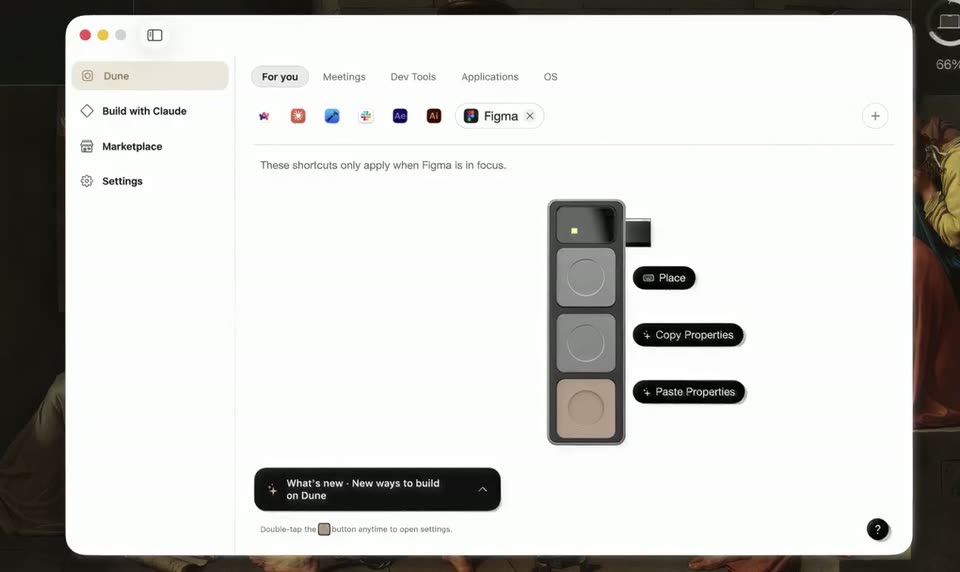
A white Dune window over a dark painting shows a vertical hardware button strip and a row of app tabs. The view zooms into the left sidebar as a cursor hovers over the Build with Claude row.
Techniques: UI zoom, Cursor demo
Camera: Push in
05 · Feature reveal · 0:08–0:09
A close-up of a light interface frames a black pill button labeled 'Chat with Claude' with a large cursor resting on it. The cursor clicks, and the button turns gray with a small loading spinner. Bullet points and a gray caption line sit above and below the button.
Techniques: Cursor demo
Camera: Static
06 · Feature reveal · 0:09–0:11
A macOS dock spans the bottom of the screen with five app icons over a painting wallpaper. The row trims to three, then the central orange starburst icon scales up as the flanking icons shrink, and the frame cuts to black.
Techniques: UI zoom
Camera: Push in
07 · Feature reveal · 0:11–0:14
A dark chat card with an orange star mark and a serif heading sits centered. The user prompt types into the input box, then the view scrolls up as the AI reply streams in line by line, listing three mapped buttons.
Camera: Static
08 · Feature reveal · 0:14–0:18
Fading up from black, a 3D-rendered black device with a small screen and three buttons sits on white. Three tan pills labeled Scan newsletters, Find founders, and Draft outreach pop in one by one to its right, then a black wipe fills each pill in sequence.
On-screen text: “Scan newsletters”, “Find founders”, “Draft outreach”
Techniques: 3D mockup, Masking
Camera: Static
09 · Feature reveal · 0:18–0:21
The Dune app window fades in with an Xcode shortcut panel beside a floating three-button control strip. The frame zooms to the sidebar as a cursor selects Marketplace, then scrolls a grid of script cards such as LinkedIn Search.
Techniques: UI zoom, Cursor demo
Camera: Push in
10 · Feature reveal · 0:21–0:22
Close-up of a light script library grid. A black cursor hovers over the LinkedIn Search card while the list scrolls up, revealing a card with an Apple logo at the right edge.
Techniques: Cursor demo
Camera: Static
11 · Feature reveal · 0:22–0:24
A light gray marketplace list blurs as a white modal scales in at center, headed by a run-location prompt with a black Install pill at top right. A cursor hovers on the button while the background list stays static.
Techniques: Cursor demo
Camera: Pull out
12 · Feature reveal · 0:24–0:25
A dimmed app background sits behind a white install modal for a LinkedIn Search script. A large black cursor moves from the macOS row, which fills solid black with a green check, down to the now-active Continue button.
Techniques: Cursor demo
Camera: Static
13 · Feature reveal · 0:25–0:26
A white setup modal sits centered over a blurred app screen. Its left panel lists three steps, the right panel three button rows, the top row filled black with a green check. A cursor hovers the black Continue button at the bottom right. The frame holds still.
Techniques: Cursor demo
Camera: Static
14 · Feature reveal · 0:26–0:27
A white install-confirmation modal for the LinkedIn Search script floats over a dimmed product page, a cursor resting on the black Install button. The modal then fades out to reveal the script's detail view with a green Installed badge at top right.
Techniques: Cursor demo
Camera: Push in
15 · Feature reveal · 0:27–0:28
A light gray settings panel fades and settles into view, listing a script's details: version 1.0.0, type Shell, updated May 2026, built for macOS. A green Installed badge and a pencil icon sit at the top right, where a black cursor hovers.
Techniques: Cursor demo
Camera: Push in
16 · CTA · 0:28–0:34
A backlit hand holds a small rectangular device with a screen and two round buttons against a warm orange gradient. The hand stays nearly still as white text appears word by word over the device, then swaps to a new line.
On-screen text: “Built by people”, “who use Dune everyday”, “Make your own”
Techniques: Kinetic type
Camera: Push in
17 · Outro · 0:34–0:37
The white lowercase wordmark mirage holds centered on a flat black background, perfectly still, as the closing sign-off. No motion, no camera move, the frame is locked off for the full duration.
Camera: Static