1:05


Introducing Lyria 3 music generation
Google · AI · Feb 2026
Adobe · Apr 2019 · 1:26 · Full motion · AI-annotated
Adobe’s 1:26 launch film runs 39 scenes, about 2.2 s each. The product is on screen from the first frame and 5 features are revealed. The call to action lands at 1:17 (89% in). Opens on the logo and a promise, then runs five title-card-led feature beats (social graphics, short videos, web pages, brand kit, templates) before a scrolling template montage and a logo-plus-URL end card. Pacing is quick and rhythmic on a flat light-gray field; signature moves are blur-and-scale mockup entrances, word-by-word text reveals, color-flipping highlight boxes and slow-drifting grids of cards.
Is this your launch? to your site or press kit.
Google · AI · Feb 2026
Karamel · Jan 2019
Films whose music sounds like this one, voice left out
Overbaked Studio · Folk, Acoustic Pop
Lovable · Lo-fi hip-hop / chillhop
Sylvian · Electronic, Chiptune
A static Adobe Spark logo lockup sits centered on a plain light gray background. The dark rounded-square icon with a yellow border and cream Sp letters holds above the gray wordmark, with no motion across the shot.
Camera: Static
On a pale gray background, the slate-blue headline “Create stunning social” slides in word by word, then “stories in minutes.” appears below it with “minutes” in bold. The two lines hold briefly, then fade out.
On-screen text: “Create stunning social”, “stories in minutes.”
Techniques: Kinetic type
Camera: Static
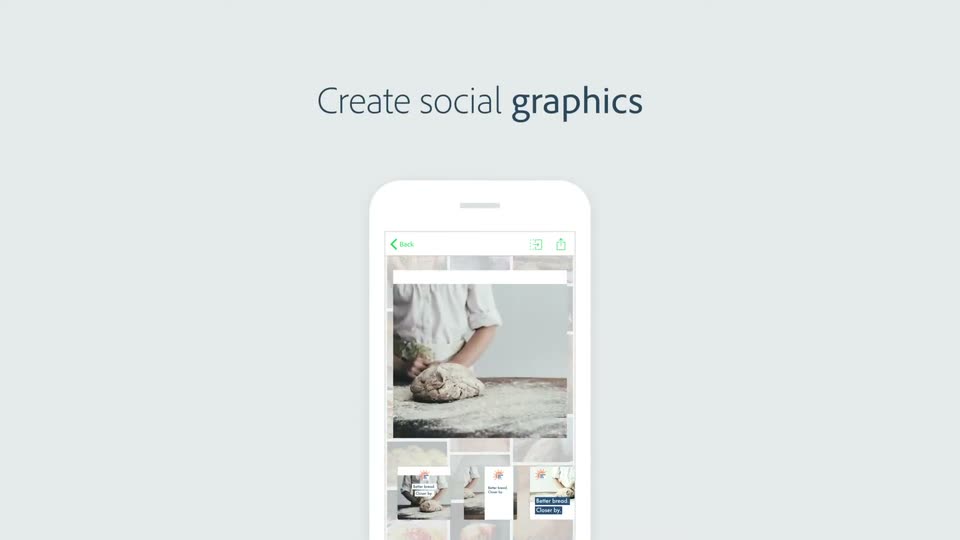
A dark-gray headline and a white phone mockup start blurred and small, then sharpen and scale up, revealing a photo-grid interface on the screen.
On-screen text: “Create social graphics”
Camera: Static
A vertical bakery social post mockup sits on a gray canvas, showing a baker's hands over flour-dusted dough with the orange sun logo at top. The tagline 'Better bread. Closer by.' animates in line by line inside highlight boxes that flip from white to navy, while three thumbnail variants of the same post sit below. A locked-off headline reads 'Create social graphics'.
On-screen text: “Create social graphics”
Techniques: Kinetic type
Camera: Pan
A white tablet mockup settles into frame on a light gray background, its screen playing a video of hands kneading dough with a red microphone button below. Above it, the headline Create short videos slides in, the word videos set in bold.
On-screen text: “Create short videos”
Techniques: Kinetic type, 3D mockup
Camera: Static
The app's white canvas plays a clip of hands sifting flour, with a red microphone button below. The caption “Flour and water” types itself in at the center, then the view tightens to the clip with a dark player bar and timecode at the bottom.
On-screen text: “Create short videos”, “Flour and water”
Techniques: Kinetic type, UI zoom
Camera: Push in
A video player frame shows hands kneading a ball of dough on a floured surface. A white caption scales up over the footage while the player's progress bar advances and the timecode ticks from 0:02 to 0:03. A small bakery sunburst logo sits in the lower right corner.
On-screen text: “Flour and water”, “Simple ingredients”
Techniques: Kinetic type
Camera: Static
A video player shows a close-up of flour-dusted hands kneading a ball of dough on a floured surface. The white caption “Simple ingredients” scales in over the footage while the player’s scrubber and timecode advance along the bottom bar.
On-screen text: “Simple ingredients”
Techniques: Kinetic type
Camera: Pan
A centered headline and a browser window mockup fade in on a light gray background. Inside the window, a bread photo sits above a toolbar, and a serif heading types out letter by letter behind a blinking caret.
On-screen text: “Create branded web pages”
Techniques: Kinetic type
Camera: Pull out
A webpage editor shows a sourdough photo above a text block. The H1 button highlights and the serif heading scales up into a large blue sans-serif title. The page scrolls down past a three-image grid to an orange Pre-order button and an orange sun logo.
Techniques: Kinetic type
Camera: Pan
A white bakery logo with an orange sunburst and a Pre-order button cuts to a gray screen where three circles with placeholder logos sit in a row. Below them the caption reads Just add your brand ingredients.
On-screen text: “Upload your logo”, “Just add your”, “brand ingredients”
Camera: Static
On a light gray field, three overlapping white circles hold a blue-teal color swatch, a teal LOGO badge and an Ag type sample above the caption Just add your brand ingredients. The circles and caption fade out, and Upload your logo appears on the empty background.
On-screen text: “Just add your brand ingredients”, “Upload your logo”
Camera: Static
A file icon labeled Logo.png slides into a cloud upload mark below the heading Upload your logo. An orange sunburst logo with a white text box pops in as a gray magnifying glass sweeps across it. An orange swatch and the caption Choose your colors fade in.
On-screen text: “Upload your logo”, “Logo.png”, “Choose your colors”
Camera: Static
On a pale gray background, an orange and a navy color swatch flank the Morning Glory Bakery sunburst logo. The logo fades out, the swatches slide to the center, then they blur away, leaving the caption Choose your colors.
On-screen text: “Orange #FDA06E”, “Navy #244E76”, “Choose your colors”
Camera: Static
A blurred color-swatch card labeled Choose your colors crossfades into a white list card titled Select a font, listing Adobe Caslon, Futura, Voltage Bold and Museo Slab on a light gray background.
Camera: Static
A white card on a light gray field lists five font names, each set in its own typeface, beneath the heading Select a font. The list shifts up slightly so the final entry, LTC Bodoni, slides fully into view.
Camera: Static
A white text card slides up into place under the static heading Select a font on a flat gray field. At the start a ghosted vertical stack of font names (Adobe Caslon, Avenir Next, Museo Slab, BFC Bodoni) dissolves out as the card settles, leaving the Futura preview and its body copy.
Camera: Static
On a pale gray background, two lines of gray text slide into the center, then three flat template mockups rise up beneath them, revealing a bakery brand with an orange sun logo and a webpage layout.
On-screen text: “And watch your brand come to life”, “with personalized templates and themes”
Techniques: Kinetic type
Camera: Pan
A light gray stage holds three flat bakery-template panels, a left article block, a center vertical logo card, and a right photo banner, which ease upward into place. Above them a two-line headline slides down from the top edge to settle over the panels.
On-screen text: “And watch your brand come to life”, “with personalized templates and themes”
Techniques: Kinetic type
Camera: Static
A grid of website cards scrolls upward: a sourdough article with photos, a vertical brand card, a dough photo with a caption, a tagline card and a gray skeleton card. The headline on the vertical card slides within its frame.
On-screen text: “Better bread.”
Techniques: Kinetic type
Camera: Static
A grid of bakery layout cards scrolls down the frame, panels pairing headlines, photos of hands kneading dough, and the orange Morning Glo logo. The duplicated 'Better bread.' line slides within its panel as the grid moves.
Techniques: Split screen
Camera: Pan
A flat grid of bakery design cards on a white background, each pairing an orange sunburst logo with bread photography. The headlines inside the cards decode from scrambled, mirrored lettering into clean type while the right card holds a gray skeleton layout.
Techniques: Kinetic type
Camera: Static
Two rows of square social post cards, each pairing a bread photo with a headline and an orange sun logo, scroll slowly upward on a white background.
Camera: Static
A masonry grid of bakery website mockups fills the frame, each card pairing a headline, a photo of bread or dough, and the Morning Glory Bakery sunburst logo. The grid holds steady with a faint, slow vertical drift.
Camera: Static
A grid of bakery web templates, washed out at first, gains color and scales up slowly. Centered thin text reads Make changes once, then See results everywhere, fading in line by line and out as the grid saturates.
On-screen text: “Make changes once.”, “See results everywhere.”
Techniques: Kinetic type, UI zoom
Camera: Pan
A grid of bakery social media posts sits beside a column of brand tiles. The color swatch fills and shifts from blue to coral, the posts' accent blocks follow, and the view scrolls down to a serif headline.
On-screen text: “Differentiate your business, cause, or personal brand.”
Camera: Pan
A flat grid of orange and white bakery brand mockups, including business cards and posters with dough and muffin photos, fills the frame. A centered gray headline reads across the middle. The layout holds static with no movement.
On-screen text: “Differentiate your business, cause, or personal brand.”
Camera: Static
A light gray slide keeps a static center headline while two horizontal rows of social media template thumbnails scroll left, swapping bakery cards for fitness cards.
On-screen text: “Differentiate your business, cause, or personal brand.”
Camera: Static
Two rows of fitness-themed social media templates sit static on a light gray field. A thin light blue headline types out letter by letter across the center, reading “Differentiate your business, cause, or personal brand.”
On-screen text: “Differentiate your business, cause, or personal brand.”
Techniques: Kinetic type
Camera: Static
A flat grid of social media post mockups fills the screen. The post art swaps between fitness and travel themes while a centered gray headline cycles through three lines of copy.
On-screen text: “Differentiate your business, cause, or personal brand.”, “Add a logo, website, contact details and more.”, “Use the templates to create your own custom posts.”
Camera: Static
A wall of Pinterest-style pins, tilted in 3D perspective, fills the top and bottom of the frame, with a light gray band across the middle holding a static headline. The pins stay in place as the camera holds the angled view.
On-screen text: “Differentiate your business, cause, or personal brand.”
Techniques: 3D mockup
Camera: Static
A flat grid of square travel-themed social cards in coral and white scrolls slowly right across a light gray background. A centered dark gray caption, “Differentiate your business, cause, or personal brand,” stays fixed while the cards drift behind it.
On-screen text: “Differentiate your business, cause, or personal brand.”
Camera: Static
A grid of gardening template cards, with flower and succulent photos and quote text, fills a light gray screen. A centered headline sits below the top row. The grid drifts slowly downward.
On-screen text: “Differentiate your business, cause, or personal brand.”
Camera: Static
A wall of gardening-themed design template cards fills the frame behind a centered tagline. The card grid drifts slowly to the left while the headline stays fixed, giving the montage a subtle sense of depth.
On-screen text: “Differentiate your business, cause, or personal brand.”
Techniques: Parallax
Camera: Static
A flat grid of teal-and-white blog cards, each pairing a swim photo with a headline, fills the frame. A centered gray tagline sits in a clear band across the middle. A slow horizontal drift moves across the wall of cards.
On-screen text: “Differentiate your business, cause, or personal brand.”
Camera: Static
A scrolling grid of swimming-themed social media mockups moves upwards behind the centered text 'Differentiate your business, cause, or personal brand.'
On-screen text: “Differentiate your business, cause, or personal brand.”
Camera: Static
A grid of bakery website and social media mockups, each with bread photos and text blocks, scrolls steadily left across the frame. A light gray horizontal band with a centered tagline stays fixed in the middle while the rows behind it move.
On-screen text: “Differentiate your business, cause, or personal brand.”
Techniques: Parallax
Camera: Pull out
A light gray backdrop holds the headline as three social post mockups, Twitter, Instagram and Facebook, rise into frame from below, each carrying a bread image and a brand badge. Small heart and like icons drift across the images, then the cards fade out.
On-screen text: “Stand out from the crowd.”
Techniques: Particles
Camera: Static
The scene dissolves in from a blurred product UI to a plain light-gray field. Centered, the Adobe Spark icon (black rounded square, cream Sp, thin yellow border) holds above the wordmark Adobe Spark and the URL spark.adobe.com. The frame stays static; the URL fades out at the end.
On-screen text: “Adobe Spark”, “spark.adobe.com”
Camera: Static