
0:45
Explore
Adobe Spark is Here! | Adobe
Adobe · May 2016 · 0:52 · Full motion · AI-annotated
- Length
- 0:52
- Scenes
- 19 · 2.8 s avg
- Product on screen
- 0:02
- Features shown
- 3
- Call to action
- 0:43 · 82%
- Voiceover
- No
- Views
- 176K on YouTube
as of November 21, 2026
00:00:00 / 00:52:23
- Length
- 0:52
- Scenes
- 19 · 2.8 s avg
- Product on screen
- 0:02
- Features shown
- 3
- Call to action
- 0:43 · 82%
- Voiceover
- No
- Views
- 176K on YouTube
as of November 21, 2026
Adobe’s 0:52 launch film runs 19 scenes, about 2.8 s each. The product shows up at 0:02 and 3 features are revealed, with social proof. The call to action lands at 0:43 (82% in). The video is cut as a chain of flat color and title cards, each holding one short line and joined by circular iris wipes, blur swaps and scale-ins on a light gray ground. Its signature moves are the icon morphs and recolors (music note to guitar, the three app icons snapping to the yellow-and-black Spark palette) and the blur-in captions, paced to a steady beat with bold yellow accents.
No filming indicatedEstimated needs: 2 capture groups — your screens or recordings · 1 official logo — reused across the film · 6 graphic passages — draw or supply · 1 3D passage — build or supply
Is this your launch? to your site or press kit.
More like this
1:34


Meet Meridian: the AI operating system for accounting firms
Meridian · Jun 2026
0:15
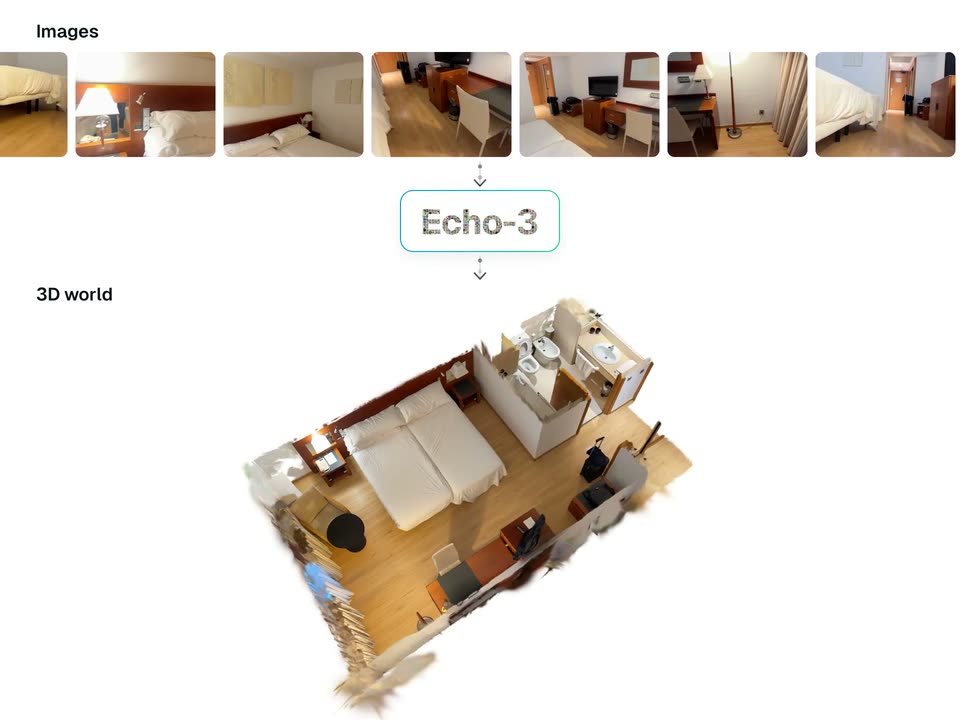

SpAItial AI - Echo-3 is now available in the API. Send a capture from a phone scan
SpAItial AI · Nov 2026
Similar soundtrack
Films whose music sounds like this one, voice left out
1:13
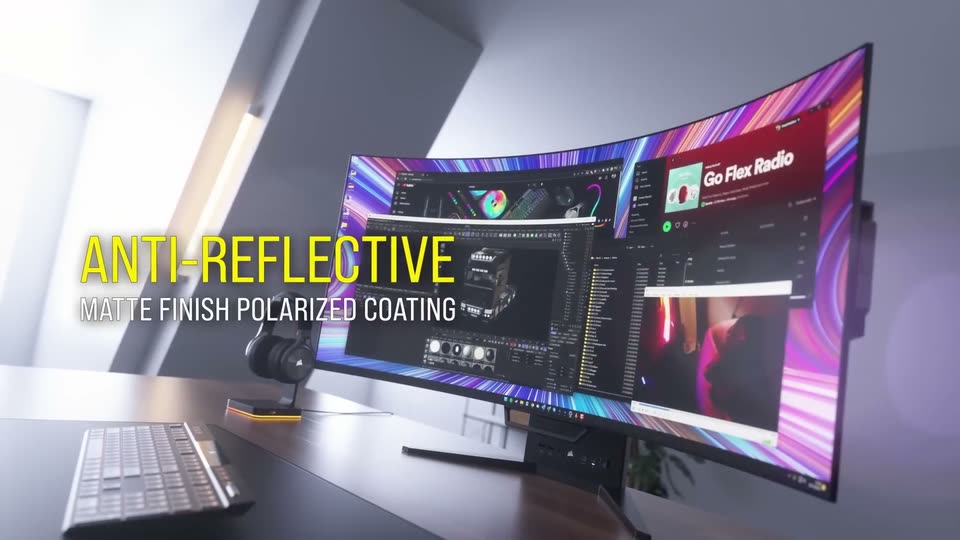

CORSAIR XENEON FLEX 45WQHD240 OLED - Bendable UltraWide Gaming Display
CORSAIR XENEON FLEX · Modern pop, electronic dance-pop
1:04


October 2026 Launch: Omni
Airtable · Electronic dance, funk, alternative rock, pop-rock
0:23

Granola - NEW ✨ Talk to Granola Chat. Now you can talk to Chat, and it'll ans
Granola · Hard rock / Alternative metal
Adobe Spark is Here! | Adobe, scene by scene
· 19 scenes as text
01 · Hook · 0:00–0:00
A thin yellow band widens from the center to fill the black frame, uncovering a faint grid of small white icons. The word “Introducing” holds centered in white over the pattern.
On-screen text: “Introducing”
Techniques: Masking
Camera: Static
02 · Hook · 0:00–0:02
A yellow field filled with a faint pattern of app icons holds the white word “Introducing” centered. A thin white horizontal line sweeps across the frame at mid-height, passing through the text. The frame stays locked off.
On-screen text: “Introducing”
Camera: Static
03 · Product intro · 0:02–0:05
A black square with a yellow Sp monogram slides left as the gray Adobe Spark wordmark scales in beside it on a light gray field. The lockup exits, then a dark blue line, The story of a new brand., appears with a thin yellow vertical bar at its right.
On-screen text: “The story of a new brand.”
Techniques: Kinetic type
Camera: Static
04 · Product intro · 0:05–0:08
A navy headline sits centered on a pale gray field with a thin yellow vertical bar to its right. The phrase is then replaced by a two-line statement, and a faint gray line fades in beneath it.
On-screen text: “The story of a new brand.”, “And a unified solution”, “for visual storytelling.”, “The apps you know and love...”
Techniques: Kinetic type
Camera: Static
05 · Product intro · 0:08–0:09
On a plain light gray field, a centered italic serif sentence cross-fades out as a bold sans-serif line fades in and scales to rest. The two headlines swap in place on a locked-off frame.
On-screen text: “And a unified solution for visual storytelling.”, “The apps you know and love...”
Techniques: Kinetic type
Camera: Static
06 · Social proof · 0:09–0:13
A dark green testimonial card opens through a circular iris over the previous scene. The Adobe Post logo and wordmark sit centered above a five-star rating that fills in, while the quote scales in below. A second iris reveals the blue Adobe Slate card at the end.
On-screen text: “Adobe Post”, “So easy to make beautiful designs!”, “Adobe Slate”
Techniques: Masking, Kinetic type
Camera: Static
07 · Social proof · 0:13–0:17
The cyan Adobe Slate logo and name sit centered on a dark teal field above a star row and the quote 'Sophisticated content in minutes!'. A brown circle expands from the center, masking to the orange Adobe Voice logo with its own stars and the word Simple.
On-screen text: “Adobe Slate”, ““Sophisticated content in minutes!””, “Adobe Voice”, “Simple”
Techniques: Masking
Camera: Static
08 · Social proof · 0:17–0:19
A dark olive card holds the orange Adobe Voice logo mark, the product name, a five-star rating and a testimonial line. The stars fill in from the left and the quote scales up into place. Then the whole lockup slides left as a soft white panel wipes in from the right edge.
On-screen text: “Adobe Voice”, “★★★★☆”, “Simplest storytelling app ever!”
Techniques: Masking
Camera: Static
09 · Product intro · 0:19–0:20
A dark panel wipes off the left edge as the line ...are now part of a family. resolves from blur on a light gray background. Two green app icons, Adobe Pass and Adobe Experience Cloud, fade in below it.
On-screen text: “...are now part of a family.”, “Simplest storytelling app ever!”
Techniques: Masking
Camera: Static
10 · Product intro · 0:20–0:25
Three app icons on a light gray background crossfade from their brand colors into a unified yellow and black style under a static headline. The gray labels update from Adobe Post, Adobe Slate, Adobe Voice to Adobe Spark Post, Spark Page, Spark Video, then the headline blurs out.
On-screen text: “...are now part of a family.”, “Adobe Post”, “Adobe Slate”, “Adobe Voice”, “Adobe Spark Post”, “Adobe Spark Page”, “Adobe Spark Video”
Techniques: Morph
Camera: Static
11 · Product intro · 0:25–0:28
On a pale gray background, the headline sits above three dark app icons with yellow outlines. The center Spark icon scales up as the side icons fade out, while a caption types in below. The clip ends on a dark bicycle template card fading in.
On-screen text: “Say hello to:”, “Adobe Voice”, “Adobe Spark”
Techniques: Kinetic type
Camera: Static
12 · Feature reveal · 0:28–0:31
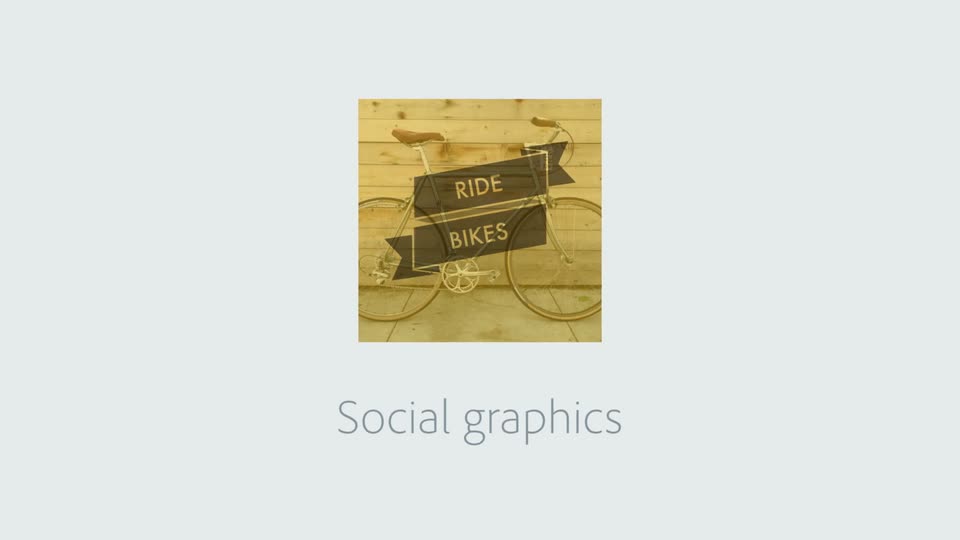
A square bike photo with a white RIDE BIKES badge sits centered on light gray, captioned Social graphics. The graphic restyles to a sepia script version with sunburst lines, then a horizontal GLACIERS kayak banner fades in above a Web store caption.
On-screen text: “Social graphics”, “RIDE”, “BIKES”, “GLACIERS”, “Web store”
Camera: Static
13 · Feature reveal · 0:31–0:34
A flat browser window on a light gray background cycles through story layouts: a kayak video with a sliding GLACIERS title, a four-image grid, then a landscape photo with a text card, while the caption Web stories scales in below.
On-screen text: “GLACIERS”, “Web stories”, “BIKES”, “Social graphics”
Techniques: Kinetic type
Camera: Static
14 · Feature reveal · 0:34–0:35
A flat browser mockup on a light gray background scrolls upward, its 3D landscape content sliding out to reveal a red audio card with a blue music note and a red mic button. The thin gray label below scales up and blurs as the mockup transitions.
On-screen text: “Web stories”
Camera: Static
15 · Feature reveal · 0:35–0:37
A flat orange card holds a white music note that morphs into a guitar above a dark bar with a red microphone button, while the caption “Animated videos” stays below.
On-screen text: “Animated videos”
Techniques: Morph
Camera: Static
16 · Feature reveal · 0:37–0:38
A centered card holds a concert crowd photo above a dark bar with a red microphone badge, captioned below. The card scales up toward the frame while the gray caption slides down and blurs out.
On-screen text: “Animated videos”
Camera: Static
17 · Demo · 0:38–0:43
A laptop with a web interface sits centered on a light gray background. A smartphone slides in from the front, then moves left as a tablet enters from the right, ending in a row of three devices. The caption below reads Available on web and mobile.
On-screen text: “Available on web.”, “Available on web and mobile.”
Techniques: 3D mockup
Camera: Push in
18 · CTA · 0:43–0:45
A yellow circle with a white plus sign floats over a faint laptop mockup that fades away, above the caption “What will you create?”. The circle shrinks and morphs into the Adobe Spark logo as the wordmark fades in below.
On-screen text: “What will you create?”, “Adobe Spark”
Techniques: Morph
Camera: Static
19 · CTA · 0:45–0:52
A centered sign-off lockup on a light gray background. The yellow Sp mark on a black square sits above the product name in gray, with the URL in dark blue beneath it. The frame holds static with no further motion.
On-screen text: “Adobe Spark”, “spark.adobe.com”
Camera: Static