0:31

Mistral AI Le Chat Agents
Mistral AI · AI · May 2025
Adobe · Sep 2023 · 0:51 · Full motion · AI-annotated
Adobe’s 0:51 launch film runs 32 scenes, about 1.6 s each. The product is on screen from the first frame and 5 features are revealed. The call to action lands at 0:46 (92% in), over a voiceover. A logo bookend frames a fast montage of single feature demos, each following the same beat of typed prompt, Generate click, and thumbnail pick. Flat white UI frames snap to full bleed saturated artwork on a 122 bpm pop track to punctuate every result.
Is this your launch? to your site or press kit.
Mistral AI · AI · May 2025
Figma · Design · Mar 2025
Notion · Productivity · Sep 2024
Films whose music sounds like this one, voice left out
Dub · Modern funk, disco, and French house
Snowfire · Modern funk, disco, and electronic dance music
Fitbit · Electronic dance music
A plain white background holds the red Adobe Firefly wordmark, centered. The mark animates in place: Firefly drops out while Adobe scales up, then Firefly returns to restore the full lockup.
On-screen text: “Adobe Firefly”
Techniques: Kinetic type
Camera: Static
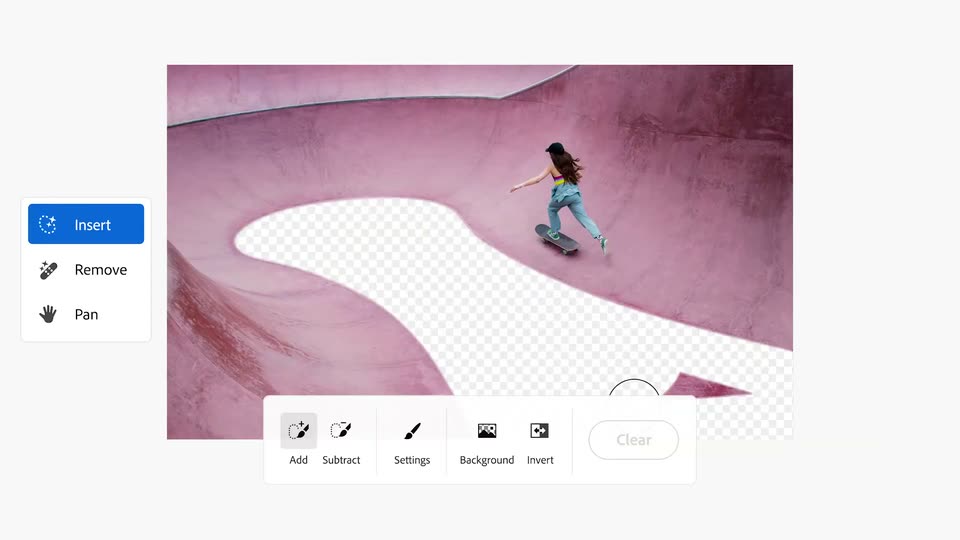
A photo of a skateboarder in a pink bowl fills the editor. Circular brush markers drag across it, widening a transparent checkerboard cutout that erases the bowl. Left menu shows Insert, Remove, Pan; bottom bar shows Add, Subtract, Settings, Background, Invert, Clear.
Techniques: Cursor demo
Camera: Static
Close-up of an editor toolbar with Add, Subtract, Settings, Background and Invert icons above a rounded prompt field. A cursor arrow moves into the field and types Pool party with floaties as the placeholder text disappears. The frame stays locked off over a pink image and checkerboard background.
Techniques: Cursor demo
Camera: Static
A photo-editing UI over a skater in a pink bowl. A left toolbar highlights Insert; a bottom prompt field reads 'Pool party with floaties' next to a blue Generate button with a cursor. The toolbar dims and the field is replaced by four result thumbnails with a More button.
Techniques: Cursor demo
Camera: Static
A flat white carousel of four 3D thumbnails sits over a pink rendered landscape with a transparency checkerboard. A large arrow cursor sweeps right across the row, each stop adding a colored pool float, while a More button and chevrons flank the strip.
Techniques: Cursor demo
Camera: Static
A white thumbnail strip spans the bottom of a pink pool render; a cursor taps the flamingo frame and the strip fades out, letting the pool scene fill the screen, then it cuts to a flat illustration of a green forest and a winding blue river.
Techniques: Cursor demo
Camera: Push in
A flat vector forest illustration fills the frame. Blue selection outlines trace the shapes and a dark Generative Recolor panel drops in at the bottom center. The cursor types autumn into the prompt field, then moves down to the Generate button.
Techniques: Cursor demo
Camera: Pull out
A flat autumn forest illustration in orange and brown fills the frame. A dark translucent panel sits in the lower center with a prompt field reading autumn and a Generate button. A cursor hovers at the button, then the frame holds still.
Camera: Static
A dark Generative Recolor panel floats over an abstract orange and blue illustration. The word winter types into the prompt field letter by letter, then a white cursor slides down toward the Generate button.
Techniques: Cursor demo
Camera: Static
A dark glass panel titled Generative Recolor holds a prompt field reading winter and a Generate button, with a cursor resting at the button's edge. The panel clears and the frame pulls back to a flat snowy forest illustration.
Techniques: Cursor demo, UI zoom
Camera: Pull out
A large black headline reads TIGER FUR above a white input bar containing the same text, a placeholder, and a Generate button. A mouse cursor moves across the placeholder.
On-screen text: “TIGER FUR”
Techniques: Cursor demo
Camera: Static
A white prompt bar on a pale gray background types out the words Realistic tiger fur, one word at a time, next to a blue Generate button. A gray cursor arrow then glides in and rests on the button.
Techniques: Kinetic type, Cursor demo
Camera: Static
A white prompt bar shows the text Realistic tiger fur next to a solid blue Generate button with a cursor on it. Four tiger-fur thumbnails pop in above the bar and the button switches to a blue outline.
Techniques: Cursor demo
Camera: Static
A product interface shows the word TIGER FUR in bold letters filled with tiger fur, a control panel on the right. A cursor clicks four T swatches, each swap changing the headline's fur, then the view zooms in.
Techniques: Cursor demo, UI zoom
Camera: Push in
The word STYLE in bold sans sits centered on a white background, its letters filled with a colorful texture that shifts from crumpled metallic paper to a floral print. The frame stays locked off while the fill animates.
On-screen text: “STYLE”
Techniques: Morph
Camera: Static
The word STYLE in 3D letters cycles through material styles on a white ground: donuts with sprinkles, then glossy chrome with dripping gold, then a prompt input screen, then letters covered in multicolored sprinkles.
Camera: Static
Close-up of a rounded input field on a light gray background. The gray placeholder text fades out while the prompt “Friendly dragon emerging from storm” types in letter by letter in black.
Techniques: Kinetic type
Camera: Static
A close-up of a white panel holding a blue Generate button. A black-outlined cursor slides in from the left, hovers over the button, and clicks it, the button darkening briefly on press.
Techniques: Cursor demo
Camera: Static
Four dragon images sit in a row above a prompt bar reading 'Friendly dragon emerging from stormy sea' with a blue Generate button. A settings panel slides in from the right showing dropdowns and style thumbnails, while a cursor hovers the button.
Techniques: Cursor demo
Camera: Static
The interface scrolls down past the styles grid to a blue Generate button. A lighting dropdown opens on the right and the cursor moves down to highlight Dramatic lighting, which gets selected.
Techniques: Cursor demo
Camera: Pan
A generator interface shows four dragon illustrations above a prompt field reading Friendly dragon emerging from stormy sea and a blue Generate button. A cursor moves to the button and clicks it, which darkens. A settings panel lists style options on the right.
Techniques: Cursor demo
Camera: Static
A light interface shows four dragon illustrations above a prompt bar, with a settings panel of dropdowns on the right. A cursor clicks the black Refresh button, then hovers the third image, revealing small action icons along its top edge.
Techniques: Cursor demo
Camera: Static
A paper-cut style illustration of a teal dragon with horns and a yellow underbelly rises from stylized waves and clouds. The view zooms in from a layout with a dark right sidebar of thumbnails and a Refresh button to a full-bleed image.
Techniques: UI zoom
Camera: Push in
Locked-off view of an upload drop zone. A motorcycle vector illustration on an orange square is dragged left by a white cursor from the right edge into the dashed box, settling over the blue Upload SVG button.
Techniques: Cursor demo
Camera: Static
A square illustration of two motorcycles on an orange background sits above an input bar with a small thumbnail and a Generate button that shifts from gray to blue on a locked-off frame.
Camera: Static
A retro cream motorcycle with dark green outlines sits on an orange field at the top. Below, a rounded white search bar holds a small thumbnail of the bike while the prompt types out word by word, then a cursor arrow slides in beside the text.
Techniques: Cursor demo
Camera: Static
A square pop-art motorcycle illustration on an orange background with a yellow sun rests above a white prompt bar. A cursor drifts right onto the blue Generate button while the typed prompt text slides in.
Techniques: Cursor demo
Camera: Static
A generation tool's screen shows the typed prompt “Purple neon tropical fairy tale” and a button flipping from Generate to Refresh, above a 2x2 grid of purple scooter art. A cursor hovers, then one tile zooms in to fill the frame.
Techniques: Cursor demo, UI zoom
Camera: Push in
A white dialog about AI transparency overlays a pink canvas with a pop-art motorcycle. The cursor clicks Continue, and the dialog shrinks into a smaller Applying Content Credentials box with a progress bar. The darkened app, prompt grid, and color swatches sit in the background.
Techniques: Cursor demo, Morph
Camera: Static
A purple halftone illustration of a motorcycle and a scooter on a pink backdrop with a pale circle. The two vehicles drift apart, the scooter sliding right to open a gap between them.
Techniques: Parallax
Camera: Static
A halftone pop-art illustration of a purple motorcycle and scooter on a magenta panel with a pale pink circle. A red border frames the panel as a large white headline locks across the center.
On-screen text: “Dream Bigger.”
Camera: Static
A red square bearing a white A glyph sits centered on a plain white field. The square recedes, leaving the solid red A mark alone in the center of the frame.
Camera: Static