1:58


Pharmie AI (YC S25) Launch Video
Playgent · Healthcare · Aug 2025
Figma · Mar 2025 · 2:18 · Full motion · AI-annotated
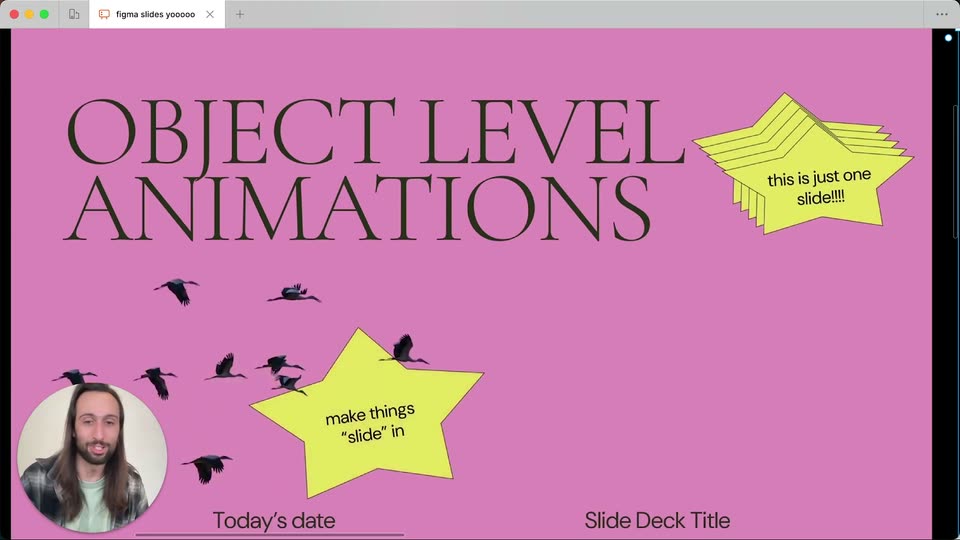
Figma’s 2:18 launch film runs 32 scenes, about 4.3 s each. The product is on screen from the first frame and 6 features are revealed. The call to action lands at 2:11 (95% in), over a voiceover. The video is a single screen-recorded Figma Slides deck that walks through six updates in order, each opened by a full-bleed serif title on a flat pink canvas and then demoed live in the editor with cursor actions and quick zoom-ins. Signature moves are the yellow star callouts that pop and slide in, fast zooms onto the props panel, and the persistent bottom-left facecam circle that anchors every scene.
Is this your launch? to your site or press kit.
Playgent · Healthcare · Aug 2025
Wispr Flow · Aug 2026
Films whose music sounds like this one, voice left out
Replit · Upbeat corporate tech
Ramp · Modern electronic
Granola · Upbeat electronic
On a pink Figma canvas, an orange Figma mark and green tag, Noah Finer, slide in beside a blue tag, Software Engineer, Figma. The tags clear and large serif lines, SIX FIGMA, SLIDES, UPDATES, appear stacked, each underlined with a yellow stroke. A circular speaker avatar stays in the bottom-left.
On-screen text: “Noah Finer”, “Software Engineer, Figma”, “SIX FIGMA”, “SLIDES”, “UPDATES”
Techniques: Kinetic type
Camera: Static
A pink Figma slide with a large dark serif title fills the frame, a presenter's webcam circle sits in the corner. A stacked yellow star slides in top right, a flock of bird silhouettes flies across, then two more stars slide and fade in with captions, alongside a veiled figure.
On-screen text: “OBJECT LEVEL ANIMATIONS”, “this is just one slide!!!!”, “make things “slide” in”, “...or make them fade in”
Camera: Static
In an editor window, a pink slide titled VIDEO IMPROVEMENTS in large serif type sits beside a circular speaker headshot. Three yellow star callouts pop in around the slide while an embedded video on the right plays a thumbs-up clip and the cursor pauses it and drags the volume slider.
Techniques: Cursor demo
Camera: Static
A pink Figma slide titled VIDEO IMPROVEMENTS sits selected in the editor, decorated with yellow star callouts and an embedded video playing a thumbs-up clip. A circular webcam of a bearded presenter floats in the lower left corner while a white caption begins at the right edge.
On-screen text: “wait, the e”
Camera: Pull out
A Figma slide editor shows a pink slide with a black canvas; a black-and-white astronaut video plays in a selected frame as its progress bar advances. A yellow star caption and white text sit beside it, with a circular presenter webcam in the lower left.
Techniques: Cursor demo
Camera: Pull out
A Figma screen recording zooms out from 80% to 40% over a pink slide with an astronaut photo and a yellow star. The cursor clicks Video settings in the right panel, a playback popover opens, the cursor highlights Autoplay, then drags a blue selection box over the slide.
Techniques: UI zoom, Cursor demo
Camera: Static
A Figma slide editor fills the frame with a pink slide titled COMPONENTS in the center canvas. A cursor travels along the bottom toolbar and hovers an icon, popping an Assets tooltip. A circular webcam of a man speaking sits in the lower left corner.
Techniques: Cursor demo
Camera: Static
A Figma Slides window fills the frame with a pink slide and an open tools menu. The cursor clicks Local components, then drags a yellow starburst onto the slide, where it lands enlarged with the label insert instances. A circular webcam of the presenter sits in the lower left.
Techniques: Cursor demo
Camera: Static
A Figma canvas shows a pink slide titled COMPONENTS with a yellow starburst selected. A cursor opens the variant dropdown and clicks through options, swapping the starburst into a blob and a sun, then selects the footer bar below.
Techniques: Cursor demo
Camera: Static
A Figma screen recording zooms from 28% to 48% onto a slide component. The cursor selects the date field, types Wednesday, then selects the title field and types Slides GA!!!! A small circular webcam of a bearded man sits in the lower left.
Techniques: UI zoom, Cursor demo
Camera: Static
A Figma workspace shows a pink slide with a yellow starburst and a selected footer frame, then zooms out to reveal a row of slides with an astronaut photo. A circular webcam of a long-haired man sits in the lower left.
Techniques: UI zoom
Camera: Static
A Figma canvas scrolls right across pink slides titled COMPONENTS and SLIDE NUMBERS. A cursor clicks the footer text on each slide, drawing a purple selection outline, while a circular webcam of the presenter stays in the lower left corner.
Techniques: Cursor demo
Camera: Static
A Figma canvas pans right across pink slides titled COMPONENTS, SLIDE NUMBERS and PPTX IMPORT EXPORT, each with a footer bar reading Wednesday and Slides GA!!!. A properties panel fills the right edge and a circular webcam of a bearded man sits bottom left.
Camera: Static
The Figma editor zooms from 33% to 40% onto a pink slide reading SLIDE NUMBERS in a dark serif. The cursor drifts to the slide's lower-left corner and places a small number 6. A circular webcam of a long-haired presenter anchors the bottom-left.
Techniques: Cursor demo, UI zoom
Camera: Static
A Figma slide canvas shows a pink slide behind a floating asset panel. The panel switches from a components grid to a tools list, and the cursor moves down to hover over the Slide number entry. A circular webcam of the presenter sits in the lower left corner.
Techniques: Cursor demo
Camera: Static
A Figma Slides editor shows a pink slide titled SLIDE NUMBERS with a facecam circle in the lower left. The cursor flips the Include total toggle, clicks Add to all slides, and a 6 / 7 counter appears on the slide and the thumbnails.
Techniques: Cursor demo
Camera: Static
Figma's slide canvas fills the screen with a grid of pink slide thumbnails. A cursor drags the SLIDE NUMBERS slide leftward over its neighbor, and the slide numbers renumber. A properties panel on the right and a presenter's webcam in the lower left stay in place.
Techniques: Cursor demo
Camera: Pull out
A Figma Slides editor shows a pink SLIDE NUMBERS slide on the canvas. The left thumbnail strip updates its previews and the zoom steps from 30% to 40%, scaling the view up. A cursor hovers on the canvas; a round webcam of a man sits lower left.
Techniques: Cursor demo, UI zoom
Camera: Static
A Figma window fills the frame, a pink slide with yellow stars and an export dialog, plus a small presenter webcam bottom left. The cursor clicks elements, then opens the top-left menu and moves down to Export slides to.
Techniques: Cursor demo
Camera: Static
A screen recording of a slide editor shows a pink slide titled PPTX IMPORT EXPORT with yellow stars and an export dialog; the cursor moves over the canvas and clicks a star, drawing a blue selection box around it.
Techniques: Cursor demo
Camera: Static
A Figma export dialog floats over a purple slide. A cursor picks PPTX from the file type dropdown, then clicks the orange Export button, and the dialog switches to an Exporting to PPTX state. A circular webcam bubble of a presenter sits in the lower left corner.
Techniques: Cursor demo
Camera: Static
A Figma editor fills the screen with a centered Save As dialog. A cursor hovers over Save, then a confirmation box with a yellow document icon asks to replace the file. A small circular webcam of a bearded man gestures in the lower left.
Techniques: Cursor demo
Camera: Static
A Figma canvas shows a pink slide with the title PPTX IMPORT EXPORT and yellow star shapes. The cursor moves over the title, then drags a blue selection box around it. A small webcam feed of the presenter sits in the lower left corner.
Techniques: Cursor demo
Camera: Static
A Figma Slides project view is shown. A cursor moves to a template card, revealing a button on hover. A circular webcam feed of a man is in the bottom left corner.
Techniques: Cursor demo
Camera: Static
A Mac desktop shows a Figma Slides tab and a Finder window listing a pptx file, with a facecam in the bottom left. The dock clears, a blue caption tags the file, and the cursor hovers on it.
On-screen text: “you're telling me this is a pptx”
Techniques: Cursor demo
Camera: Static
A Figma team page fills the frame, its template grid and left sidebar visible. A green plus cursor rests on a pink PPTX thumbnail in the canvas, and a Finder window at lower right shows the same file boxed in blue. The presenter's webcam circle sits bottom left.
On-screen text: “you're telling me this is a.pptx”
Techniques: Cursor demo
Camera: Static
Screen recording of the Figma Slides web app. A centered import dialog lists a pptx file and a progress line over a dimmed template gallery. A Downloads window in the corner closes, while a circular webcam feed of a man sits in the bottom left.
Techniques: Cursor demo
Camera: Static
A browser window loads a blank gray Figma Slides page; a small icon and a thin white line sit in the center beneath a hovering cursor. A circular webcam inset of a long-haired man is pinned in the lower left corner.
Techniques: Cursor demo
Camera: Static
A screen capture of the Figma Slides editor. A cursor selects the headline on a pink slide, opens the font menu and swaps it to a serif face, then opens the fill picker. The canvas jumps to slide two; a presenter talks from a circular webcam inset at bottom left.
Techniques: Cursor demo
Camera: Static
A Figma Slides editor shows a pink slide reading 'Thank you!!' with a large pixelated hand cursor pointing at a dropdown menu. A circular webcam of a long-haired man sits in the lower left, and a small arrow cursor drifts across the canvas.
Techniques: Cursor demo
Camera: Static
On a white background, a small green pixel square scales up in the center, framed by four purple squares at the corners. The center block gains black pixel details as it grows, all in a locked-off frame.
Camera: Static
A dark green selection box with purple corner handles covers the black Figma wordmark. The box scales away, leaving the logo centered on a plain white background.
On-screen text: “Figma”
Camera: Static