1:57
Alibaba Cloud - 3D Studio is now live on WonderClip. Try it free for a limited time
Alibaba Cloud · Nov 2026
Zapier’s 4:31 clip runs 58 scenes, about 4.7 s each. The product is on screen from the first frame and 1 feature is revealed. The call to action lands at 0:41 (15% in), over a voiceover. A step-by-step tutorial that alternates a static talking-head presenter with screen recordings framed as rounded, sometimes tilted cards over a soft blurred multicolor backdrop, keeping the presenter in a small rounded inset while the UI is shown. The pace is steady and instructional, built on quick zooms into UI controls, hand-drawn orange arrows with bold black captions for callouts, and 3D tilts of the app window, all set to a friendly conversational voiceover with no score.
Is this your launch? to your site or press kit.
Alibaba Cloud · Nov 2026
A man speaks into a studio microphone in front of a wooden bookshelf, gesturing with both hands. The lower frame fades to white as the Zapier wordmark appears on the left, then the Claude wordmark with an orange spark icon appears on the right.
On-screen text: “_zapier”, “Claude Connectors”
Camera: Static
A man in a gray patterned shirt speaks into a studio microphone in front of wooden bookshelves, gesturing with both hands. The lower frame fades to white, carrying the black serif title beside an orange starburst mark.
On-screen text: “Claude Connectors”
Camera: Static
A bearded man in a dark patterned shirt speaks into a studio microphone, pinching his fingers and gesturing, in front of wooden bookshelves holding books and a plant. A static title reads Claude Connectors.
On-screen text: “Claude Connectors”
Camera: Static
A white Directory window fills the frame over a blurred multicolor backdrop, its Connectors tab open to a grid of app cards. A cursor glides across the cards as the list scrolls down, revealing Atlassian Rovo and Slack at the bottom.
Techniques: Cursor demo
Camera: Static
On a cream background, a white rounded prompt box holds a typed calendar request above a model selector and an orange send button. A black cursor glides from the center of the box to the microphone icon on the right.
On-screen text: “Let's noodle”
Techniques: Cursor demo
Camera: Static
A full-screen chat interface floats over a blurred warm background. A cursor hovers in the answer area as the response types out a week's calendar in bullet points, with a small pink star pulsing beneath the text.
On-screen text: “Let's noodle”
Techniques: Cursor demo
Camera: Static
A man in a gray patterned shirt sits centered behind a black studio microphone, speaking to camera. He raises both hands in open, explanatory gestures. Wooden shelves stacked with books and a trailing green plant fill the soft-focus background.
Camera: Static
A light Zapier settings page titled “Supported triggers and actions” lists calendar triggers and actions in two columns. A cursor hovers over the filter pills, then the page scrolls down to reveal more rows.
Techniques: Cursor demo
Camera: Static
A white panel holds two columns of integration cards that scroll upward as a cursor hovers over entries. The view then cuts to a chat assistant screen showing a weekly calendar overview and a typed prompt in the input box.
Techniques: Cursor demo
Camera: Pan
A light chat window on a blurred warm background lists a weekly calendar. The shot zooms into the bottom, where a typed Zapier prompt sits in the input bar. A cursor moves across the field and rests on the orange send button, then the view pulls back.
Techniques: UI zoom, Cursor demo
Camera: Static
A man in a patterned shirt speaks into a studio microphone, raising his right hand in a small gesture, framed against wooden bookshelves and plants in a home office.
Camera: Static
A light chat interface greets the user; the cursor clicks the plus icon, a dropdown menu opens, and the view zooms in as the cursor selects Connectors, revealing a submenu with the Zapier toggle.
Techniques: Cursor demo, UI zoom
Camera: Push in
The Zapier MCP Apps view lists Google Calendar tools while the cursor glides to the Add apps button. A modal then opens, blurring the background behind a grid of app icons and a search field.
Techniques: Cursor demo, UI zoom
Camera: Push in
A grid of app integration cards scrolls upward beneath a search field, revealing more app names, while a cursor arrow appears at the right edge.
Techniques: Cursor demo
Camera: Push in
A flat Claude webpage fades in, showing a headline and three feature columns for Chat, Cowork and Code, each with a short blurb and a small mockup. Green checkmark badges pop in one by one on the columns, above a black Download for macOS button.
Camera: Push in
A man in a dark patterned shirt speaks into a studio microphone in a home office, gesturing with both hands. The Zapier homepage screen then fades in to fill the frame, with the man reduced to a small rounded video inset at the lower right.
Camera: Static
A browser window shows Zapier's homepage beside a small inset video of a man speaking into a microphone. A cursor moves to the orange sign-up button and clicks it as a white zapier.com card slides in from the bottom left, then the frame zooms into the hero section.
On-screen text: “zapier.com”
Techniques: Cursor demo, UI zoom
Camera: Push in
The Zapier sign-up page fills the screen; the view zooms in on the email form while a cursor rests on the Log in link, then pulls back to a tilted browser window on a blurred backdrop. A man's webcam inset sits bottom right beside a static zapier.com caption.
On-screen text: “zapier.com”
Techniques: UI zoom, Cursor demo, 3D mockup
Camera: Pull out
A screen recording of the Zapier dashboard fills the frame, with a small rounded picture-in-picture of a presenter in the lower right. The view zooms in on the left menu as a cursor moves to and hovers over the MCP servers item.
Techniques: UI zoom, Cursor demo
Camera: Push in
A white dashboard view fills the frame with a left menu and a Copilot panel on the right. A hand cursor hovers over the MCP servers row, and a small video of a man speaking into a microphone sits in the bottom right corner.
Techniques: Cursor demo
Camera: Pull out
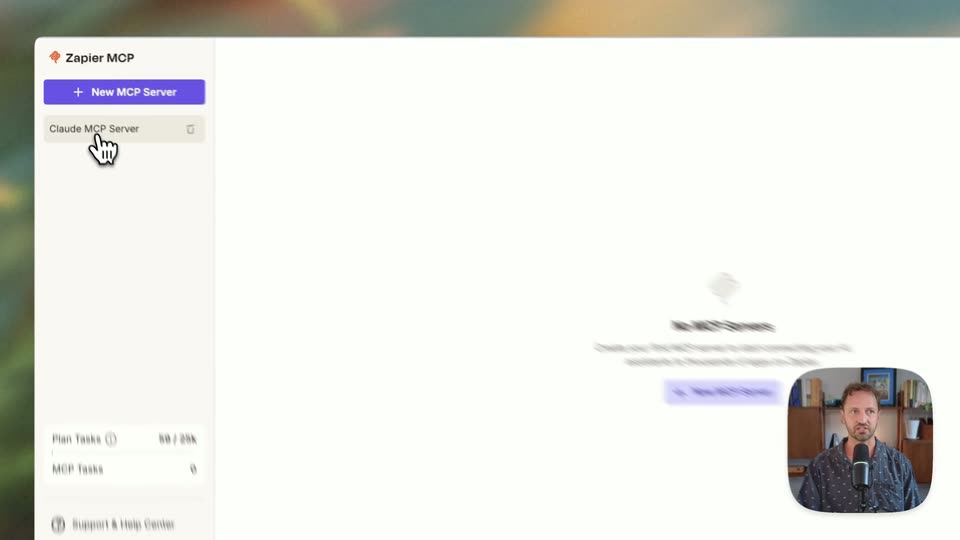
A white Zapier MCP interface fills the frame, its left sidebar showing plan tasks while a hand cursor hovers over it. The empty main panel reads No MCP Servers. A small rounded clip of a man speaking into a microphone sits in the bottom right corner.
Techniques: Cursor demo
Camera: Pull out
A white Zapier MCP dashboard with an empty state fills the frame, a hand cursor glides from the left toward the top edge, and a small inset of a man at a microphone sits in the lower right corner.
Techniques: Cursor demo
Camera: Static
The Claude chat window fills the frame, with the presenter's webcam feed in the bottom-right corner. The view zooms in on the input box; a hand cursor clicks the plus icon, opens the menu, and hovers over Add connector to reveal the Browse connectors submenu.
Techniques: UI zoom, Cursor demo
Camera: Static
A Directory modal shows connector cards in two columns, with a speaker inset bottom-right. The cursor hovers and scrolls the grid; the view then zooms into the search field. The cursor types Zapier, filtering to one card, then the view zooms out and dissolves to a smaller copy.
Techniques: Cursor demo, UI zoom
Camera: Pull out
A white Directory panel over a dimmed app window; a hand-drawn orange arrow links the Connectors tab to the zapier search field. A large black caption builds line by line, then fades to leave only Zapier. A man speaks into a microphone in a circular inset at bottom right.
On-screen text: “You'll see this if your Claude owner has not enabled Zapier”
Techniques: Kinetic type
Camera: Static
A screen recording shows the Claude Directory modal with 'Zapier' typed in the search bar, the cursor hovering over the Zapier connector card. A presenter in a home office appears in a rounded picture-in-picture at the bottom right.
Techniques: Cursor demo
Camera: Static
A Claude sign-in page fills the left half with the serif headline and a login card, while a vertical video of a person at a paper-covered desk plays in the right panel. The left column drifts right and the video panel eases slightly larger as the shot settles.
Camera: Push in
A light sign-up screen with a serif headline and a centered login card sits beside a vertical panel showing a desk with sticky notes. The word next fades in to complete the headline, then an integrations list crossfades over the form.
On-screen text: “Question what's next”, “Your thinking partner for big ambitions”
Techniques: Split screen, Kinetic type
Camera: Pull out
The Organization settings page scrolls down as a hand-drawn orange arrow points to the highlighted Connectors item in the sidebar, labeled Desktop extension allowlist. The view then zooms into the Add button, whose dropdown opens to show All available and Custom.
On-screen text: “Desktop extension allowlist”
Techniques: UI zoom
Camera: Push in
A Directory modal displays a Zapier connector card after a search, and an orange hand-drawn arrow points to its plus icon. The scene then cuts to the Zapier detail page showing its connector URL and category chips.
Camera: Static
A Directory modal with a Zapier search and one connector card fills the frame. A cartoon cursor moves to the card's plus icon and clicks it, the icon becoming a spinner, as the view zooms in and the presenter's webcam shrinks to the corner.
Techniques: Cursor demo, UI zoom
Camera: Push in
A white modal card scales in over a blurred directory screen, a cursor arrow hovers at its top-right corner, and a small rounded video of a man at a microphone sits bottom right as the frame pulls back to the full window.
Techniques: Cursor demo
Camera: Pull out
A browser window shows a Zapier authorization page where a cursor moves to the Allow button and clicks it, the button turning into an Authorizing spinner as the view zooms in. A small webcam inset of a man speaking sits in the lower right corner.
Techniques: Cursor demo, UI zoom
Camera: Push in
A chat interface with a small video of a man at a microphone in the bottom corner. A hand cursor moves to a top-right toast reading 'Connected to Zapier.' The view zooms into that corner, then back out.
Techniques: Cursor demo, UI zoom
Camera: Pull out
A chat interface card tilts in 3D over a blurred backdrop, then flattens; a webcam self-view of a man sits in the lower right. A cursor clicks the plus icon, opens the Connectors submenu, and rests on the Zapier toggle as the frame zooms in, then pulls back.
Techniques: 3D mockup, UI zoom, Cursor demo
Camera: Pull out
A cursor clicks the Connectors menu in a chat interface and flips the Zapier toggle on, then the view cuts to the Connectors settings page, which loads with a spinner. A small webcam feed of a man speaking sits in the bottom right corner.
Techniques: Cursor demo
Camera: Push in
A settings screen shows a Connectors list; a white modal panel fades and scales in over the dimmed page, listing Gmail, Google Drive and Slack cards above the Zapier and GitHub rows. A hand cursor hovers the Zapier row while a presenter's webcam stays in the corner.
Techniques: Cursor demo
Camera: Pull out
A white Connectors settings panel sits in a modal over a blurred desktop, with a small talking-head video in the lower right corner. A hand cursor drifts across the Zapier tool-permission rows, pausing on Read-only tools and Get Configuration URL.
Techniques: Cursor demo
Camera: Static
A light Zapier MCP dashboard fills the frame, with a small webcam inset of a man speaking at bottom right. A hand cursor moves to the sidebar and clicks the Claude MCP Server row, then the view zooms into that server's Apps page.
Techniques: Cursor demo, UI zoom
Camera: Pan
A screen recording of the Zapier MCP interface with a small presenter webcam inset bottom right. A white hand cursor clicks the purple Add apps button, sliding in an Add tools panel with a grid of app tiles. The view zooms into the panel as the cursor clicks Google Calendar.
Techniques: Cursor demo, UI zoom
Camera: Push in
A cursor scrolls a list of Google Calendar tools in a modal, opens the Select tools menu and clicks Select All Tools, then hits Connect. The panel swaps to a Google Calendar account screen. A small face-cam of a presenter with a microphone sits in the lower right corner.
Techniques: UI zoom, Cursor demo
Camera: Pull out
A locked-off screen recording of the Zapier MCP app shows a centered Connect to Google Calendar modal with a Choose account dropdown, a hand cursor icon hovering over it, and a rounded webcam feed of a presenter in the bottom right corner. The modal settles in with a brief crossfade at the start.
Techniques: Cursor demo
Camera: Pull out
A hand cursor clicks through a Google Calendar connection flow in the Zapier MCP window: a connect dialog, an account picker, a permission screen. A man with a microphone sits in a small webcam inset at bottom right. The view zooms onto the Add 14 tools button.
Techniques: Cursor demo, UI zoom
Camera: Push in
A zoomed-in white panel shows a hand cursor over an Add tools button, then the frame pulls back to reveal the full MCP dashboard with a sidebar, an Apps list, and a purple Add apps button, while a presenter's webcam sits in the bottom corner.
Techniques: Cursor demo, UI zoom
Camera: Pull out
A settings screen shows the Connectors panel with the Zapier connector and a Disconnect button. A cursor slides down from the top to hover over the three-dot menu on the right, while a circular inset of a man at a microphone sits in the bottom-right corner.
Techniques: Cursor demo
Camera: Static
A cursor clicks the Zapier connector menu and Refresh tools list; a spinner loads, then the tools list fills in and a toast confirms the refresh. The view pulls back to the full window as the cursor scrolls rows and hovers a block icon, showing a Blocked tooltip.
Techniques: Cursor demo, UI zoom
Camera: Pull out
A connectors panel and a refresh toast close over the app window, revealing the home view with the greeting and a typed prompt in the input box. The cursor hovers at the top right corner.
Techniques: Cursor demo
Camera: Static
A serif headline tops a floating chat box; a hand cursor clicks the orange send button. The view cuts to the full app over a blurred desktop, a permission dialog is approved, an event list scrolls in, then zooms into the input as a follow-up prompt is typed and sent.
On-screen text: “What's cooking, Bryce?”, “Using Zapier, give me next week's events for the Build Anything calendar.”
Techniques: Cursor demo, UI zoom
Camera: Push in
A close-up of a chat input bar zooms out to reveal the full app window tilted in 3D against a blurred background. A hand cursor taps the red send button, then an arrow cursor hovers at the top corner as the AI reply finishes.
Techniques: Cursor demo, UI zoom, 3D mockup
Camera: Pull out
A cursor navigates a light calendar app, stepping back a week until purple event blocks fill the grid. It clicks the Marketing Team Standup event, zooming into the detail card, then hovers a guest row to reveal a contact card with a Send Mail button.
Techniques: Cursor demo, UI zoom
Camera: Static
A light Zapier MCP dashboard fills the frame. A cursor slides to the purple Add apps button and clicks it, opening a modal with a search field and a grid of app tiles. The view zooms into the modal as the cursor hovers over Google Calendar.
Techniques: Cursor demo, UI zoom
Camera: Push in
A close-up of the Add tools dialog with a grid of app tiles, a hand cursor hovers over the tiles, then the frame zooms out to reveal the full Zapier MCP dashboard on a blurred desktop as the cursor drifts to the top bar.
Techniques: UI zoom, Cursor demo
Camera: Pull out
A bearded man in a dark patterned shirt sits centered behind a black studio microphone, speaking to camera. Behind him are wooden bookshelves with books and a hanging green plant. He gestures with both hands, spreading them wide and pointing, as he talks. The shot is a static medium frame.
Camera: Static
A man in a patterned shirt sits at a microphone, gesturing with both hands as he speaks. A video call overlay in the top right corner shows two participants, a woman in orange and a man in a striped shirt, each in a home setting.
Camera: Push in
A bearded man in a patterned shirt talks into a studio microphone, gesturing with both hands. A dark inset card on the right shows a video call grid that collapses into two small participant thumbnails stacked at the right edge.
Camera: Static
A man in a patterned shirt talks into a microphone on the left, gesturing with both hands. On the right, a product window shows a document and a dropdown menu of toggle options that switch on as a cursor moves. Near the end the man reframes to center.
Techniques: Split screen, Cursor demo
Camera: Pull out
A bearded man in a dark patterned shirt sits before a black studio microphone, speaking to the camera. He gestures with his right hand, fingers pinched, then raises it beside his head. Wooden bookshelves, books, and a trailing plant fill the softly lit background.
Camera: Static
A bearded man in a dark patterned shirt speaks into a studio microphone, gesturing with his right hand, framed against wooden bookshelves and a plant. The shot holds steady, then the image fades to black.
Camera: Static