0:50

Topaz Labs - @Adobe + Topaz Labs 🤝🙌 Just announced—you can now access select Topaz
Topaz Labs · Oct 2025
Whop’s 0:27 launch film runs 14 scenes, about 2.0 s each. The product is on screen from the first frame and 4 features are revealed. There is no explicit call to action; a voiceover carries the film. Built as a chain of single-feature reveals, each opened by a blur-to-focus white headline with one red word and then demoed by a thin line-and-node diagram on black. Signature moves are camera zooms that ride the connecting line, counting numbers, and a recurring red dollar coin that travels the path to express the money loop.
Is this your launch? to your site or press kit.
Topaz Labs · Oct 2025
Perplexity · AI · Sep 2026
On a black background, the centered headline scales up from a small, blurred state to full size and sharpens into focus, then holds. The frame stays locked.
On-screen text: “Introducing Whop Ads”
Techniques: Kinetic type
Camera: Static
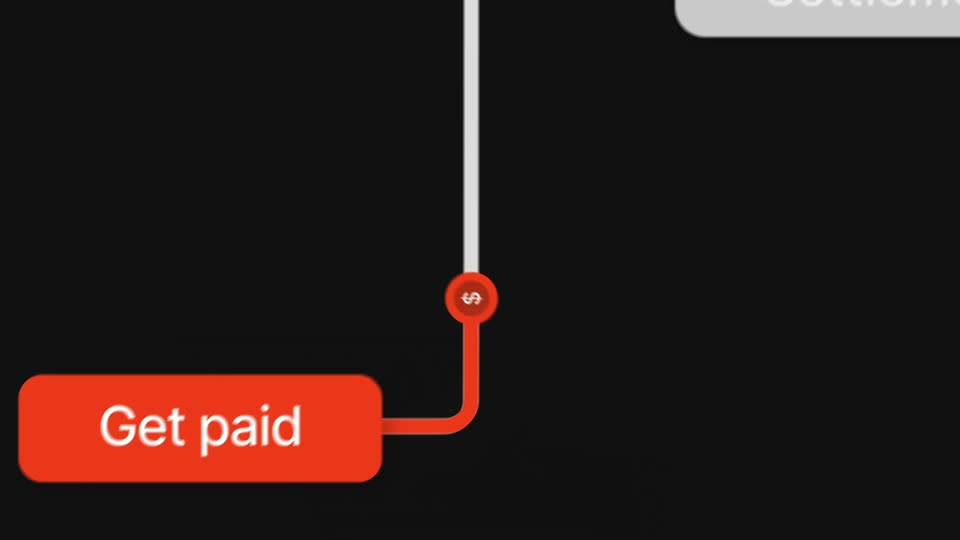
On a dark background, a red “Get paid” button shrinks as the frame zooms out. A red line with a dollar-sign node extends rightward to a gray “Settlement” box.
Techniques: UI zoom
Camera: Pan
A red line traces a rounded loop on a static black background while a red dollar coin travels along it. Two gray pill labels, Settlement and Withdraw, slide beneath the line.
Camera: Pan
On a black background, a white path and a red path meet at a small circular node. The paths rotate as the white line draws into a red rounded button labeled Run ads, which scales up to full size while the red line drops vertically below the node.
On-screen text: “Run ads”
Camera: Static
On a black field, an orange pill labeled Run ads holds center while an orange line draws down from its left edge and a white line draws up from its right edge toward the corners. The headline Instantly reinvest your revenue fades in above, with revenue in red.
On-screen text: “Run ads”, “Instantly reinvest your revenue”
Camera: Static
On a dark field, a red 'Run ads' button anchors a thin red line and a white curve joined by a small red dollar coin, with the caption 'Instantly reinvest your revenue' above. The whole diagram scales up and slides down-left in a quick zoom.
On-screen text: “Instantly reinvest your revenue”, “Run ads”
Techniques: UI zoom
Camera: Pan
A dark account-connection card with a cursor on a blue button holds center as two blurred panels slide out to the edges and a red line sweeps across the frame, while the headline slides in at the top.
On-screen text: “Leverage Meta at enterprise level”
Techniques: Kinetic type
Camera: Pull out
A bold white headline with red words blurs into focus at the top while a red line leads in from the left. Below, a dark rounded card grows from left to right, revealing a funnel of an eye, a cursor and a target icon with counting numbers.
On-screen text: “and distribute across all major platforms soon”
Techniques: Kinetic type, Masking
Camera: Static
A dark analytics dashboard fills the frame under the headline Monitor your performance. A cursor opens a dropdown and switches the view from a funnel to a line chart, the figures ticking up. The shot then zooms into the panel, blurring to a green projected profit line.
On-screen text: “Monitor your performance”
Techniques: Cursor demo, UI zoom
Camera: Push in
A dark ad dashboard fills the frame: a breadcrumb path sits at the top, and a green projected gross profit figure counts up from $23,653.29 to $58,434.07 while a green area chart climbs. The panel then slides upward with motion blur.
Techniques: Kinetic type
Camera: Pull out
A black card holds the line “Spend money to make money”, white with “make money” in red. It scales in from the left with a motion blur, settles centered, then dims and fades out.
On-screen text: “Spend money to make money”
Techniques: Kinetic type
Camera: Static
A tight, blurred close-up on an orange “Get paid” pill pulls back to reveal a circular loop of white arrows on black. The orange pills “Grow reach,” “Run ads,” “Get paid” slide into place, and a glowing dollar coin orbits the loop, pulsing at each stage.
On-screen text: “Get paid”, “Run ads”, “Grow reach”
Techniques: UI zoom, Kinetic type
Camera: Pull out
A dark circular flow diagram shows orange labels sliding along white curved arrows, then cuts to the centered Whop logo, locked off on black.
On-screen text: “Run ads”, “Get paid”, “Grow reach”, “Whop”
Camera: Push in
The Whop logo, a red abstract mark beside the white wordmark, settles into the center of a plain black background and holds still as a sign-off.
Camera: Static