0:50

Blinka (YC F26): Banking for US companies operating globally
Blinka · Fintech · Nov 2026
Webflow · Mar 2026 · 4:19 · Full motion · AI-annotated
Webflow’s 4:19 launch film runs 18 scenes, about 14 s each. The product shows up at 0:36 and 1 feature is revealed. The call to action lands at 4:02 (93% in), over a voiceover. tone:
Is this your launch? to your site or press kit.
Blinka · Fintech · Nov 2026
Y Combinator · Feb 2026
A screen recording of a web design editor frames a portfolio homepage with a large heading. A circular video of a bearded man talking sits in the lower left. Near the end the cursor moves and the page scrolls down to reveal two project cards.
Techniques: Cursor demo
Camera: Pan
A white portfolio page sits inside a design tool canvas. A cursor glides from the page body up to the top navigation and hovers over ABOUT, the hero headline and circular portrait clearing from the layout.
Techniques: Cursor demo
Camera: Static
A web builder interface frames a portfolio site preview. A dark overlay lifts to brighten the page as the cursor slides from the ABOUT tab to the BLOG tab, pointing at the blog section.
Techniques: Cursor demo
Camera: Static
A blog page inside a design editor sits static on a white canvas, listing three article titles under a Portfolio header. A cursor hovers the BLOG nav item, a spinner spins mid-page, then the cursor slides to the CMS tab. A circular webcam of a bearded man sits lower-left.
Techniques: Cursor demo
Camera: Static
A dark CMS dashboard displays a Blog Posts table with five entries. The frame zooms in to drop the sidebar and enlarge the list, while a cursor hovers over the add menu and the first row. A circular presenter avatar sits in the lower left corner.
Techniques: UI zoom, Cursor demo
Camera: Push in
A dark blog posts table fills the screen, listing five entries with green Published status. A mouse cursor glides rightward across the top row. A circular webcam of a bearded man in a dark shirt sits in the lower left corner, speaking to camera.
Techniques: Cursor demo
Camera: Static
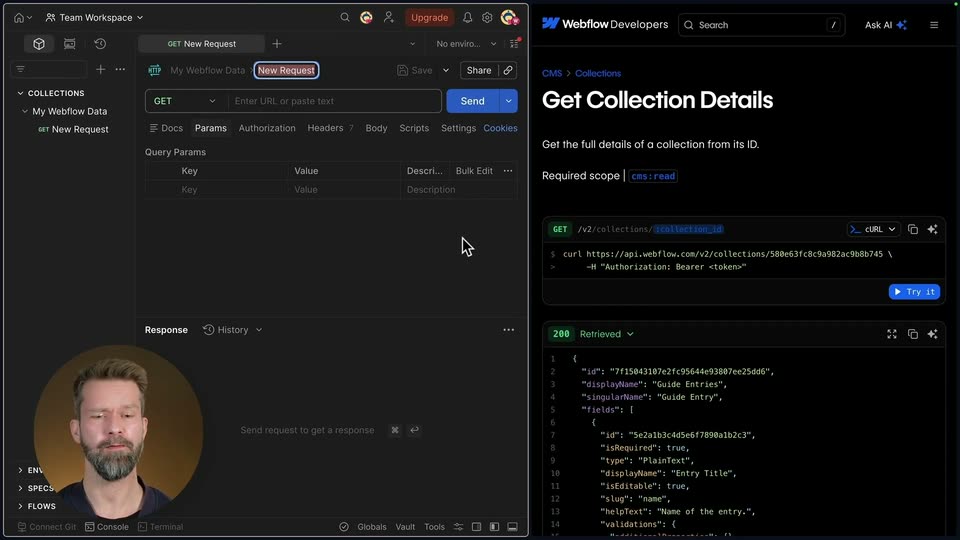
Webflow's CMS entry editor is shown close-up, then zooms out to the full app. It cuts to Postman, where a cursor clicks Add request in an empty collection, with Webflow API docs in a right panel. A circular presenter video sits in the lower-left corner.
Techniques: UI zoom, Split screen, Cursor demo
Camera: Pull out
A dark API workspace with a circular webcam of a bearded presenter in the lower left. The view zooms to the settings gear, the cursor opens the MCP servers panel, types a server name, and a checklist of tools loads and scrolls.
Techniques: UI zoom, Cursor demo
Camera: Pan
A dark IDE interface fills the frame, with a circular facecam of a bearded man in the lower left corner. A mouse cursor glides from a blue toggle switch up to the close icon on the MCP Servers tab, preparing to dismiss the panel.
Techniques: Cursor demo
Camera: Static
A dark API workspace fills the frame with a circular talking-head pinned bottom left. The cursor drags a collection chip into the AI chat box, types a prompt, and the panel streams a bulleted answer listing one Webflow site with its metadata.
Techniques: Cursor demo, UI zoom
Camera: Static
A dark three-column API workspace fills the screen. A cursor glides through the right panel's site details, then the view reframes onto the focused input box at the bottom right as a text caret blinks. A small circular video of a bearded man sits in the lower left corner.
Techniques: Cursor demo, UI zoom
Camera: Push in
A dark chat panel types a question, then the agent's reply streams in word by word and a five-row table of blog posts scrolls into view. A bearded presenter speaks from a circular inset at the lower left; the cursor selects the words Blog Posts mid-answer.
Techniques: Cursor demo
Camera: Pull out
A dark workspace interface fills the frame, a circular webcam of a smiling man at lower left. The right panel scrolls to show an AI answer, the cursor selects the first bullet, then the view zooms into the panel as that line lands in the chat box.
Techniques: Cursor demo, UI zoom
Camera: Push in
A dark chat panel fills the right side while a circular webcam of a bearded man sits in the lower left. A blinking caret types a sentence into the blue-outlined input box, word by word, then the panel resets to an empty field with a Generating indicator.
Techniques: Cursor demo
Camera: Static
A dark API client shows its AI chat panel reading 'Generating...' beside a bearded presenter in a bottom-left circle. The view pulls back to the full workspace; the cursor opens a GET request, hits Send, and a 200 OK JSON response loads, then the tab switches to an MCP tools list.
Techniques: Cursor demo, UI zoom
Camera: Pull out
A dark documentation page for the Webflow MCP server shows two logo circles, then scrolls down to a feature list as a cursor hovers, while a presenter talks from a circular webcam in the lower left.
Techniques: Cursor demo
Camera: Pan
On a black field, a small blue angular logo mark reveals itself at center, its strokes wiping in from the right, then holding still.
Techniques: Masking
Camera: Static
On a black background, the blue W mark and white Webflow wordmark settle into a centered lockup within the first half-second, then hold perfectly still for the rest of the clip.
Camera: Static