2:39
Explore
Y Combinator - Aurorin is building new professional CAD Software from the ground up
Y Combinator · Feb 2026 · 1:09 · AI-annotated
- Length
- 1:09
- Scenes
- 26 · 2.7 s avg
- Product on screen
- 0:10
- Features shown
- 3
- Call to action
- 0:56 · 81%
- Voiceover
- Yes
00:00:00 / 01:09:25
Y Combinator’s 1:09 launch film runs 26 scenes, about 2.7 s each. The product shows up at 0:10 and 3 features are revealed. The call to action lands at 0:56 (81% in), over a voiceover. A talking-head launch video that alternates a locked-off host shot by the Bay Bridge with dark-mode screen captures of the CAD app, punctuated by a fast cold-open montage. Pacing is brisk and cut-driven, with white bottom captions and a single recurring orange flame logo; the signature move is the split-screen timer that contrasts a slow legacy tool against an instant AI prompt.
Footage neededEstimated needs: 5 capture groups — your screens or recordings · 1 official logo — reused across the film · 6 filmed passages — shoot, supply or replace · 1 3D passage — build or supply
Is this your launch? to your site or press kit.
More like this
1:06


Y Combinator - Lightsprint (@lightsprintai) is a collaborative platform that helps t
LightSprint · B2B · May 2026
0:50


Blinka (YC F26): Banking for US companies operating globally
Blinka · Fintech · Nov 2026
Y Combinator - Aurorin is building new professional CAD Software from the ground up, scene by scene
· 26 scenes as text
01 · Hook · 0:00–0:01
A black frame holds centered white text. “Engineers” appears first, then “build” joins it on the same line. The text stays static and centered as the voiceover begins.
On-screen text: “Engineers build”
Techniques: Kinetic type
Camera: Static
02 · Hook · 0:01–0:02
A 3D satellite with a tall blue solar array hovers over a cloud-covered Earth against a starry sky, the panel tilting slowly while the frame stays locked off. A white caption runs along the bottom edge.
On-screen text: “Engineers build satellites and rockets and”
Techniques: 3D mockup
Camera: Static
03 · Hook · 0:02–0:03
A wide locked-off shot shows a rocket rising vertically from a coastal launch pad, leaving a thick white smoke trail against a blue sky with scattered clouds. Water and green land fill the foreground. A white subtitle line sits at the bottom of the frame.
On-screen text: “Engineers build satellites and rockets and”
Camera: Static
04 · Hook · 0:03–0:04
A bright car factory is shown in a locked-off wide shot, orange robot arms flanking a bare car frame on a central conveyor. The shot cuts to a man in a white t-shirt standing at the line's center. White subtitles run along the bottom.
On-screen text: “Engineers build satellites and rockets and”, “robots, and so much more that the world desperately needs.”
Camera: Static
05 · Problem · 0:04–0:08
A young man in a dark t-shirt stands center frame at a waterfront, a suspension bridge and a blue port crane behind him, speaking to camera. The locked-off shot holds steady while white subtitles run along the bottom.
On-screen text: “robots, and so much more that the world desperately needs.”, “Engineers use CAD software to bring ideas to reality.”
Camera: Static
06 · Problem · 0:08–0:10
A SolidWorks sketch window fills the frame as a line is drawn left to right, its length and angle updating with live measurements. A bottom caption carries the narration, then swaps to a new line.
On-screen text: “Engineers use CAD software to bring ideas to reality.”, “The problem is,”
Techniques: Cursor demo
Camera: Static
07 · Product intro · 0:10–0:15
A young man in a dark t-shirt stands centered and speaks to camera, locked-off, against a harbor with a suspension bridge and a port crane under a blue sky. A red-orange flame icon and the wordmark 'Aurorin CAD' appear in the top right while white subtitles run along the bottom.
On-screen text: “The problem is,”, “CAD is painfully slow and tedious.”, “Aurorin CAD”, “Aurorin is fixing that.”, “We built new CAD software from the ground up,”
Camera: Static
08 · Feature reveal · 0:15–0:17
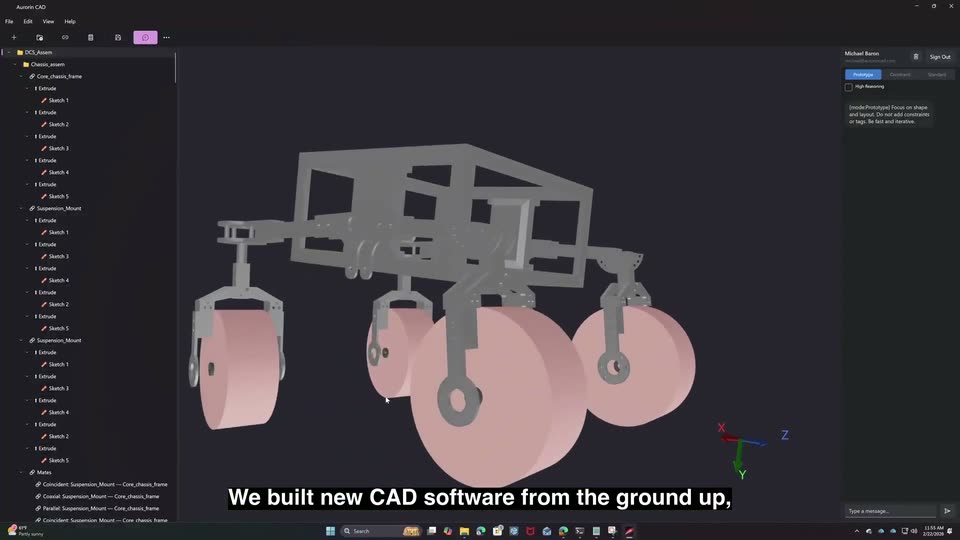
A screen capture of the CAD application shows a gray chassis frame with four pink wheels in the 3D viewport. The model slowly orbits from a front view toward a three-quarter angle, while a static caption runs along the bottom of the frame.
On-screen text: “We built new CAD software from the ground up,”
Camera: Static
09 · Feature reveal · 0:17–0:18
A CAD application window displays a gray chassis assembly in a 3D viewport. The view zooms in on one plate part as the left feature tree refreshes to its components. A white caption sits at the bottom edge.
On-screen text: “We built new CAD software from the ground up,”
Techniques: UI zoom, Cursor demo
Camera: Static
10 · Feature reveal · 0:18–0:21
Screen capture of a CAD application: the 3D viewport pulls back from a close-up of a gray tube to reveal a full chassis frame with pink wheels, while a component tree fills the left panel and a caption runs along the bottom.
On-screen text: “making a new CAD kernel, designed for rapid execution speed,”
Techniques: UI zoom, Cursor demo
Camera: Static
11 · Feature reveal · 0:21–0:22
A dark empty canvas fills the left while a chat panel slides in from the right edge and widens, exposing a Prototype mode row, a lamp design card, a blue prompt bubble, and a Thinking indicator. White subtitles run along the bottom.
On-screen text: “making a new CAD kernel, designed for rapid execution speed,”, “and to be AI native.”
Techniques: Masking
Camera: Static
12 · Feature reveal · 0:22–0:23
A dark interface fills the frame with a chat panel on the right. The panel shows a prototype mode, a lamp image, a blue prompt bubble, and a thinking indicator. A white caption sits at the bottom center. The screen holds still.
On-screen text: “and to be AI native.”
Camera: Static
13 · Feature reveal · 0:23–0:25
A man in a dark T-shirt with two clip mics stands centered before the Bay Bridge and harbor water, speaking to camera in a locked-off medium shot; a metal railing crosses the foreground. Subtitles at the bottom swap from one line to the next.
On-screen text: “Here's what that speed looks like in practice.”, “This part took about 20 minutes to make in SOLIDWORKS.”
Camera: Static
14 · Feature reveal · 0:25–0:32
A split screen pairs a Solidworks sketch on the left with the Aurorin app on the right. The left timer jumps to 17:25 as the part extrudes while the right timer reaches 0:42 and a chat prompt builds the 3D model. A caption swaps below.
On-screen text: “Here's what that speed looks like in practice.”, “This part took about 20 minutes to make in Solidworks.”, “In Aurorin, just a single natural language prompt in seconds.”
Techniques: Split screen, Speed ramp
Camera: Static
15 · Demo · 0:32–0:32
A screen recording of the Aurorin CAD app shows a grey 3D frame model rotating and zooming in the dark viewport, while a white caption scales in along the bottom edge.
On-screen text: “Aurorin is full mechanical CAD software with”
Camera: Static
16 · Demo · 0:32–0:34
Screen capture of the Aurorin CAD interface: a gray 3D frame model sits in the viewport with a sketch plane panel open on the left. A cursor moves to a beam and selects it, turning it blue. A white caption line runs along the bottom.
On-screen text: “Aurorin is full mechanical CAD software with”
Techniques: Cursor demo
Camera: Static
17 · Demo · 0:34–0:37
A screen capture of the Aurorin CAD window shows a gray 3D lever part, then cuts to a 2D sketch grid with pink dimension labels and a cursor opening a constraint menu. White caption text runs along the bottom.
On-screen text: “Aurorin is full mechanical CAD software with”, “sketches, constraints, assemblies, mates,”
Techniques: Cursor demo
Camera: Static
18 · Demo · 0:37–0:39
A locked-off screen capture of the Auroran CAD interface shows a gray 3D assembly of a lever, block and bracket. A cursor clicks Create in the Add Mate dialog, closing it, while the parts rotate slightly.
On-screen text: “sketches, constraints, assemblies, mates,”, “and all the other features you'd expect.”
Techniques: Cursor demo
Camera: Static
19 · Demo · 0:39–0:41
A full screen of the Auroran CAD interface shows a 3D frame model in the viewport, with an extrude panel at left and a chat panel at right. The model updates, dropping its top beam, as the cursor rests in the viewport.
On-screen text: “and all the other features you'd expect.”
Techniques: Cursor demo
Camera: Static
20 · Feature reveal · 0:41–0:43
Screen recording of the Aurorin CAD app: a gray 3D tube frame rotates and shrinks in the dark viewport as a parameter dialog closes, while a chat panel runs on the right. A cursor moves in the viewport. White subtitles at the bottom swap between two lines.
On-screen text: “and all the other features you'd expect.”, “With Aurorin, you can work in natural language or”
Techniques: 3D mockup, Cursor demo
Camera: Static
21 · Feature reveal · 0:43–0:45
A dark CAD workspace shows a gray box model with a blue face and an open Add Mate dialog, then transitions to a chat panel where a photo of a printed part and the question can you make this appear. A white caption reads standard CAD UI.
On-screen text: “With Aurorin, you can work in natural language or”, “standard CAD UI.”
Techniques: Cursor demo
Camera: Static
22 · Feature reveal · 0:45–0:49
A dark CAD screen starts zoomed on the right-hand chat panel, then pulls back to show two gray 3D parts in the viewport. A cursor moves, and the view switches to a 2D sketch with blue geometry, pink dimensions, and a constraints list; white captions run along the bottom.
On-screen text: “Its Al agent can generate 3D parts with constrained”, “sketches, complete with GD&T tolerances through”
Techniques: UI zoom, Cursor demo
Camera: Pull out
23 · Feature reveal · 0:49–0:53
A dark CAD canvas on the left holds a sketch with a red X axis and a purple 29.00mm dimension. On the right, a chat panel lists completed tasks, then a paragraph of explanation types in below. Subtitles caption the bottom edge.
On-screen text: “sketches, complete with GD&T tolerances through”, “model-based definitions.”
Camera: Static
24 · Feature reveal · 0:53–0:56
A split CAD screen: on the left a white drawing sheet fills with animated dimension lines and GD&T frames, on the right a chat panel streams the model update. Two C-bracket renders, gray angled and black front, sit in the sheet; a cursor taps a symbol.
On-screen text: “And then, it can generate your engineering drawings for you.”
Techniques: 3D mockup, Cursor demo
Camera: Static
25 · CTA · 0:56–1:07
A young man in a dark T-shirt stands centered by a metal railing, speaking to camera with a suspension bridge and harbor cranes behind. The locked-off shot holds as bottom captions cycle through statements about teams switching CAD software and reaching out.
On-screen text: “Teams are already switching from their existing CAD software to Aurorin,”, “and others are using it for rapid prototyping alongside their”, “existing tools.”, “If you would like your engineering team to move way faster, reach out now.”
Camera: Static
26 · Outro · 1:07–1:09
The Aurorin CAD lockup holds centered on a black background: a rounded-square icon with a glowing orange streak on a purple field, beside the wordmark in an orange-to-red gradient. The frame is locked off and the logo stays still for the full clip.
On-screen text: “Aurorin CAD”
Camera: Static