2:13

Introducing Sites in Codex
OpenAI · AI · Jun 2026
Warp · Sep 2025 · 2:57 · Full motion · AI-annotated
Warp’s 2:57 launch film runs 22 scenes, about 8.1 s each. The product is on screen from the first frame. The call to action lands at 2:51 (97% in), over a voiceover. The video runs as a talking-head intro, three locked-off screen-recorded examples of the CLI in a local terminal, GitHub Actions, and a remote server, then a beta PSA and a logo card. Its signature look is a dark grid-and-galaxy backdrop with monospace terminal type and a small rounded webcam inset.
Is this your launch? to your site or press kit.
OpenAI · AI · Jun 2026
AiSDR · B2B · Sep 2026
Cloudchipr · B2B · Feb 2023
A dark terminal window sits centered on a grid-lined desktop. A rounded webcam inset in the bottom right shows a woman speaking to camera, while a white cursor rests on the right edge. The frame stays locked throughout.
Camera: Static
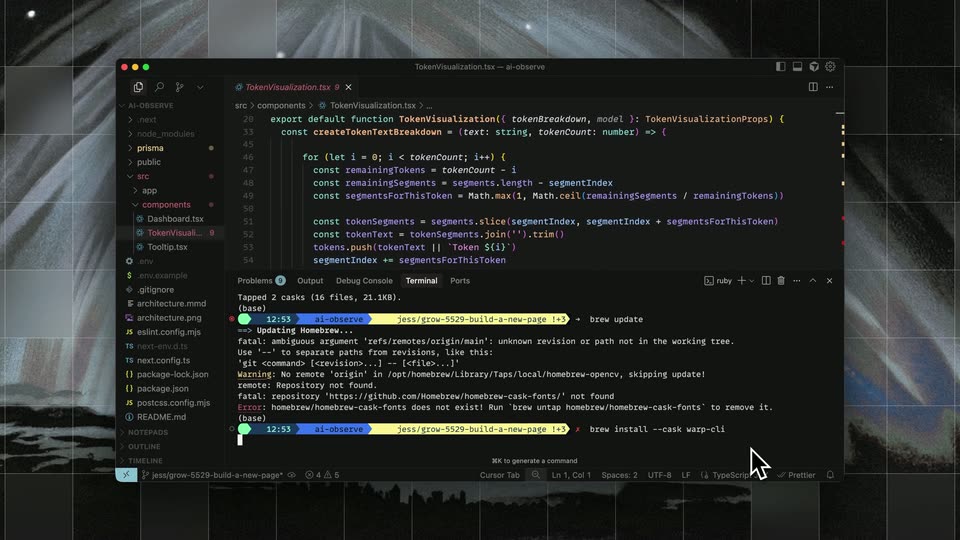
A locked-off shot of a dark code editor over a galaxy wallpaper. The TypeScript panel stays static while the terminal below streams brew and warp agent commands with scrolling output. A white arrow cursor rests at the right edge.
Camera: Static
A dark code editor interface fills the frame against a blurred mountain background. The terminal panel at the bottom displays text appearing line by line, and a white mouse cursor rests on the right side.
Techniques: Cursor demo
Camera: Static
A desktop screen shows a code editor and a terminal behind a centered image viewer window displaying a system architecture diagram of labeled boxes and connecting lines. A mouse cursor hovers at the right of the diagram. The frame holds still.
Camera: Static
A code editor window on a dark photographic background, the TokenVisualization.tsx file open. The content scrolls down from TypeScript code to a markdown section on component interactions, then holds, with a mouse cursor resting in the middle.
Techniques: Cursor demo
Camera: Pan
A dark code editor window floats over a nebula and mountain background with a faint grid. The markdown file inside scrolls up and down, revealing headings such as Deployment Architecture and Runtime Behavior, while a white down arrow stays fixed at the center.
Camera: Pan
A dark settings window sits centered over a faint grid and aurora backdrop. A white cursor glides across the YOLO agent panel, pausing on each permission row: apply code diffs, read files, create plans, execute commands, call MCP servers.
Techniques: Cursor demo
Camera: Static
A dark settings window of the Warp app sits centered over a dimmed desktop wallpaper with a grid overlay. Its main panel lists profile configurations, with one command denylist row highlighted. A white cursor hovers over the list and the frame holds static.
Techniques: Cursor demo
Camera: Static
Dark code editor with an open terminal over a grid-lined desktop. A command types out in the terminal, then a table of agent profile IDs and names prints below it. A mouse cursor idles at the right edge.
Camera: Static
A flat dark terminal window is centered over a gridded, low-light backdrop with a city silhouette. In the input line a slash command is typed character by character, and the autocomplete menu above it narrows from five rows to three, the first row highlighted blue.
Camera: Static
A dark Rules window sits over a galaxy photo with a grid overlay. A white cursor hovers over the summarize codebase card, then the panel switches to a New rule form as the cursor types a long instruction into the Rule field.
Techniques: Cursor demo
Camera: Static
A dark rule editor window displays a rule named summarize codebase with its instruction text. A hand cursor hovers over the text, then an arrow cursor rests beside it. A bottom menu panel appears listing Blocks, Workflows, Notebooks and Rules, with an @ badge centered below.
Techniques: Cursor demo
Camera: Static
A dark terminal window sits on a starfield desktop. As '@summarize' is typed, a Workflows dropdown lists on the left and a preview card fills the right; the list scrolls, then a workflow token fills the input and a command-C chip appears below.
Camera: Static
A dark code editor over a blurred grid background shows a YAML workflow file; the code scrolls down through steps installing and authenticating the Warp CLI, then running a reviewer agent. A white cursor idles on the right; a caption on API key support appears bottom right.
On-screen text: “Support for API keys (as shown here) isn't out yet, but will be soon!”
Camera: Static
A white workflow log window floats in 3D over a gridded cityscape. The job status flips to failed, the cursor drags the scrollbar, and log lines scroll past while warning lines flash yellow and positive lines flash green.
Techniques: 3D mockup, Cursor demo
Camera: Static
A dark terminal window on a nebula wallpaper shows a cursor typing docker commands into the prompt. A subshell notice slides in, then a log file opens in an editor, the pane filling with timestamped success and failure entries.
Techniques: Cursor demo
Camera: Static
A dark terminal window floats over a starfield with a faint grid. A white cursor types a warp agent command into the prompt, then the pane scrolls to reveal a markdown report listing memory exhaustion, database and API failures.
Techniques: Cursor demo
Camera: Static
A dark macOS terminal window sits centered on a faint grid background, listing server error categories in monospace text. A static cursor arrow rests in the empty right area while a white caption line runs along the bottom edge.
On-screen text: “The most urgent issues are memory exhaustion and database connection saturation, which are directly impacting payment processing functionality.”
Camera: Static
A dark terminal window over a gridded space wallpaper displays a markdown log report; the text scrolls to bring the report header into view. The terminal then clears to an empty prompt while a rounded video-call inset of a speaking woman fades in at the bottom right.
Camera: Static
A dark terminal window fills the frame over a dim galaxy wallpaper with a faint grid. A rounded webcam inset at the bottom right shows a woman in a light-blue top talking to camera. A cursor arrow rests at the right edge. The shot stays locked off.
Camera: Static
On a black field, a tiny white square in the center expands and splits into the Warp two-panel mark. The wordmark warp.dev fades in to its right, the lockup holds, then shrinks and fades out.
On-screen text: “warp.dev”
Techniques: Morph
Camera: Static
A white two-panel logo sits centered on a black field, then scales down until only a small rounded square remains in the middle.
Camera: Static