1:00

Meet Notion Mail
Notion · Productivity · Apr 2025
Cloudchipr · Feb 2023 · 4:02 · Full motion · AI-annotated
Cloudchipr’s 4:02 launch film runs 20 scenes, about 12 s each. The product is on screen from the first frame and 6 features are revealed. The call to action lands at 3:50 (95% in), over a voiceover. The video is one continuous screen-recording walkthrough with the presenter pinned in a corner circle, moving from the landing page through the AWS setup wizard into feature-by-feature dashboard tours, then a 3D card montage and a return to the homepage. Pacing is slow and even (about two cuts per minute at 110 BPM), with crossfades between hero states and dropdown-driven chart updates as the signature moves.
Is this your launch? to your site or press kit.
Notion · Productivity · Apr 2025
Craft · Productivity · Nov 2020
Films whose music sounds like this one, voice left out
Microsoft · Upbeat electronic
Vybe · Upbeat electronic
Hume AI · Upbeat electronic
A browser window shows the static Cloudchirp landing page, headline and dashboard mockups, with a circular webcam of a man in the lower right. The cursor moves from Sign up to Login, and a long URL types out in the bottom status bar.
Techniques: Cursor demo
Camera: Static
A browser window shows the CloudChirp landing page, opening on the Automate cloud cost optimization hero with table and chart mockups, then crossfading to the Never miss a cost optimization opportunity hero. A circular webcam inset of a smiling presenter sits in the lower right corner.
Camera: Static
A browser window shows the CloudChipr app loading: a blank white page fills with a left sidebar of menu items and a profile warning box. The presenter's webcam sits in a circle at the bottom right. The view stays static.
Camera: Static
A browser window shows the CloudChipr setup screen with a blue left panel and a provider list. A cursor clicks the GCP option, then the NEXT button, and the form advances to the access-mode step.
Techniques: Cursor demo
Camera: Static
A browser window shows the CloudChipr setup page: a blue left panel with a logo and a step list on the right. The cursor selects the read/write radio, clicks Next, and the form swaps to the AWS console step. A circular webcam of the presenter sits bottom right.
Techniques: Cursor demo
Camera: Static
AWS CloudFormation console loads the Quick create stack form, then scrolls to the Capabilities section. A cursor checks the acknowledgment box and clicks the orange Create stack button; the stack status becomes CREATE_COMPLETE. A circular webcam of a man sits bottom right.
Techniques: Cursor demo
Camera: Pull out
A browser window shows the CloudChipr setup page; the step list advances to a connected state, then a white modal with a party popper pops in over the dimmed page. The cursor glides to the PROCEED button. A presenter's face sits in a circle at the bottom right.
Techniques: Cursor demo
Camera: Static
A locked-off screen recording of the cloudchipr app shows the AWS Accounts page: two account cards with spending and waste donut charts, a sidebar menu, and a circular presenter video in the corner. A cursor hovers over the menu and the cards while captions appear.
On-screen text: “Great job!!!”, “you can save right now!!”
Techniques: Cursor demo
Camera: Static
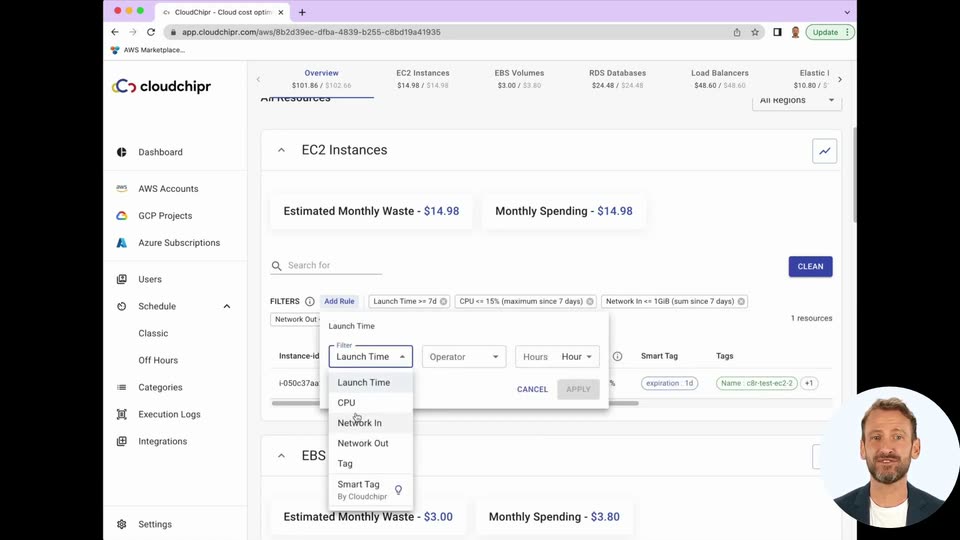
The CloudChipr dashboard scrolls from the overview chart to the EC2 Instances card, where a cursor opens filter popups and cycles through Launch Time, CPU and Smart Tag options. A presenter's headshot stays in a circle at the bottom right.
Techniques: Cursor demo
Camera: Pan
A screen recording of the CloudChipr dashboard scrolls through resource tables for EBS, RDS, Load Balancers and Elastic IPs. A cursor opens the Clean Actions dropdown, picks Stop, then clicks CLEAN, opening a confirmation dialog with a typed-confirmation field. A presenter's webcam circle stays bottom-right.
Techniques: Cursor demo
Camera: Static
A browser window displays the CloudChipr dashboard, with the RDS Databases panel showing waste and spending figures and a two-row resource table. A circular inset of a presenter's face sits in the bottom right corner. A cursor moves from the Schedule menu in the sidebar to the search field.
Techniques: Cursor demo
Camera: Static
A browser window fills the frame showing the CloudChipr schedule page, with a table of four jobs and a left menu. A cursor glides down the rows, pausing on two of them, while a talking presenter's head in a white circle sits in the bottom right corner, briefly shrinking and growing.
Techniques: Cursor demo
Camera: Static
The CloudChipr Off Hours page fills a browser window. The cursor clicks a Recommended Off Hours row, expanding it to a CPU chart with green off-hours bands. The view scrolls down, the cursor hovers the chart for tooltips, then moves to CREATE. A circular presenter webcam sits bottom right.
Techniques: Cursor demo
Camera: Pan
A browser window shows the CloudChipr cost dashboard; the page scrolls down through stacked bar charts while a cursor opens dropdowns to switch date ranges and groupings, updating the charts. A man's webcam feed sits in a circle at the bottom right.
Techniques: Cursor demo
Camera: Pan
A Cloudchipr dashboard recording shows a cursor typing a cost question and pressing the blue ask button; a spinner loads, then a table appears, and clicking the chart icon swaps it for a colorful pie chart. A circular inset of a speaking man sits bottom right.
Techniques: Cursor demo
Camera: Static
A thin white line on a dark background widens into a rounded rectangle outline, then a white bar grows across it from left to right. A circular headshot of a bearded man in a suit stays fixed in the bottom right corner.
Techniques: Morph
Camera: Static
A dark 3D card holding a white horizontal bar expands into a white dashboard listing AWS Accounts, SCP Projects and Organizations, a small white strip flying off to the top left. A circular presenter headshot stays in the bottom right corner.
Techniques: 3D mockup, Morph
Camera: Static
A tilted 3D dashboard window sits center on a dark field. A “Great job!” card, a stacked-bar chart panel, and small stat pills slide in from the edges and fill with figures, while a circular presenter headshot holds the lower right corner.
Techniques: 3D mockup
Camera: Static
A browser window shows the Cloudchhip landing page, scrolling down from the FinOps headline to a row of trust badges. A man's webcam sits in a circular frame at the bottom right.
Camera: Static
A full-screen browser shows the CloudChirp homepage, a bold black-and-purple headline over a blue button and a tilted dashboard mockup. A circular webcam of a smiling man in a blazer sits bottom right. The cursor rests near Login while the page stays static.
Camera: Static