1:16

Feature overview: Linear cloud coding agent
Linear · Productivity · Nov 2026
Sapien · 1:31 · AI-annotated
Sapien’s 1:31 launch film runs 13 scenes, about 7.1 s each. The product is on screen from the first frame and 3 features are revealed. The call to action lands at 1:08 (75% in), over a voiceover. The video alternates a presenter in a studio with flat, cursor-driven dashboard walkthroughs, moving from customer simulation to competitor testing and a final report. Its pacing is slow and stable, using dissolves into the UI, precise cursor clicks, and a closing logo fade to define the style.
Is this your launch? to your site or press kit.
Linear · Productivity · Nov 2026
Google · AI · Apr 2008
A man in glasses and a dark jacket speaks into a studio microphone, gesturing with his hands. The shot fades in from white, and the background shelves with books and colorful blocks stay softly out of focus.
Camera: Static
A blurred office shot of a man with glasses dissolves to plain white as the Sapien research dashboard fades to full opacity, its charts and sidebar sharpening into a flat browser-window view.
Camera: Pan
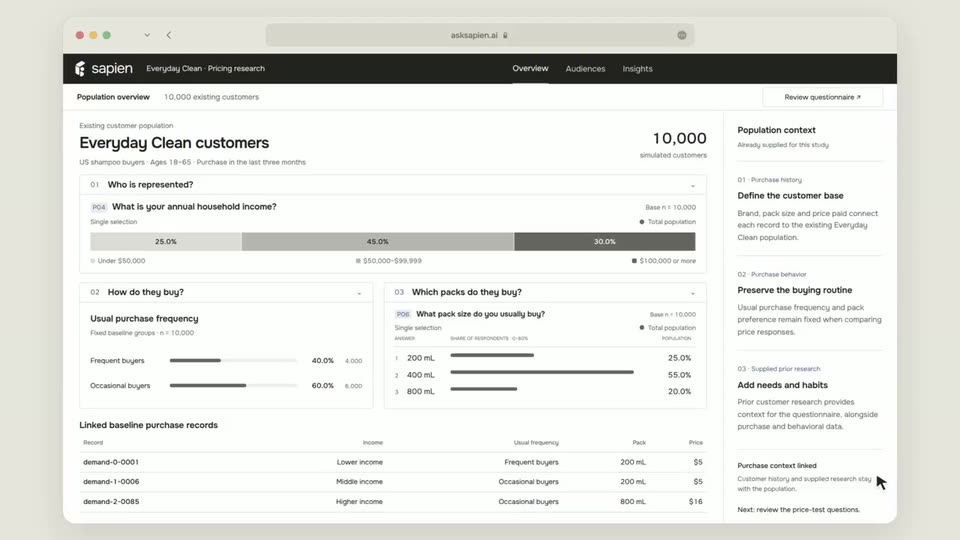
A browser window shows the Sapien pricing dashboard: a customer header, three bar-chart panels, a records table, and a right context sidebar. The frame holds, then a cursor moves to the top-right button and the screen switches to a list of price-test questions.
Techniques: Cursor demo
Camera: Static
A browser window displays a pricing questionnaire with three question cards while the cursor hovers at the right edge. The view then switches to an analytics screen with a segment filter sidebar, a line chart of volume demand, and a report contents panel.
On-screen text: “asksapien.ai”
Techniques: Cursor demo
Camera: Static
A flat browser mockup of the Sapien pricing dashboard. A cursor clicks the $10 and $11 toggles, the chart line and index values update, then it switches segment tabs to Frequency and Usual pack. The view scrolls to a response table and the cursor picks a lower-income filter.
Techniques: Cursor demo
Camera: Static
A flat browser window shows the Sapien pricing dashboard. A cursor clicks Apply filters and the response table renumbers for the lower-income segment. The cursor then clicks a report-contents entry, scrolling the page to the frequency-and-packs section, and rests on the Open competitor study button.
Techniques: Cursor demo
Camera: Static
A browser window frames the sapien pricing interface, its main panel listing competing shampoos with buyer counts and current prices. A cursor hovers on the Compare prices button, drifts to the lower right, then returns to the button.
Techniques: Cursor demo
Camera: Static
A browser mockup of a pricing-research dashboard. A cursor clicks the $9, $10, $11 price buttons, updating the heading, bar chart and percentages, then selects the Silk & Co population in the left sidebar and repeats the price clicks, and finally opens a conclusions panel that overlays the view.
Techniques: Cursor demo
Camera: Static
A browser window of the Sapien app shows a pricing report: a bold headline, a two-item conclusions list on the left, a line chart and a metrics table on the right. A cursor drifts down the page, then the screen cross-dissolves into a blurred person in a white shirt.
Techniques: Cursor demo
Camera: Static
A man with glasses in a dark jacket speaks into a studio microphone, gesturing with both hands. Blurred shelves of books and colorful objects fill the background. Locked-off medium shot, steady pace.
Camera: Static
A man with glasses and a dark jacket speaks into a studio microphone, gesturing with one hand, against shelves of color swatches. The shot cuts to a white background where two small tilted cards, one olive and one gray-green, float in 3D.
On-screen text: “CT”
Techniques: 3D mockup
Camera: Static
A black cube-like mark and the lowercase word sapien sit centered on a cream background. The wordmark fades from light gray to solid black, then the field shifts to dark olive while the logo stays put.
On-screen text: “sapien”
Camera: Static
A black frame holds a still brand lockup with the large caption ; sapien, locked off with no motion.
On-screen text: “; sapien”
Camera: Static