0:50

Chris Yoo ⚡ CoRL - Fine-tuning VLAs just got so much easier. Today, we're releasing Tra
Dreamscale Labs · Industrials · Oct 2026
Sapien · 1:31 · AI-annotated
Sapien’s 1:31 launch film runs 12 scenes, about 7.7 s each. The product is on screen from the first frame and 7 features are revealed, with social proof. There is no explicit call to action; a voiceover carries the film. The video bookends a long interface walkthrough with locked-off presenter shots, and joins the two modes with slow dissolves. Every screen is a flat browser mockup on a cream or light gray field, driven by a single cursor, with deliberate holds so the data stays readable.
Is this your launch? to your site or press kit.
Dreamscale Labs · Industrials · Oct 2026
Cursor · Developer tools · Oct 2025
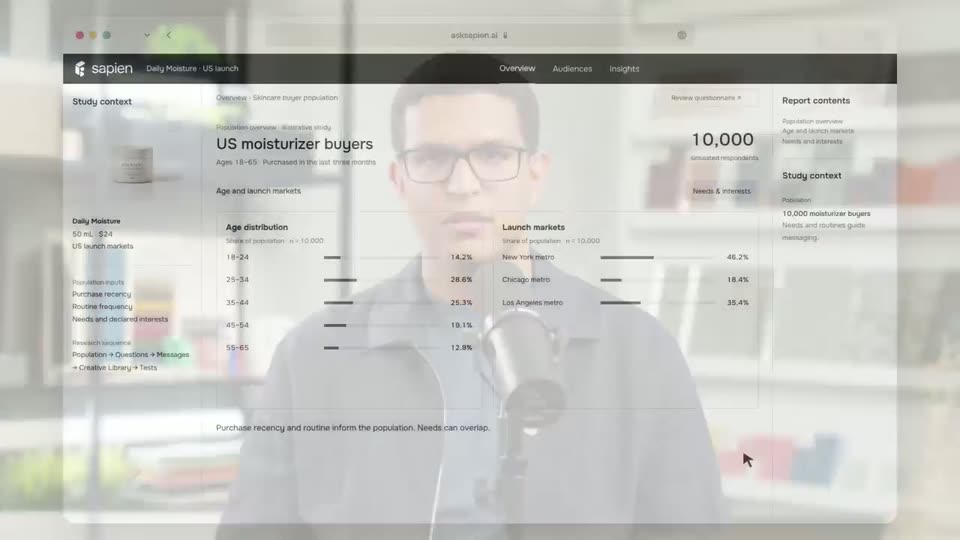
A man in glasses and a dark jacket speaks into a studio microphone, gesturing with both hands. He is centered in a locked-off medium shot against a soft-focus backdrop of shelves holding books and plants. The frame fades in from white at the start.
Camera: Static
A man with glasses speaks into a studio microphone, gesturing with both hands. The shot dissolves into a Sapien analytics dashboard, the presenter fading out as the interface fills the frame.
Camera: Static
A browser window shows the Sapien dashboard with bar charts for US moisturizer buyers. A cursor glides to the Needs & interests tab and clicks it, swapping the age and market charts for needs and interests. The view then dissolves to a questionnaire page.
Techniques: Cursor demo
Camera: Static
A browser window shows the Sapien questionnaire for a moisturizer launch. The page scrolls down through question sections while the right sidebar highlights each section, then cuts to a results view with two bar charts comparing benefits and barriers.
Techniques: Cursor demo
Camera: Static
A browser window shows a research dashboard; a cursor clicks the Apply simplicity segment button and the bar charts update to segment data with dual bars. The page scrolls down to the message results, then cuts to a Creative Library grid of ad cards.
On-screen text: “asksaplen.ai”
Techniques: Cursor demo
Camera: Static
A flat browser mockup of the Sapien interface shows a grid of skincare ad cards in a Creative Library. A cursor hovers over a card, the grid scrolls down, then the view switches to a detail page with horizontal interest bars.
On-screen text: “asksapien.ai”
Techniques: Cursor demo
Camera: Pan
A flat browser window displays an ad research dashboard. A cursor clicks the bottom row of the ranked ads list, swapping the detail panel from AD-024 to AD-081, then glides up to the Compare audiences button.
On-screen text: “asksaplen.ai”
Techniques: Cursor demo
Camera: Static
A flat browser window of the Sapien dashboard sits on a light gray field. A cursor moves across the page and clicks audience cards in the left rail, and the central report swaps its headline and percentage figures to match each selection.
Techniques: Cursor demo
Camera: Static
A browser window on a light background shows the Sapien dashboard. The view starts on a close-up of a side-by-side audience comparison with two percentage figures, then zooms out and scrolls up to reveal the full layout with left and right side panels. A cursor rests at the lower right.
On-screen text: “asksapien.ai”
Techniques: UI zoom
Camera: Static
A man with glasses in a dark jacket speaks into a studio microphone, gesturing with his hands, against a softly blurred background of shelves holding books and objects. The camera stays locked off at a medium close-up.
Camera: Push in
A black geometric mark and the lowercase wordmark sit centered on a cream field. The logo fades in from a light gray state to full dark, holds, then the whole frame fades to black as a sign-off.
On-screen text: “sapien”
Camera: Static
A plain black background carries the brand logo and the large word, '; sapien', both held still in a locked-off frame. The shot holds without any motion for the full clip.
On-screen text: “; sapien”
Camera: Static