
0:42
Explore
00:00:00 / 03:26:23
- Length
- 3:26
- Scenes
- 28 · 7.4 s avg
- Product on screen
- 0:00
- Features shown
- 4
- Call to action
- 3:10 · 92%
- Voiceover
- Yes
- Views
- 6K on YouTube
as of November 27, 2026
GitHub’s 3:26 launch film runs 28 scenes, about 7.4 s each. The product is on screen from the first frame and 4 features are revealed. The call to action lands at 3:10 (92% in), over a voiceover. The video is a single continuous workflow demo that opens and closes with a talking head and fills the middle with full-screen terminal and browser captures cut at about five cuts per minute. Its signature moves are the corner facecam inset, blue keycap badges that flash the keys being pressed, and a tilted 3D calendar mockup that bridges the terminal and the browser.
Footage neededEstimated needs: 6 capture groups — your screens or recordings · 2 filmed passages — shoot, supply or replace · 1 3D passage — build or supply
Is this your launch? to your site or press kit.
More like this

2:05

Space intelligence for all: Constellation Space
Constellation Space · B2B · Nov 2026
1:09

Giga - Everyone is trying to build a support agent. Now you can build one i
Giga (Scout) · Jul 2026
New in GitHub Copilot CLI: Bring GitHub right into your terminal, scene by scene
· 28 scenes as text
01 · Product intro · 0:00–0:09
A bearded man in a navy striped polo sits at a desk, talking to the camera and gesturing with both hands, raising an open palm mid-sentence. The locked-off medium shot keeps him centered against a blurred room with a window and a shelf of miniature houses.
Camera: Static
02 · Problem · 0:09–0:12
A full-screen PocketCal web app shows a twelve-month year view with a left sidebar of event groups and settings. The cursor moves from the June 2026 grid to December 2026 and clicks the 8th, which highlights purple. A small webcam video of the presenter sits in the bottom-right corner.
Techniques: Cursor demo
Camera: Static
03 · Problem · 0:12–0:13
A browser window shows a Copilot chat panel with a greeting and prompt buttons over a mountain landscape. The landscape fades from a pale washed-out tone to a dark green aurora. A small self-view video of a man gestures in the bottom right corner.
Camera: Static
04 · Problem · 0:13–0:13
A static browser view shows an open command panel at the top and a centered white card reading 'Hi Burke, how can I help?' over a green mountain wallpaper. Four suggestion chips sit below the search box; a small webcam tile of a bearded man fills the bottom right.
Camera: Static
05 · Problem · 0:13–0:14
A web browser window shows a search bar with a prompt and buttons over a mountain landscape, with a small video feed of a man in the bottom right corner.
Camera: Static
06 · Problem · 0:14–0:24
A browser window shows the PocketCal year view, twelve month grids in two rows, beside a sidebar of event groups. A bearded man in a striped shirt sits in a small webcam box at bottom right, gesturing. The cursor drifts down the sidebar, hovering over the group names.
Techniques: Cursor demo
Camera: Static
07 · Feature reveal · 0:24–0:48
A dark GitHub Copilot terminal fills the frame with a small webcam of the speaker in the corner. The view zooms in, then a cursor clicks the top tabs in turn, swapping the panel between Issues, Pull requests and a list of Gists.
Techniques: UI zoom, Cursor demo
Camera: Push in
08 · Feature reveal · 0:48–0:55
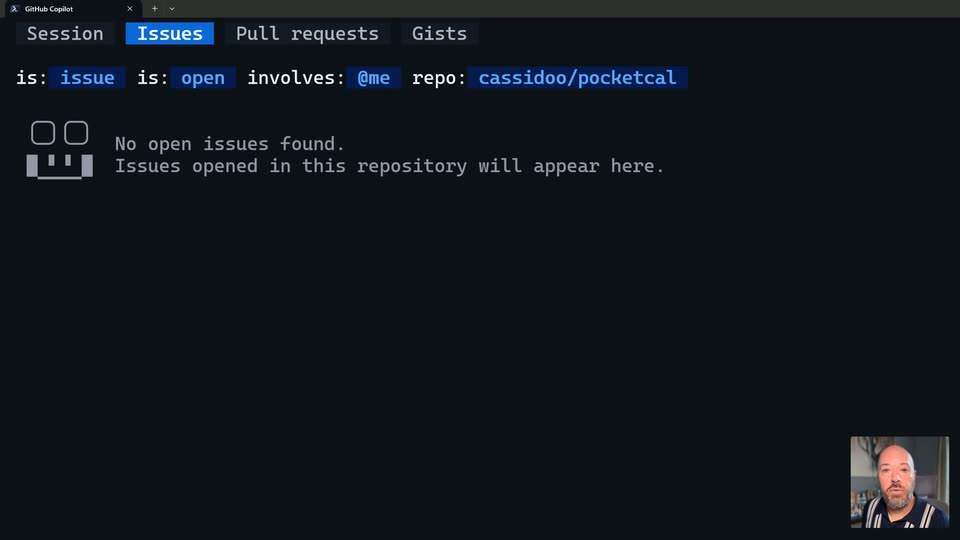
A dark terminal switches from the Issues list to the Session tab, where a command is submitted and the AI logs file searches, ending with a GitHub issue link. A blue caption types in at right; a webcam of the presenter sits bottom-right.
On-screen text: “AI Work Sped Up”
Camera: Static
09 · Feature reveal · 0:55–0:56
A dark terminal UI lists a session log of file searches and a created issue. A cursor appears, the top tab switches from Session to Issues, and the pane clears to an empty No open issues found list. A small webcam of the presenter stays in the corner.
Techniques: Cursor demo
Camera: Static
10 · Feature reveal · 0:56–1:06
A dark terminal issues view fills the screen. The filter line edits as the involves tag is removed, and three issue rows appear at the top. A blue key-hint square flashes A then O mid-screen. A small webcam inset of a bearded presenter sits bottom right.
Camera: Static
11 · Feature reveal · 1:06–1:15
A browser shows a GitHub-style issue page. A blue keycap marked 0 flashes at the center, then a cursor opens the Assignees menu, types cassidy into the filter, and checks the user. A small webcam feed of a man sits in the bottom-right corner.
Techniques: Cursor demo
Camera: Static
12 · Demo · 1:15–1:23
A dark terminal window fills the frame, showing Copilot CLI startup text and a blue bullet list, with a small webcam feed of a woman in the lower right corner. The view then zooms in on the top-left text, cropping out the webcam.
Techniques: UI zoom
Camera: Push in
13 · Demo · 1:23–1:26
A dark terminal TUI crossfades from a setup message to an issues list with the Issues tab highlighted; a small webcam inset of the presenter sits bottom right. A blue Enter keycap badge pops in at the center.
On-screen text: “Enter”
Camera: Static
14 · Demo · 1:26–1:33
A dark terminal issue view stays static while a small webcam feed in the bottom right shows a woman in a pink top speaking and gesturing. A blue keycap labeled Enter appears at center, then swaps to C.
On-screen text: “Enter”, “C”
Camera: Static
15 · Demo · 1:33–1:54
A dark terminal streams GitHub Copilot CLI log lines as it works through issue #24, with a small webcam of a presenter in pink in the corner. The view opens on a GitHub issue panel, then cuts to the prompt where commands and colored status lines appear line by line.
Camera: Pull out
16 · Demo · 1:54–1:55
A dark terminal log fills the frame, then it dims as a tilted 3D mockup of the PocketCal calendar, showing several month grids with colored event chips, scales in at center. A small webcam feed of the presenter stays in the bottom right corner.
Techniques: 3D mockup
Camera: Pan
17 · Demo · 1:55–2:04
A screen recording of the PocketCal web app, a grid of monthly calendars with colored event blocks, fills the frame beside a small webcam feed of a woman. The cursor drags the Conferences row by its handle to reorder it, then moves to the address bar to copy the URL.
Techniques: Cursor demo
Camera: Push in
18 · Demo · 2:04–2:05
A full-screen browser window shows a white page with a row of small app icons centered near the bottom. A mouse cursor rests at the top left by the new tab button. A small webcam feed of the presenter sits in the bottom right corner.
Techniques: Cursor demo
Camera: Static
19 · Demo · 2:05–2:13
A light calendar web app fills the screen, a left sidebar of event groups and settings beside a grid of monthly grids with colored date blocks. A small facecam of a woman in a pink shirt sits in the bottom right corner as the cursor drifts across the interface.
Techniques: Cursor demo
Camera: Static
20 · Feature reveal · 2:13–2:15
A dark terminal window fills the locked-off frame, its log of shell commands and file edits scrolling upward as new lines appear, settling on a summary line about issue #24. A small webcam video of a woman in a pink shirt sits in the bottom right corner above the Windows taskbar.
Camera: Push in
21 · Feature reveal · 2:15–2:24
A dark terminal fills the frame, a small presenter webcam pinned to the corner. The user types a slash command, an autocomplete list drops in, and after choosing /pr create the log scrolls through git steps to a created PR link, the view reframing to the full window.
Techniques: UI zoom
Camera: Pull out
22 · Feature reveal · 2:24–2:31
A dark terminal lists one open pull request under a blue-highlighted Pull requests tab, with a presenter's webcam inset in the bottom-right corner. The view then cuts to the PocketCal web app, a grid of monthly calendars with colored event blocks and a sidebar of event groups.
Camera: Static
23 · Feature reveal · 2:31–2:32
A locked-off screen capture of a desktop browser on a mostly white GitHub page, with a small blue square marked 0 in the center and a white cursor nearby. A webcam inset in the bottom right shows a woman in a pink shirt speaking.
Techniques: Cursor demo
Camera: Static
24 · Feature reveal · 2:32–2:39
A GitHub pull request page fills the screen, with a small webcam feed of a woman in the bottom right corner. The cursor moves to the reviewers gear icon in the right sidebar, opens a dropdown, and clicks a suggested user, adding a checkmark.
Techniques: Cursor demo
Camera: Static
25 · Feature reveal · 2:39–2:49
The dark terminal UI switches from the Session tab to the Pull requests tab, listing one pull request that is then selected and loads. A small webcam video of the presenter sits in the bottom right corner.
Camera: Static
26 · Feature reveal · 2:49–2:52
A dark monospace terminal displays a GitHub pull request detail, then a blue square with the letter C appears in the center as the screen switches to a session prompt. A small webcam of a bearded man who gestures sits in the bottom right corner.
Camera: Static
27 · Feature reveal · 2:52–3:10
A dark terminal fills the frame as a review command is typed and a code-review summary with bullet points streams in. A blue caption types onto the right, and a small webcam of the presenter stays in the corner.
On-screen text: “AI Work Speed Up”
Techniques: Kinetic type
Camera: Static
28 · CTA · 3:10–3:26
A bald bearded man in a navy polo with white and black stripes sits at a desk, talking to camera and gesturing with both hands. Model buildings line a shelf behind him and a glass door shows the outdoors, both softly blurred. Locked-off medium shot.
On-screen text: “725”
Camera: Static