0:59

NETTER 1 - Samuel Ladroue
Netter · B2B
Operon · 0:42 · Full motion · AI-annotated
Operon’s 0:42 launch film runs 20 scenes, about 2.1 s each. The product shows up at 0:05 and 5 features are revealed. The call to action lands at 0:37 (89% in), over a voiceover. The video is built as a tight problem-to-pipeline arc: a dark CAD opening states the manual counting pain, the product is named over a 3D interface, then five features are each announced with a bold headline and proven in a short UI clip, and a blue stat card punctuates the rhythm. Its signature style is high-contrast black and electric blue fields, flat type-on-card beats alternating with live interface demos, and a recurring set of colored detection rings that tie the technical footage to the
Is this your launch? to your site or press kit.
Netter · B2B
FlowFuel (built by MystiqueMide) · Sep 2026
Altair Health · Healthcare · Nov 2026
Bold white phrases appear in sequence over a slowly drifting CAD blueprint: 'Hundreds of symbols,' 'Dozens of sheets,' 'Counted by hand,' while red circles mark the drawing. A small caption and a large '4 detections' counter settle in the lower left.
On-screen text: “Hundreds of symbols.”, “Dozens of sheets.”, “Counted by hand.”, “Reading sheet M2.2...”, “4”, “detections”
Techniques: Kinetic type
Camera: Static
A dark schematic blueprint fills the right half, its orange and blue detection rings popping in one by one as a magenta zone glows. On the left, a status line reads while a large white counter ticks up from 36 to 132 beside the word detections.
On-screen text: “Reading sheet M2.2...”, “36”, “detections”
Techniques: Kinetic type
Camera: Pull out
A dark screen with a white headline and a product interface in 3D perspective. The interface shows a floor plan with colored markers and side panels. The subheadline fades in below the headline.
On-screen text: “Meet Operon.”, “The AI agent that does your HVAC takeoff.”
Techniques: 3D mockup
Camera: Static
A dark frame holds the headline “Meet Operon.” and a subhead above a product window: a warehouse floor plan dotted with colored markers, a project list on the left and a verify panel on the right. The frame stays locked off with no motion.
On-screen text: “Meet Operon.”, “The AI agent that does your HVAC takeoff.”
Camera: Static
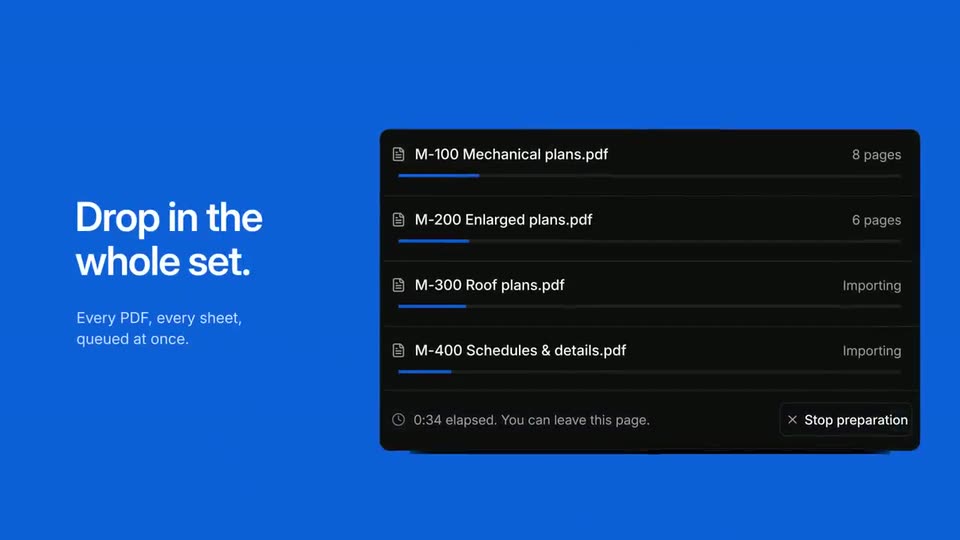
White headline and subline fade in on the left over a flat blue field. On the right a dark import-queue panel scales in as a document icon drops into it; four PDF rows populate with filling blue progress bars, their status flipping from Importing to page counts.
On-screen text: “Drop in the whole set.”, “Every PDF, every sheet, queued at once.”
Camera: Static
A solid blue field holds a large white 10x in the center, the numeral one resolving from a flag shape into its final form. A smaller white caption, typically faster than labeling by hand, fades in beneath it. The frame stays locked off.
On-screen text: “10x”, “typically faster than labeling by hand”
Techniques: Kinetic type
Camera: Static
A CAD drawing covered with orange, blue and purple pin markers. The cursor hovers a blue pin and a dark detail card pops up; it clicks Verify and a small toast confirms the action. A large 10x and a caption sit on the still frame.
On-screen text: “typically faster than labeling by hand”, “10x”
Techniques: Cursor demo
Camera: Static
A 2D floor plan with colored marker dots fills the left half; a dark Verify panel lists tagged items on the right. A cursor clicks the top row's Verify button, the status changes to a green Verified check, and the 0/25 counter ticks to 1/25.
Techniques: Cursor demo
Camera: Pull out
On a black background, a white headline reads “Verify in one click.” with a gray subheadline fading in beneath it. A flat CAD interface slides up from the bottom edge and sharpens into focus, showing two building plans with colored markers and a verification list on the right.
On-screen text: “Verify in one click.”, “Inspect any symbol, or approve all 43 Type D grilles at once.”
Techniques: Kinetic type
Camera: Pull out
A white headline and gray subhead sit above a tilted 3D view of a CAD interface on black. The interface shows a floor plan dotted with colored markers, a left tree panel, and a right list with Verify buttons, plus a small verified toast at the bottom.
On-screen text: “Verify in one click.”, “Inspect any symbol, or approve all 43 Type D grilles at once.”
Techniques: 3D mockup
Camera: Static
In a dark chat view, a slash-command menu fades out as /quant is typed into the message box. The view then reframes onto a posted AI Quantities card listing diffuser counts, with the cursor hovering over the top figure.
Techniques: Cursor demo, UI zoom
Camera: Pan
A dark chat interface shows a bot card listing material quantities with a table of diffuser types and counts. A cursor glides down to the Share in conversation button as the card settles into place.
Techniques: Cursor demo
Camera: Static
A close-up of a dark Quantities list panel sharpens as a cursor hovers over its buttons, then the view pulls back to the full chat app with sidebar, revealing a nested takeoff card. The headline “Ask the agent. Loop in the team.” appears over the interface.
On-screen text: “Ask the agent. Loop in the team.”
Techniques: Cursor demo, UI zoom
Camera: Pull out
A black frame holds a white headline and gray subtitle above a dark chat interface mockup. The interface shows a sidebar and a project chat with an agent card listing quantities. The scene stays static.
On-screen text: “Ask the agent. Loop in the team.”, “Type /quantities or /review in any project chat, then share the answer with everyone.”
Camera: Static
A dark weekly timeline is shown as a cursor drags a task card from a list into the Tuesday column, which glows blue as the drop zone. A confirmation toast slides up at the bottom while the frame reframes from a close list to the full calendar.
Techniques: UI zoom, Cursor demo
Camera: Static
A close-up of a dark project detail panel, a cursor selects the Review takeoff stage and opens the owner menu to pick Maya Ortiz. The view then zooms out to the full bid board with a saved toast, and the panel dims as the cursor moves to Save changes.
Techniques: Cursor demo, UI zoom
Camera: Pull out
A bold white headline and a gray subline sit above a dark bid-board interface that scales up slightly into focus. The board shows a weekly grid of bid cards and a right-hand detail panel for one project.
On-screen text: “Every bid, on one board.”, “Stages, owners and bid values your whole team can see.”
Camera: Static
On a solid blue field, four verbs stack vertically one line at a time. Schedule, Assign and Price fade in in a dim blue-white, then Submit lands in bright white at the bottom, locking the list in place.
On-screen text: “Schedule.”, “Assign.”, “Price.”, “Submit.”
Techniques: Kinetic type
Camera: Static
On a pale gray field, a bold black headline and gray subline sit above two flat cards. A materials spreadsheet left carries a blue button; a cursor clicks it, an invoice card slides in from the right, and a green Ready to send badge pops in below.
On-screen text: “From takeoff to invoice list.”, “Export the takeoff and generate a ready-to-send invoice list in one click.”
Techniques: Cursor demo
Camera: Static
On black, a silver three-lobed mark sits centered, then slides left as the white wordmark fades in beside it. A gray tagline and a blue URL fade in below, and the whole lockup dims and fades out at the end.
On-screen text: “Start your free trial”, “hvac.operonsolutions.com”
Camera: Static