
0:43
Explore
Operon Solutions posted on LinkedIn
Operon · 2:01 · Full motion · AI-annotated
- Length
- 2:01
- Scenes
- 24 · 5.1 s avg
- Product on screen
- 0:25
- Features shown
- 2
- Call to action
- 1:55 · 95%
- Voiceover
- Yes
00:00:00 / 02:01:29
- Length
- 2:01
- Scenes
- 24 · 5.1 s avg
- Product on screen
- 0:25
- Features shown
- 2
- Call to action
- 1:55 · 95%
- Voiceover
- Yes
Operon’s 2:01 launch film runs 24 scenes, about 5.1 s each. The product shows up at 0:25 and 2 features are revealed. The call to action lands at 1:55 (95% in), over a voiceover. Dark, single-accent motion design built on white line drawings over black, with the camera doing slow push-ins and pull-backs to reveal scale, then a trace line animating the answer. Pacing is calm and even (about 3.4 cuts a minute) with long UI holds, so the signature moves are the sheet-grid reveal, the sweeping light band, and the line that follows the pipe.
No filming indicatedEstimated needs: 5 capture groups — your screens or recordings · 1 official logo — reused across the film · 9 graphic passages — draw or supply · 1 3D passage — build or supply
Is this your launch? to your site or press kit.
More like this


Operon Solutions posted on LinkedIn, scene by scene
· 24 scenes as text
01 · Problem · 0:00–0:06
A white line-drawn P&ID schematic appears on black, instrument circles and tag labels legible, then the camera pulls back to reveal the full dense page of piping and control symbols.
Camera: Pull out
02 · Problem · 0:06–0:07
White line-art technical drawings on a black background. A dense P&ID schematic fills the frame, then a cut reveals two building floor plans side by side with a drawing-notes block below. The camera holds with a slow, subtle drift.
Camera: Pan
03 · Problem · 0:07–0:08
White line drawings of industrial schematics, equipment tables, and floor plans fill a black sheet as the camera pans across the page. The dense technical documentation slides left to reveal legends and labeled diagrams.
Camera: Pan
04 · Problem · 0:08–0:10
A dense grid of white technical tables, legends and wiring diagrams fills the black frame; the view pulls back to reveal the full wall of sheets.
Camera: Pull out
05 · Problem · 0:10–0:12
On black, faint white line schematics form a continuous sheet, then the view pulls back as the drawing breaks into a grid of framed blueprint panels, rows of small technical drawings.
Camera: Pull out
06 · Problem · 0:12–0:12
A black screen holds a tight grid of small white engineering schematics, each a dense line drawing. The view pushes in steadily, the cells enlarging until only a few drawings fill the frame.
Camera: Push in
07 · Problem · 0:12–0:13
A black field of white line schematics, engineering diagrams and wiring charts, fills the frame in a grid. The view pushes in, enlarging the central diagrams as the grid recedes.
Camera: Push in
08 · Problem · 0:13–0:25
A dark PDF viewer shows a P&ID schematic with a thumbnail strip. A search bar types “what feeds 20-VA50?” and shows no results, then the view zooms to 300% as a red line traces the pipe from a circled tag to the sheet edge and onto the next page.
On-screen text: “what feeds 20-VA50?”
Techniques: Kinetic type, UI zoom
Camera: Push in
09 · Product intro · 0:25–0:26
A dark drawing viewer holds on a single circuit schematic crossed by a red trace line, then pulls back to reveal a dense grid of schematic thumbnails.
On-screen text: “SP-189.5 Borg”
Techniques: UI zoom
Camera: Pull out
10 · Product intro · 0:26–0:28
A grid of dim technical drawings fills a black frame. A vertical band of light sweeps left to right across the panels, brightening them as it passes.
Techniques: Light sweep
Camera: Static
11 · Product intro · 0:28–0:28
A grid of faint white and teal technical drawings fills a black screen. A vertical beam of light pulses on the right edge while the grid slowly zooms in.
Techniques: Light sweep
Camera: Push in
12 · Product intro · 0:28–0:34
A full piping and instrumentation diagram fills the dark frame, its multicolored lines and instrument symbols glowing. The view zooms in smoothly until a green vessel labeled 20-VA50 and its tag symbols fill the screen.
Techniques: UI zoom
Camera: Push in
13 · Product intro · 0:34–0:35
A dark engineering CAD interface tilts in 3D perspective, showing a P&ID drawing with colored pipe tags and a left file panel, as the brand logo fades in above.
Techniques: 3D mockup
Camera: Pull out
14 · Feature reveal · 0:35–0:59
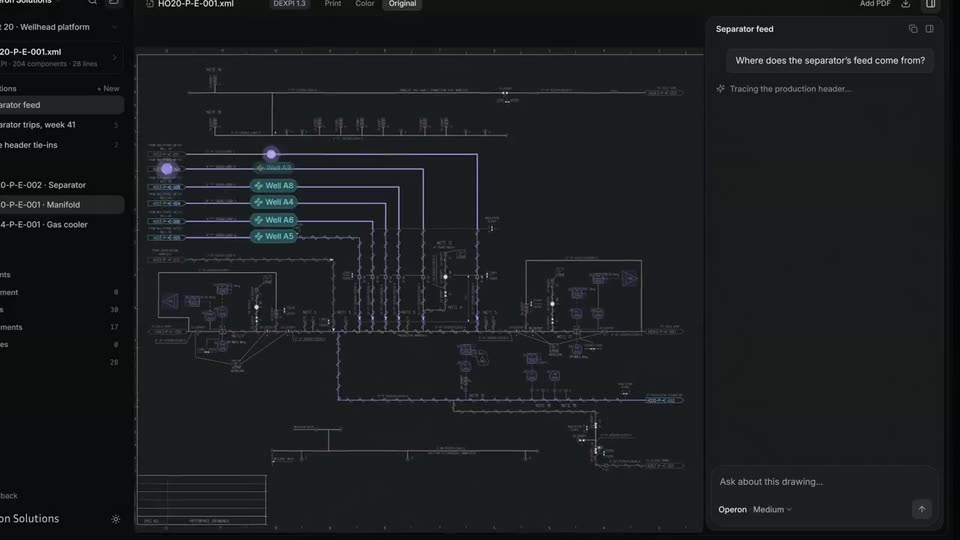
The Operon Solutions logo holds above a dark P&ID viewer, then the camera zooms into the interface. A cursor types a question in the chat box, a purple line traces the feed across drawings to six well labels, and a hover tooltip shows one well's details.
On-screen text: “Operon Solutions”
Techniques: UI zoom, Cursor demo
Camera: Push in
15 · Feature reveal · 0:59–1:14
A dark HVAC plan fills the center of a three-panel app. A cursor hovers a diffuser, types a prompt in the right chat box, and sends it. The plan zooms out as purple dots trace ducts to twelve diffusers, then reframes on the showroom as results fill the chat.
Techniques: Cursor demo, UI zoom
Camera: Pan
16 · Feature reveal · 1:14–1:19
A phone mockup sits centered on a black background, its lock screen showing the date and a large 6:02 clock. A dark notification card fades in below the clock with the Operon mark, “Morning brief - Unit 20” and a one-line summary.
On-screen text: “Ask about this building...”
Camera: Static
17 · Feature reveal · 1:19–1:20
A front-facing phone on a black background shows a dark lock screen with a large 6:02 clock and a morning brief card. The clock, date and card fade out, leaving the app header with Unit 20 and shift details.
Camera: Static
18 · Feature reveal · 1:20–1:30
A flat phone screen on black builds a dark log: overnight event rows stack in line by line, then the view scrolls to a today card. A detail screen for the morning round slides in from the right.
Camera: Static
19 · Feature reveal · 1:30–1:38
A dark phone screen on black shows a separator checklist. Live DCS values fill in row by row as the counter climbs, then a hand taps the Read buttons in the lower gauge list, logging field values. The frame holds, drifting slightly at the end.
Techniques: Cursor demo
Camera: Static
20 · Feature reveal · 1:38–1:42
A phone screen on black starts dimmed with a Listening prompt and audio bars, brightens into a reading card showing 880 mm over a process diagram, then scrolls down to a comparison list.
Camera: Pan
21 · Feature reveal · 1:42–1:48
A dark phone interface scrolls down past a P&ID diagram and a comparison table, where a red 140 mm difference value and a red threshold line appear. The scroll stops on a drafted calibration work order card with Edit and Submit buttons.
Camera: Pan
22 · Feature reveal · 1:48–1:53
A dark work-order card fills the phone screen with asset, problem, action, priority and craft rows. An Attached row fades in, the header flips to SUBMITTED with a status line, the Submit button is tapped, then the view pulls back to the full unit screen with two reading lists.
Techniques: UI zoom
Camera: Static
23 · Feature reveal · 1:53–1:55
A black phone mockup on a black background displays a dark interface with two lists of sensor readings and a round-complete banner. The screen resolves from a soft blur into sharp focus over the clip.
Camera: Static
24 · CTA · 1:55–2:01
The Operon Solutions logo fades in at top center above a dark laptop and phone mockup showing the app's floor plan and data screens. The URL fades in below the devices, the frame holds, then everything fades to black.
On-screen text: “Operon Solutions”, “operonsolutions.com”
Camera: Static