1:42
Explore
SpaceX Super Intelligence - Grok Build is now available in Beta for all SuperGrok and X Premium+
Grok Build · May 2026 · 0:43 · AI-annotated
- Length
- 0:43
- Scenes
- 10 · 4.4 s avg
- Product on screen
- 0:00
- Features shown
- 3
- Call to action
- 0:31 · 72%
- Voiceover
- No
00:00:00 / 00:43:18
Grok Build’s 0:43 launch film runs 10 scenes, about 4.4 s each. The product is on screen from the first frame and 3 features are revealed. The call to action lands at 0:31 (72% in). The video is a tight feature tour: a product title card, three headline opened feature blocks (Plan, Run subagents, Skills import) each paired with a terminal demo, then a URL call to action and closing logo. Its signature moves are blur to sharp focus pulls, slow push ins on the terminal window, and centered white headlines fading over monochrome grain.
No filming indicatedEstimated needs: 3 capture groups — your screens or recordings · 1 3D passage — build or supply
Is this your launch? to your site or press kit.
More like this
SpaceX Super Intelligence - Grok Build is now available in Beta for all SuperGrok and X Premium+, scene by scene
· 10 scenes as text
01 · Product intro · 0:00–0:01
The words Grok Build sit centered on a dark, grainy gradient. They open out of focus and pull sharp into a locked frame as a soft sheen drifts across the textured surface.
On-screen text: “Grok Build”
Techniques: Light sweep
Camera: Static
02 · Feature reveal · 0:01–0:04
The wordmark “Grok Build” holds on a dark gray gradient, then the bold word “Plan” cuts in. A terminal window fades up in the center, showing the Grok CLI logo, a three-line menu and a cursor at the prompt.
On-screen text: “Grok Build”, “Plan”
Camera: Push in
03 · Feature reveal · 0:04–0:06
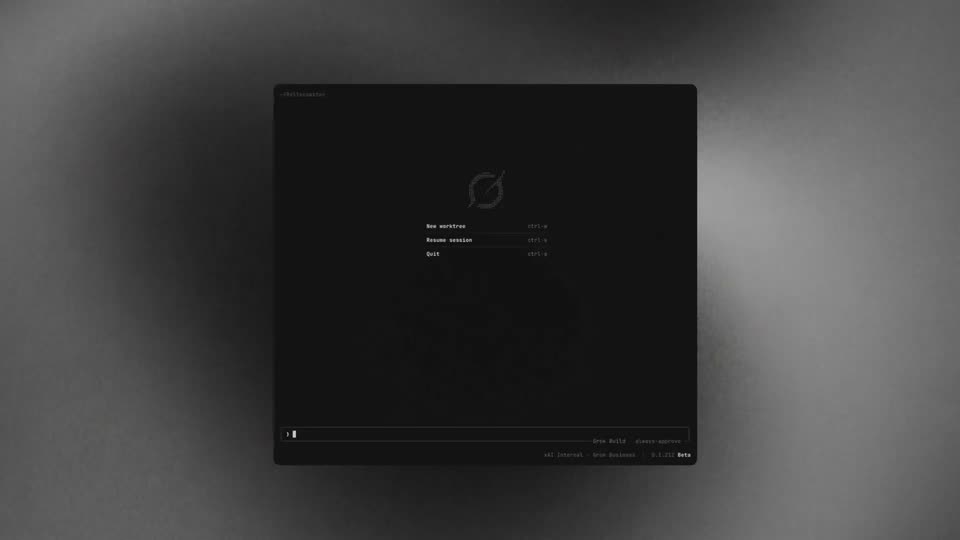
A dark terminal screen shows a dotted circular logo above a three-line monospace menu listing New worktree, Resume session and Quit with their shortcuts, plus a version status bar at the bottom. The view opens soft and blurred, then pulls into sharp focus.
Camera: Static
04 · Feature reveal · 0:06–0:18
A dark terminal window on a gray textured surface opens on a close-up of its status line, then zooms out to the full frame. Scrolling log lines and a typed prompt fill it as a white headline fades in at center, then a question panel appears and the window blurs.
On-screen text: “Grok asks the right questions to nail the details”
Techniques: UI zoom
Camera: Push in
05 · Feature reveal · 0:18–0:20
A dim headline 'Run subagents' slides into the center over a dark gradient with a soft glow on the right. It sharpens to bright white as a blurred code-editor window fades in behind it.
On-screen text: “Run subagents”
Techniques: Kinetic type
Camera: Static
06 · Feature reveal · 0:20–0:22
A dark terminal window on a gray backdrop sharpens from a dim blur into a crisp CLI view showing subagent lines. A large white headline then fades in across the center of the window.
On-screen text: “Automatically import your Skills, Marketplaces, and MCPs”
Camera: Static
07 · Feature reveal · 0:22–0:24
A white two-line headline sits centered over a dark, blurred interface. A dark terminal panel slides up from the bottom edge, bringing a command and output into focus while the headline rises.
On-screen text: “Automatically import your Skills, Marketplaces, and MCPs”
Camera: Static
08 · Feature reveal · 0:24–0:25
A dark terminal window titled ~/Rollercoaster rotates in from a 3D angle and settles flat on a gray backdrop. The command /check-work types out, results scroll, then /skills opens a side panel listing skills under tabs.
On-screen text: “Automatically import your Skills,”, “Marketplaces, and MCPs”
Techniques: 3D mockup
Camera: Push in
09 · Feature reveal · 0:25–0:31
A dark terminal shows a Skills panel listing user skills with a search bar. The frame zooms in on the panel, then a white cursor moves from the xlsx row up to hover across the Marketplace, Plugins and Hooks tabs.
Techniques: UI zoom, Cursor demo
Camera: Push in
10 · CTA · 0:31–0:43
On a dark textured background, the white headline “Try Grok in your terminal” appears centered above a monospace line “just go to x.ai/cli” in a rounded box that fills with black. The text fades, and the white Grok logo, a circle with a diagonal pointer, appears, brightens, then fades.
On-screen text: “Try Grok in your terminal”, “just go to x.ai/cli”
Camera: Static