
0:51
Explore
Introducing the ElevenLabs MCP server
ElevenLabs · Apr 2025 · 1:54 · AI-annotated
- Length
- 1:54
- Scenes
- 38 · 3.0 s avg
- Product on screen
- 0:12
- Call to action
- 1:41 · 88%
- Voiceover
- Yes
- Views
- 34K on YouTube
as of November 27, 2026
00:00:00 / 01:54:14
- Length
- 1:54
- Scenes
- 38 · 3.0 s avg
- Product on screen
- 0:12
- Call to action
- 1:41 · 88%
- Voiceover
- Yes
- Views
- 34K on YouTube
as of November 27, 2026
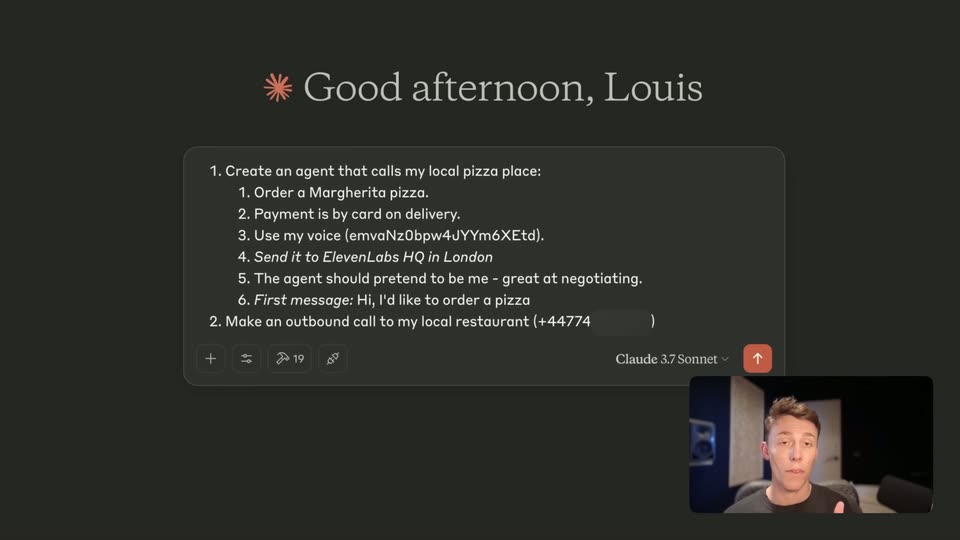
ElevenLabs’s 1:54 launch film runs 38 scenes, about 3.0 s each. The product shows up at 0:12. The call to action lands at 1:41 (88% in), over a voiceover. One continuous live demo: a corner webcam inset narrates over the Claude interface, the typed prompt and recurring permission modals carry the middle, and the call conversation fills the frame against a blurred monochrome backdrop. Signature moves are the word-by-word typing, the centered permission modal that keeps popping, and the chromatic glitch that hands off to the pixel-logo outro.
Footage neededEstimated needs: 3 capture groups — your screens or recordings · 1 official logo — reused across the film · 1 filmed passage — shoot, supply or replace · 1 graphic passage — draw or supply
Is this your launch? to your site or press kit.
More like this


1:01

Introducing Runway Agent 2.0 | Runway
Runway · AI · Jun 2026
1:24

Meet the Underlord: Descript's Open Beta Feature Drop
Descript · Design · May 2025
Similar soundtrack
Films whose music sounds like this one, voice left out
2:04


Bland AI Launch Announcement
Bland · Corporate Tech Launch
2:35

Hey Revia, AI call assistant for healthcare providers
Hey Revia · Corporate Tech Demo
Introducing the ElevenLabs MCP server, scene by scene
· 38 scenes as text
01 · Hook · 0:00–0:04
A dark Claude chat interface fills the frame, the greeting sliding in above an empty prompt box. A small webcam feed of the presenter sits in the bottom-right corner as he talks to camera.
Camera: Static
02 · Hook · 0:04–0:08
A dark Claude chat screen shows a greeting above an empty prompt box; a presenter talks and gestures in a small video inset at the bottom right. The greeting slides in and the model label scales on load.
Camera: Static
03 · Hook · 0:08–0:12
A dark Claude chat screen with a serif greeting line and an empty prompt box fills the frame, while a small webcam feed in the bottom right corner shows a presenter talking and gesturing. The shot stays locked off.
Camera: Static
04 · Demo · 0:12–0:20
A dark chat interface shows the greeting 'Good afternoon, Louis' above an input box where a numbered prompt about a pizza-ordering agent is typed out. A small webcam inset of a man talking stays fixed in the bottom right corner.
Techniques: Cursor demo
Camera: Push in
05 · Demo · 0:20–0:21
A dark chat interface fills the frame. A serif greeting sits at the top above a large prompt box listing numbered instructions to build a pizza-ordering agent, with a blinking caret at the end. A small webcam video of a man speaking occupies the bottom right corner.
Camera: Static
06 · Demo · 0:21–0:24
A dark Claude chat screen shows the greeting 'Good afternoon, Louis' above a typed prompt about a pizza-ordering agent. The content fades out, leaving only the orange spark mark top left, while a small webcam inset of the presenter stays pinned bottom right.
Camera: Static
07 · Demo · 0:24–0:25
A dark chat screen types out an agent's reply word by word above a small orange spinner, while a man speaks in a small video inset at the bottom right. Near the end, a permission dialog for an ElevenLabs tool fades in behind the text.
Techniques: Kinetic type
Camera: Static
08 · Demo · 0:25–0:27
A dark chat interface displays a centered permission dialog for the ElevenLabs tool, with a code block and a small rotating loader on the left. A webcam feed of a man speaking occupies the bottom right corner. The frame stays locked.
Camera: Static
09 · Demo · 0:27–0:28
A dark chat interface shows a message about setting up a pizza-ordering agent, a code block with a voice_id, and a small spinner rotating below. A webcam feed of a man in a room sits in the bottom-right corner.
Camera: Static
10 · Demo · 0:28–0:33
A dark chat interface streams the agent's replies and code blocks, the view scrolling up as new lines type in and a red spinner rotates. A small webcam feed of a man talking holds the bottom right, then a tool-permission dialog with three buttons pops up.
Camera: Static
11 · Demo · 0:33–0:36
A dark chat interface shows a code block behind a permission dialog asking to allow an ElevenLabs tool, with three buttons. A small webcam feed of a man speaking sits in the bottom right corner.
Camera: Static
12 · Demo · 0:36–0:37
A dark chat view shows a JSON code block and a permission dialog asking to allow a tool, which fades out. The interface scrolls up to reveal a new line of text. A small rounded selfie video of a man talking plays in the bottom right corner.
Camera: Static
13 · Demo · 0:37–0:40
A dark chat interface is dimmed behind a centered permission modal asking to allow an ElevenLabs tool, while a small webcam feed of a man gesturing sits in the bottom right corner.
Camera: Static
14 · Demo · 0:40–0:42
A dark chat interface fills the frame with a centered permission dialog asking to allow a tool from ElevenLabs, listing three action buttons. A small rotating loading spinner sits to the left. A webcam inset in the lower right shows a man speaking.
Camera: Static
15 · Demo · 0:42–0:44
A dark agent console shows a list of setup steps in white text; a code block and a red spinner appear then clear. A small webcam inset of a man talking stays in the lower right.
Camera: Static
16 · Demo · 0:44–0:46
A dark chat interface streams an agent's message about placing an outbound call. A rounded permission dialog with three buttons slides up from the bottom center. A small video feed of a man speaking stays fixed in the lower right corner.
Camera: Static
17 · Demo · 0:46–0:47
A dark chat interface scrolls upward, revealing lines of body copy about setting up a pizza-ordering agent and ElevenLabs calls. A rounded permission dialog with three buttons sits centered, and a small webcam feed of a man in a dark room occupies the bottom right corner.
Camera: Static
18 · Demo · 0:47–0:48
A dark chat log fills the screen behind a centered permission dialog asking to allow a tool from ElevenLabs, with three buttons. A small webcam feed of a man speaking sits in the bottom right corner.
Camera: Static
19 · Demo · 0:48–0:49
A dark chat interface fills the frame with a centered permission dialog for an ElevenLabs tool, while a small webcam window at right shows a man speaking. A gray bar covers the dialog's buttons.
Camera: Static
20 · Demo · 0:49–0:52
A dark agent chat lists pizza-ordering steps and a code block with a red spinner. A small webcam feed of a man in the bottom right corner plays as he speaks. The interface then fades to a dark blank screen, leaving only the webcam inset.
Camera: Static
21 · Demo · 0:52–0:53
A dark application window fades in on the left, its interface mostly empty, while a small video-call tile in the bottom right shows a man holding a blue phone. The window settles into place over one second.
Camera: Static
22 · Demo · 0:53–0:56
A dark app window with a reply field sits on a blurred black-and-white backdrop. A picture-in-picture video in the lower right shows a man in a black shirt holding up a light blue phone, then lowering it as he speaks.
Camera: Static
23 · Demo · 0:56–1:01
A dark Claude window fills the left, its title bar shifting from Untitled to Order MacArthur Pizza with Reservation. A small call widget with green Answer and red Decline buttons flashes top-right, then a red square icon takes its place. A man speaks in a bottom-right webcam box.
Camera: Static
24 · Demo · 1:01–1:05
A dark app window with a title bar and an empty reply field fills the frame against a blurred black-and-white backdrop. A rounded webcam box in the lower right shows a man in a dim room talking, his mouth moving as he speaks while the interface stays static.
Techniques: Split screen
Camera: Static
25 · Demo · 1:05–1:09
A dark chat window with a reply field sits on the left over a blurred black-and-white backdrop, while a small webcam inset in the bottom right shows a man in a black shirt talking and gesturing.
Camera: Static
26 · Demo · 1:09–1:13
A dark macOS chat window with a reply bar sits on a blurred black-and-white backdrop. A rounded-corner webcam feed of a man in a black shirt occupies the lower right, speaking to camera.
Camera: Static
27 · Demo · 1:13–1:17
A dark chat window fills the left side, showing a Reply to Claude input bar and a Chat button at the bottom. A small webcam feed of a man in a dark shirt sits in the bottom right corner. He talks to camera against a blurred black and white backdrop.
Camera: Static
28 · Demo · 1:17–1:21
A dark chat window titled Order MacBooks Pro 4 with Neuralink fills the left of the frame over a blurred black-and-white background. In the bottom right, a man in a black t-shirt speaks in a small webcam inset, glancing aside and holding a phone.
Camera: Static
29 · Demo · 1:21–1:25
A dark chat window with an empty message area sits on the left over a blurred black-and-white background, while a small picture-in-picture video in the lower right shows a man speaking into a microphone.
Camera: Static
30 · Demo · 1:25–1:29
A dark chat window with an empty reply field sits on a blurred black background. A rounded video inset in the lower right shows a man speaking into a studio microphone. The window stays static while he talks and gestures slightly.
Techniques: Split screen
Camera: Static
31 · Demo · 1:29–1:33
A dark macOS-style app window sits on a blurred black-and-white background, its title bar showing a pizza-order task and an empty reply field at the bottom. A small picture-in-picture video of a man speaking in a studio fills the lower right corner.
Camera: Static
32 · Demo · 1:33–1:37
A dark app window with an empty chat area and a reply field at the bottom occupies the left, while a small webcam video of a young man speaking sits in the lower-right corner. The background is a blurred dark pattern.
Techniques: Split screen
Camera: Static
33 · Demo · 1:37–1:41
A dark app window with a bottom input bar sits over a blurred black-and-white pattern. A small webcam tile of a man talking in the lower right corner scales up to fill the screen, sliding over the window.
Techniques: UI zoom
Camera: Push in
34 · CTA · 1:41–1:45
A young man in a dark t-shirt speaks to the camera in a dim room with a blue wall and a wall speaker. His footage sits inside a dark macOS-style window with traffic-light buttons, floating over a blurred black-and-white abstract background.
Camera: Static
35 · CTA · 1:45–1:50
A blond man in a dark t-shirt talks to the camera inside a video call window with a macOS title bar, backed by a blurred, darkened copy of the same footage. A red and cyan chromatic aberration glitch flashes across the frame at the end.
Camera: Static
36 · Outro · 1:50–1:52
A grid of pixelated MCP lettering in green and white slides vertically on a black field, pulsing from dim to bright and back. The IIElevenLabs logo with a green MCP tag stays locked in the center.
On-screen text: “MCP”, “IIElevenLabs MCP”
Techniques: Kinetic type
Camera: Static
37 · Outro · 1:52–1:53
On a black field, the centered lockup shows the white ElevenLabs wordmark beside a green pixel-block MCP. A sparse scatter of white and green rectangular pixels clears from the frame in the first beat, leaving the static logo.
On-screen text: “IIElevenLabs MCP”
Techniques: Particles
Camera: Static
38 · Outro · 1:53–1:54
A static lockup sits centered on a pure black field. The white ElevenLabs wordmark, preceded by two thin vertical bars, holds left of a green segmented, pixel-style MCP. The frame is locked off with no motion for the full duration.
On-screen text: “ElevenLabs MCP”
Camera: Static