0:26

Superlist - Make it happen. Make it reality. Make it magic. 👉 Make is our firs
Superlist · May 2024
Floot’s 1:26 launch film runs 31 scenes, about 2.8 s each. The product shows up at 0:09 and 3 features are revealed. There is no explicit call to action; a voiceover carries the film. A warm peach-gradient motion piece built from soft 3D-tilted UI mockups, floating rounded cards and a recurring paper-plane orange cursor that drives every interaction. Pacing is steady at about 128 bpm with quick zoom-ins and motion-blur slides, alternating centered text cards with close-up interface demos, and a final logo lockup closes the loop.
Is this your launch? to your site or press kit.
Superlist · May 2024
Accordio · Nov 2026
A cascade of white code cards fans across a peach gradient, the front card sharp while the back layers blur with depth. An orange cursor arrow drifts left as the stack pans right, exposing more JavaScript lines on the lead card.
Techniques: Parallax
Camera: Push in
Three rounded code-editor cards stack diagonally on a soft peach gradient, the front one sharp and the others blurred. JavaScript lines type in line by line while a flat orange arrow pointer drifts down across the stack.
Techniques: 3D mockup
Camera: Pull out
A white rounded callout with an orange border holds centered black text that fills in word by word, ending with anywhere in orange, while blurred code document panels drift behind and an orange paper-plane cursor rests at the lower right.
On-screen text: “It just can't put it anywhere”
Techniques: Kinetic type, Parallax
Camera: Pull out
A white rounded caption card with a thin orange border sits centered, holding the line with the final word in orange. Behind it, a blurred peach backdrop shows stacked document windows and an orange cursor. The frame is locked off and the text stays still.
On-screen text: “It just can't put it anywhere”
Camera: Static
On a soft peach gradient, a white rounded card bearing orange asterisk marks slides down from above and tucks behind a centered orange rounded icon with a white code glyph, settling into a stacked position.
Camera: Static
An orange rounded folder icon with a white code symbol and white cards tucked behind it slides from center to the left, leaving a horizontal motion-blur trail, on a soft peach gradient.
Camera: Static
On a peach gradient with vertical orange bands, an orange code folder icon slides off toward the top-left corner while three orange circle icons, a cloud, a globe and a link, fade in as a vertical column on the right, each under a small gray label.
On-screen text: “Deployment”, “Hosting”, “Linking”
Techniques: Parallax
Camera: Pull out
Four orange code-folder icons with motion blur sit on a peach field while a vertical orange panel listing Deployment, Hosting and Live App slides off to the right, revealing the gray headline 'The fix takes a minute' scaling in at center.
On-screen text: “Deployment”, “Hosting”, “Live App”, “The fix takes a minute”
Techniques: Kinetic type
Camera: Push in
A centered headline on a soft peach gradient reads 'The fix takes a minute', the word 'minute' in orange, while two orange gear-and-clock icons rotate slowly in the lower-left corner.
On-screen text: “The fix takes a minute”
Techniques: Kinetic type
Camera: Static
A tilted 3D mockup of the Floot website sits on an orange gradient with a glossy sphere at right. The view zooms in to a flatter hero while the headline scales up.
On-screen text: “The fix takes a minute”
Techniques: 3D mockup, UI zoom, Kinetic type
Camera: Push in
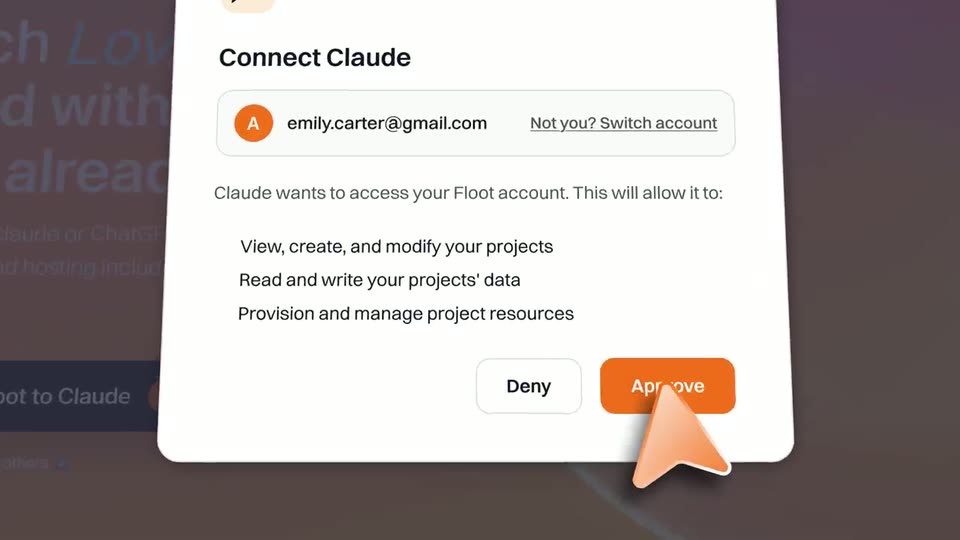
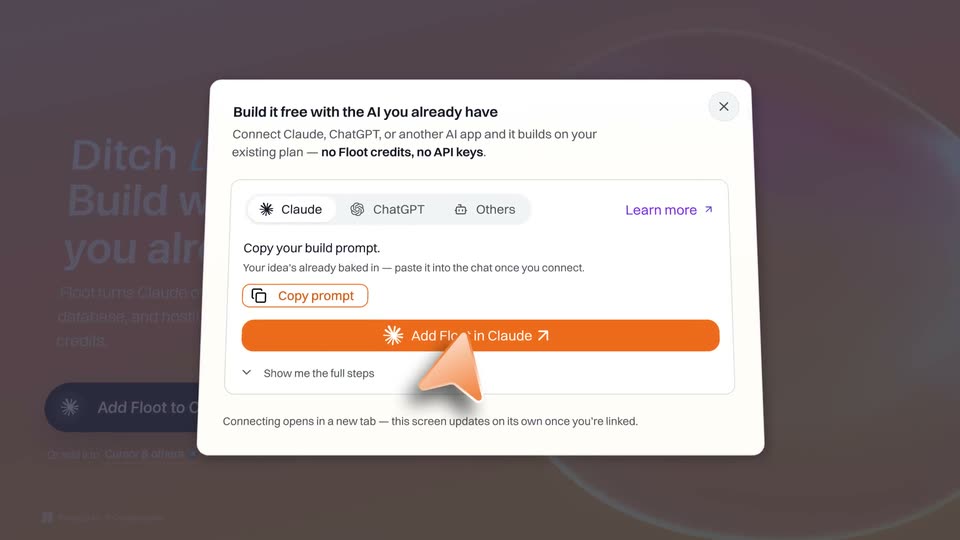
A white modal over a blurred landing page shows a Claude connection flow. An orange cursor hovers the Add Float in Claude button, then the panel swaps to a Connect Claude screen, a permissions list, and a You're in! confirmation. The background shifts from peach to dark purple.
Techniques: Cursor demo
Camera: Push in
The view zooms in on a white Connect Claude dialog over a blurred purple screen. A large peach cursor arrow glides from the center down to the orange Approve button and hovers there.
Techniques: UI zoom, Cursor demo
Camera: Push in
A white onboarding card sits centered over a dimmed, blurred Float webpage. The card lists authentication status, a prompt box and a dark Skip all approvals panel, while a large orange cursor hovers over the panel and the card scrolls slightly to reveal an orange Finish connecting button.
Techniques: Cursor demo
Camera: Pan
A white modal card over a blurred landing page scrolls its content upward, revealing a Connected status and a build prompt box. An orange cursor clicks the orange Finish connecting button, then glides down to hover the Open Claude button.
Techniques: UI zoom, Cursor demo
Camera: Static
A white connection card sits over a blurred webpage, showing a Float logo, a connected status, a copy-prompt box and an orange Open Claude button. An orange cursor hovers over the button as the frame slowly pushes in.
Techniques: Cursor demo, UI zoom
Camera: Pull out
A white chat card sits centered on a pale background. An orange cursor glides up into the input field as the prompt 'hi, claude, could you tell me more about you?' types in, while the greeting 'Good afternoon, Emily' fades in above. Suggestion chips line the card's lower edge.
Techniques: Cursor demo
Camera: Push in
A chat screen zooms into a prompt card as an orange cursor clicks the send button, then a permission panel scrolls in and the cursor taps Allow once. The view settles on a new project card titled Project Management App.
On-screen text: “Good afternoon, Emily”
Techniques: UI zoom, Cursor demo
Camera: Push in
A chat response about a coffee landing page fills the screen, then the view zooms in on the body copy while an orange cursor glides down to point at the underlined Open live preview link.
Techniques: UI zoom, Cursor demo
Camera: Push in
A white Open external link dialog floats over a dimmed chat window. The view slowly zooms in as a peach 3D cursor arrow glides from the long URL down to the black Open link button and clicks it.
Techniques: UI zoom, Cursor demo
Camera: Pan
A browser window displays a dark coffee landing page with a headline and a hero photo of a copper kettle pouring into a dripper. The view zooms in toward the hero image while an orange cursor hovers near the top right.
Techniques: Cursor demo, UI zoom
Camera: Push in
A dark coffee landing page sits inside a website editor. The orange cursor clicks the serif headline, swapping 'waking up' for 'staying up' inside a dashed selection box with a small toolbar, then the view zooms onto the hero photo of a copper kettle pouring into a dripper.
Techniques: Cursor demo, UI zoom
Camera: Pan
A close-up of a dark coffee-subscription landing page shows a serif headline beside a brewing photo with a small orange triangle marker. The view pulls back and the page blurs out of focus as the white caption No Tabs. fades in at the center.
On-screen text: “No Tabs.”
Techniques: UI zoom
Camera: Pull out
A blurred dark coffee site sits behind centered white text that cycles through “No Tabs.”, “No Handoffs.”, “No Git.”, then the focus pulls sharp to reveal the product toolbar with a large orange cursor.
On-screen text: “No Tabs.”, “No Handoffs.”, “No Git.”
Techniques: Kinetic type
Camera: Push in
A 3D-tilted browser window floats on a peach background, its top toolbar in focus. A large orange cursor arrow with a white outline rises from the dark canvas and hovers over the orange Publish button as the camera reframes tighter on the toolbar.
Techniques: 3D mockup, Cursor demo
Camera: Static
A 3D-tilted white toolbar hovers above a dark video of a steaming copper teapot. An orange arrow cursor sweeps right to left across the buttons, which shift and settle into place.
Techniques: 3D mockup, Cursor demo
Camera: Pull out
A 3D browser mockup of a dark coffee site tilts on a peach gradient, then faces the camera as the page scrolls past the hero, product cards, and roast section before tilting away.
Techniques: 3D mockup
Camera: Pull out
On a soft peach gradient, the centered line “And the part that matters:” fades in with bold black emphasis words, then “no second AI bill.” scales in beneath it. A terracotta app icon with a white starburst pops in on the left as the scene ends.
On-screen text: “And the part that matters:”, “no second AI bill.”
Techniques: Kinetic type
Camera: Static
Three app icons, Claude, ChatGPT and Cursor, pulse gently with labels below on a peach gradient. The row shrinks and rises as an orange beam fans down to three new icons labeled Desktop, Web, Mobile, then the frame washes to solid orange.
On-screen text: “Claude”, “ChatGPT”, “Cursor”, “Desktop”, “Web”, “Mobile”
Camera: Static
A soft peach gradient fills the frame as the ChatGPT and Claude app icons fade out. Centered dark text lines appear in sequence: “Built this way,” then “it runs on the plan you already pay for.” then “Two flat subscriptions.”
On-screen text: “Built this way,”, “it runs on the plan you already pay for.”, “Two flat subscriptions.”
Techniques: Kinetic type
Camera: Static
Black headline lines appear one after another, centered on a soft peach gradient. The lines give way to an orange rounded-square icon with a cream inner square, which scales up from the center, a black curved mark forming at its base.
On-screen text: “Two flat subscriptions.”, “Nothing metered.”
Camera: Static
A cream app icon with a black F mark starts blurred inside an orange halo, then sharpens as the bold wordmark Floot assembles letter by letter to its right. Below, the tagline types in word by word on a soft peach gradient.
On-screen text: “One conversation.”, “One real, working app.”
Techniques: Kinetic type
Camera: Static