1:26
Build with the AI subscription you're already paying for.
Floot · B2B · Aug 2026
Floot · 1:26 · Full motion · AI-annotated
Floot’s 1:26 launch film runs 28 scenes, about 3.1 s each. The product shows up at 0:10. There is no explicit call to action; a voiceover carries the film. The video alternates clean 3D-tilted interface mockups with flat peach-gradient title cards, using a single recurring orange cursor to drive every click and keep the eye moving. Pacing is steady at about five cuts per minute, with each beat landing on a centered caption or a zoom into one button, and the signature move is the mockup tilting in 3D, flattening, then scrolling to reveal the result.
Is this your launch? to your site or press kit.
Floot · B2B · Aug 2026
Veeza AI · Consumer · Oct 2026
CrowdReply · Jul 2026
Films whose music sounds like this one, voice left out
Luminai · Modern corporate electronic
DJI · Modern electronic and cinematic trailer music
Taste Labs · Upbeat electronic
Several white code panels fan out in 3D perspective against a peach gradient, the front panel sharp while the back ones blur into depth. An orange cursor arrow hovers over a middle panel as the stack drifts slowly.
Techniques: 3D mockup
Camera: Push in
Layered white code cards float in a soft peach 3D space, sharp in front and blurred behind, while an orange arrow cursor glides downward across the panels.
Techniques: Parallax, Cursor demo
Camera: Pull out
Blurred white code windows on a peach gradient; a white rounded card with an orange border sits centered, its caption filling in word by word, the last word in orange. An orange cursor arrow drifts across the blurred windows.
On-screen text: “It just can't put it anywhere”
Techniques: Kinetic type
Camera: Static
A white rounded caption card with the line sits centered over a blurred peach-toned app interface, an orange cursor faintly visible at right. The frame is locked off and the text stays still for the whole shot.
On-screen text: “It just can't put it anywhere”
Camera: Static
An orange rounded icon with a white code symbol and fanned white cards sits centered on a peach gradient, then slides left and shrinks as a lighter panel with a vertical seam slides in from the right, and a small orange cloud chip appears at the top right.
Camera: Static
Flat vector illustration on a peach gradient. Orange code folders with white paper and a slash symbol drift and scatter across the left. A darker orange panel slides in from the right, settling three round icons with labels: cloud, globe, link.
Techniques: Parallax, Masking
Camera: Static
A peach gradient background holds the centered headline, the word minute in orange, which scales into place while two orange gear icons, one with a clock and one with a check, sit at the bottom left.
On-screen text: “The fix takes a minute”
Techniques: Kinetic type
Camera: Static
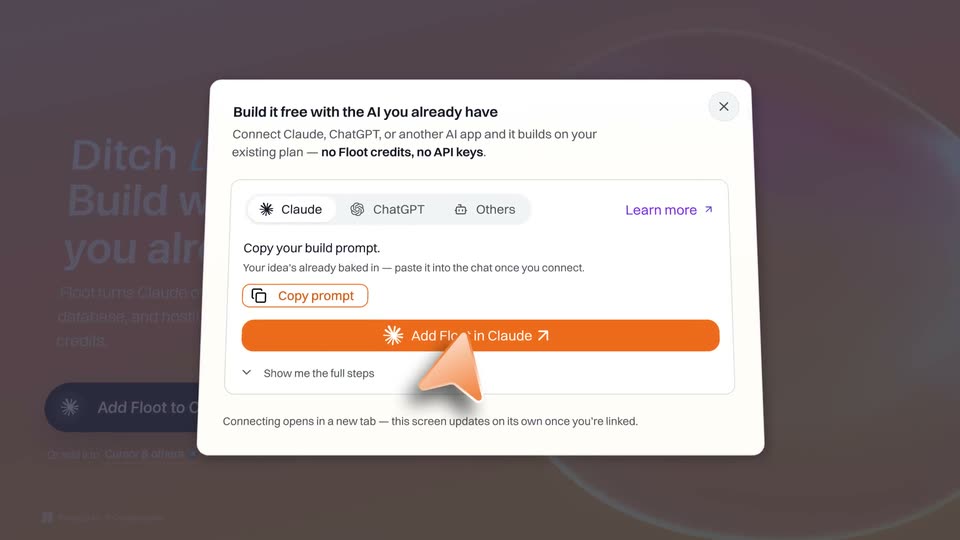
A 3D-tilted Float landing page with a glass orb at the right straightens as the camera zooms onto the CTA row. A cursor clicks Add Float to Claude, opening a connection modal, then hovers the orange Add Float in Claude button.
On-screen text: “The fix takes a minute”
Techniques: 3D mockup, UI zoom, Cursor demo
Camera: Push in
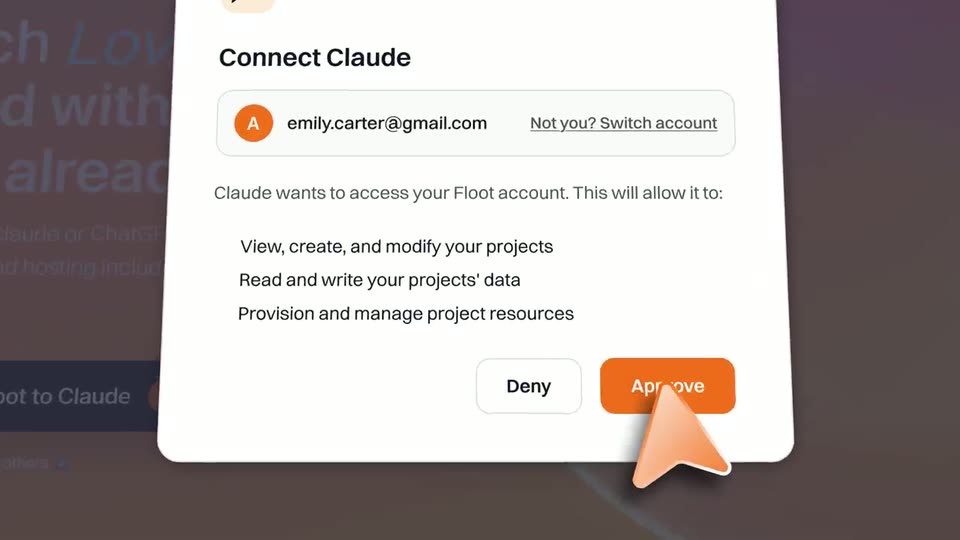
A white Connect Claude dialog overlays a blurred app screen as the view tightens. A large orange cursor glides to the orange Approve button and clicks it.
Techniques: UI zoom, Cursor demo
Camera: Push in
A white onboarding card showing the Float logo and a Now build your first app headline scrolls upward over a dimmed landing page, revealing an orange Finish connecting button, while an orange pointer arrow slides down from the dropdown toward the button.
Techniques: Cursor demo
Camera: Push in
A white onboarding card on a blurred app background swaps its content: the recommended-mode panel dissolves upward as the Floot connection panel and a long orange action button slide into place, a flat orange cursor arrow resting on the button.
Camera: Pull out
A dimmed Fleet landing page sits behind a white connection card reading 'You're connected to Claude'. A large peach cursor sweeps from the copy icon down the card to the orange Open Claude button as the frame tightens on the card.
Techniques: Cursor demo, UI zoom
Camera: Static
A white chat window, tilted in 3D, flattens and zooms in. A large orange cursor types a build prompt into the input, clicks the send button, then clicks Allow once and Open live preview. The chat scrolls up to show the project being created.
Techniques: 3D mockup, UI zoom, Cursor demo
Camera: Push in
A close-up of a chat window scrolls up through a message thread, an orange pointer hovers above the input field that holds a typed question.
Camera: Pan
A Flood response card shows body copy and a bulleted feature list. The view scrolls up and an orange cursor arrow moves to hover the underlined Open live preview link.
Techniques: Cursor demo
Camera: Push in
A white dialog titled Open external link sits over a dimmed chat interface, showing a long URL and Cancel and Open link buttons. An orange cursor glides down the dialog and presses the black Open link button as the frame zooms in on it.
Techniques: UI zoom, Cursor demo
Camera: Pan
A tilted 3D browser mockup of a dark coffee landing page. The camera reframes and zooms toward the hero image of a copper kettle pouring over a dripper, while a peach cursor arrow drifts in from the right and hovers over the image.
Techniques: 3D mockup, UI zoom, Cursor demo, Parallax
Camera: Push in
A Float browser window fills the frame, its toolbar showing an orange Select button. An orange cursor hovers the toolbar, then the dark canvas pans down and the coffee pour-over photo scales up as the cursor glides toward it.
Techniques: Cursor demo, UI zoom
Camera: Pan
The orange cursor clicks the serif headline on a dark page in a website builder; the words swap to 'staying up' in a dashed edit box. The view zooms out to reveal the full hero, with a photo of a hand pouring from a copper kettle into a dripper.
Techniques: Cursor demo, UI zoom
Camera: Pan
A dark website hero view: a serif headline and body copy with an outlined button sit on the left, a video thumbnail of a kettle pouring into a dripper with a play button on the right. The thumbnail brightens through a rounded mask while the left text block slides left into place.
On-screen text: “Start a Subscription”
Techniques: Masking
Camera: Static
A dark coffee landing page fills the frame, a play button over the pour-over shot. The view blurs as centered white captions read No Tabs., No Handoffs., No Git. in sequence, then sharpens and pulls back to show the page tilted in 3D under the editor toolbar.
On-screen text: “No Tabs.”, “No Handoffs.”, “No Git.”
Techniques: Kinetic type, UI zoom, 3D mockup
Camera: Push in
A tilted 3D view of a collaboration tool's toolbar reframes onto its top row. An orange arrow cursor slides right across the icons and rests on the orange Publish button.
Techniques: 3D mockup, UI zoom, Cursor demo
Camera: Pull out
A browser window mockup tilts in 3D against a peach gradient while its dark coffee website scrolls down: hero headline, three coffee bags, a roaster section, then review cards. The window rotates between head-on and angled views.
Techniques: 3D mockup
Camera: Pull out
On a peach-to-cream gradient, centered black text fades in line by line: first the lead-in, then a second line scaling in beneath it. The lines clear and an orange rounded-square icon with a white starburst appears on the left.
On-screen text: “And the part that matters:”, “no second AI bill.”
Techniques: Kinetic type
Camera: Static
Three rounded app icons, an orange starburst, a black knot, a white cube, pop in side by side on a peach gradient with black labels beneath. The row lifts up as an orange beam widens behind it and three white line icons labeled Desktop, Web, Mobile fade in below.
On-screen text: “Claude”, “ChatGPT”, “Cursor”, “Desktop”, “Web”, “Mobile”
Camera: Static
A faint 3D mockup with two app icons fades out on a peach gradient as centered black text lines fade in one by one, each holding for a beat before the next.
On-screen text: “Built this way,”, “it runs on the plan you already pay for.”, “Two flat subscriptions.”, “Nothing metered.”
Techniques: Kinetic type, 3D mockup
Camera: Static
A soft peach-to-white gradient fills the frame, holding the centered black line “Nothing metered.” The shot is locked off with no motion, the words resting in the middle of the empty field.
On-screen text: “Nothing metered.”
Camera: Static
A cream rounded-square icon with a black F mark sits centered on a peach gradient, its orange glow fading as the bold “Flood” wordmark pops in letter by letter to the right. Below, the tagline “One conversation. One real, working app.” builds word by word.
On-screen text: “One conversation. One real, working app.”
Techniques: Kinetic type
Camera: Static