2:46

Introducing Descript: The Ultimate Video Tool That's Changing Everything
Descript · Design · Oct 2020
Veeza AI · Oct 2026 · 1:06 · AI-annotated
The video alternates live-action founder shots with glitchy kinetic type against a coastal backdrop and clean 3D UI cards on soft blue gradients, moving from pain to logo reveal to a step-by-step product tour. Signature moves include words popping and sliding around the speaker, blur-to-focus reveals, split-screen comparisons, and the blue mascot punctuating each step.
Descript · Design · Oct 2020
Anthropic · AI · Oct 2026
The Browser Company · Productivity · Apr 2024
A founder stands in a medium shot before a blurred bay and bridge, talking to camera in grainy, glitch-styled footage. Bold white words pop and slide in around him: AI, TOURIST VISA, AGENT, WEAK PASSPORTS, 5 BILLION, GO ON VACATION; a name lower-third sits at the lower right.
On-screen text: “Aly Moursy”, “Founder, Veeza AI”, “AI”, “TOURIST”, “VISA”, “AGENT”, “WEAK”, “PASSPORTS”, “5 BILLION”, “people know.,”
Techniques: Kinetic type
Camera: Pull out
A man in a dark sweater sits at a white table with a laptop, gesturing with both hands as he talks. The caption research the visa rules sits across the lower frame, the word rules in blue. The image starts blurred and resolves into focus.
On-screen text: “research the visa rules”
Camera: Pan
A split screen shows a man at a laptop on the left and hands typing on the right. The caption 'research the visa rules' swaps to 'fill in the form', the new line scaling in with its last word in blue.
On-screen text: “research the visa rules”, “fill in the form”
Techniques: Split screen, Kinetic type
Camera: Pull out
A 2x2 grid of live shots shows a man at a laptop, hands typing, and a phone form. White text with a blue word, fill in the form again, scales in across the center, then a second line, in the collect, begins below.
On-screen text: “fill in the form again”, “in the collect”
Techniques: Split screen, Kinetic type
Camera: Static
A four-panel montage of people with paperwork sits above hands flipping through tax forms; the line 'fill in the form' scales out while 'collect the documents' assembles word by word, 'documents' in blue, then the frame blurs.
On-screen text: “fill in the form”, “again”, “collect the documents”
Techniques: Split screen, Kinetic type
Camera: Pan
A laptop in 3D perspective sits on a desk, its screen showing a visa application form with a refresh button. A hand rests near the keyboard. The light blue word refresh floats to the left as the frame sharpens from blur into focus.
On-screen text: “refresh”
Techniques: 3D mockup
Camera: Static
A close-up of a booking interface shows a pixel hand cursor gliding to the Refresh button in the Appointment Availability panel. It clicks, the button fills blue, and a spinner with the line Checking for available appointments appears.
Techniques: Cursor demo
Camera: Push in
A man in a dark sweater sits at a desk before a laptop, both hands gripping his head and grimacing in frustration. The dim room has wooden cabinets with books behind him. He shifts his hands slightly while the voiceover complains about work.
Camera: Pull out
Medium shot of a man in a dark gray sweater seated at a table with an open laptop bearing a small red sticker, speaking to camera in a softly lit room with a potted palm and bright window behind. Static framing.
Camera: Static
A man in a dark sweater talks at a desk with a laptop; the focus racks away from him as a round blue 3D mascot with two antennae and closed smiling eyes pops into the right foreground.
Camera: Push in
A blue 3D mascot with a smiling face and two antennae sits on white beside a torn-paper edge over a blurred plant. It shrinks and slides left as the wordmark Veeza AI appears to its right, settling into a centered brand lockup.
On-screen text: “Veeza AI”
Camera: Static
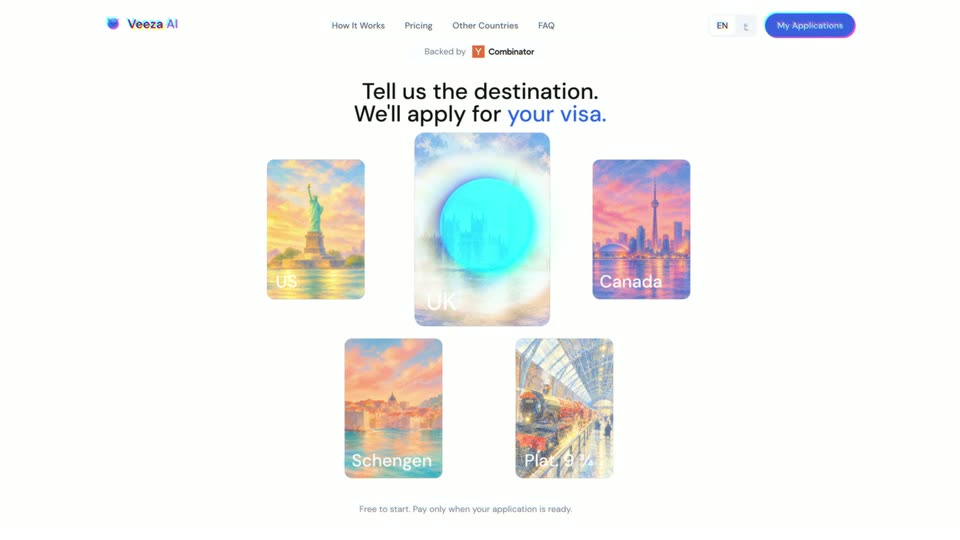
A white landing page shows five destination cards under a two-line headline. The UK card scales up toward the center over a soft blue glow while the other cards shrink and shift, and a cursor dot appears over it.
Techniques: UI zoom, Cursor demo
Camera: Static
A tilted white passport card in 3D perspective fills in with a photo and details, then shrinks to the right as a larger visa application form slides in on the left, its fields auto-populating with green checkmarks and a blue submit button.
On-screen text: “[Scanned passports are encrypted]”
Techniques: 3D mockup
Camera: Static
A white visa application card, tilted in 3D on a blue gradient, slides left and scales down as two smaller document cards slide in from the right edge.
On-screen text: “[Scanned passports are encrypted]”
Techniques: 3D mockup
Camera: Static
A round blue 3D character with antennae and a smile bobs at center on a soft blue gradient, surrounded by six white document cards showing file names, PDF and DOC icons, and Encrypted padlock labels. The character's eyes close into happy arcs as the cards drift and tilt gently.
Techniques: 3D mockup
Camera: Pull out
A glossy blue 3D mascot with a smiling face sits among floating encrypted document cards on a soft blue gradient. The view shifts to a white Document Check panel listing verification steps as a glossy 3D cursor and a blue Veeza AI tag slide in from the right.
On-screen text: “Veeza AI”
Techniques: 3D mockup
Camera: Static
A white checklist card floats in 3D perspective on a blue gradient. A cursor tagged Veeza AI clicks each row, turning it green with a check; the last row turns red with a warning as the view zooms in and a smiling blue blob drops in from the top.
On-screen text: “Veeza AI”
Techniques: 3D mockup, Cursor demo, UI zoom
Camera: Static
A tilted white UI card floats on a blue gradient, showing a missing-document alert for travel insurance, then the content swaps to “Ready for expert review” with a glowing blue orb. A small blue blob character with a face hovers at the top left.
Techniques: 3D mockup
Camera: Static
A glossy blue 3D blob character with a smiling face rises from behind a blue caption card, then the card is replaced by a small white card with a green checkmark while the blob shrinks.
On-screen text: “Ready for expert review”
Camera: Static
A white rounded confirmation card with a green checkmark circle and the line Appointment booked! pops in at center, scaling up on a soft blue gradient.
Camera: Static
A white card with a green checkmark and the text Appointment booked! holds steady in the center as the background shifts from a blue gradient to a blurred figure in a cap at a desk.
Camera: Pan
A diagonal split screen wipes open to show a man at a laptop, stressed with a hand on his forehead on the left, smiling on the right. White captions read 'Doing it yourself' and 'With VEEZA AI' at the bottom.
On-screen text: “Doing it yourself”, “With VEEZA AI”
Techniques: Split screen
Camera: Pan
A diagonal split screen shows the same man at a desk with a laptop: on the left he rubs his forehead looking tired, on the right he smiles at the screen. Static captions read “Doing it yourself” and “With VEEZA AI” beneath each side.
On-screen text: “Doing it yourself”, “With VEEZA AI”, “F26”
Techniques: Split screen
Camera: Push in
A man in a dark sweater speaks to camera against a blurred coastal backdrop with the Golden Gate Bridge in the distance. The words Egyptian and Canadian pop in on either side of him as he gestures, then Egyptian fades out.
On-screen text: “Egyptian”, “Canadian”
Techniques: Kinetic type
Camera: Static
A blue gridded globe slides in from the left edge on a white background as “Travel looks” sharpens from a motion blur, then “DIFFERENT” pops in below in blue and “Canadian” appears.
On-screen text: “Travel looks”, “DIFFERENT”, “Canadian”
Techniques: Kinetic type
Camera: Static
A 3D globe with a latitude grid and a small white airplane sits on the left against a white background. On the right the headline reads 'Travel looks DIFFERENT', then the words swap to 'for DIFFERENT passports' while the globe keeps turning. The clip ends in a horizontal motion-blur wipe.
On-screen text: “Travel looks”, “DIFFERENT”, “for”, “passports”
Techniques: Kinetic type
Camera: Push in
A man in a dark sweater stands before a blurred bay backdrop, talking and gesturing. Captions flank his head: “Pick your” left, “destination” right, then “We’ll handle EVERYTHING” at chest level, “EVERYTHING” in blue. A 3D blue blob mascot pops in at right as white smoke bursts at left.
On-screen text: “Pick your”, “destination”, “We’ll handle EVERYTHING”
Techniques: Kinetic type, Particles
Camera: Push in
A blue 3D mascot hovers over a washed-out outdoor shot, then the frame whites out and the mascot slides left as the URL types in beside it.
On-screen text: “We'll handle EVERYTHING”, “www.Veeza.Ai”
Techniques: Kinetic type, Masking
Camera: Static
A blue 3D mascot with two antennae and the URL sit on a white card. A blue watercolor texture then blooms across the frame and covers the logo.
On-screen text: “www.Veeza.AI”
Techniques: Masking
Camera: Static
A light blue watercolor wash fills the frame, with soft white blooms near the center and deeper blue pigment pooling along the edges and bottom left. The textured paper grain stays static throughout the short clip.
Camera: Static
A light blue watercolor texture fills the frame, then the texture recedes to leave a plain off-white background.
Camera: Static