1:13

Introducing Aleph 2.0 | Runway
Runway · AI · May 2026
Umbrel’s 2:00 launch film runs 63 scenes, about 1.9 s each. The product is on screen from the first frame and 13 features are revealed. The call to action lands at 1:55 (97% in), over a voiceover. Built as a version recap that flips 2.0 into 2.1, then a long chain of single-feature beats, each announced by a centered white headline and proven with a 3D-tilted UI panel or a live-action insert. The signature move is the tilted 3D card and panel that floats over a blurred photographic backdrop, punctuated by neon line-draws, a dotted-black grid for tag demos, and a cream-and-blob mascot gag that closes on a planet-horizon URL card.
Is this your launch? to your site or press kit.
Runway · AI · May 2026
Nintendo · Nov 2026
Films whose music sounds like this one, voice left out
BYT · Upbeat electronic
Hanji · Modern electronic, corporate tech
YouLearn · Upbeat electronic
A tablet in 3D perspective displays a Photos app with a monthly grid of family photos and a dark sidebar. A white headline, Back up photos instantly, sits across the top. The device tilts gently on a pale background, with a green screen peeking below.
On-screen text: “Back up photos instantly.”
Techniques: 3D mockup
Camera: Static
A vertical stack of tilted feature cards in 3D perspective scrolls up past the camera. The top card reads 'Run any OS within Umbrel.' flanked by app icons, then a 'Multiple accounts' card with three profile photos, then 'https ON' and 'GPU Acceleration' badges, ending on a 'Can you install Flipsy?' card.
On-screen text: “Run any OS”, “within Umbrel.”, “Multiple accounts”, “https ON”, “GPU Acceleration”, “Can you install Flipsy?”, “OpenAI”, “MCP”
Techniques: 3D mockup
Camera: Pull out
A vertical stack of feature cards scrolls inside a white oval mask on black. The view pulls back and reframes so the dark blue FailSafe (RAID) card scales up to center, with the Cloud imports and UmbrelOS phone cards settling below.
On-screen text: “FailSafe (RAID)”, “wherever you run umbrelOS”
Techniques: UI zoom
Camera: Pull out
A black elliptical ring frames a 3D stack of tilted feature cards on white. The central black card shows a red heart icon, the title FailSafe (RAID) and storage devices, while blue and gray cards recede above and below. The group scales down as the camera pulls back.
On-screen text: “FailSafe (RAID)”, “wherever you run umbrelOS”
Techniques: 3D mockup
Camera: Pull out
Extreme close-up on the zero of a giant black 2.0, where a small 3D server with a lit UI screen rotates inside the counter. The camera pulls back to center the full 2.0 on white while the zero softens out of focus.
On-screen text: “2.0”
Techniques: 3D mockup, Kinetic type
Camera: Pull out
A version number sits centered on a dark purple-to-magenta gradient. The figures scale down from a large 2.0 to a smaller 2.1, the trailing digit resolving from 0 to 1, the 2. in pink and the final 1 in white.
On-screen text: “2.0”, “2.1”
Techniques: Kinetic type, Morph
Camera: Static
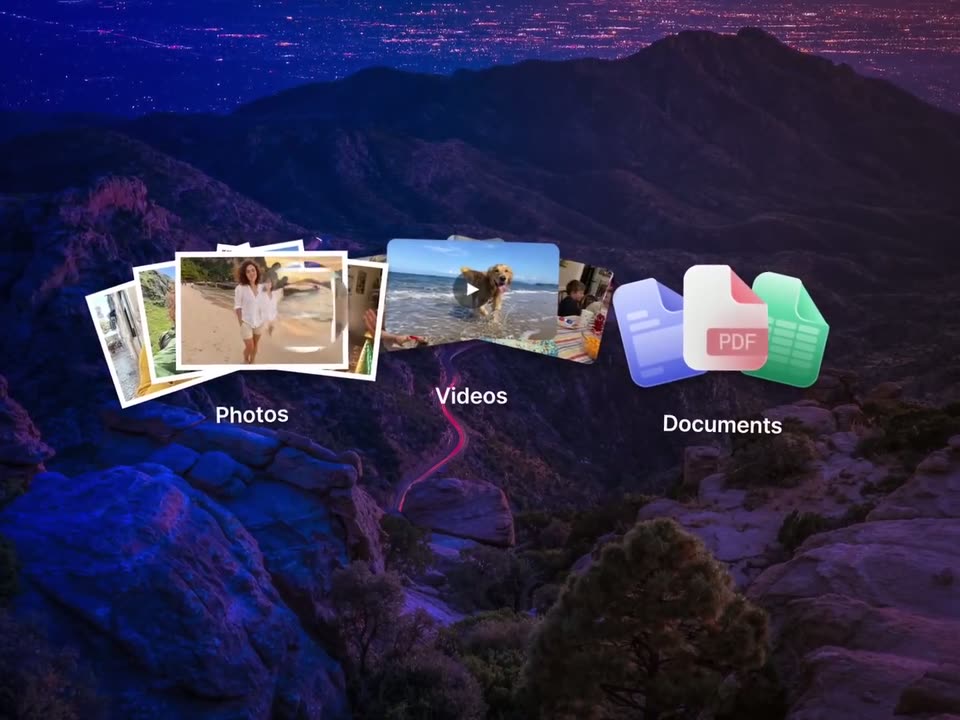
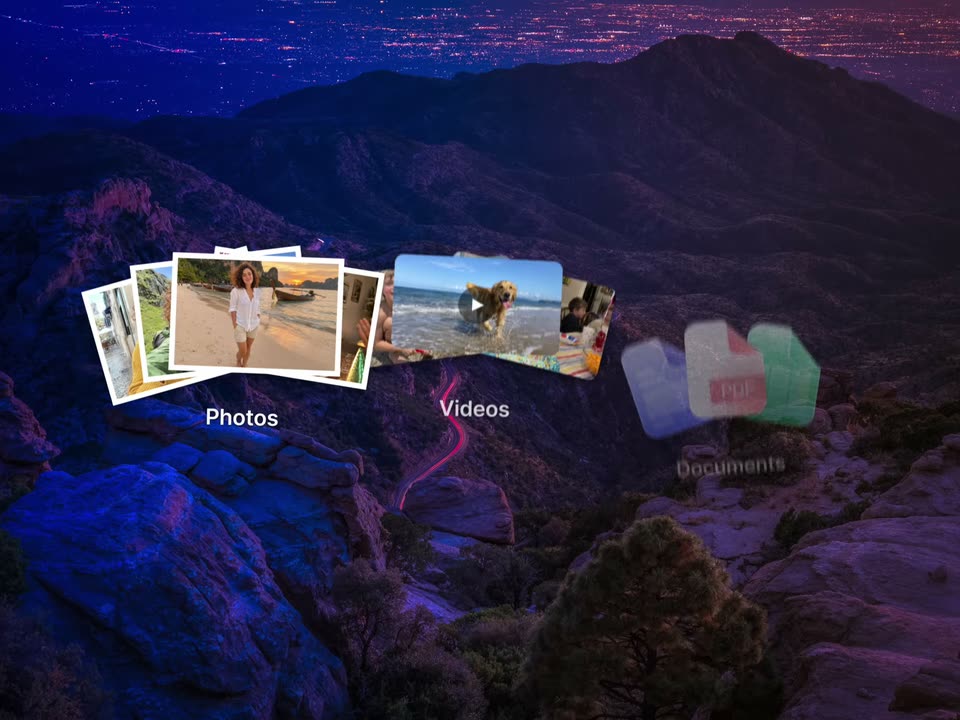
A night mountain landscape with a winding light-trail road and distant city lights fills the frame. Two flat cards float over it: a fanned stack of photos labeled Photos on the left, and a single beach video thumbnail labeled Videos that scales in on the right.
Camera: Static
Night mountain vista with distant city lights. Three floating 3D groups sit mid-frame: a photo fan, a video thumbnail, and document icons, each under a label. A magnifier circle sweeps the photos then the video; both then blur and drift off while the documents hold. A search button rests below.
Techniques: 3D mockup
Camera: Static
Over a night mountain landscape, 3D file icons and a glowing search orb float above the ridge as a blurred photo card whooshes past. The headline “Type what you remember!” scales in word by word, then the camera pushes in, blurring the text and orb.
On-screen text: “Type what you”, “remember!”
Techniques: Kinetic type, UI zoom
Camera: Push in
A dark search panel materializes over a blurred sunset gradient with a floating sphere. The query Dad in December 2025 types into the bar, then chips for Dad and December 2025 plus two Photos thumbnails slide in as the panel sharpens.
Techniques: Kinetic type
Camera: Static
A dark rounded panel with a search field reading “leo falling off a bike” and a zoom slider floats over a blurred photo of a house at sunset. A white cursor drifts down and left from the search bar while the frame stays locked off.
Techniques: Cursor demo
Camera: Static
Close-up of a dark photo app screen: a search field reads “leo falling off a bike” above a zoom slider, while a thumbnail of a boy on a red bike slides in from the left edge as a cursor hovers over it.
Techniques: Cursor demo
Camera: Pull out
A dark two-pane media viewer stays locked. The left pane plays a home video of a child in a blue helmet riding a red bike, then falling onto the grass. The right Info panel lists file details, a transcript, a person tag, a location map, and a source line.
Camera: Static
A zigzag row of beach photos tilts in 3D perspective over a dotted black grid. White web lines connect the images as dark pill tags slide in to label detected items, the central photo staying in color while the rest desaturate.
On-screen text: “Sun, July 19, 2026”, “Okay.”
Techniques: 3D mockup, Parallax
Camera: Static
A zigzag row of beach photos floats in 3D against a dotted black backdrop, some grayed out, with pill labels naming objects; the photos give way to two white document pages that tumble and blur as they rotate.
On-screen text: “Mountains”, “Sun hat”, “Sunglasses”, “Anna”, “Beach”, “Long-tail boat”
Techniques: 3D mockup
Camera: Static
A zigzag fan of white document pages floats in 3D perspective over a black dotted grid, one page showing code with yellow highlights. Gray pill-shaped labels slide and scale in around the pages, each naming a detail read from the documents.
On-screen text: “28 lines read”, “Check-ups · covered”, “Eye tests · every 2 years”, “Glasses · $250 a year”, “Orthodontics · under 18”
Techniques: 3D mockup, Kinetic type
Camera: Push in
White 3D planes sweep across a dark dotted background as pill labels slide away. A rounded card with the host's voice note settles in the center, 'Wi-Fi password' highlighted yellow, above an animating audio waveform.
On-screen text: “Check-ups · covered”, “28 lines read”, “Eye tests · every 2 years”, “Glasses · $250 a year”, “Orthodontics · under 18”, “The keys are in the lockbox by the door, code 4719.”, “Oh, and by the way, the Wi-Fi password is reindeer.”, “Towels are in the cupboard in the hallway.”
Techniques: Kinetic type
Camera: Static
A family photo of a woman, a boy and an older man on a couch sits on a plain background. White rounded-rectangle outlines draw around each face in turn, and a small name label fades in beneath each as the photo gently scales up.
On-screen text: “Anna”, “Leo”, “Dad”
Camera: Push in
A dark photo-library panel sits in 3D perspective on the left, its month grids of family photos lifting out as tilted cards, while three circular avatars labeled Dad, Anna, Leo stack on the right; a selection ring moves down the list as matching photos float forward.
Techniques: 3D mockup
Camera: Static
A small black hub on a wood base rests on a sunlit wooden console. The camera pushes in from a wide shot of the media unit to a tight close-up of the device. Names and a date hold as a static overlay against the dappled wall.
On-screen text: “Dad”, “Anna”, “Leo”, “October 2026”, “9”
Techniques: 3D mockup
Camera: Push in
The camera flies forward through a dark field of glowing nodes and thin connecting lines, the palette shifting from green to purple. White text 'Small, specialized' and 'AI models' fade in at center, then a rounded rectangle badge reading 'Running locally' scales up and tilts.
On-screen text: “Small, specialized”, “AI models”, “Running locally”
Techniques: Particles, Kinetic type, Parallax
Camera: Static
A white bold label “Running locally” sits centered in a glowing purple rounded-rectangle outline on a dark field with faint network lines. The box scales up while the text fades out.
On-screen text: “Running locally”
Techniques: Kinetic type
Camera: Static
A glowing purple rounded-square frame sits centered on a near-black field of faint circuit traces and dots. Inside, a neon line icon draws itself, morphing from a thin open arc into a dome with a wavy base.
Techniques: Morph
Camera: Push in
A black cube NAS enclosure sits on a desk. Four hard drive trays slide out from the front to expose the drives, then slide back in to close the panel.
Techniques: 3D mockup
Camera: Push in
A dark Storage settings panel floats in 3D perspective over a sunset mountain landscape. The drive list updates from four drives to three drives plus SSDs while the camera slowly orbits the panel.
Techniques: 3D mockup, Parallax
Camera: Static
A dark glass storage panel floats in 3D perspective over a sunset mountain range. It rotates to flip from the storage overview to a FailSafe Mode list, the top option outlined in orange, then blurs as it turns away.
Techniques: 3D mockup
Camera: Push in
A tilted close-up of a dark FailSafe Mode screen. The list of RAID options scrolls down slowly, revealing the RAID-Z2 and Mirror rows beneath the orange-highlighted recommended choice, set against a blurred coastal backdrop.
Techniques: 3D mockup
Camera: Pan
The view starts tight on the Earth's horizon with an orange sunrise glow, then zooms out to reveal the Photos map interface: a toolbar with a zoom slider, view toggles and a search field slides in at the top, and a 405 items count slides in at the top left.
Techniques: UI zoom
Camera: Static
A tilted Photos app window sits on a desktop as its 3D globe spins, photo pins popping across the Americas and Europe. The camera pulls back to frame the whole window, then dives into Portugal, the map darkening to street level.
Techniques: 3D mockup, Parallax, UI zoom
Camera: Pull out
A dark map of the Lisbon area sits center frame over a blurred coastal backdrop, marked by rounded photo pins with small count badges. The map pans slowly as a vertical-band blur transition begins at the edges.
Camera: Push in
Three file icons, a red PDF, a blue document and a green spreadsheet, drop one by one into an open orange-to-purple folder. They hover above a dark blue rippling water surface that fills the frame.
Techniques: 3D mockup
Camera: Static
A gradient orange-to-purple folder icon floats over a dark blue water surface. The icon tilts and rises while white invoice pages tumble out below it in 3D perspective.
Techniques: 3D mockup
Camera: Static
Three white documents, an invoice, a letter and a spreadsheet, float in a row in 3D perspective over a dark blue rippled surface, a pink gradient bar at the top. They ease into place with soft drop shadows and a brief motion blur.
Techniques: 3D mockup
Camera: Push in
A white invoice is centered on a dark blurred background, a markup toolbar floating above it. The cursor signs the document in blue cursive as the frame zooms in on the signature line.
Techniques: Cursor demo, UI zoom
Camera: Pan
A white letter page fills a dark document viewer, its toolbar and orange Save button across the top, the word Sunday highlighted. The body text then dissolves into soft blurred lines as the frame defocuses.
Camera: Static
A spreadsheet window on a dark backdrop shows a Lisbon trip budget table with item and cost columns. The frame eases out to a wider view as a cursor moves to the cost column and selects the €240 cell.
Techniques: Cursor demo
Camera: Pull out
A blue rounded-square app icon with a white umbrella mark starts large and out of focus, then pulls into sharp focus and shrinks toward the center. The word Umbrel fades in beneath it on a plain white background.
On-screen text: “Umbrel”
Camera: Static
A split screen shows the Umbrel app on an iPhone (left, labeled iOS) and on a Mac window (right, labeled macOS). The two panels crossfade focus, the right side sharpening then the left, over a light background.
On-screen text: “iOS”, “macOS”
Techniques: Split screen, 3D mockup
Camera: Static
A 2x2 grid of device screens shows the same app on an iPhone, iMac, Android phone and Windows laptop, each with a dark device card. The bottom two panels fade in after the top two, then the whole grid slowly scales up. Platform labels sit in the top-left of each panel.
On-screen text: “iOS”, “macOS”, “Android”, “Windows”
Techniques: Split screen
Camera: Static
A dark, softly blurred background with warm brown edges holds a centered two-line headline. “Plus so” scales in first, then “much more.” follows on the second line, each arriving with a slight blur, on a locked-off frame.
On-screen text: “Plus so”, “much more.”
Techniques: Kinetic type
Camera: Static
A dark screen holds the white headline “Voice memos, transcribed” above a voice-memo player card. Transcription lines fade in one after another while the orange progress bar advances, and the whole composition slowly scales up over a row of app icons.
On-screen text: “Voice memos, transcribed”
Techniques: UI zoom
Camera: Static
A vertical video player is centered on black, showing a curly-haired woman speaking to the camera with a caption at the bottom. The headline 'Videos, captioned' sits locked above it, with icons at the top right and a thumbnail filmstrip along the bottom.
On-screen text: “Videos, captioned”
Camera: Static
A dark settings panel for a virtual machine is shown in a locked-off close-up. A white cursor moves to the Zigbee USB dongle row and flips its toggle from off to on. A glowing white headline reads across the top.
On-screen text: “USB and bridged networking in Machines”, “Okay, so I finally”, “made it to Lisbon.”, “II”
Techniques: Cursor demo
Camera: Static
A black smartphone mockup sits centered on a black background, its screen showing a Windows desktop above a virtual keyboard. A white headline reads across the top, overlapping the device's upper edge, and the frame holds still.
On-screen text: “A touch console for Machines”
Camera: Static
A dark settings screen with an Accessibility popup centered, the headline 'Now comes in all sizes' above it. A cursor drags the text size slider from left to right while the list stays still.
On-screen text: “Now comes in all sizes”
Techniques: Cursor demo
Camera: Static
A dark search panel hovers over a blurred background below a glowing orb. The fixed headline 'Search in any language' sits at top while the panel's content updates from a Files list to a row of night-street photo thumbnails.
On-screen text: “Search in any language”
Camera: Static
A black screen holds white text that builds word by word into the line “Oh, and one more thing,” matching the voiceover.
On-screen text: “Oh, and one more thing.”
Techniques: Kinetic type
Camera: Static
In a locked-off frame on a cream background, the headline fades in from blur above two soft blob mascots, one blue, one red with a sprout. They slide together, hug, and swap small app icons, then colorful blobs pop in around the edges.
On-screen text: “Oh, and”, “Meet Murmur.”
Camera: Static
Angled close-up of a display showing the Murmur app store page. A carousel of promo cards auto-scrolls left, pushing the blue card out and centering the green card, while the page header, metadata and about section stay still.
On-screen text: “Meet Murmur.”
Camera: Pan
A 3D-tilted settings screen titled Connect a model crossfades from an expanded ChatGPT option to an expanded local model option, the cursor glides down and hovers over the Download Qwen3.5 4B button.
Techniques: 3D mockup, Cursor demo
Camera: Push in
A split screen shows two browser windows: a dark Hermes Agent profiles list on the left and a light murmur chat app on the right. The right panel fills in with a search bar and a list of agent chats as a cursor moves to hover over Atlas.
Techniques: Split screen, Cursor demo
Camera: Pull out
The Murmur chat interface wipes in from behind a dark left-edge mask, sharpening from a blurred offset into a crisp two-panel view. The agent list sits left, the Atlas conversation right, over a soft blurred echo of the same screen.
Techniques: Masking
Camera: Push in
A light chat interface fills the frame. On the left, a list of agent rows (Atlas, Basil, Juniper, Ginger, Hermes) with colored avatars scrolls as a new Lisbon weekend entry slides in. The right-hand transcript panel blurs and shifts, hinting at a transition.
Camera: Pull out
The app window, sidebar and all, sits soft-focused at first, then the view pushes in until the Lisbon weekend group chat fills the frame, its agent replies and bulleted itinerary now sharp.
Techniques: UI zoom
Camera: Push in
A light chat window titled Atlas shows a user bubble asking to install Jellyfin. The reply text, listing organized library stats, fades in from a translucent ghost to solid black. A Call button sits top right.
Camera: Push in
On a dark background with a soft blue and purple glow, the question builds word by word from left to right. The frame stays locked off while the line completes and holds.
On-screen text: “Don't feel like typing?”
Techniques: Kinetic type
Camera: Static
Macro close-up of a dark chat interface, tilted in perspective with shallow depth of field. A white cursor glides in and hovers over the purple Call button while the blurred prompt below reads organize my whole movie collection?
On-screen text: “Don't feel like typing?”
Techniques: Cursor demo
Camera: Static
A dark call screen starts out of focus with a white cursor, then racks into focus to reveal a glowing blue ghost avatar, a 0:01 timer and call controls at the bottom. The word Hey. fades in below the avatar as the timer ticks.
On-screen text: “Call”, “ize my whole movie collection?”, “0:01”
Techniques: UI zoom
Camera: Pull out
A dark call interface centers a glowing blue blob avatar. A transcript types out below as the timer ticks. The avatar's eyes close into a smile, its label swaps to I think you just did., then the header and controls fade, leaving the blob on black.
Techniques: UI zoom
Camera: Push in
A 3D studio set with a black backdrop and wooden platform where colorful ghost-like blobs hop into a line; the center blue blob morphs into a scalloped umbrella shape as the others settle with cute faces. A camera sits out of focus in the foreground.
Techniques: Morph
Camera: Push in
Eight small white mascot figures with closed eyes stand in two rows on a white wooden plank, a silver umbrella behind them on a dark backdrop. The 3D scene settles into a tilted photo card with a white border on black.
Camera: Pull out
A tilted Polaroid frame on black holds a grayscale 3D render of eight small blob creatures with closed eyes sitting on a wooden bench beneath a metal arch. The whole card sways gently, rotating a few degrees, while the creatures stay still.
On-screen text: “HeM”
Camera: Pull out
A static dark space plate shows a planet's glowing horizon across the bottom. Centered white text reads Out now., then is replaced by the URL umbrel.com with a small disclaimer caption at the bottom, before the frame fades to black.
On-screen text: “Out now.”, “umbrel.com”, “Some features shown may vary by hardware.”
Camera: Static