
3:34
Explore
00:00:00 / 01:13:12
- Length
- 1:13
- Scenes
- 27 · 2.7 s avg
- Product on screen
- 0:00
- Features shown
- 2
- Call to action
- 1:04 · 87%
- Voiceover
- Yes
- Views
- 200K on X
as of November 21, 2026
Treg’s 1:13 launch film runs 27 scenes, about 2.7 s each. The product is on screen from the first frame and 2 features are revealed. The call to action lands at 1:04 (87% in), over a voiceover. The video is built as a terminal story: a pixel title card flashes the command, a GTA 6 launch anecdote sets up the flood of posts, then a Claude Code window types /doomscroll and the interface filters 272 clips into a ranked top 12 report before generalizing to any topic. The style is dark near-black with peach pixel display type and monospace UI, driven by sweeping scan lines, count-up counters, and grid snap-ins at a steady 124 bpm pace.
No filming indicatedEstimated needs: 2 capture groups — your screens or recordings · 1 official logo — reused across the film · 1 graphic passage — draw or supply
Is this your launch? to your site or press kit.
More like this




Similar soundtrack
Films whose music sounds like this one, voice left out
1:25

0:57

2:17

Sawyer Covington - This is what having a creative team of 100 could look like. Introduci
General Context · Electronic
Jason Zhou - Introducing @treg_ai /doomscroll skill My agent watched 272 GTA-6 ti, scene by scene
· 27 scenes as text
01 · Product intro · 0:00–0:00
A dark blurred background holds a pixel-font line: a small black icon with two white dots, then white 'treg', orange '/doomscroll', and 'any topic' inside a dark box with a thin green underline. The line sits centered and stays still.
On-screen text: “treg /doomscroll any topic”
Camera: Static
02 · Problem · 0:00–0:01
On a near-black background with a faint red glow, white pixelated text reads “GTA 6” over “came out last night.” The frame is locked off; the type begins blurred and pulls into sharp focus over the first second.
On-screen text: “GTA 6”, “came out last night.”
Camera: Pull out
03 · Problem · 0:01–0:04
A peach pixel counter climbs from 45 to 2712 above the white pixel headline 'posts about tips & tricks.' Below, a bar chart of post thumbnails grows left to right along a LAUNCH to NOW timeline as two featured cards pop up and a white playhead line sweeps across.
On-screen text: “posts about tips & tricks.”
Techniques: Kinetic type
Camera: Pan
04 · Feature reveal · 0:04–0:06
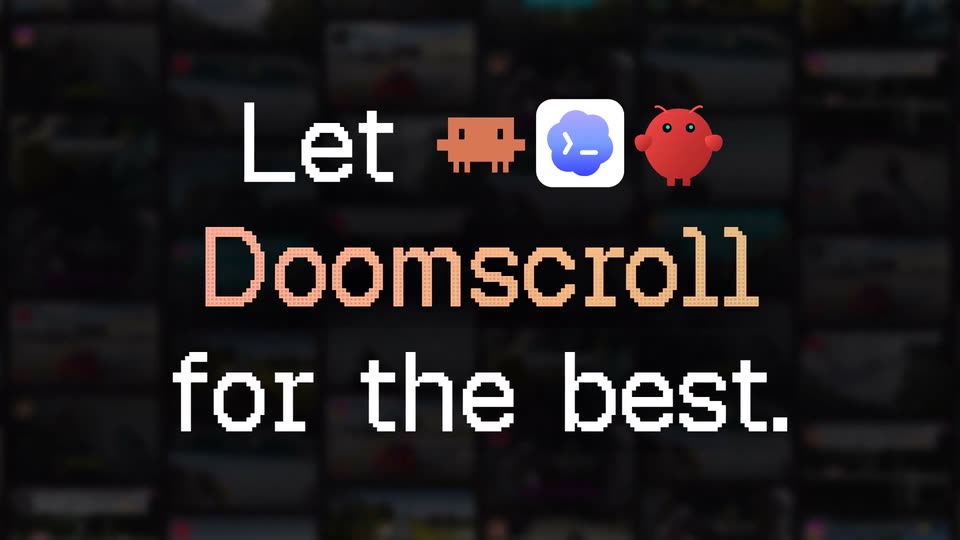
A centered pixel-font headline appears over a dark, blurred grid of video thumbnails. The first line reads “Let” with three inline icons: an orange pixel invader, a white app icon with a blue blob, and a red invader. Below, “Doomscroll” in peach and “for the best.” in white hold static.
On-screen text: “Let Doomscroll for the best.”
Techniques: Kinetic type
Camera: Static
05 · Feature reveal · 0:06–0:10
On a dark background, a pixel monospace command line reads treg /doomscroll in white and orange. A rounded chip on the right cycles topics, ending on a GTA logo and GTA 6 inside a green outline, then the line settles into a Claude Code terminal window with a prompt.
On-screen text: “treg /doomscroll”, “any topic”, “tesla”, “GTA 6”
Techniques: Kinetic type
Camera: Static
06 · Feature reveal · 0:10–0:14
A dark Claude Code terminal bar types the command /doomscroll GTA 6 hacks & tips with a green --since 6h chip. The bar shrinks upward, and a status line appears below with a progress bar, then the text treg is pulling posts from 4 platforms.
Techniques: Kinetic type
Camera: Pull out
07 · Feature reveal · 0:14–0:15
A dark Claude Code terminal floats over a blurred grid of video thumbnails. A typed command and a filling yellow progress bar sit above a status line. The window slides up as a result line with a username and post title slides in at the bottom.
Camera: Pull out
08 · Feature reveal · 0:15–0:18
A dense grid of small video thumbnails fills the frame. A bright yellow vertical line sweeps across the columns left to right, while a counter in the bottom bar ticks up and the caption line cycles through clip titles. White text reads 'watching all 272 clips' at the top.
On-screen text: “watching all 272 clips”
Camera: Pull out
09 · Feature reveal · 0:18–0:19
A dense grid of small video thumbnails fills the frame. A thin green vertical line sweeps left to right, lighting up tiles with green borders and checkmarks as it passes. A top headline and a bottom bar with a caption and a ticking counter stay fixed.
On-screen text: “watching all 272 clips.”, “People are digging for the Metaboy 3.0 glitch animations”
Camera: Static
10 · Feature reveal · 0:19–0:23
Scattered video thumbnails with glowing green borders drift over a dark feed, then snap into a tidy 3x4 grid as the top-left headline switches from 'watching all 272 clips.' to '12 worth watching.'
On-screen text: “watching all 272 clips.”, “12 worth watching.”
Camera: Push in
11 · Feature reveal · 0:23–0:24
A dark grid of twelve video thumbnails with view counts fills the screen under a stats line. The grid dims as a glowing phone mockup in 3D perspective pops up center, showing a car clip, then swaps to a boat clip.
Techniques: 3D mockup
Camera: Static
12 · Feature reveal · 0:24–0:30
A dark grid of video thumbnails sits behind a large left player playing a GTA 6 clip: a truck drives a bridge, then clips through the rail into the water as yellow captions flash. The frame pulls back to reveal the full feed, the highlighted card reading 'THE GLITCH #3'.
On-screen text: “THE GLITCH”, “#3”, “The launch-day glitches”
Techniques: UI zoom
Camera: Pull out
13 · Feature reveal · 0:30–0:31
A dark grid of video thumbnails fills the frame. One card, outlined in green, scales up to the foreground as the rest of the grid dims, while a pink rank number and the word Secret pop in beside it.
On-screen text: “#2”, “Secret”
Techniques: UI zoom
Camera: Static
14 · Feature reveal · 0:31–0:40
A vertical GTA 6 clip of a jet-ski glitch plays in a phone frame on the left, over a dark grid of dimmed thumbnails. On the right, a yellow label, a large pink #2, the white title Secret dog island, a handle and a view count sit in place.
On-screen text: “THE EASTER EGG”, “#2”, “Secret dog island”, “@spectrexgaming”, “151K views”
Camera: Static
15 · Feature reveal · 0:40–0:41
A dark interface shows a grid of video thumbnails with a stats line at top right; green borders mark two cards. The view then reframes onto one card, which expands into a centered video of a person in a shopping cart.
Techniques: UI zoom
Camera: Static
16 · Feature reveal · 0:41–0:48
A dimmed grid of video thumbnails sits behind a vertical phone player on the left, where a man pries a grate off a wall and a green $1,353 pops up. On the right, a pink pixel #1 and white Secret money stash label the clip, and 14K views fades in below the handle.
On-screen text: “THE MONEY TIP”, “#1”, “Secret money stash”, “@millzaatv”, “14K views”
Camera: Static
17 · Feature reveal · 0:48–0:49
A vertical gameplay clip of a man crouching by a wall scrolls left inside a dark feed, the MillzaaTV watermark and a green $1,353 counter sliding within the panel as the next card peeks in at the right edge.
Camera: Pull out
18 · Feature reveal · 0:49–0:52
A dark terminal window shows a doomscroll command and its report-ready line. Below it, a report card titled Top GTA 6 easter eggs slides up and scrolls, revealing two rows of video thumbnails with captions and a footer line.
Camera: Pull out
19 · Feature reveal · 0:52–0:53
Large orange pixel text reading /doomscroll any topic sits centered over a dimmed product interface showing a doomscroll report with a row of video thumbnails. The text stays static across the shot.
On-screen text: “/doomscroll”, “any topic”
Camera: Static
20 · Feature reveal · 0:53–0:55
A dark terminal window with a doomscroll report sits behind a large peach pixel headline. The headline slides up to the top as the window brightens into view, and a left column of topic labels fades in with one row boxed in green.
On-screen text: “/doomscroll any topic”
Techniques: Kinetic type
Camera: Pull out
21 · Feature reveal · 0:55–0:56
A pixel-font orange headline holds at the top while a left topic list scrolls up, the green selection box hops to the next row, and the terminal command plus right results panel swap to the new topic.
On-screen text: “/doomscroll any topic”
Camera: Static
22 · Feature reveal · 0:56–0:57
A black frame holds a peach pixel headline reading /doomscroll any topic. A left column lists saved topics, the new AI launches row boxed in green, while a flat Claude Code window on the right shows the command and six numbered result cards.
On-screen text: “/doomscroll any topic”
Camera: Static
23 · Feature reveal · 0:57–0:59
A pixel orange headline reads /doomscroll any topic over a flat dark interface. On the left a gray topic list scrolls up, highlighting F1 Las Vegas GP in a green box. On the right a terminal prints a command, then a results card fills with six F1 thumbnails.
On-screen text: “/doomscroll any topic”
Camera: Static
24 · Feature reveal · 0:59–1:02
Under a static peach pixel headline, a topic list scrolls on the left with a green pill tracking the selection, while a terminal on the right morphs from sneaker drops to any topic and its report cards repopulate.
On-screen text: “/doomscroll any topic”, “GTA 6 easter eggs”, “new AI launches”, “F1 Las Vegas GP”, “sneaker drops”, “your competitors”, “K-pop comebacks”, “your brand on Reddit”, “any topic”, “any window”
Techniques: Kinetic type, Morph, Split screen
Camera: Static
25 · Feature reveal · 1:02–1:04
A peach pixel headline reads /doomscroll any topic above a Claude Code window showing the command and a six-card results panel. The left search bar and window fade as a full-screen grid of video cards fills the frame, one card outlined in green.
On-screen text: “/doomscroll any topic”, “K-pop comebacks”, “your brand on Reddit”, “any topic”, “any window”
Camera: Static
26 · CTA · 1:04–1:04
A blank white frame gives way to a black rounded-square app icon that pops into the center, paired with a blurred wordmark appearing to its right. The icon holds two overlapping rounded squares, one black and one white.
Camera: Static
27 · CTA · 1:04–1:13
Centered treg logo on white, surrounded by a fading grid of app icons, the tagline swapping between '4,000+ data & tools' and 'No subscription. Pay as you go.' Then a monospace '/doomscroll skill for' headline with four pixel faces and a terminal bar typing the install command.
On-screen text: “4,000+ data & tools”, “No subscription. Pay as you go.”, “/doomscroll skill for”, “$ set up treg with the doomscroll skill”
Techniques: Kinetic type
Camera: Static