1:00
Explore
Mads Lunau - Today, we’re launching Parahelp 3. With Parahelp 3, we’re doubling d
Parahelp · Jun 2026 · 3:34 · AI-annotated
- Length
- 3:34
- Scenes
- 66 · 3.2 s avg
- Product on screen
- 0:09
- Features shown
- 3
- Call to action
- 3:28 · 97%
- Voiceover
- Yes
00:00:00 / 03:34:18
Parahelp’s 3:34 launch film runs 66 scenes, about 3.2 s each. The product shows up at 0:09 and 3 features are revealed, with social proof. The call to action lands at 3:28 (97% in), over a voiceover. A product launch video that alternates a talking-head presenter in a bright office with clean screen recordings, keeping a small webcam inset of the presenter in the corner during every demo to maintain presence. Emphasis is carried by typographic title cards, sliding notification cards, and slow zooms into interface text rather than flashy motion.
Footage neededEstimated needs: 4 capture groups — your screens or recordings · 1 official logo — reused across the film · 8 filmed passages — shoot, supply or replace · 1 graphic passage — draw or supply · 1 3D passage — build or supply
Is this your launch? to your site or press kit.
More like this

Mads Lunau - Today, we’re launching Parahelp 3. With Parahelp 3, we’re doubling d, scene by scene
· 66 scenes as text
01 · Problem · 0:00–0:09
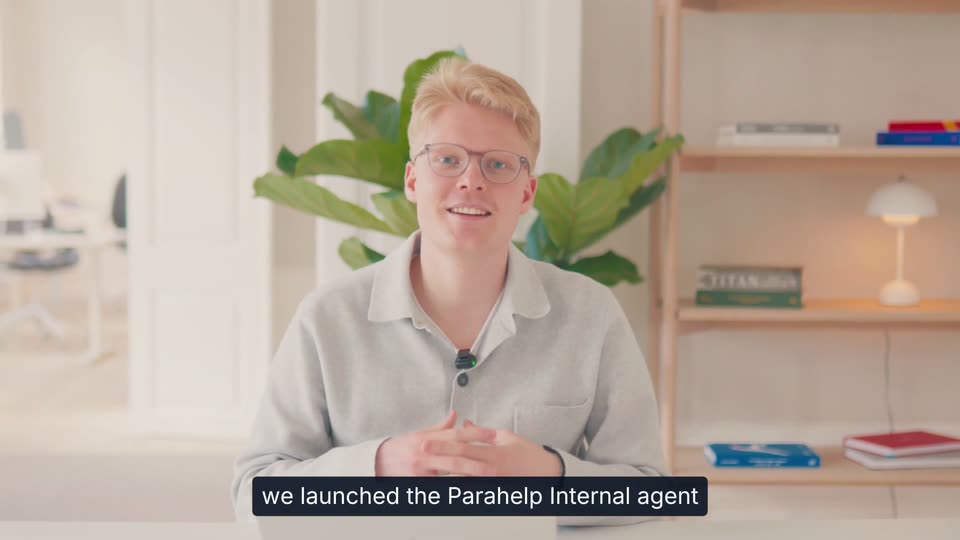
A blond man with glasses sits at a desk in a bright office, speaking to camera and gesturing with his hands. A white lower third labels him Mads, COO & Co-founder, at the right, while white captions on a dark bar track his speech at the bottom.
On-screen text: “Mads”, “COO & Co-founder”, “companies are growing faster than ever”, “and it's often at the expense”, “of delightful customer support”, “that's why I'm really excited to launch Parahelp 3”
Camera: Pull out
02 · Product intro · 0:09–0:10
A blond person with glasses sits at a desk in a bright room with a plant and bookshelf, gesturing while speaking. A large white title reads Parahelp 3 across the chest, the 3 entering after the first frame, with a subtitle bar at the bottom.
On-screen text: “that's why I'm really excited to launch Parahelp 3”, “Parahelp 3”
Techniques: Kinetic type
Camera: Static
03 · Product intro · 0:10–0:11
A heavily blurred shot of a person in a bright room fills the frame. The white title 'Parahelp 3' with a small blue dot to its left sits centered and stays locked off for the full duration.
On-screen text: “Parahelp 3”
Camera: Static
04 · Social proof · 0:11–0:13
On a soft blue gradient, a white “Used by” label holds left of center while a brand mark and name cycle in to its right: Cursor, then Framer, then Quo, then HeyGen. The label stays fixed as each logo and word take its place.
On-screen text: “Used by CURSOR”, “Used by Framer”, “Used by Quo”, “Used by HeyGen”
Camera: Static
05 · Product intro · 0:13–0:14
A blonde person in glasses and a light collared shirt sits at a desk, speaking and gesturing with fingertips pressed together. A bright room with a leafy plant and a wooden bookshelf fills the background. A dark caption bar holds text at the bottom of the frame.
On-screen text: “an AI customer support team”
Camera: Static
06 · Product intro · 0:14–0:18
Black cursor arrows drift and fade across a pale background, a few carrying small colored app icons with red dots, while thin diagonal lines sweep the frame and a dark caption bar at the bottom updates its text.
On-screen text: “an AI customer support team”, “that automatically evolves with your company”
Techniques: Particles
Camera: Pan
07 · Feature reveal · 0:18–0:20
A person with short blonde hair and glasses sits at a desk, gesturing with both hands while speaking to camera. A green plant and a wooden bookshelf fill the bright background. White subtitles on a dark bar appear at the bottom of the frame.
On-screen text: “a few months ago”, “we launched the Parahelp Internal agent”, “that automatically evolves with your company”
Camera: Static
08 · Feature reveal · 0:20–0:24
On a light gray screen, a cursor moves over an empty chat input, then a prompt about Datadog logs types in beside a blue send button. The line morphs into a white message card from Aaron, with a Working spinner below. Dark caption bars at the bottom carry the voiceover.
On-screen text: “we launched the Parahelp Internal agent”, “which our customers could chat with”, “to build and improve their AI”
Techniques: Cursor demo, Morph
Camera: Static
09 · Feature reveal · 0:24–0:33
A pale agent chat shows Aaron's prompt card, then a stack of action rows (search, create tool, update memory, run tests) builds downward while the frame zooms in on the list. Bottom subtitles swap phrase by phrase.
On-screen text: “to build and improve their AI”, “since then we've seen our customers build agents”, “that can resolve much more complex tickets”, “much faster”
Techniques: UI zoom
Camera: Pull out
10 · Problem · 0:33–0:35
A person with short blonde hair and glasses speaks to camera in a bright room, gesturing with both hands. A leafy green plant and a wooden bookshelf with a lamp sit behind them. A white subtitle on a dark bar runs along the bottom.
On-screen text: “but we've also kept hearing the same problem”
Camera: Static
11 · Problem · 0:35–0:42
A chat input field on a plain off-white background types itself out: a caret blinks, then '??????', 'Should I' and 'What should I do?' appear letter by letter beside a circular up-arrow send button. A dark subtitle bar at the bottom shows the voiceover lines.
On-screen text: “which is that they still had to manually identify”, “what to build and improve”
Techniques: Kinetic type
Camera: Static
12 · Problem · 0:42–0:44
A blond person with glasses sits at a desk in a bright room with a large plant and wooden bookshelf behind, talking to the camera and gesturing with both hands. White subtitles on a dark rounded box swap at the bottom of the frame.
On-screen text: “What should I do?”, “that's especially hard”, “when you're a fast moving tech company”
Camera: Static
13 · Problem · 0:44–0:46
A Github notification card floats centered on a blue gradient. A Slack notification card slides in from above, nudging the Github card down. A black caption bar at the bottom swaps its white text.
On-screen text: “when you're a fast moving tech company”, “where your products and policies constantly change”
Camera: Static
14 · Problem · 0:46–0:47
A stacked list of app notifications (Notion, Slack, Github) sits on a blue gradient background. The feed scrolls upward as a new Linear card slides in from the top, while a dark caption pill at the bottom holds the subtitle text.
On-screen text: “where your products and policies constantly change”
Camera: Static
15 · Problem · 0:47–0:47
A vertical feed of light notification cards from Github, Linear, Notion and Slack scrolls on a dark blue field as a new entry arrives at the top. A black caption bar at the bottom holds the line about products and policies changing.
On-screen text: “where your products and policies constantly change”
Camera: Static
16 · Problem · 0:47–0:48
A vertical feed of rounded notification cards, each tagged with an app icon and name such as Notion, Slack, Linear and GitHub, scrolls upward across a dark blue gradient. A dark caption bar with white text stays fixed along the bottom edge.
On-screen text: “where your products and policies constantly change”
Camera: Static
17 · Feature reveal · 0:48–1:00
A blond man with glasses in a gray sweater sits at a desk in a bright room, speaking to camera and gesturing. Four white circular app icons for Slack, Linear, GitHub and Notion pop in across the lower frame while caption lines cycle at the bottom.
On-screen text: “with Parahelp 3”, “the internal agent lives in your tools”, “such as Slack Linear Github Notion”, “and automatically evolves”, “with your customer agent as your company changes”
Camera: Pull out
18 · Feature reveal · 1:00–1:06
Two browser windows sit side by side: a Parahelp admin chat left, a Slack announcements thread right, with a small video of a man in the lower-left corner. The layout holds still while white subtitle captions swap on dark bars at the bottom.
On-screen text: “as an example”, “I just announced to the team that we have migrated”, “our customers to Parahelp 3”
Camera: Static
19 · Feature reveal · 1:06–1:12
Side-by-side product screens show the Parahelp admin app and a Slack thread announcing the 3.0 migration, with a small webcam feed of the presenter in the lower-left corner. A dark caption bar at the bottom swaps lines of text, and the frame zooms in on the Slack thread at 5s.
On-screen text: “our customers to Parahelp 3”, “and in the message in an internal Slack channel”, “I mentioned some key features”
Techniques: UI zoom
Camera: Push in
20 · Feature reveal · 1:12–1:12
A Slack thread lists Parahelp 3.0 features beside a partial document window and a small presenter video in the lower left. A dark caption pill at the bottom reads the line. A cursor rests on the message. The frame holds static.
On-screen text: “I mentioned some key features”
Techniques: Cursor demo
Camera: Static
21 · Feature reveal · 1:12–1:18
A close-up of a product thread zooms out to reveal a two-panel interface, with a small webcam video of a presenter in the corner. A cursor clicks a bullet point under an important note as bottom captions read the line about the scale plan.
On-screen text: “and then also an important note”, “where I said that only customers on our scale plan”
Techniques: UI zoom, Cursor demo
Camera: Pull out
22 · Feature reveal · 1:18–1:24
Side by side, a Parahelp admin window (with a small video of a person at lower left) and a Slack thread window sit on a light gray background. A cursor drifts across the Slack text as a dark caption bar at the bottom swaps through phrases.
On-screen text: “can connect Parahelp to Github”, “and in the case”, “where a customer show interest in upgrading”
Techniques: Split screen, Cursor demo, Kinetic type
Camera: Static
23 · Feature reveal · 1:24–1:36
A desktop recording shows the Parahelp admin app beside a Slack thread on the 3.0 announcement, with a webcam inset of a man talking in the corner. The view zooms into the thread as the cursor clicks the #sales link, pulls back, then zooms onto the app's reply.
On-screen text: “then”, “the team member should ping me in this Slack channel, sales”, “right after I did this”, “Parahelp automatically picks up on this information”, “and performs the relevant actions”
Techniques: UI zoom, Cursor demo
Camera: Push in
24 · Feature reveal · 1:36–1:38
A two-pane product screen: a Notion doc and a video call of a man on the left, a Slack thread with a drafted announcement on the right. A cursor rests on the message. A black caption bar at the bottom displays the voiceover in white text.
On-screen text: “and performs the relevant actions”, “to keep both the customer support agent”
Techniques: Cursor demo
Camera: Static
25 · Feature reveal · 1:38–1:40
A product screen shows a Notion document on the left and a Slack message on the right, with a small video of a man in the lower corner. A dark caption bar at the bottom displays phrases in sequence to match the narration.
On-screen text: “to keep both the customer support agent”, “Notion docs up to date”
Techniques: Kinetic type
Camera: Static
26 · Feature reveal · 1:40–1:41
A Notion page listing customer support updates fills the frame, a small video call window of a bespectacled man sits in the lower left, and a dark caption bar reads at the bottom. A mouse cursor rests over the page body.
On-screen text: “and our Notion docs up to date”
Camera: Static
27 · Feature reveal · 1:41–1:42
A desktop view shows the Parahelp admin chat on the left and a Notion thread of drafted updates on the right, which scrolls up slightly. A small webcam tile of a woman at a desk sits in the lower left, and a dark caption bar reads across the bottom.
On-screen text: “and our Notion docs up to date”
Camera: Static
28 · Feature reveal · 1:42–1:44
Two overlapping Paralelp admin windows fill a light backdrop, a small video of a man speaking sits in the lower-left corner. A cursor drifts from the right-hand thread view to the left chat panel, and a caption appears at the bottom.
On-screen text: “if we click into the chat”
Techniques: Cursor demo
Camera: Static
29 · Feature reveal · 1:44–1:46
A Parahelp chat interface fills the frame, showing a document of agent instructions with a hand cursor hovering over the body text. A small webcam feed of a presenter sits in the lower-left corner, and a second window peeks out on the right.
On-screen text: “and that the”
Techniques: Cursor demo
Camera: Static
30 · Feature reveal · 1:46–1:50
A browser window with the Parahelp chat sits centered over a second doc window, with a small live-action presenter in the bottom-left corner. A cursor hovers over the chat body while a dark caption bar at the bottom swaps its text.
On-screen text: “and that the”, “internal agent started to perform this work”, “it's started from a continuous task”
Techniques: Cursor demo
Camera: Static
31 · Feature reveal · 1:50–1:52
A browser window shows a Parahelp chat task, with a small video of a man in the lower left and a dark caption bar below. A cursor rests over the text while the screen stays static.
On-screen text: “it's started from a continuous task”
Camera: Static
32 · Feature reveal · 1:52–1:54
A flat view of the Parahelp admin chat interface fills the frame, with a second browser window peeking out on the right and a small live-action clip of a gesturing presenter in the lower-left corner. A dark caption bar at the bottom holds the line while the interface stays static.
On-screen text: “and in a continuous task has a specific trigger”
Camera: Static
33 · Feature reveal · 1:54–1:56
A browser window of the Parahelp admin interface fills the frame, with a second window peeking from the right and a small webcam of a man gesturing in the lower left. A dark caption bar at the bottom swaps its text as the man speaks.
On-screen text: “and in a continuous task has a specific trigger”, “in it can be scheduled to a specific time”
Camera: Static
34 · Feature reveal · 1:56–1:58
A static browser window of the Parahelp Admin interface shows a chat message about scanning #company-announcements beside a document panel. In the bottom-left, a man with glasses signs while a dark caption pill reads “either a schedule or certain events”.
On-screen text: “either a schedule or certain events”
Camera: Static
35 · Feature reveal · 1:58–2:06
A browser window showing the Parahelp admin chat sits in front of a second, darker window, while a small video of a man in a beige shirt talks in the lower-left corner. A dark caption bar at the bottom swaps from one line to another.
On-screen text: “and certain tools that it triggers on”, “when a Github PR is merged or Slack message is posted”
Camera: Static
36 · Feature reveal · 2:06–2:08
A locked-off browser view of the Parahelp admin interface, with a small live-action inset of a man in glasses at the lower left and a second window cut off at the right. A dark caption bar holds white text at the bottom.
On-screen text: “and then it runs with a specific initial prompt”
Camera: Static
37 · Feature reveal · 2:08–2:12
A ParaHelp chat window fills the frame, showing agent instructions with a cursor on the text. A second window peeks in from the right and a gesturing presenter sits in the lower-left corner. A dark caption bar at the bottom swaps lines as the view zooms into the document.
On-screen text: “and then it runs with a specific initial prompt”, “in this case the prompt is that it should”
Techniques: Cursor demo, UI zoom
Camera: Push in
38 · Feature reveal · 2:12–2:14
A light browser window shows a document page with a message from Parahelp Admin, while a small video of a bespectacled man speaks in the lower left. A dark caption bar at the bottom carries the voiceover, and a text caret blinks in the body.
On-screen text: “in this case the prompt is that it should”
Camera: Static
39 · Feature reveal · 2:14–2:18
A browser window displays a Parahelp Admin chat prompt about scanning company announcements, with a small video inset of a red-haired man in glasses at the lower left. A dark rounded caption bar at the bottom swaps its text to follow the voiceover.
On-screen text: “identify relevant information and announcements”, “and then draft changes to keep our customer support”
Camera: Static
40 · Feature reveal · 2:18–2:22
A browser window shows a Parahelp chat doc with an admin message, while a small video inset of a bespectacled man sits in the lower-left. A dark caption bar at the bottom cycles through phrases as a text caret moves across the document.
On-screen text: “and then draft changes to keep our customer support”, “agent configurations”, “and tools as well as Notion docs up to date”
Camera: Static
41 · Feature reveal · 2:22–2:29
A close-up of the ParaHelp chat panel shows an admin instruction message; a hand cursor clicks to expand a 'Worked for 20 minutes' line, revealing file and command counts. A small video of the presenter sits in the lower-left corner, then the frame zooms out to the full browser window.
On-screen text: “and tools as well as Notion docs up to date”, “based on this it goes ahead and works for 20 minutes”, “where it's first of all”
Techniques: Cursor demo, UI zoom
Camera: Pull out
42 · Feature reveal · 2:29–2:30
A 3D perspective layout holds the Parahelp admin browser window flat at center, a Notion document panel angled to the right, and a video call tile of a person in the lower left. A dark caption box sits at the bottom.
On-screen text: “where it's first of all”, “understands the current state of the”
Techniques: 3D mockup
Camera: Static
43 · Feature reveal · 2:30–2:32
A locked-off view of the Parahelp admin interface shows a chat panel and a Notion document side by side, with a small video of a woman in the lower left. A dark caption bar at the bottom reads “understands the current state of the”.
On-screen text: “understands the current state of the”
Camera: Static
44 · Feature reveal · 2:32–2:34
A locked-off screen recording shows the Parahelp admin chat in a browser window, a second document window behind it on the right, and a small talking-head video in the lower left. Subtitle bars at the bottom read the narration in sequence.
On-screen text: “understands the current state of the”, “the agent and Notion docs”
Camera: Static
45 · Feature reveal · 2:34–2:36
A full-frame view of the Parahelp admin interface shows a task list that scrolls up slowly beside a Notion document panel. A small video of a man with glasses plays in the lower-left corner, and a dark caption bar sits across the bottom.
On-screen text: “and then it goes ahead and starts to make the changes”
Camera: Static
46 · Feature reveal · 2:36–2:38
A browser window shows the Parahelp admin interface with a cursor hovering over a created-tool card, while a second window holding a Notion page sits to the right. A small video of a man at a desk fills the bottom-left corner as the bottom caption swaps.
On-screen text: “and then it goes ahead and starts to make the changes”, “for example it creates this new tool”
Techniques: Cursor demo
Camera: Static
47 · Feature reveal · 2:38–2:40
A browser view of the Parahep admin interface shows a chat panel with “Created tool” cards and green code blocks, a Notion doc on the right, and a small presenter video in the corner. The frame zooms into the tool description as a hand cursor hovers.
On-screen text: “for example it creates this new tool”, “and the tool is enabling the customer agent”
Techniques: Cursor demo, UI zoom
Camera: Push in
48 · Feature reveal · 2:40–2:44
A close-up of a 'Created tool' card with a hand cursor zooms out to reveal the full Parahelp Admin window, its sidebar and a second document panel. A small video inset of a man sits in the lower left, and a dark caption bar holds the subtitle at the bottom.
On-screen text: “and the tool is enabling the customer agent”
Techniques: UI zoom, Cursor demo
Camera: Pull out
49 · Feature reveal · 2:44–2:55
The Parahelp admin screen sits behind a Notion thread panel on the right, where a cursor hovers over the #sales mention in the announcement note. A small talking-head video plays in the bottom-left corner and white subtitles roll across the bottom. The view zooms into the thread at the end.
On-screen text: “as I wrote here”, “to post in the case where a customer shows interest in”, “in upgrading to the scale plan”, “a message in the sales channel”
Techniques: Cursor demo, UI zoom
Camera: Push in
50 · Feature reveal · 2:55–2:56
A split screen pairs an agent dashboard of tool cards on the left with a Slack sales channel message on the right. A small live-action inset shows the presenter looking down. A cursor hovers over a created tool card while captions read the voiceover.
On-screen text: “a message in the sales channel”, “this is what it defines here”
Techniques: Split screen, Cursor demo
Camera: Static
51 · Feature reveal · 2:56–2:58
A light agent-chat screen shows a Created tool diff card whose green code lines scroll up to reveal secret tokens, a cursor hovering over it; a small inset video of a man at a desk sits lower left and a dark caption bar carries the narration at the bottom.
On-screen text: “this is what it defines here”, “with the connections that I've already set up”
Techniques: Cursor demo
Camera: Static
52 · Feature reveal · 2:58–3:00
A light agent interface displays a Created tool card with green Disabled and Slack buttons as a cursor glides across the rows. A small video of a man at a desk sits in the lower left, and a dark caption bar reads at the bottom.
On-screen text: “with the connections that I've already set up”
Techniques: Cursor demo
Camera: Static
53 · Feature reveal · 3:00–3:04
A product chat interface scrolls upward while a cursor hovers and clicks collapsible rows. A small video of a man sits in the lower left, and a dark caption pill at the bottom swaps its text.
On-screen text: “and it does many more things”, “it also gives us the breakdown”
Techniques: Cursor demo
Camera: Static
54 · Feature reveal · 3:04–3:06
A screen share of a documentation interface shows a cursor clicking the Actions tab, switching from a text page to a list of pending approvals. A small video of a man is in the bottom left corner, and a black caption box at the bottom displays text.
On-screen text: “it also gives us the breakdown”, “and under the action step”
Techniques: Cursor demo
Camera: Static
55 · Feature reveal · 3:06–3:08
A white Actions panel lists pending-approval items with green and red line counts; a hand cursor hovers over one row while a small presenter video plays in the bottom-left corner. The view then blurs and zooms out to reveal the full app window.
On-screen text: “we can easily see”, “what are all the”
Techniques: Cursor demo, UI zoom
Camera: Pull out
56 · Feature reveal · 3:08–3:10
A browser window shows the Paralelp Admin Actions page, a list of pending approvals scrolling as a cursor moves down it. A webcam of a blond man with glasses sits bottom-left, and a second document window with an Approve actions button sits behind. A dark caption box carries the voiceover.
On-screen text: “what are all the”, “specific actions that it has drafted for us”
Techniques: Cursor demo
Camera: Pull out
57 · Feature reveal · 3:10–3:12
A browser window shows the Parahelp admin interface with a pending-approval list of drafted actions scrolling upward under a hovering cursor. A dark caption bar at the bottom carries the voiceover line, and a small clip of a man in a white shirt sits in the lower-left corner.
On-screen text: “specific actions that it has drafted for us”
Techniques: Cursor demo
Camera: Static
58 · Feature reveal · 3:12–3:14
A product admin screen lists memory and snippet updates, a cursor hovers over one row, a small webcam inset of a man talks in the lower left, and a white caption on a dark bar sits at the bottom.
On-screen text: “and we can very easily both review”
Techniques: Cursor demo
Camera: Static
59 · Feature reveal · 3:14–3:16
A browser window shows the Paralelp admin interface, a list of pending approvals with a hand cursor resting on one row, while a small video of a man typing plays in the lower left. A dark caption bar at the bottom appears with the line.
On-screen text: “and also approve when relevant”
Techniques: Cursor demo
Camera: Static
60 · Feature reveal · 3:16–3:20
A browser window of an admin panel shows a list of agent configuration rows that scroll upward as a cursor hovers over them. A small video of a speaker sits in the lower left, and white captions on a dark bar appear at the bottom.
On-screen text: “and also approve when relevant”, “so a ton of different configurations for the agent”
Techniques: Cursor demo
Camera: Static
61 · Feature reveal · 3:20–3:22
A Parahelp admin browser window fills the frame, a list of update entries with a hand cursor moving down the rows. A small inset of a man speaking sits in the lower left, and a dark caption bar runs across the bottom.
On-screen text: “so a ton of different configurations for the agent”
Techniques: Cursor demo
Camera: Static
62 · Feature reveal · 3:22–3:24
A flat browser mockup displays a ParaHelp actions list; a cursor moves to and selects an Update page row. A small webcam video of a person sits lower left, and a second document panel remains visible on the right. Bottom captions replace each other.
On-screen text: “that we have”, “and then also updates to relevant notion pages”
Techniques: Cursor demo
Camera: Static
63 · Feature reveal · 3:24–3:26
A browser window shows the Parahelp admin list of update actions. A cursor clicks the Connections row, opening a detail panel with page ID and content, while a Notion page sits behind and a small video of a man speaks in the corner.
On-screen text: “and then also updates to relevant notion pages”
Techniques: Cursor demo
Camera: Push in
64 · Feature reveal · 3:26–3:28
A dimmed app screen shows an 'Updated page' dialog listing a Connections link, Page ID and Update Type, with a hand cursor hovering mid-frame. A small video inset of a man at a desk sits bottom left while a dark caption bar holds the line at the bottom.
On-screen text: “notion also updates to relevant notion pages”
Techniques: Cursor demo
Camera: Static
65 · CTA · 3:28–3:29
A ghosted settings form fades out to a plain off-white field, then the word “Para” types in letter by letter at center, the final letter still fading in.
On-screen text: “Para”
Techniques: Kinetic type
Camera: Static
66 · CTA · 3:29–3:34
The dark blue wordmark Parahelp.com fades in on a plain light gray field, holds steady, then fades out. The frame is locked off and the wordmark stays centered.
On-screen text: “Parahelp.com”
Camera: Static