1:19

Runway - Runway is now in DaVinci Resolve Access the world's best models dire
Runway · AI · Sep 2026
General Context · Apr 2026 · 2:17 · AI-annotated
General Context’s 2:17 launch film runs 50 scenes, about 2.8 s each. The product shows up at 0:15 and 3 features are revealed. The call to action lands at 1:50 (80% in), over a voiceover. Stealth-launch tone: deadpan presenters on a black stage, confident claims, no hype. Structure alternates locked-off presenter shots with rapid 3D-tilted UI flythroughs, each screen carrying word-by-word typed captions that mirror the voiceover. Signature moves: the perspective tilt on interface screens, phrase-by-phrase caption builds, and a lime-green accent on near-black.
Is this your launch? to your site or press kit.
Runway · AI · Sep 2026
Quippy · Consumer · Oct 2026
Alloovium · Real Estate and Construction · Jul 2026
The clip fades in from black to two presenters standing side by side in a dim room, their faces and torsos faintly lit against the dark, while a voiceover introduces a live demonstration.
Camera: Static
Two men in black sweaters sit on a dark stage before a black backdrop, hands folded on their knees, under a faint grid ceiling. White captions build a sentence phrase by phrase above their heads while the frame stays locked off.
On-screen text: “What you're about to see”, “is a live demonstration”, “of a new platform”, “that we've spent the last 6 months building in stealth”, “We believe it's the future of”, “the future of market research”, “performance analysis”, “creative strategy and production.”, “This is”, “General Context”
Techniques: Kinetic type
Camera: Static
A dark prompt interface fades up from black. A striped globe icon sits beside the greeting Good afternoon, Sawyer. A text field holds the query Can you give me a creative strategy breakdown with a blinking caret and a green send button, and four pill buttons line the row below.
Camera: Static
A dark dashboard shows a feed of brand cards with a topic dropdown open, the cursor at the search bar. It cuts to a chat task panel where a Lululemon creative strategy breakdown fills the screen, the cursor hovering at the right edge.
Techniques: Cursor demo
Camera: Static
A dark agent interface displays a grid of sneaker ad thumbnails beside a left panel. A centered white prompt asks for a creative strategy breakdown on Meta. The view then reframes onto a generated document, Top Hooks & Angles, with paragraphs of analysis and a cursor on the right.
Techniques: UI zoom
Camera: Static
A dark AI chat window shows a Nike persona prompt and a list of subqueries under a white cursor, then switches to a Deep Research panel with a yellow progress bar and stacked insight cards.
Techniques: Cursor demo
Camera: Static
A dark analytics dashboard with ad cards is framed close, a cursor resting on it, then the view reframes wider and pans quickly right across a wall of Nike and Adidas ad creatives, a green launch card and a phone mockup.
Techniques: Cursor demo, UI zoom, Speed ramp
Camera: Static
A dark generator interface is shown at a 3D angle, its canvas filled with a grid of sneaker ad cards bearing bold headlines. The grid tilts and rotates to face the camera, revealing a prompt bar at the bottom.
Techniques: 3D mockup
Camera: Static
A 3D-tilted browser window presents the Spyglass feed. A text caret types the query into the search bar, and a dropdown of search options expands below it over the post cards.
Techniques: 3D mockup
Camera: Static
A dark analytics table of Meta ad spend and revenue sits beside a sunset image, then the view switches to a creative brief titled Defy Gravity with a 3D white Nike sneaker floating above a table of top ads. A cursor hovers over the sneaker.
Techniques: Cursor demo
Camera: Static
A tilted product interface fills the frame: a purple poster of two floating white sneakers under the headline DEFY GRAVITY sits left of a dark prompt panel with a cursor at its edge.
Camera: Static
A dark dashboard fills the frame, showing a row of filter chips above a grid of creator cards. Each card pairs a name and date with a video thumbnail, while one card on the right carries a colored bar chart and a caption box. The view holds steady.
Camera: Static
A man in a black shirt speaks against a black background. White text builds line by line on the right, ending with 1000 fold.
On-screen text: “Our goal is to partner with the best person on your team or the best marketer you know and multiply them 1000 fold”
Techniques: Kinetic type
Camera: Static
A dark onboarding card fills the frame. The brand-setup panel shows Nike and nike.com entered, then switches to a social step displaying a Nike profile card with follower counts. A large white caption types out across the bottom; a lime Next button sits lower right.
On-screen text: “First, login and add your brand info”, “your social profiles,”
Techniques: Kinetic type
Camera: Push in
A dark interface panel crossfades from a brand identity view with the Nike swoosh, font list and color swatches to a product confirmation list of three Nike items with prices, while a white caption at the bottom changes from confirm your brand kit to and add your brand kit.
On-screen text: “confirm your brand kit”, “and add your brand kit”
Camera: Push in
A dark product dashboard titled Your products sits tilted in 3D perspective, its grid of sneaker and jacket cards dimmed. A white caption on a dark pill reads and add your products. at the lower center. The interface holds nearly still.
On-screen text: “and add your products.”
Techniques: 3D mockup
Camera: Static
A dark competitor-selection panel floats at an angle in 3D space, with adidas, New Balance and Reebok rows outlined in green and marked with check badges. A white caption builds word by word across the bottom while the panel holds still.
On-screen text: “Then, add your competitors”
Techniques: 3D mockup, Kinetic type
Camera: Static
A tablet tilted in 3D perspective shows a dark grid of competitor ad cards, adidas apparel and sneakers, that reshuffles. A dark caption bar at the bottom types out the words while the angled screen stays in frame.
On-screen text: “and a few example static ads”
Techniques: 3D mockup
Camera: Static
A tilted 3D screen shows a dark dashboard grid of competitor ad cards, with the caption 'to help us align your agents.' below. It cuts to a row of four vertical video players on a blurred green background, a cursor resting on the timeline.
On-screen text: “and the few example static ads”, “to help us align your agents.”
Techniques: 3D mockup, Cursor demo
Camera: Static
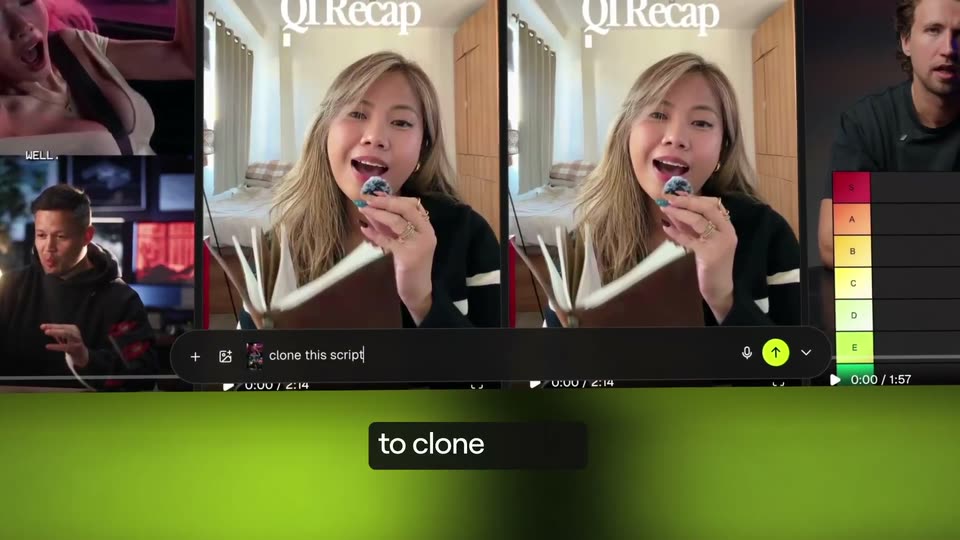
A row of short-form video preview cards sits on a green gradient background. A cursor hovers at the prompt bar and the words 'clone this script' type in as the view zooms onto the input field. A dark caption box at the bottom fills in word by word.
On-screen text: “After that, task the Spyglass agent to clone scripts”
Techniques: Cursor demo, UI zoom
Camera: Push in
A dark AI-agent interface, tilted in 3D perspective, shows a command bar and a progress list. A brief document card fills in with text, a cursor hovers over the paragraph, and a white caption builds at the bottom.
On-screen text: “storyboards”, “ads, organic posts,”, “ads, organic posts, and more”
Techniques: 3D mockup, Kinetic type, Cursor demo
Camera: Static
A tilted browser shows the Spyglass feed. A cursor hovers the search bar as a query is typed, opening a dropdown of AI search options, while a dark caption bar fills in at the bottom.
On-screen text: “You can also use AI search or filters”
Techniques: 3D mockup, Cursor demo
Camera: Static
A dark browser window shows a search field typing out 'ads that shoe nike shoes' above a dropdown of search options and brand accounts, with a social post visible at the right edge. A white caption holds steady at the bottom center.
On-screen text: “You can also use AI search or filters”
Camera: Static
A dark browser view of a video-ad grid fills the screen after a blurred zoom pulls back. A search bar holds the query and a cursor hovers over an AI filter chip. A caption box at the bottom carries the line.
On-screen text: “to find exactly what you're looking for”
Techniques: UI zoom, Cursor demo
Camera: Pull out
A dark prompt screen auto-types a Lululemon research query into the input box as a white caption builds word by word beneath it. The frame then cuts to a tilted 3D view of the results page, where a hand cursor rests on the agent's markdown answer.
On-screen text: “or have an agent do the research instead.”
Techniques: Kinetic type, 3D mockup, Cursor demo
Camera: Pull out
A dark interface shows a grid of generated sneaker ad images above a prompt bar. The view zooms into the prompt bar as the words make anything are typed into the field, while white captions run along the bottom.
On-screen text: “And if you want to produce in bulk,”, “you can head over to asset studio,”, “where you have the world's state-of-the-art image model”, “at your fingertips.”
Techniques: UI zoom, Kinetic type
Camera: Push in
A dark ad-creation panel, tilted in 3D perspective against a blurred green background, displays a runner image with a prompt box and a green download button. A white caption types out word by word along the bottom left.
On-screen text: “You can produce photorealistic assets,”
Techniques: 3D mockup, Kinetic type
Camera: Static
A tilted screen floats in 3D space against a green gradient. On it, an ad editor shows a Nike Vomero shoe photo with a bold white title on the left and a dark panel with a prompt box and yellow download button on the right. A white caption at the bottom reads “You can produce photorealistic assets,”.
On-screen text: “You can produce photorealistic assets,”
Techniques: 3D mockup
Camera: Static
A tablet tilted in 3D perspective displays a dark app screen with a Nike runner ad on the left and a clone panel on the right. A white caption at the bottom reads 'You can produce photorealistic assets,' then a black box highlights 'static ads,'.
On-screen text: “You can produce photorealistic assets,”, “static ads,”
Techniques: 3D mockup
Camera: Static
A dark product interface panel floats in 3D perspective over a blurred green background. It shows a Nike shoe ad with the word ZOOMX and a side panel holding a prompt field and a yellow Download button, while a white caption builds up at the bottom.
On-screen text: “static ads, product shots, or any”
Techniques: 3D mockup
Camera: Static
A dark AI-tool panel sits on the right beside a generated Nike sneaker ad on a magenta field, the panel showing product tags and a yellow Download button. A black caption bar at the bottom types out the words in sync with the voiceover.
On-screen text: “static ads, product shots,”, “or any”
Techniques: Kinetic type
Camera: Static
A dark interface panel on the right holds a prompt field and a lime Download button. Center-left, a generated Nike shoe ad with the headline UNLEASH SPEED and a swoosh floats over a gray gradient, while a white caption completes at the bottom.
On-screen text: “or any imagery that you need.”
Camera: Static
A locked-off split view holds a generated white sneaker ad on the left and a dark prompt panel with a green download button on the right, while a black caption bar sits at the bottom.
On-screen text: “or any imagery that you need.”
Camera: Static
A dark browser window shows a task composer greeting the user. A hand cursor clicks the plus menu, selects the Deep research chip, then types a prompt and picks Nike from a dropdown list. White captions build word by word along the bottom edge.
On-screen text: “or any imagery that you need.”, “If you've got some deeper research,”, “like “help me find new personas to target””
Techniques: Cursor demo, Kinetic type
Camera: Static
A dark task screen shows a greeting line and a prompt field holding a Nike chip. Two hand cursors slide to the green send button on the right, while a white caption types in word by word at the lower left.
On-screen text: “or”, “give me”
Techniques: Cursor demo, Kinetic type
Camera: Static
A dark research interface lists subqueries, a cursor presses a yellow Start Research button, then the panel crossfades to a Research complete state where an Executive Summary card fades in. A white caption builds word by word along the bottom.
On-screen text: “or “give me a strategy breakdown of my most viral content””
Techniques: Cursor demo, Kinetic type
Camera: Static
A dark chat interface fades in with a greeting and a prompt box; a cursor types a request about Meta ads, then the view shifts to the agent's task panel where a data table and results scroll into view. White subtitle captions build word by word along the bottom.
On-screen text: “or “audit my Meta ad account””, “you task an agent at any time to run in the background”, “while you complete other work.”, “The best part, every task is completed”, “with the”
Techniques: Cursor demo, Kinetic type
Camera: Pull out
A dark document view of an ad analytics report scrolls slowly upward, revealing a data table and a creative strategy breakdown, while a white caption holds at the bottom and a cursor hovers over the list.
On-screen text: “with the full context of your creative data in mind.”
Techniques: Cursor demo
Camera: Pull out
Two men in black sweaters sit on stools in a dark room beneath a grid ceiling. White phrases build word by word above them, announcing that General Context is now generally available. The shot cuts to a tilted drive interface showing a folder of top-performing ads.
On-screen text: “Now that you've gotten”, “a sneak peak of what's inside”, “we'd like to announce”, “General Context”, “is now generally available”, “to commemorate”, “today's launch”
Techniques: Kinetic type, 3D mockup
Camera: Static
A tilted 3D Google Drive window sits on a green gradient. A cursor clicks the IG Reels folder, and the list swaps to a row of video ad thumbnails. A large caption reads today's launch.
On-screen text: “today's launch”
Techniques: Cursor demo
Camera: Static
A Google Drive folder grid, tilted in 3D perspective, scrolls vertically past rows of video ad thumbnails while a cursor glides across them. The view then pulls back to a head-on angle, revealing a left sidebar listing folders such as IG Reels and Video Ads.
Techniques: 3D mockup, Cursor demo, UI zoom
Camera: Pull out
A tilted Google Drive window shows a folder grid. A cursor clicks the Static Ads tile, and the view quickly transitions into a grid of ad image thumbnails.
Techniques: 3D mockup, Cursor demo
Camera: Static
A Google Drive folder of static ad creatives scrolls rapidly down a grid of brand thumbnails, from 1st Pharmacy to Bombas, while the cursor hovers over files. The window holds a slight 3D tilt against a dark green backdrop.
Techniques: 3D mockup, Cursor demo
Camera: Pull out
Two men in black sweaters sit on stools in a dark room beneath a glowing grid ceiling, facing the camera. A white caption fades in above them. The frame stays locked off and static.
On-screen text: “to test out General Context”
Camera: Static
A rounded search bar centered on a black dotted background types out generalcontext.com with a blinking cursor. A magnifier icon then scales in on the right edge of the bar.
On-screen text: “generalcontext.com”
Techniques: Kinetic type
Camera: Static
A search bar shows generalcontext.com, then the dark website hero fades in with its headline and chat box. The placeholder swaps from 'Audit my Meta ad account' to 'Break down Nike's ad strategy', then the page blurs to black as 'Comment CONTEXT below' appears.
On-screen text: “generalcontext.com”, “Comment CONTEXT below”
Camera: Pull out
A blurred dark website landing page fills the background while sharp white text reading 'Comment CONTEXT below' builds across the center, with CONTEXT in lime green. The frame stays locked off as the line completes.
On-screen text: “Comment CONTEXT below”
Techniques: Kinetic type
Camera: Static
Two men in black sweaters sit on stools in a dark room beneath a glowing grid ceiling. They talk and smile, then fist bump as a third person's arm enters from the left edge.
On-screen text: “E”
Camera: Static
A white circular logo with horizontal bars sits centered on a black field, its bright bloom settling into a soft halo as faint dust particles drift. The mark holds for several seconds, then dims and fades to black.
Techniques: Particles
Camera: Static
The frame holds on a solid black background with no visible text, logo, or motion, a blank cut-to-black that persists for the full duration of the clip.
Camera: Static