2:57
Explore
TestSprite - Your coding agent can run all night. It still can't tell if what it b
TestSprite · Jun 2026 · 3:44 · AI-annotated
- Length
- 3:44
- Scenes
- 60 · 3.7 s avg
- Product on screen
- 0:00
- Features shown
- 1
- Call to action
- 0:19 · 9%
- Voiceover
- Yes
- Views
- 1M on X
as of November 28, 2026
00:00:00 / 03:44:18
- Length
- 3:44
- Scenes
- 60 · 3.7 s avg
- Product on screen
- 0:00
- Features shown
- 1
- Call to action
- 0:19 · 9%
- Voiceover
- Yes
- Views
- 1M on X
as of November 28, 2026
TestSprite’s 3:44 launch film runs 60 scenes, about 3.7 s each. The product is on screen from the first frame and 1 feature is revealed, with social proof. The call to action lands at 0:19 (9% in), over a voiceover. Built as a flat, grid-paper motion system: pale off-white backgrounds, hard-edged white UI cards and terminal windows, and a single green accent for everything that passes or is solved, with red reserved for failures. Pacing is steady at roughly 111 BPM with short cuts, driven by typing headlines, drawing charts, scrolling dashboards, and green check stamps that recur as the visual punchline. Structure runs promise, proof, three named problems, one long feature demo, a leaderboard payoff, then a
No filming indicatedEstimated needs: 6 capture groups — your screens or recordings · 1 official logo — reused across the film · 9 graphic passages — draw or supply
Is this your launch? to your site or press kit.
More like this
1:30

YouArt Desktop — an AI creative teammate
YouArt · Consumer · Nov 2026
1:11

Richard Wang - Support teams spend their days digging, escalating, and re-explaining
Clad Labs · B2B · Sep 2026
Similar soundtrack
Films whose music sounds like this one, voice left out
0:50

Alfi - Your group chat designed to bring friends together
Text.ai · Modern electronic dance music, specifically nu-disco, indie dance, and deep house.
1:17

Abhishek Das - We're excited to launch Delegate. An agent you delegate work to and m
Yutori · Modern electronic
1:17

Xiaoyin Qu - We just launched Agentsky @agentsky_dev, world’s 1st Agent Market! Op
AgentSky · Upbeat electronic
TestSprite - Your coding agent can run all night. It still can't tell if what it b, scene by scene
· 60 scenes as text
01 · Product intro · 0:00–0:03
A static split layout. On a white grid card, the black headline TestSprite CLI and a green npm install command sit at left. At right, a flat macOS-style window lists a test log over a blurred green aerial background.
On-screen text: “TestSprite CLI”, “$ npm install -g @testsprite/testsprite-cli”
Techniques: Split screen
Camera: Static
02 · Product intro · 0:03–0:06
On a light gray grid, a black headline types itself out character by character with a green cursor, ending on the green word trust. A gray caption box at the bottom mirrors the line in white bold text. The TestSprite logo sits in the top right corner.
On-screen text: “You no longer need the biggest, most expensive model”, “to ship software you can trust.”
Techniques: Kinetic type
Camera: Static
03 · Social proof · 0:06–0:09
A flat browser window of the CoderCup Agents page scrolls down from the hero headline to the leaderboard charts and table, while a caption in a dark box at the bottom swaps from “to ship software you can trust.” to “We proved it on a public leaderboard.”
On-screen text: “You no longer need the biggest, most expensive model”, “to ship software you can trust.”, “We proved it on a public leaderboard.”
Camera: Pan
04 · Social proof · 0:09–0:19
Four line charts draw in across a dashboard, then a leaderboard table fills row by row while a gray caption bar swaps lines at the bottom; the camera zooms into the Kimi row, outlining 0.892 and $31.88 in green.
On-screen text: “We proved it on a public leaderboard.”, “The cheapest model in the field built the most correct app,”, “scoring 89% at half the cost of the priciest one.”, “The difference was one tool running in the loop.”
Techniques: UI zoom
Camera: Push in
05 · CTA · 0:19–0:21
On a light gray grid, the TestSprite wordmark holds center as a green CLI types in beside it. A white URL bar with the GitHub repo slides in below, while bottom captions swap to match the voiceover.
On-screen text: “The difference was one tool running in the loop.”, “The TestSprite CLI.”, “And today, we're open sourcing it.”, “github.com/TestSprite/testsprite-cli”
Camera: Static
06 · CTA · 0:21–0:22
On a light grid background, the TestSprite CLI logo and a green-bordered URL bar sit centered. A cursor clicks the star icon, which fills green, then the whole center graphic fades to white while the bottom caption holds.
On-screen text: “TestSprite CLI”, “github.com/TestSprite/testsprite-cli”, “And today, we're open sourcing it.”
Techniques: Cursor demo
Camera: Static
07 · CTA · 0:22–0:23
On a pale gray grid background, the centered TestSprite CLI title and a pill-shaped GitHub URL box fade out, leaving only the TestSprite logo in the top right corner.
On-screen text: “TestSprite CLI”, “github.com/TestSprite/testsprite-cli”
Techniques: Kinetic type
Camera: Static
08 · Social proof · 0:23–0:27
On a light gray grid, a green monospace 100,000+ pops in left of center with a gray label below. A second green 50,000+ drops in to its right, settling with its own label. A dark caption bar at the bottom updates the line.
On-screen text: “100,000+”, “users & community members”, “Here's why this matters.”, “Over the past year, more than 100,000 teams have used”, “50,000+”, “developers & teams on boarded”
Techniques: Kinetic type
Camera: Static
09 · Social proof · 0:27–0:29
A light grid background holds a left-aligned headline and two green stat figures, with the TestSprite logo top right. The green headline words blur and slide into place, then a blurred aerial photo of a person on a hill fades in on the right half while a caption bar updates at the bottom.
On-screen text: “Trusted by a Global Developer Community”, “100,000+ 50,000+ users & community members developers & teams”, “Over the past year, more than 100,000 teams have used”, “TestSprite to check what their coding agents build.”
Techniques: Kinetic type
Camera: Static
10 · Social proof · 0:29–0:34
A two-column slide: the left holds a black-and-green headline over a grid with two green stat figures, while the right shows a water-lily painting behind a grid of company logos that fade in row by row. A dark caption bar at the bottom updates with the voiceover.
On-screen text: “Trusted by a Global Developer Community”, “100,000+ users & community members”, “50,000+ developers & teams onboarded”, “TestSprite to check what their coding agents build.”, “And across every one of them, we”, “see the same 3 hard limits.”
Techniques: Split screen
Camera: Pull out
11 · Problem · 0:34–0:35
A flat white context-window panel fades into the center of a light gray grid, showing a green 20K/200K meter and an auth token row. A dark caption box with white text reads “The first is memory.” below it.
On-screen text: “The first is memory.”
Camera: Static
12 · Problem · 0:35–0:46
A white Context Window panel on a light grid fills with task rows as its meter climbs to red 192K. The camera zooms in, a Compacting context dialog shrinks the list to a summarized row, and dropped items fall below as red Out of scope cards before the scene fades.
On-screen text: “The first is memory.”, “The model can't fit your whole project”, “in its context window, so you're forced to compact”, “aggressively, and a requirement you gave it”, “hours ago could quietly fall out of scope.”
Techniques: UI zoom
Camera: Static
13 · Problem · 0:46–0:50
A flat browser window on a grid background builds a ShopKit product page, sections fading in one by one beside a status chip. Captions swap below. The frame then zooms in as the chip flips to Done and the cart total reads $NaN.
On-screen text: “Regression.”, “As it builds new things, it breaks things.”, “It had already gotten right about one feature”
Techniques: UI zoom
Camera: Static
14 · Problem · 0:50–0:56
A white panel with a red-outlined “2 items · $NaN” badge and a red X icon sits on a light grid background, then cuts to a headline that types out character by character, “1 in 5” in red. White captions on a dark gray bar run along the bottom.
On-screen text: “It had already gotten right about one feature”, “in five today, with no reliable way to even notice,”, “About 1 in 5 (avg ≈ 23%) features silently break, and nothing flags it.”, “it can't tell whether what it just wrote actually works.”
Techniques: Kinetic type
Camera: Static
15 · Problem · 0:56–0:56
A white browser window on a light grid background shows a stat line with “1 in 5” in red, then the line clears to an empty window, while a dark caption bar stays fixed at the bottom.
On-screen text: “About 1 in 5 (avg ≈ 23%) features silently break, and nothing flags it.”, “it can't tell whether what it just wrote actually works.”
Camera: Static
16 · Problem · 0:56–1:01
A flat browser window on a pale grid background shows a TestSprite error report card that fades in, holds, then fades out. The card displays an unhandled runtime error and a dark code block with one line highlighted. White captions on dark pills swap at the bottom.
On-screen text: “it can't tell whether what it just wrote actually works.”, “So it reports a feature as done”, “on a page that never rendered.”
Camera: Static
17 · Problem · 1:01–1:03
On a pale grid background, “And the bill.” types out letter by letter with a blinking pink cursor, “bill” in red, while a caption below reads “Models keep getting better and more expensive.” A thin chart frame titled “Cost to ship quality” fades in around the text.
On-screen text: “And the bill.”, “Models keep getting better and more expensive.”
Techniques: Kinetic type
Camera: Static
18 · Problem · 1:03–1:06
A white chart card titled Cost to ship quality on a pale grid background draws a red line rising from lower left to upper right, ending in a dot. A gray bar below cycles white caption text.
On-screen text: “And the bill.”, “Models keep getting better and more expensive.”, “The industry's answer to quality has been”
Camera: Static
19 · Problem · 1:06–1:08
A pale grid background holds a white card with a red border and a pink rising-arrow icon, quoting 'Pay for a bigger model'. A dark caption bar at the bottom repeats the line in white. The TestSprite logo sits in the top right corner and the frame stays static.
On-screen text: “Pay for a bigger model”, “pay for a bigger model.”
Camera: Static
20 · Feature reveal · 1:08–1:11
A light grid background holds a small bordered callout reading “Pay for a bigger model.” A large green curved shape scales up from the corner until it fills the frame, covering the callout. A subtitle bar stays at the bottom.
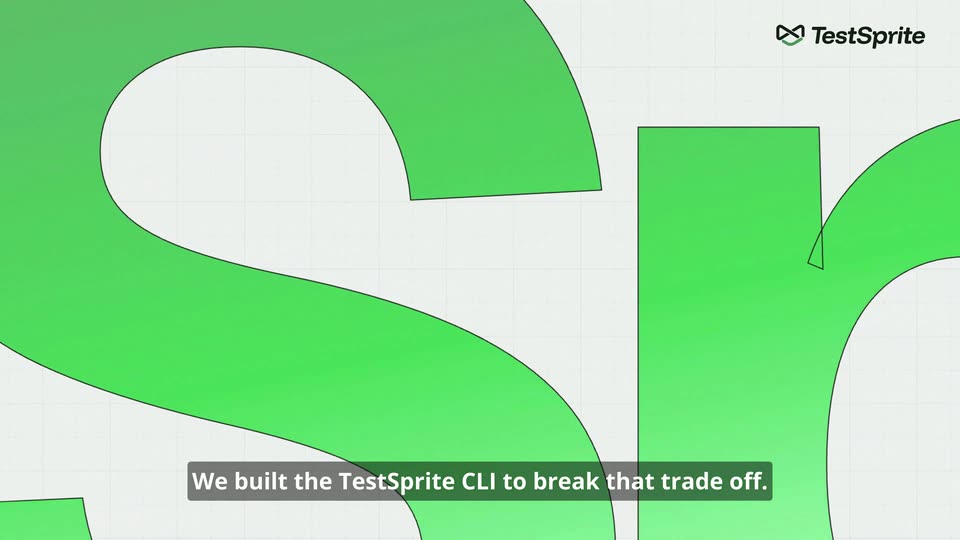
On-screen text: “We built the TestSprite CLI to break that trade off.”
Camera: Pan
21 · Feature reveal · 1:11–1:12
A green gradient fills the frame as the giant white word TestSprite scrolls left across the center. A small TestSprite logo sits top right, and a caption line at the bottom swaps from one sentence to the next, scaling in.
On-screen text: “We built the TestSprite CLI to break that trade off.”, “Let the agent verify its own work as it builds and get”
Techniques: Kinetic type
Camera: Pan
22 · Feature reveal · 1:12–1:13
A giant white TestSprite wordmark, cropped to its middle letters, holds on a green gradient while a dark caption bar scales in at the bottom. The frame then cuts to a green grid where a smaller green TestSprite CLI wordmark sits center.
On-screen text: “Let the agent verify its own work as it builds and get”, “TestSprite CLI”
Camera: Pan
23 · Feature reveal · 1:13–1:17
On a light gray grid, the green title TestSprite CLI fades in with a brief horizontal double-image that settles, holds, then fades out. A dark caption bar at the bottom swaps two lines of white text.
On-screen text: “TestSprite CLI”, “Let the agent verify its own work as it builds and get”, “better on its own, no matter which model it's running.”
Techniques: Kinetic type
Camera: Static
24 · Feature reveal · 1:17–1:22
A white GitHub star badge sits centered on a pale grid background, its count rolling rapidly. The badge then morphs into a wide code box showing the npm install command with a copy icon. Lower-third captions run along the bottom.
On-screen text: “So here's how it works.”, “It's open source as of today, and it installs”, “$ npm install -g @testsprite/testsprite-cli”
Techniques: Morph
Camera: Static
25 · Feature reveal · 1:22–1:28
A green-outlined code box with an npm install command sits centered on a light grid background. A cursor glides in, clicks the copy icon, which flips to a checkmark as a green Copied badge pops above the box. Bottom captions swap in time with the voiceover.
On-screen text: “in one line, a command line tool”, “the agent calls itself. Nothing”, “to babysit, no human in the loop.”
Techniques: Cursor demo
Camera: Static
26 · Feature reveal · 1:28–1:31
A white info card with a green 'REAL PASSED CASE' tag and an Amazon example fades in over a light grid background, a white caption bar sits below it. Near the end a product UI screen fades in behind the card.
On-screen text: “REAL PASSED CASE”, “Example 1 · https://amazon.com”, “Testing: End-to-end product checkout flow.”, “It runs through your live app the way a real user would.”
Camera: Static
27 · Feature reveal · 1:31–1:33
The TestSprite interface shows a test-step list on the left and an Amazon.com preview on the right. The preview starts dimmed behind a play button, then brightens as a cursor appears on the right, while subtitles change at the bottom.
On-screen text: “REAL PASSED CASE”, “Example 1 · https://amazon.com”, “Testing: End-to-end product checkout flow.”, “Say It's a shopping site.”, “It logs in, searches for a laptop, adds it”
Techniques: Cursor demo
Camera: Push in
28 · Feature reveal · 1:33–1:34
The view zooms into a browser window showing the Amazon homepage, where a white cursor with a dark ring hovers. White annotation cards appear at the corners and a caption bar runs along the bottom.
On-screen text: “REAL PASSED CASE”, “Example 1 · https://amazon.com”, “Testing: End-to-end product checkout flow.”, “It logs in, searches for a laptop, adds it”, “STEP 1”, “Our agent kicks things off by searching 'wireless mouse' on Amazon”
Techniques: UI zoom, Cursor demo
Camera: Pan
29 · Feature reveal · 1:34–1:36
A flat TestSprite preview window shows an Amazon search screenshot with a dropdown of mouse suggestions. Two white callout cards with green tags overlay the page, and a dark caption bar at the bottom swaps its text.
On-screen text: “REAL PASSED CASE”, “Example 1 · https://amazon.com”, “Testing: End-to-end product checkout flow.”, “STEP 1”, “Our agent kicks things off by searching 'wireless mouse' on Amazon”, “It logs in, searches for a laptop, adds it”, “to the cart and checks out. Our agent does it all.”
Camera: Static
30 · Feature reveal · 1:36–1:37
An Amazon mouse listing fills the TestSprite preview window. A green 'REAL PASSED CASE' card holds the top left. The right step card crossfades from STEP 1, searching 'wireless mouse', to STEP 2, filtering by FREE Shipping. A grey caption bar and a 'Test successful' line stay fixed below.
On-screen text: “REAL PASSED CASE”, “Example 1 · https://amazon.com”, “Testing: End-to-end product checkout flow.”, “STEP 1”, “Our agent kicks things off by searching 'wireless mouse' on Amazon”, “to the cart, checks out and confirms the order.”, “Test successful. No errors detected.”, “STEP 2”, “Now filtering by FREE Shipping”
Camera: Static
31 · Feature reveal · 1:37–1:38
The TestSprite preview shows an Amazon results page; a cursor clicks the Free Shipping by Amazon checkbox while a STEP 2 callout reads Now filtering by FREE Shipping. The page scrolls down, a success line appears, and the callout cross-fades to the next step.
On-screen text: “REAL PASSED CASE”, “Example 1 · https://amazon.com”, “Testing: End-to-end product checkout flow.”, “STEP 2”, “Now filtering by FREE Shipping”, “to the cart, checks out and confirms the order.”, “Opening up a product page for a closer look”
Techniques: Cursor demo
Camera: Static
32 · Feature reveal · 1:38–1:39
A TestSprite preview window displays an embedded Amazon screenshot that switches from a product page to a cart page. Two white callout cards sit over the screen, and a bottom caption updates to match the voiceover.
On-screen text: “REAL PASSED CASE”, “Example 1 · https://amazon.com”, “Testing: End-to-end product checkout flow.”, “STEP 3”, “Opening up a product page for a closer look”, “to the cart, checks out and confirms the order.”, “actually went through. The whole flow end to end.”
Camera: Static
33 · Feature reveal · 1:39–1:41
An Amazon checkout page fills the frame with two white callout cards overlaid. The left card shows a green REAL PASSED CASE badge and a URL; the right card swaps from a STEP 3 caption to a STEP 4 caption. White subtitles on a dark bar run along the bottom edge.
On-screen text: “REAL PASSED CASE”, “Example 1 · https://amazon.com”, “Testing: End-to-end product checkout flow.”, “STEP 3”, “Opening up a product page for a closer look”, “STEP 4”, “Dropping it into the cart”, “actually went through. The whole flow end to end.”
Camera: Static
34 · Feature reveal · 1:41–1:42
A TestSprite preview window shows an Amazon sign-in page with a cursor over the email field. Two white annotation cards overlay it, one top-left labeled REAL PASSED CASE and one right labeled STEP 5, while a caption bar runs along the bottom.
On-screen text: “REAL PASSED CASE”, “Example 1 · https://amazon.com”, “Testing: End-to-end product checkout flow.”, “STEP 5”, “Signing in at checkout, almost there”, “actually went through. The whole flow end to end.”
Camera: Static
35 · Feature reveal · 1:42–1:42
On a light grid background, a white card with a green REAL PASSED CASE label crossfades into a second card with a pink REAL FAILED CASE label, each listing a test example and a caught bug, while a dark subtitle bar updates below.
On-screen text: “REAL PASSED CASE”, “Example 1 · https://amazon.com”, “Testing: End-to-end product checkout flow.”, “actually went through. The whole flow end to end.”, “REAL FAILED CASE”, “Example 2 · TestSprite Internal HR Tool”, “Testing: Sending an offer-letter email to a new applicant.”, “Bug caught: Email footer rendered “TestSprite” instead of the configured “Company ABC”.”, “If any step breaks, TestSprite catches it”
Camera: Static
36 · Feature reveal · 1:42–1:45
A white card with a red border and a red REAL FAILED CASE tag sits on a light grid background, listing a bug example. A gray caption bar below swaps its line, and a faded HR-tool UI screen fades in behind the card near the end.
On-screen text: “REAL FAILED CASE”, “Example 2 · TestSprite Internal HR Tool”, “Testing: Sending an offer-letter email to a new applicant.”, “Bug caught: Email footer rendered “TestSprite” instead of the configured “Company ABC”.”, “If any step breaks, TestSprite catches it”, “and hands your agent exactly what to fix.”
Camera: Static
37 · Feature reveal · 1:45–1:46
A product interface with two overlay cards: a red-bordered failure card on the left and a step card on the right that flips from STEP 1 to STEP 2. The background UI shifts between the settings form and the email compose view while a bottom caption stays fixed.
On-screen text: “REAL FAILED CASE”, “Example 2 - TestSprite Internal HR Tool”, “Testing: Sending an offer-letter email to a new applicant.”, “Bug caught: Email footer rendered “TestSprite” instead of the configured “Company ABC”.”, “STEP 1”, “Adding 'Alex Candidate' as a new applicant”, “and hands your agent exactly what to fix.”, “STEP 2”, “Heading over to Emails to pick the 'Offer Letter' template”
Camera: Static
38 · Feature reveal · 1:46–1:47
A screen recording of the TestSprite interface shows an email compose panel filling in with an offer-letter template. Two annotation cards sit on top, a red-bordered failed-case note at left and a green step-2 note at right, while a gray caption bar reads at the bottom.
On-screen text: “REAL FAILED CASE”, “Example 2 - TestSprite Internal HR Tool”, “Testing: Sending an offer-letter email to a new applicant.”, “Bug caught: Email footer rendered “TestSprite” instead of the configured “Company ABC”.”, “STEP 2”, “Heading over to Emails to pick the 'Offer Letter' template”, “and hands your agent exactly what to fix.”
Camera: Static
39 · Feature reveal · 1:47–1:48
A static view of the TestSprite interface shows a compose-email form. A red-bordered REAL FAILED CASE note sits top-left, a green STEP 3 note overlays the body field, and a gray caption bar reads at the bottom.
On-screen text: “REAL FAILED CASE”, “Example 2 · TestSprite Internal HR Tool”, “Testing: Sending an offer-letter email to a new applicant.”, “Bug caught: Email footer rendered “TestSprite” instead of the configured “Company ABC”.”, “STEP 3”, “Previewing the composed offer letter..”, “So you know the app really works”
Camera: Static
40 · Feature reveal · 1:48–1:52
An offer-letter email preview sits behind two white annotation cards with red badges: the left explains a failed test case, the right flags the wrong footer, and a red box outlines the 'TestSprite' signature. Subtitle captions change at the bottom, then the frame cuts to blank gray.
On-screen text: “REAL FAILED CASE”, “Example 2 · TestSprite Internal HR Tool”, “Testing: Sending an offer-letter email to a new applicant.”, “Bug caught: Email footer rendered 'TestSprite' instead of the configured 'Company ABC'.”, “STEP 4 · FAIL”, “Wait! The footer says 'TestSprite', but it should be 'Company ABC'”, “you know the app really works”, “Not just that the code compiles.”
Camera: Push in
41 · Feature reveal · 1:52–2:00
A dark terminal window on a pale grid backdrop types the command testsprite init with a green highlight, then a masked API key. The camera zooms in on the command line, then pulls back as green and gray output lines fill the window. Bottom captions change with the voiceover.
On-screen text: “Setup is 3 commands in about a minute.”, “Install it, add your key and run testsprite agent install.”, “After that your coding Agent, Claude Code, Codex, whatever”
Techniques: UI zoom
Camera: Static
42 · Feature reveal · 2:00–2:05
A code terminal fades in, then eight logo tiles for coding agents (Claude, Codex, Google Antigravity, KIMI, Cursor, Trae, Visual Studio Code, And More) pop in one by one on a grid-paper background and fade out. TestSprite logo top right.
On-screen text: “After that your coding Agent, Claude Code, Codex, whatever”, “you're running knows how to call TestSprite on its own.”, “That's the last command you type.”
Camera: Static
43 · Feature reveal · 2:05–2:12
A dark terminal window on a faint grid background streams command output line by line, an orange bullet marking each Bash call, while the camera slowly pushes in until the text fills the frame. White caption bars at the bottom swap in place.
On-screen text: “From there the agent runs the test itself mid build,”, “reads the report and fixes its own work.”, “And everything the agent runs shows”
Techniques: UI zoom, Kinetic type
Camera: Push in
44 · Feature reveal · 2:12–2:20
A light TestSprite report page for a failed test fills the frame. The camera pushes in from the full window toward the preview panel, where a cursor moves to the play button on a Mexico vs South Africa match card and the overlay clears. Dark caption boxes appear at the bottom.
On-screen text: “up in your TestSprite portal.”, “Every test we generate, every run,”, “the recordings and root causes.”, “All there to dig into whenever you want.”
Techniques: UI zoom, Cursor demo
Camera: Push in
45 · Feature reveal · 2:20–2:24
A flat front view of the Matchday odds interface stays static while a dark caption bar at the bottom cycles through three short phrases. The screen then fades to a plain light gray field with only the TestSprite logo in the top right corner.
On-screen text: “All there to dig into whenever you want.”, “But you're not the one running tests anymore.”, “The agent is.”
Camera: Static
46 · Feature reveal · 2:24–2:25
A flat product interface fades in over a light gray field, showing an integration tests table for amazon.com. The TestSprite logo sits in the top right corner while a white caption reads across the bottom.
On-screen text: “That's how TestSprite makes your agent stronger.”
Camera: Static
47 · Feature reveal · 2:25–2:36
A browser mockup of the TestSprite app fills the frame; the Integration Tests table accumulates green Pass rows while its counter climbs from 4 to 119. The camera zooms into the sidebar count, then pulls back as caption bars swap at the bottom.
On-screen text: “That's how TestSprite makes your agent stronger.”, “Every behavior that passes is kept.”, “The suite grows with the project until it becomes”, “the one thing the model can't be on its own.”, “A lasting record of every requirement.”
Techniques: UI zoom
Camera: Pull out
48 · Feature reveal · 2:36–2:38
A flat browser window shows the TestSprite Integration Tests list, rows of green Pass statuses and test names. The list refreshes with new rows while a dark caption bar at the bottom swaps from one line to the next. The TestSprite logo sits top right.
On-screen text: “A lasting record of every requirement.”, “Hundreds of them.”
Camera: Static
49 · Feature reveal · 2:38–2:53
Two product windows open overlapping, then slide apart into a split view: a test dashboard left, a dark CLI terminal right. The terminal types commands line by line, flagging a failed checkout test, naming the root cause, and reporting it fixed in green, while bottom captions narrate.
On-screen text: “Far more than fit in any context window.”, “So even when your agent has been running for hours,”, “TestSprite CLI flags a regression the moment it happens.”, “And the agent fixes it on the spot”, “before it moves on to the next phase.”, “That's how we keep your project high quality over time.”
Techniques: Split screen, Kinetic type
Camera: Push in
50 · Social proof · 2:53–2:54
A split view of a test list and a terminal window fades out to a plain light gray field, leaving the TestSprite logo in the top right corner.
Camera: Static
51 · Social proof · 2:54–2:54
On a pale grid background with the TestSprite logo top right, a dark pill caption reading “Remember the leaderboard?” pops in at the bottom, then fades as a large light gray headline “Every entrant that has shipped.” fades in at the upper left.
On-screen text: “Remember the leaderboard?”, “Every entrant that has shipped.”
Camera: Static
52 · Social proof · 2:54–2:58
A browser window holds the CoderCup Agents page as its content scrolls down. The view passes a heading and two buttons, then settles on a comparison section with four line charts and a leaderboard table. White captions on dark pills swap in at the bottom.
On-screen text: “Remember the leaderboard?”, “We had the top coding agents,”, “including Claude Code, Codex, Antigravity, and Kimi,”
Camera: Pan
53 · Social proof · 2:58–3:05
Four white benchmark cards slide in from the left, one after another, on a pale grid, then each card unfolds downward to reveal a test chart and a composite score. The view zooms and pans right to rest on the rightmost card.
On-screen text: “including Claude Code, Codex, Antigravity, and Kimi,”, “build the same app under the same rules.”, “And the cheapest model didn't win on intelligence.”
Techniques: UI zoom
Camera: Push in
54 · Social proof · 3:05–3:18
A model card slides off left, then Intelligence and Verification type out in the center with a green cursor. Five behavior rows with green checks and LOCKED IN labels stack up one by one as a green highlight moves row to row.
On-screen text: “And the cheapest model verified on intelligence.”, “It won on verification.”, “Intelligence”, “Every behavior it got right was locked”, “Verification”, “in and rechecked on every change.”, “So progress never leaked away.”, “Run after run, hour after hour.”, “Nothing it had earned ever slipped”, “Re-checked on every change · run after run”
Techniques: Kinetic type
Camera: Pan
55 · Social proof · 3:18–3:26
Three white cards labeled Memory, Regression, and The Bill pop in one by one on a light gray grid. Their gray icons morph into green checkmarks in sequence, then the cards clear and a headline types out with a cursor, 'no longer need' in green.
On-screen text: “Memory”, “Nothing it has learned ever slipped.”, “Regression”, “regression,”, “The Bill”, “The leaderboard shows all three are solvable at once.”, “That's the value we're bringing to the industry.”, “You no longer need the biggest, most expensive model”
Techniques: Morph, Kinetic type
Camera: Static
56 · Other · 3:26–3:29
On a light gray grid, a centered headline types out word by word with a blinking caret, key phrases in green, while a gray caption bar at the bottom swaps to the second line.
On-screen text: “You no longer need the biggest, most expensive model”, “to ship software you can trust.”
Techniques: Kinetic type
Camera: Static
57 · Other · 3:29–3:35
On a pale gray grid, a two-line headline types itself out letter by letter in green and black with a blinking cursor. A gray caption bar at the bottom swaps lines to match the voiceover, then the text fades out. The TestSprite logo stays top right.
On-screen text: “to ship software you can trust.”, “Top-tier quality, without paying top-tier prices, now within reach for every team.”, “Top tier quality without paying top tier prices.”, “Now within reach for every team.”
Techniques: Kinetic type
Camera: Static
58 · CTA · 3:35–3:41
A flat code box with a green border and an npm install command sits on a light grid background. A cursor clicks the copy icon and a green Copied badge pops up as a GitHub URL fades in below. Bottom captions swap twice, then the box fades out.
On-screen text: “TestSprite CLI is open source and live today.”, “github.com/TestSprite/testsprite-cli”, “The link is below.”, “If you're building with an agent, you can hand this”
Techniques: Cursor demo
Camera: Static
59 · Outro · 3:41–3:42
On a pale grid background, the TestSprite mark scales up at center as the tagline fades in word by word behind it. A dark caption bar at the bottom updates its line to match the voiceover.
On-screen text: “If you're building with an agent, you can hand this”, “10x your AI-native dev speed with our autonomous AI”, “to it now and let it verify its own work.”
Techniques: Kinetic type
Camera: Static
60 · Outro · 3:42–3:44
The TestSprite logo and tagline sit centered on a light gray grid background, static. A white caption on a dark rounded bar at the bottom holds for the first second, then fades out.
On-screen text: “10x your AI-native dev speed with our autonomous AI testing agent handling verification.”, “to it now and let it verify its own work.”
Camera: Static