1:29
OpenUI 1.0: Intelligent UI for every agent
OpenUI · Oct 2026
TestSprite · Nov 2026 · 2:17 · AI-reviewed
TestSprite’s 2:17 launch film runs 24 scenes, about 5.7 s each. The product shows up at 0:42 and 5 features are revealed, with social proof. There is no explicit call to action; a voiceover carries the film. TestSprite 4.0 uses a mountain-climb metaphor, two team members speaking in an office, and animated product demonstrations. A continuous feature-history chart leads to the release reveal; sage layouts then combine interface replays, serif feature lists, a failed paid-upgrade test, comparison counters, integrations and a GitHub merge gate. The film closes on the recurring ridge shot. Adoption, accuracy, cost and concurrency figures are claims presented by TestSprite, not independently tested results.
Is this your launch? to your site or press kit.
OpenUI · Oct 2026
Anthropic · AI · Feb 2026
Anthropic · AI · Apr 2026
Films whose music sounds like this one, voice left out
Spline · Modern electronic pop
Korso · Electronic
Black fades into a snowy slope with a line of climbers. The framing drifts down the slope as a white serif headline and smaller italic release caption fade in and later out, within one continuous shot.
On-screen text: “The long climb to an agent you can trust”, “Releasing TestSprite 4.0, our brand-new agent”
Techniques: Kinetic type
Camera: Pan
A static medium shot of two women with laptops at a table in a warm, wood-toned office. The woman on the right speaks to camera, then the one on the left; subtitles run along the bottom and lower-third name captions fade in at each side.
On-screen text: “Building a testing agent you can trust with your pipeline is hard.”, “Gia”, “GTM team, TestSprite”, “I'm Gia, from TestSprite.”, “Sasha”, “Customer support team, TestSprite”, “And I'm Sasha, from customer support.”
Camera: Static
An aerial view eases away from a rocky snowy summit. Four white counters and line charts build across the sky, ending at 150,000+ developers, 50,000+ teams, 600K+ npm installs and 5K+ GitHub stars. These are figures presented by TestSprite.
On-screen text: “Over the past three years,”, “150,000+”, “developers building with TestSprite”, “50,000+”, “teams running it on their own product”, “600K+”, “npm installs of the MCP server and CLI”, “Aug 2025 to Nov 2026”, “5K+”, “GitHub stars on the open-source CLI”
Techniques: Kinetic type
Camera: Pull out
A woman with round glasses and a bright orange scarf sits in a warm, softly lit office, a large green plant and a wooden shelf behind her. The locked-off medium shot holds on her face as she speaks, with white subtitles fading in along the bottom edge.
On-screen text: “Every bug report, every request, every release they trusted us with —”, “we took to heart.”
Camera: Static
A lone climber in dark gear and a backpack hunches up a narrow snowy ridge in a whiteout, ice axe in hand. The locked-off wide shot holds as the figure inches forward. A caption box sits at the bottom of frame.
On-screen text: “Every version was a camp on the way up,”
Camera: Static
On a cream field, a feature counter rises from zero to 1,806 while the line chart and feature pills build on the left. Interface cards crossfade on the right from the first version in 2024 to TestSprite 2.0 in 2025 and TestSprite 3 in August 2026. The chart, counter and layout remain continuous.
On-screen text: “features shipped since July 2024”, “1,806”, “Jul 2024”, “The first version, 2024”, “GitHub & Google sign-in”, “Billing & plans”, “AI chat test builder”, “Run replay video”, “TestSprite 2.0, 2025”, “TestSprite 3, August 2026”
Techniques: Split screen, Kinetic type
Camera: Static
A continuous aerial view drifts back from a snowy ridge at dusk. A small Today, we’re releasing line builds above the large white serif title TestSprite 4.0, followed by a dissolve into the forest and product interface.
On-screen text: “All of it led here.”, “Today, we're releasing”, “TestSprite 4.0”, “our new testing agent.”
Camera: Pull out
Split screen: left, a white serif headline over a dark forest photo; right, a light panel where a logo mark, headline, body copy and input field fade in one after another. A cursor moves into the field, types a test request, and rests on the send button.
On-screen text: “TestSprite 4.0, our brand-new testing agent.”, “What should we test?”, “Test Acme Invoices. Tax applies off.”, “This brand-new agent changes everything.”, “You don't have to do anything.”, “Just let it know what you want to test.”
Techniques: Split screen, Cursor demo
Camera: Static
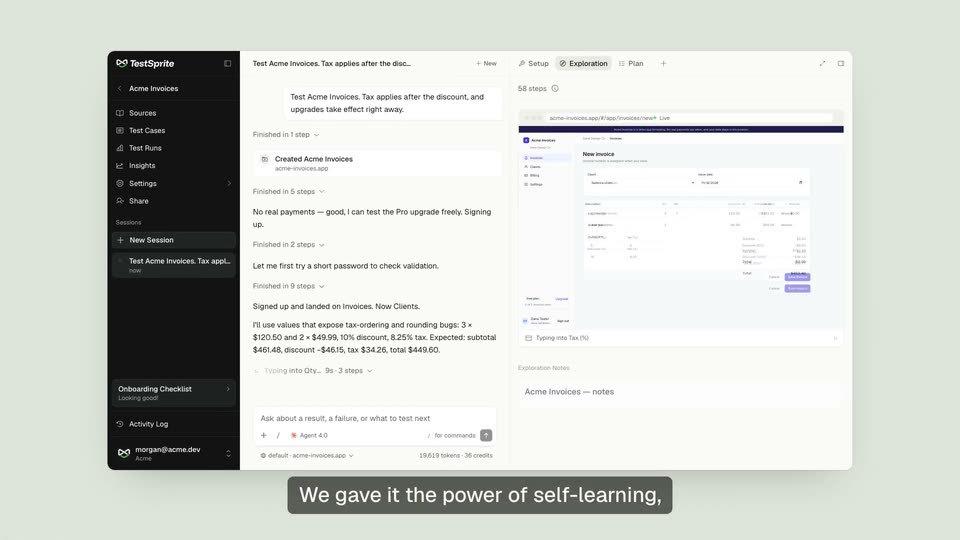
The TestSprite setup interface scales back from a close crop into a floating panel on a sage background. The Exploration tab displays a browser preview beside discovered notes and navigation, before the notes become a separate card.
On-screen text: “We gave it the power of self-learning,”
Techniques: 3D mockup
Camera: Pull out
A notes card on the left gives way to an invoicing-app replay, then to a scrolling categorized test plan. On the right, serif lines build in order: Self-learning, Self-exploring, Self-planning and Organized memory. These panel changes form one continuous feature-list composition.
On-screen text: “Self-learning”, “Self-exploring”, “Self-planning”, “Organized memory”, “Acme Invoices — notes”
Techniques: Split screen, Kinetic type
Camera: Static
A flat UI mockup of an invoices app shows two pricing cards. A cursor glides to the Pro card's Upgrade button, clicks it, and a confirmation toast slides up. A step label pill and a subtitle bar overlay the screen.
On-screen text: “and better skills to write, run and review test cases.”, “#33 Click 'Upgrade to Pro button'”
Techniques: Cursor demo
Camera: Static
The Acme Invoices replay shows a cursor confirming a $19 payment, dismissing the subsequent upgrade notice with Not now, and reaching the reload assertion. The demo does not show a successful upgrade: the following view still marks Free as the current plan.
On-screen text: “#34 Click 'Confirm and pay $19.00 button'”, “#38 Click 'Not now' button”, “#48 The Billing page and sidebar should continue to show the Pro plan after reload.”
Techniques: Cursor demo
Camera: Static
The Free card remains marked Current plan after the paid upgrade. A red highlight and X flag the failed assertion: the account stayed on Free despite a payment marked Paid. This is the bug demonstrated in the film.
On-screen text: “Free”, “$0 / month”, “Pro”, “$19 / month”, “Current plan”, “The $19.00 payment was marked Paid, but the account remained on the Free plan after reload.”
Techniques: Cursor demo
Camera: Static
A white Test failed report card isolates the billing failure on a pale sage background. Expected and Actual sections explain that the account should remain on Pro after reload, but stayed on Free; the card slides left as the comparison layout begins.
On-screen text: “With all these capabilities, it tests your website like a real user,”
Camera: Static
The failed-test report sits left as a serif headline and animated 94% accuracy graphic build on the right. TestSprite compares its stated 94% result with 86% for Claude Code & Codex. These are the advertiser’s figures, not independently verified measurements.
On-screen text: “Beats even the best general model.”, “94%”, “bug-finding accuracy”, “TestSprite 94%”, “Claude Code & Codex 86%”, “by eight points in bug-finding accuracy,”
Techniques: Split screen, Kinetic type
Camera: Static
In one continuous split layout, a test-case list scrolls and status badges update on the left. The right-side 1/100 claim becomes a counter rising to $428 for GPT-6 Astra, then $4.60 for TestSprite, with a ~100× cheaper comparison for 200 UI integration tests. All price and performance comparisons are claims in the film.
On-screen text: “1/100”, “of top-tier LLM fees”, “200 UI integration tests, generated and run, on GPT-6 Astra”, “$428”, “$4.60”, “200 UI integration tests, generated and run, on TestSprite”, “~100× cheaper”
Techniques: Split screen, Kinetic type
Camera: Static
A front-facing TestSprite execution window shows a browser-state graph being expanded and reframed inside its canvas, alongside an updating test list. The movement belongs to the graph within the interface; this is not an orbiting 3D render of the dashboard.
On-screen text: “And it's way faster than running it locally or on your own cloud,”, “since we can run more than a hundred tests concurrently.”
Camera: Static
A flat TestRunner execution window sits on the left, its node graph and progress bar ticking forward, while a large serif number on the right rolls and settles at 100+ above the line tests running at the same time. A gray caption bar reads across the bottom.
On-screen text: “100+”, “tests running at the same time”, “since we can run more than a hundred tests concurrently.”
Techniques: Kinetic type
Camera: Static
Four integration cards for GitHub, Linear, Jira and Slack sit in a two-by-two grid. A cursor clicks Connect buttons; green highlights and Connected to Acme statuses appear in the product demonstration.
On-screen text: “Integrations”, “GitHub”, “Linear”, “Jira”, “Slack”, “Connect”, “Connected to Acme”
Techniques: Cursor demo
Camera: Static
A dark terminal window sits centered on a pale gray background. Commands type out line by line with a blinking cursor, a red failure line then a green success line appear, while a caption bar at the bottom swaps from one phrase to another.
On-screen text: “testsprite test create”, “testsprite test failure get”, “testsprite test run”, “exit 1: the run failed”, “exit 0: passed. The test now lives in your durable suite.”
Techniques: Kinetic type
Camera: Static
A GitHub pull request card on a pale sage background: the TestSprite count ticks up from 0/42 to 42, then the card expands to show a failed test and a blocked merge, while a bottom caption bar fades out.
On-screen text: “Promo codes at checkout #482”, “Ran into trouble — 1 failed”, “41 passed · 1 failed · 42 total”, “Checkout keeps the promo total after a reload”, “Merging is blocked”
Camera: Static
A white test-plan card on a pale gray background scrolls down through a numbered list of invoice test steps. A dark rounded caption bar with white text sits along the bottom, then fades out as the list keeps scrolling.
On-screen text: “And it builds your regression test suite automatically,”
Camera: Static
A dark green forested slope with a small tower fills the frame. A small TestSprite corner logo accompanies a white serif sentence that builds line by line: Every release goes through a gate you can trust. The landscape remains the main visual, rather than a logo-only card.
On-screen text: “TestSprite”, “Every release”, “goes through a gate”, “you can trust.”
Techniques: Kinetic type
Camera: Static
The aerial ridge view continues as the framing slowly eases back. Made with a heart by a group of builders fades in and out, followed by the TestSprite logo, TestSprite 4.0 is available today and the smaller release-trust line. No cut separates the closing captions.
On-screen text: “Made with ❤️ by a group of builders.”, “TestSprite”, “TestSprite 4.0 is available today.”, “An agent you can trust with the release.”
Techniques: Kinetic type
Camera: Pull out