1:41

Introducing the Street View snowmobile
Google · AI · Feb 2010
Cline · Sep 2026 · 0:39 · Full motion · AI-annotated
Cline’s 0:39 launch film runs 19 scenes, about 2.1 s each. The product is on screen from the first frame and 2 features are revealed. There is no explicit call to action. The video stacks cream title cards with growing purple highlights against live terminal, editor, and 3D-tilted phone screens, moving from an SDK announcement to a CLI pass and then an extension review. Signature moves: word-by-word text reveals, a left-to-right purple highlight sweep, and camera pans that slide whole panels across the frame.
Is this your launch? to your site or press kit.
Google · AI · Feb 2010
Uniswap · Feb 2024
Two lines of black sans-serif text appear sequentially on a plain beige background. A purple rectangular highlight then expands from left to right behind the words of the first line.
On-screen text: “The extension is now”, “built on Cline SDK”
Techniques: Kinetic type
Camera: Static
A cream card holds two black lines that scale in, “Same IDE experience” over “New shared foundation underneath”, while a purple rounded bar grows left to right behind the second line. A faint earlier line, “The extension is now built on Cline SDK”, slides out at the top.
On-screen text: “The extension is now”, “built on Cline SDK”, “Same IDE experience”, “New shared foundation underneath”
Techniques: Kinetic type
Camera: Static
On a cream background, the headline scales in, the second line wrapped in a purple highlight bar. Below, a diagram fades in: a Cline SDK card linked by purple lines to CLI and VS Code extension cards, a JetBrains card appearing beneath.
On-screen text: “Same IDE experience”, “New shared foundation underneath”, “One SDK layer across Cline surfaces”, “CLI”, “Cline SDK”, “VS Code extension”, “JetBrains extension”
Techniques: Kinetic type
Camera: Static
A cream slide holds a hub-and-spoke diagram: a central Cline SDK card linked by purple lines to CLI, VS Code, and JetBrains cards. Above it, the headline scales in, with a purple bar highlighting part of the second line.
On-screen text: “Same IDE experience”, “New shared foundation underneath”, “One SDK layer across Cline surfaces”
Techniques: Kinetic type
Camera: Pan
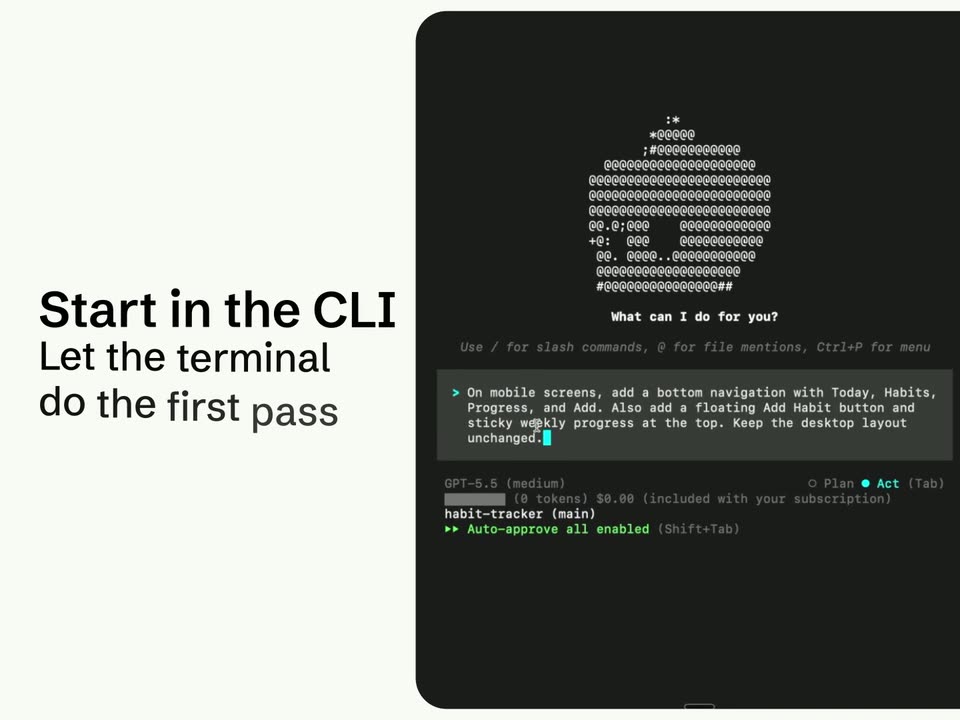
A dark terminal card slides in from the right beside a cream panel. The headline “Start in the CLI” and the subline “Let the terminal do the first pass” fade in word by word, while a prompt in the terminal types out a task description.
On-screen text: “Start in the CLI”, “Let the terminal do the first pass”
Techniques: Kinetic type, Cursor demo
Camera: Pan
A bold black headline holds a white left panel while a dark terminal on the right streams a coding assistant's output, appending a thinking note, a four-step plan, run and search commands, then a file read and a short finding. The left text stays fixed.
On-screen text: “Start in the CLI Let the terminal do the first pass”
Techniques: Split screen
Camera: Static
A cream left panel holds the bold headline and a smaller subline, while a dark terminal window on the right shows a CSS diff with green highlighted lines and a text cursor, both held static.
On-screen text: “Start in the CLI”, “Let the terminal do the first pass”
Camera: Static
Left half is a white panel holding the static black headline; right half is a dark terminal window whose diff and build log scrolls steadily upward.
On-screen text: “Start in the CLI”, “Let the terminal do the first pass”
Techniques: Split screen
Camera: Pull out
A dark terminal window showing diff output slides left across a light background, while a second dark agent panel tracks in from the right carrying the bold headline SHARED SESSION. The left-side headline text crossfades between two stacked lines during the slide.
On-screen text: “Start in the CLI”, “better terminal”, “of the first pass”, “SHARED SESSION”
Techniques: Kinetic type
Camera: Pan
A 3D-tilted code editor window with a chat panel and a phone preview sits on a light background. The camera pans right, sliding the bold SHARED SESSION headline out of frame to the left while revealing the phone mockup on the right.
On-screen text: “SHARED SESSION”
Techniques: 3D mockup, Parallax
Camera: Pan
A laptop in 3D perspective displays a code editor beside a phone app preview on a light gray backdrop. A bold black headline types in at the top reading “Continue in the extension,” finished by a purple rounded-square logo icon.
On-screen text: “Continue in the extension”
Techniques: 3D mockup, Kinetic type
Camera: Pan
A bold black headline reads Continue in the extension, the last word on a purple highlight, a gray subtitle fades in beneath it, then the view zooms into the left chat panel of a code editor as a purple Cline chat tag slides in.
On-screen text: “Continue in the extension”, “Inspect, and review the same task”, “Cline chat”
Techniques: UI zoom
Camera: Push in
A dark chat panel sits left of a code diff editor, with a purple 'Cline chat' tag overlaying the top-left corner. A hand cursor hovers over the first prompt while the screen holds still.
On-screen text: “Cline chat”
Camera: Static
A dark code editor interface is shown with a purple label reading Git diff. The code scrolls rapidly downward through lines of syntax. At the end, the view transitions to a mobile phone mockup on the left and a headline on the right.
On-screen text: “Git diff”, “Mobile preview”, “Same powerful agent in trusted IDE”
Techniques: Speed ramp, UI zoom
Camera: Pan
A phone mockup labeled Mobile preview sits on the left, its habit app switching from a weekly progress list to an Add habit form. On the right, a black headline reads over a cream field while the tagline Review. Test. Refine. turns from gray to black under a purple highlight bar.
On-screen text: “Mobile preview”, “Same powerful agent in trusted IDE”, “Review. Test. Refine.”
Camera: Static
A tilted phone mockup of a habit app sits left of a static black headline on cream. The phone screen flips from a weekly progress form to a daily summary as a cursor taps the bottom tabs, under a purple Mobile preview tag.
On-screen text: “Mobile preview”, “Same powerful agent in trusted IDE”, “Review. Test. Refine.”
Techniques: 3D mockup, Cursor demo
Camera: Static
A front-facing phone mockup of a habit tracker sits left of a headline, tagged with a purple 'Mobile preview' pill. The view zooms out to place the phone inside a full IDE workspace, code editor on the left and a browser preview on the right.
On-screen text: “Mobile preview”, “Same powerful agent in trusted IDE”, “Review. Test. Refine.”
Camera: Pull out
A dark code editor and diff sit beside a phone preview scrolling through a habit app on a pale background. A purple caption bar centered between them cycles benefit phrases, the last scaling in.
On-screen text: “Better agent performance”, “Lower token usage”, “Smoother surface continuity”
Techniques: Kinetic type
Camera: Pan
On a cream background, the Cline robot logo fades from light gray to black at center while the bold title and the gray tagline slide in from offset positions, then the frame holds.
On-screen text: “Cline Extension”, “Customize Cline once. Work from anywhere.”
Techniques: Kinetic type
Camera: Static