1:38


Best SaaS Product Demo Video | Teamble
Teamble · Feb 2025
Uniswap · Feb 2024 · 1:19 · AI-annotated
Uniswap’s 1:19 launch film runs 46 scenes, about 1.7 s each. The product is on screen from the first frame and 5 features are revealed. There is no explicit call to action; a voiceover carries the film. The video is built as a three-act product tour: a brand tagline and a three-surface list open it, each surface (extension, web app, mobile) then gets a pink title card followed by tight UI demos, and a logo card closes it. Its signature look is white type bars that slide and scale in over a glitching pink-black-white block field, paired with 3D tilted device mockups on flat magenta and magenta-on-black text cards, cut at a fast pace of about nine cuts per minute.
Is this your launch? to your site or press kit.
Teamble · Feb 2025
Black Forest Labs · Oct 2026
Pink, black and white geometric blocks shift behind two white bars holding the headline. “Swap Smarter” stays fixed while “with Uniswap” scales in around a pink unicorn mark.
On-screen text: “Swap Smarter”, “withUniswap”
Techniques: Kinetic type
Camera: Pull out
A pink field of black and white rectangles and horizontal lines shifts as white blocks slide in from the left, carrying the black text Extension, Web App and Mobile App.
On-screen text: “Swap Smarter”, “withUniswap”, “Extension”, “Web App”, “Mobile App”
Techniques: Kinetic type
Camera: Static
A plain magenta background holds, then a tilted laptop and phone mockup scale in at an angle, showing a crypto dashboard and a wallet screen. The two devices stay static in 3D perspective for the rest of the clip.
Techniques: 3D mockup
Camera: Pan
A dark tablet and a smartphone float in 3D perspective on a flat magenta field, both showing a crypto wallet interface with token lists, a balance and a price chart. The pair drifts slowly as the camera eases in.
Techniques: 3D mockup, Parallax
Camera: Static
A white horizontal bar on a black background holds magenta text that scales down from a cropped size into its final position. The locked-off frame holds as the type settles inside the bar.
On-screen text: “Simple and secure products”
Techniques: Kinetic type
Camera: Static
Three white blocks with magenta sans text stack on a black field. The top line slides up and off as the next two lines rise into a staggered layout, then a magenta bar wipes in along the bottom edge.
On-screen text: “Simple and secure products”, “For ALLLLLLLLLL”, “The ways you swap”
Techniques: Kinetic type
Camera: Static
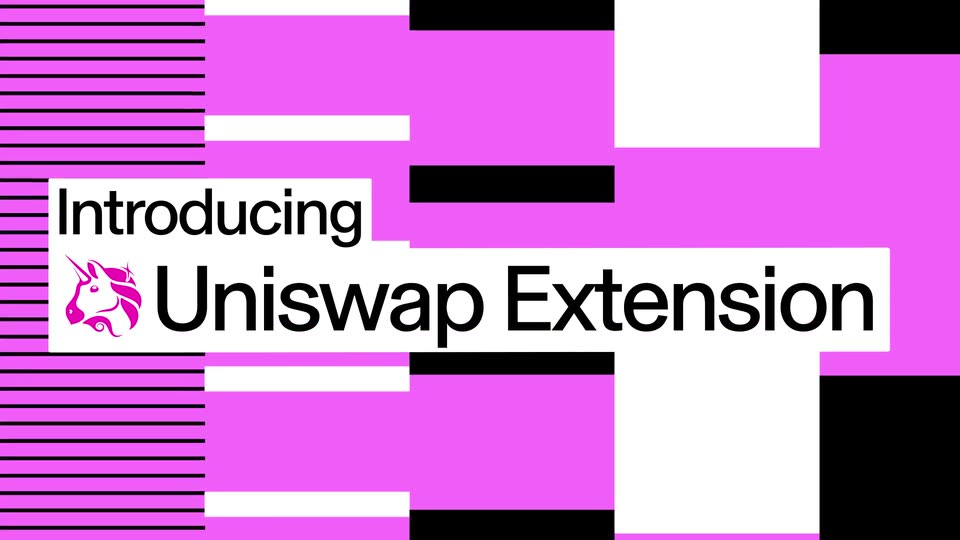
A pink, black and white glitch field of horizontal bars flickers and settles into a clean pink backdrop with black lines at left. White panels slide in carrying the black title and the pink unicorn mark, the word 'Introducing' scaling up as it lands.
On-screen text: “Introducing”, “Uniswap Extension”
Techniques: Kinetic type
Camera: Static
On a static dark frame, a Chrome Web Store listing for Uniswap sits center-left with its unicorn logo and a blue Add to Chrome button to the right. A headline scales in as the listing slides up into place.
On-screen text: “Introducing”, “Uniswap Extension”
Techniques: Kinetic type
Camera: Static
A dark Uniswap browser window on a magenta field starts as a close-up of the address bar and hayden.eth, then reframes to the full PEPE token page with swap panel, then shifts to the top-left extension header.
Techniques: UI zoom
Camera: Pull out
A dark PEPE token page, with price chart and swap panel, fills a browser window on a solid magenta background. The window slides right, exposing the left edge of a second interface at the frame's right side.
Camera: Static
A dark trading interface, framed in a browser window, floats on a hot pink background. The 3D mockup rotates from a steep side angle toward a flatter frontal view, revealing a token price chart, a swap panel, and a vertical token list.
Techniques: 3D mockup
Camera: Push in
A dark wallet card on the right shows a profile, a dollar balance, four action tiles and a token list. A swap panel on the left fades to black, leaving the wallet in view.
Camera: Push in
A black frame holds a wallet panel on the right: a colorful avatar, the handle hayden.eth, a $30,777.19 balance with green change, four purple tiles labeled Swap, Buy, Send and Receive, and a Tokens list starting with Ethereum. The panel eases down a few pixels over the shot.
Camera: Static
A side-by-side layout shows a white card with the word Swap in pink on the left and a dark swap panel on the right. The panel lists an ETH amount with a Max tag, a pink Choose token pill and a network cost line. Both areas drift slowly downward.
On-screen text: “Swap”
Techniques: Split screen
Camera: Static
A dark buy screen occupies the right, listing an Ethereum balance and a debit card payment field. On the left, pink Swap and Buy words on white cards slide into position.
On-screen text: “Swap”, “Buy”
Techniques: Kinetic type
Camera: Static
On the left, white cards hold magenta words that rearrange into 'Swap, Buy Send' as 'Receive' appears below and scales up. On the right, a dark wallet panel stays locked on the Receive view, showing a green QR code and the address 0x29e2...8E0A.
On-screen text: “Swap, Buy”, “Send”, “Receive”
Techniques: Kinetic type
Camera: Static
Left of a dark frame, pink text on two white cards reads “Swap, Buy, Send” and a larger “Receive”. Right, a flat wallet receive panel shows a green QR code with a circular avatar, the handle hayden.eth and a row of small token icons. The shot is locked off.
On-screen text: “Swap, Buy, Send”, “Receive”
Techniques: Split screen
Camera: Static
A wallet sidebar sits on the right over black while white blocks with magenta type on the left swap lines from Swap, Buy, Send, Receive / Directly from to Directly from / The sidebar. A pink block with black stripes then wipes up to cover the frame.
On-screen text: “Swap, Buy, Send, Receive”, “Directly from”, “The sidebar”
Techniques: Kinetic type
Camera: Static
Pink abstract blocks and horizontal line patterns drift behind a central white bar that widens from the left, revealing the pink unicorn logo and the black title Uniswap Web App.
On-screen text: “Uniswap Web App”
Techniques: Masking
Camera: Static
On a near-black background, magenta sans-serif text on white bars scales into frame. The first line appears at center, then a second line lands below it, both locked to the frame.
On-screen text: “With even more ways to”, “Discover, research, and swap”
Techniques: Kinetic type
Camera: Static
A dark swap interface card sits centered on a magenta background, then scales up to fill the frame, pushing the magenta border off screen. The view lands on the ETH swap form with its pink Select token button.
Techniques: UI zoom
Camera: Static
On a black background, a row of four gray tab labels sits in the lower third. A rounded pill highlight shifts from Swap to Limit, which enlarges and inverts to black text on a white pill while the other labels dim.
Camera: Static
A white box with pink text reading 'Now with support for' sits on a dark background. It slides up and shrinks as a second, larger white box with 'Limit Orders' appears below it.
On-screen text: “Now with support for”, “Limit Orders”
Techniques: Kinetic type
Camera: Static
A dark limit-swap form in close-up: the price field shows a pink caret as the value changes from $2,209.81 to $2,800, then the frame pans down through the pay and receive rows, expiry pills and the pink Submit button.
Techniques: UI zoom, Cursor demo
Camera: Pan
A dark interface shows a pink submit button and a green circular arrow icon. The button exits, and confirmation text slides up into view below the icon.
On-screen text: “Limit submitted”, “1 ETH →2,800 DAI”, “Swap executes when ETH is $2,800”, “Expires March 28, 2024. 11:29 AM”
Techniques: Kinetic type
Camera: Static
A dark confirmation screen centers a green up-arrow icon above the white headline Limit submitted. An ETH-to-DAI swap line and two gray detail lines sit below it. The whole block drifts slowly upward into place over the second.
Techniques: Kinetic type
Camera: Static
A white block on a black field holds the magenta line And fully integrated. The block grows downward and to the right, opening to reveal a larger second line, Data & Insights. The first line scales in as the white shape expands.
On-screen text: “And fully integrated”, “Data & Insights”
Techniques: Kinetic type, Masking
Camera: Static
A dark trading app view shows the Pepe PEPE price header and a 2023 chart. The green line graph converts into red and green candlesticks as the chart-type toggle at the bottom switches from line to candlestick, while the price tags and axis labels stay fixed.
Techniques: Morph
Camera: Push in
Green and red candlestick bars form a price line that drifts steadily left across a black background, climbing to a peak on the right then dipping back down.
Camera: Push in
Green and red candlestick bars form a price line that rises, peaks, and falls, scrolling left across a black background. The chart drifts steadily as one layer with no other elements.
Camera: Static
A dark user interface shows a chart type toggle and a segmented control with 'Price', 'Volume', and 'TVL'. A selection pill slides from 'Price' to 'Volume'.
Camera: Static
A dark screen shows two rounded pill controls side by side. The left pill holds a line-chart icon and a bar-chart icon; the right pill lists Price, Volume and TVL, with TVL set in a darker highlighted pill. The frame is locked off and static.
Camera: Static
On a black field, the magenta line “Detailed pool data” sits on a white strip at left, then shrinks as a second white strip appears below with the larger magenta line “At your fingertips”.
On-screen text: “Detailed pool data”, “At your fingertips”
Techniques: Kinetic type
Camera: Static
On black, a pink-and-blue stacked area chart for Uniswap TVL draws in on the left. A matching bar chart for Uniswap volume slides in from the right, bars rising, the two panels settling side by side.
On-screen text: “Uniswap TVL”, “$4.57B”, “Uniswap volume”, “$1.69T”
Camera: Static
A dark browser window mockup of a crypto pool page floats on a flat magenta field, tilted in 3D, then eases upright. A stats card on the right fills in row by row, revealing pool balances, TVL, volume and fees, while the price chart stays static on the left.
On-screen text: “Uniswap TVL”, “$4.57B”, “May 2020”, “Uniswap volume”, “$1.69T”
Techniques: 3D mockup
Camera: Static
A dark transactions table fills the frame. The list scrolls slowly upward, the Transactions heading sliding off the top edge while new rows with green and red type labels enter from the bottom.
Camera: Push in
A dark transaction list on a black background scrolls upward, each row showing a timestamp, a green action label, a dollar amount and a wallet address. A magenta bar with thin black lines slides in along the bottom edge near the end.
Camera: Pan
Abstract pink, white and black rectangles and a column of horizontal lines drift vertically behind two white title cards that slide in from the left, the first carrying the Uniswap logo and “Uniswap App”, the second a larger “On iOS and Android” that scales up.
On-screen text: “Uniswap App”, “On iOS and Android”
Techniques: Kinetic type
Camera: Pull out
A white rectangle expands on the left, uncovering the magenta headline Swap Whenever, while a tilted phone mockup of the Swap screen with a number keypad slides in on the right; the caption On iOS and Android scales in.
On-screen text: “Swap Whenever”, “On iOS and Android”
Techniques: Masking, Kinetic type, 3D mockup
Camera: Pan
Magenta sans-serif words on white blocks read “Swap / Whenever”, then swap to “Whenever / Wherever” as the blocks slide; dim phone swap screens fade out on the left.
On-screen text: “Swap”, “Whenever”, “Wherever”
Techniques: Kinetic type
Camera: Static
A dark swap widget fades in at center. A cursor types 2.2 in the top field while the dollar value and the PEPE amount count up, settling on 5,126,330,000 above a pink Swap button.
Techniques: Cursor demo
Camera: Static
A dark swap screen with a pink Swap button fades out, leaving a thin green ring at center, then a rounded dark card fades in with a green success line and the figure 5,126,330.
Camera: Static
A white rounded swap-notification card with Ethereum and PEPE coin icons scales up from the center on a black background. Green text reads Successfully swapped above a dark ETH to PEPE amount line.
Camera: Static
Magenta field with a striped band and scattered black and white blocks that jump to new positions. A white card on the left stacks three black lines: Extension scales in, Web App slides in, Mobile App sits still.
On-screen text: “Extension”, “Web App”, “Mobile App”
Techniques: Kinetic type
Camera: Pan
On a solid magenta field, two white bars slide into place carrying the black tagline, a magenta unicorn head between the words. The bars shrink and merge into a small white rounded square holding the unicorn mark, which holds centered as the sign-off.
On-screen text: “Swap Smarter”, “with Uniswap”
Techniques: Kinetic type, Morph
Camera: Static
A flat magenta field fills the entire frame and holds completely static for the full duration, with no elements, motion, or text.
Camera: Static