0:56

Meet Firefly Video Model | Adobe
Adobe · Feb 2025
beehiiv · Oct 2026 · 1:05 · AI-annotated
beehiiv’s 1:05 launch film runs 28 scenes, about 2.3 s each. The product is on screen from the first frame and 5 features are revealed. There is no explicit call to action; a voiceover carries the film. Dark indigo to near-black gradients with soft blue and purple glows keep the whole video on one consistent field.
Is this your launch? to your site or press kit.
Adobe · Feb 2025
Moonshot AI · Oct 2026
HyperFrames · Sep 2026
A purple hexagon bearing the white beehiiv mark scales up to the center of a dark blue field. Dozens of blue link-icon circles then fly in and settle radially around it as light rays burst outward from the hub.
On-screen text: “With beehiiv's native integrations,”, “your newsletter doesn't live”, “on an island.”
Techniques: Particles
Camera: Push in
A glowing purple rounded card with a chain link icon multiplies and fans out into a stack of cards spreading to the right on a dark blue gradient. The caption swaps from “on an island.” to “Instead, you can connect” at the bottom.
On-screen text: “on an island.”, “Instead, you can connect”
Techniques: Morph
Camera: Push in
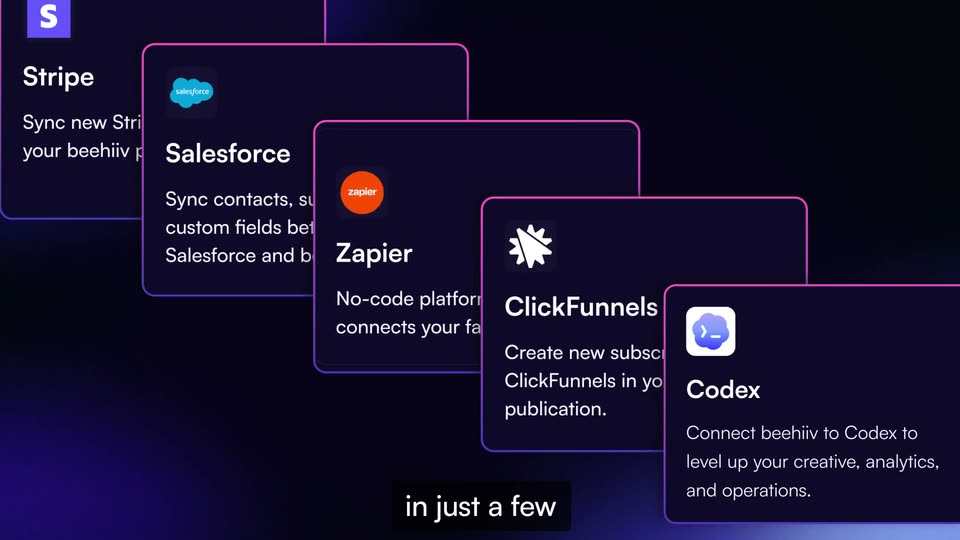
A diagonal cascade of dark integration cards, each with a brand logo and short blurb, recedes from upper left to lower right on a black background. The camera pans diagonally across the stack, revealing new cards, while a white caption phrases in at the bottom.
On-screen text: “Instead, you can connect”, “of your tech stack”, “clicks.”
Techniques: 3D mockup, Parallax
Camera: Push in
The white Arc arch logo in a rounded square on a dark blue gradient quickly splits into a two-by-two grid of tiles showing the Arc logo, a black square on white, and an X, with a blue plus circle at the center. A caption is locked at the bottom.
On-screen text: “And whatever your goals are,”, “六”
Techniques: Morph
Camera: Static
Two rounded app-icon tiles joined by a small blue plus badge float on a dark blue gradient. The logos inside the tiles swap between different integrations, and the pair slides from a diagonal to a side-by-side layout while subtitles read at the bottom.
On-screen text: “there's an integration”, “to help you get there.”
Camera: Static
A dark card with a pink horizontal bar chart labeled 6-MONTH GROWTH builds up as the bars extend, the bottom caption swaps to Looking to grow?, then a large muted-purple headline LOOKING TO GROW? scales in at the top.
On-screen text: “to help you get there.”, “Looking to grow?”, “LOOKING TO GROW?”
Techniques: Kinetic type
Camera: Push in
A perspective-tilted card with a pink bar chart sits on a dark blue backdrop. The white headline scales up above it as the card zooms forward, and a black caption box holds the question at the bottom.
On-screen text: “LOOKING TO GROW?”, “Looking to grow?”
Techniques: 3D mockup, Kinetic type, UI zoom
Camera: Push in
A white logo in a gradient square sits left on a dark purple field. A line draws right to a LinkedIn icon, then branches as ManyChat, Linktree, Discord, and X icons pop in one by one. The frame zooms in near the end.
On-screen text: “We now integrate with”, “LinkedIn, plus tools like”, “ManyChat, Linktree, and Discord.”, “And our native Meta”
Camera: Pan
On a dark blue gradient, a blue Meta logo card scales up from small to full size, linked by a purple line to a white stacked-bars icon below. At 2.1s a white diagonal ribbon wipes across the card's right edge, revealing pink EARLY ACCESS text.
On-screen text: “And our native Meta”, “ads integration is open”, “for early access.”, “EARLY ACCESS”
Techniques: Masking
Camera: Push in
A tilted 3D metrics card floats over a dark purple glow, its pink progress bars and revenue chart filling in. Beneath it, a stacked headline builds line by line: NEED TO KEEP, YOUR BUSINESS, CONNECTED?, with a small caption below.
On-screen text: “NEED TO KEEP YOUR BUSINESS CONNECTED?”, “business connected?”, “EARLY ACCESS”, “for early access.”
Techniques: 3D mockup, Kinetic type
Camera: Pull out
A tilted 3D metrics dashboard with pink bars floats over a dark blue gradient. A large pink-and-white headline scrolls up line by line while a white caption box at the bottom updates phrase by phrase.
On-screen text: “NEED TO KEEP YOUR BUSINESS CONNECTED?”, “business connected?”, “With WordPress, you can”
Techniques: 3D mockup, Kinetic type
Camera: Static
A white WordPress tile shrinks and slides to the top left, linking by a drawn line to a HubSpot tile. A browser frame opens and a 'Science Behind Design' article page slides in from the right, while a subscriber counter card rises and its number ticks upward.
On-screen text: “With WordPress, you can”, “connect your newsletter to”, “And with HubSpot,”
Camera: Push in
A dark field with blue corner glows holds a hexagon around the white HubSpot logo, which eases left as a second hexagon with an orange node icon appears at right. Outlined pill labels with tiny icons pop in around the pair, and a black caption bar sits at the bottom.
On-screen text: “And with HubSpot,”, “Marketing and sales stay in sync.”
Camera: Static
A dark blue diagram centers two hexagons with the HubSpot and Salesforce logos, linked by thin lines to icon labels like Capture leads, Qualify prospects and Track interactions. The whole layout drifts slowly while a bottom caption reads Marketing and Sales stay in sync.
On-screen text: “Marketing and Sales stay in sync.”
Camera: Push in
A white stacked-bar mark in a dark hexagon holds center on a purple gradient while a four-pointed star expands and rotates behind it. The caption “Want to put AI to work?” stays fixed in a dark box at the bottom.
On-screen text: “Want to put AI to work?”
Camera: Static
A dark chat panel with an input field sits below a row of integration icons. The left pink-purple arch icon stays fixed while the right icon swaps through orange, blue, and black logos, each linked by a line to a central checkmark, as subtitles list the integrations.
On-screen text: “Want to put AI to work?”, “We integrate with Claude,”, “Codex, and now Grok.”
Camera: Static
A purple and an orange app icon, joined by a checkmark, sit above a prompt bar on a dark field. Prompt text types itself into the bar, then a hand cursor glides to the send button. White captions on black boxes run along the bottom.
On-screen text: “So you can build”, “powerful workflows right from”
Techniques: Cursor demo
Camera: Static
A split screen shows a dark chat panel on the left where assistant lines appear one by one, and a blue survey form on the right that fills in with a name field and role options. A white caption sits on a black bar across the bottom.
On-screen text: “powerful workflows right from”
Techniques: Split screen
Camera: Pan
A dark split-screen interface holds a purple prompt bubble and a survey summary on the left while the right column of survey questions scrolls up, revealing new options. A white caption box sits at the bottom center.
On-screen text: “your favorite tools.”
Techniques: Split screen
Camera: Static
A blue rounded square with a white plus sign scales up at center on a dark background, gaining a dashed white border. A swarm of overlapping purple and blue circles multiplies around it. White subtitles read “And those are just a few of the”.
On-screen text: “And those are just”, “a few of the”
Techniques: Particles
Camera: Static
A blue rounded-square icon with a white plus and dashed white border sits centered over a field of overlapping translucent circles in purple, magenta and blue. The background drifts and zooms slowly while the icon scales gently. A dark caption reading possibilities. rests at the bottom.
On-screen text: “possibilities.”
Techniques: Parallax
Camera: Static
An orange rounded square bearing the white zapier wordmark sits centered on a dark purple gradient. A pink dashed curve draws itself along the right edge of the square while a black caption bar at the bottom updates from possibilities. to With Zapier, Make, and.
On-screen text: “possibilities.”, “With Zapier, Make, and”
Camera: Static
Three flat app tiles, a purple Make mark, an orange Zapier mark and a blue API mark, settle on a dark blue gradient, joined by pink dashed curves. White double arrows fade in at the left edge while a black caption bar at the bottom swaps lines.
On-screen text: “With Zapier, Make, and”, “our open API, you”
Camera: Pull out
On a dark blue gradient, a diagram of app tiles pans left. A beehiiv logo tile shrinks at the left, arrows link it to a blue API tile, dashed pink lines tie it to purple Wix and orange Zapier tiles, and a pink grid tile appears at the right.
On-screen text: “our open API, you”, “can connect beehiiv to”, “just about anything.”
Camera: Pull out
A purple hexagon with the Arc logo sits at the center of a pink ring with dashed spokes; app icons scale in and orbit around it as the ring rotates. White captions on a black bar at the bottom follow the voiceover.
On-screen text: “Because your tool should”, “work together, not hold”, “you back.”
Camera: Pull out
A translucent wireframe cube tumbles in 3D over a dark grid of dashed lines. Gradient pink-to-purple circles and a person icon float on its faces while the camera orbits. Bottom captions read 'The future of creating', then 'isn't another walled garden.'
On-screen text: “The future of creating”, “isn't another walled garden.”, “you back.”, “zapier”
Camera: Static
A central person logo and a ring of app icons light up on a dark blue field. Below, the headline builds: a pink line 'THE FUTURE OF CREATING' then a huge 'IS OPEN' that brightens from gray to white. Bottom subtitles caption the voiceover.
On-screen text: “isn't another walled garden.”, “THE FUTURE OF CREATING IS OPEN”, “It's open.”
Techniques: Kinetic type
Camera: Static
A white stacked-bar icon holds center on a black field, then shifts left as the lowercase wordmark beehiiv fades in letter by letter to its right, settling into a static lockup.
On-screen text: “beehiiv”
Techniques: Kinetic type
Camera: Static