1:09
state machines - Introducing State Machines. The first infrastructure to spin up ente
State Machines · Sep 2026
HyperFrames · Sep 2026 · 1:28 · AI-annotated
HyperFrames’s 1:28 launch film runs 52 scenes, about 1.7 s each. The product shows up at 0:40 and 3 features are revealed. There is no explicit call to action; a voiceover carries the film. A black-field explainer that stitches typographic title cards, scrolling benchmark tables and a recurring dot-sphere 3D motif into a fast, roughly 26-cuts-per-minute argument for a video benchmark. One sunlit live-action field shot breaks the pattern at the product reveal, while green A/B panels carry the methodology demos and a green accent color ties the data highlights together.
Is this your launch? to your site or press kit.
State Machines · Sep 2026
1Deploy · Sep 2026
Sonos · Hardware · Apr 2023
A black screen holds, then a single line of white text fades in at the bottom center of the frame.
On-screen text: “Motion design isn't dead.”
Camera: Static
A dark social media post card, tilted in perspective, slides up from the bottom of a black frame and settles, revealing an avatar, a verified name and handle, and the post body. A small white caption sits centered at the bottom.
On-screen text: “Motion design isn't dead.”
Techniques: 3D mockup
Camera: Static
A rounded tweet card floats on a black field, showing the name Kailash with a blue check and the line Motion design is dead!? A white caption below scales in, reading Motion design isn't dead.
On-screen text: “Motion design isn't dead.”, “In fact,”
Camera: Static
A dark tweet card from Kailash scales up and drifts to center while faint code and label text drift behind it at a different speed; a small caption sits locked at the bottom.
On-screen text: “In fact,”
Techniques: Parallax
Camera: Static
A dark tweet card from Kailash, @kail_designs, reading “Motion design is dead!?” brightens as a light gray media panel rises from its lower edge, while the caption “we think it's just starting” sits below in a small pill.
On-screen text: “In fact,”, “we think it's just starting”
Camera: Pull out
A dark X post card about motion design floats over a design-tool view as a zigzag line draws itself on the white grid canvas, with a gray caption box at the bottom.
On-screen text: “to expand and AI will”
Camera: Pull out
A dark screen opens on a centered tweet card, then pulls back to reveal the full editor: a video grid on the left and a numbered clip list on the right. A white caption line holds at the bottom.
On-screen text: “to expand and AI will”
Techniques: UI zoom
Camera: Static
A centered X post card floats over a fanned stack of rotated dashboard mockups, then cuts to the same card over a blurred office. White subtitle captions sit in a black bar at the bottom center.
On-screen text: “to expand and AI will”, “play a huge part in”
Techniques: 3D mockup
Camera: Static
A centered tweet card floats over a blurred interface that shifts from a message compose box to a multi-panel dashboard. The card shrinks slightly and its embedded image crossfades from technical drawings to a single yellow sphere. A caption reads at the bottom.
On-screen text: “play a huge part in”
Camera: Static
A centered Twitter post mockup holds still over a darkened, blurred shot of two men at a table, while a teal $2M graphic fades out behind it. The post highlights “AI just killed motion design” above a lightbulb blueprint. A bottom caption reads “play a huge part in.”
On-screen text: “play a huge part in”
Camera: Static
A social media post card by Titouan Gillet sits centered over blurred code, crossfading in from a previous post. Its embedded media shows a Connect your Amazon panel with a toggle, while a white caption at the bottom reads unlocking the possibility for more.
On-screen text: “unlocking the possibility for more”
Camera: Static
A black social-post card is centered over a dimmed background of large gray words. The card holds a profile, a sentence with a green highlight, and an embedded product screenshot that scrolls slightly, while a white caption sits at the bottom.
On-screen text: “unlocking the possibility for more”
Camera: Static
A centered X post card from Titouan Gillet holds static on a dark field, its body text and embedded product screenshot unchanged. Behind it, dimmed product screens and large text fade out to a plain gray. A white subtitle sits at the bottom.
On-screen text: “people to create video.”
Camera: Static
A centered social post card floats over a dim office that fades to black; the card scrolls up to expose an embedded UI screenshot, and a black caption box at the bottom reads 'people to create video.'
On-screen text: “people to create video.”
Camera: Pan
On a black background, the white word Every blurs into the center, holds, then fades, while a small caption at the bottom switches from You see, to every new model comes with.
On-screen text: “You see,”, “Every”, “every new model comes with”
Techniques: Kinetic type
Camera: Static
A white bold headline scrolls left across a dark topographic map that crossfades into a dim room showing a 2026 screen, while a small caption box sits fixed at the bottom.
On-screen text: “Every new model comes with”, “every new model comes with”
Techniques: Kinetic type
Camera: Static
A white headline line blurs in from the left over a dark olive botanical illustration, then the background swaps to a scatter plot of speckled benchmark dots as the words 'report card:' settle into the top left corner.
On-screen text: “every new model comes with a report card:”, “2026”
Techniques: Kinetic type
Camera: Static
A benchmark table assembles on black as rows slide down into place, then a green outline highlights the DeepSeek V4.1-Flash column. The table splits into two blocks around a green-outlined gap while the report card title dims.
On-screen text: “report card”
Techniques: Masking
Camera: Static
A dark benchmark table lists model scores across columns. The view zooms into a terminal window where nginx and pytest commands type out, then the screen fills with overlapping code snippets and diffs. White captions at the bottom track the voiceover.
On-screen text: “These tests measure how well”, “a model solves hard,”, “checkable problems”, “like code and agentic work”
Techniques: UI zoom
Camera: Push in
A dark field of code and terminal output scrolls slowly, bright foreground lines drifting over dim background lines. A white caption in a black box at the bottom carries the voiceover.
On-screen text: “like code and agentic work”, “or math and science.”
Techniques: Parallax
Camera: Pan
A black field of white mathematical formulas and code lines drifts across the frame with heavy motion blur, scrolling past the viewer. A small white caption stays fixed at the bottom center throughout.
On-screen text: “or math and science.”
Camera: Pan
Blurred chemical formulas and hexagonal molecular rings drift past on a black field, then fade to a single green point that expands into a sphere of small green dots, dense at the core and sparse at the rim.
On-screen text: “or math and science.”, “But many people are pushing”, “these models somewhere else that”, “is much harder to quantify.”
Techniques: Parallax, Particles
Camera: Pan
A sphere of white and teal particles on black disperses into a full-screen dot grid, then a product UI screen slides in from the left behind the dots. Small white captions appear at the bottom center.
On-screen text: “is much harder to quantify.”, “Creative work,”, “UI design,”
Techniques: Particles, Morph
Camera: Push in
Split screen: the left column stacks interface screenshots (Linear, Stripe, Agentic Infrastructure) drifting slowly downward, while the right black panel holds a dot grid and words fade in at the bottom center, one replacing the other.
On-screen text: “U I design,”, “writing,”
Techniques: Split screen, Kinetic type
Camera: Static
A two-column webpage sits on a black dotted field. The left holds a white headline above a stack of product screenshots. The right cross-fades from torn-paper cards of prose to a dark grid of feature labels, while a gray button swaps its word from writing to video.
On-screen text: “The product development system for teams and agents”, “Purpose-built for planning and building products. Designed from the inside.”
Camera: Static
A grid of nine rounded cards on black, each holding a product screen or a block of body text, scrolls downward. Green check and red cross marks pop onto the cards, then the whole grid fades to black.
On-screen text: “There's no answer key for”, “So people improve by trial”
Camera: Pull out
On black, a 3D row of small interface panels sits in perspective with a white cursor at the left. The row collapses into one dark command bar with a green up-arrow button, which then fades out as the cursor slides to the bottom right.
On-screen text: “So people improve by trial”, “error”
Techniques: 3D mockup, Morph
Camera: Static
A dark rounded input bar on black types “this doesnt quite feel right” word by word behind a blinking cursor. The bar slides left, revealing a green circular button with an up arrow at its right end. Small white captions appear at the bottom.
On-screen text: “Our team set out to”, “change that for video generated”
Techniques: Kinetic type
Camera: Static
A dark rounded bar holding two green up-arrow buttons collapses toward the center until it becomes a single green button, while a white cursor glides in and rests on it. The caption “from code,” stays fixed at the bottom of the black frame.
On-screen text: “from code,”, “change that for video generated”
Techniques: Morph, Cursor demo
Camera: Static
A man in a gray sweater and glasses stands in a sunny grassy field, gesturing as he speaks to camera. Subtitles line the bottom while a large 'Code?Video' title pops in above him, flanked by 'introducing' and 'benchmark', then 'Who says a video is good?' appears.
On-screen text: “from code,”, “a quantifiable way to measure”, “how well a model makes”, “video.”, “introducing”, “Code?Video”, “benchmark”, “I'm sure you're asking,”, “Who says a video is”, “good?”
Camera: Static
A man in a beige sweater stands in a sunlit field under a large white headline, “good?” in green. The shot cuts to a green 3D panel with GPT version labels and a center divider, the man blurred behind it.
On-screen text: “Who says its good?”, “We started with people,”
Techniques: 3D mockup
Camera: Static
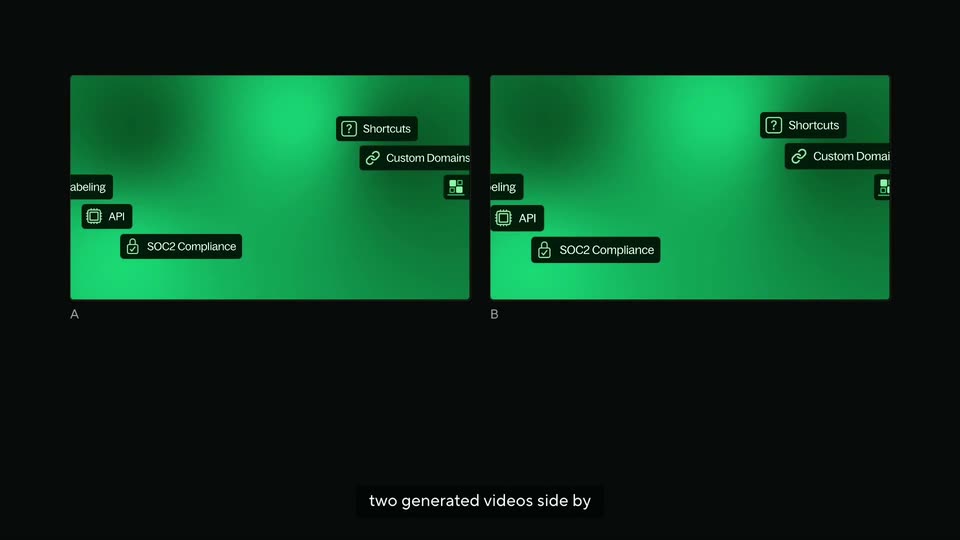
Two green panels labeled A and B sit side by side on black, each holding a grid of dark rounded chips with icons (Command Bar, Shortcuts, Zapier, Custom Apps). The chip groups slowly scale outward as a white caption runs along the bottom.
On-screen text: “We started with people,”, “two generated videos side by side”
Techniques: Split screen
Camera: Static
Two green panels, A and B, sit side by side showing the same grid of dark pill buttons; the view zooms in then back. A caption line types below, then a large white headline poses the question while a cursor hovers over the A button.
On-screen text: “two generated videos side by side”, “followed by simple questions.”, “Does it hold your attention?”
Techniques: Split screen, UI zoom, Kinetic type, Cursor demo
Camera: Pull out
Two green panels labeled A and B list rows of feature chips. A cursor glides to the B button and clicks it, lighting it up, as the centered caption swaps from one question to the next.
On-screen text: “Does it hold your attention?”, “Does it match the brief?”
Techniques: Cursor demo
Camera: Pull out
A dark interface shows two empty video panels labeled A and B above the prompt Does it match the brief? and two answer buttons, then the view fills with a scrolling list of judgment rows, each pairing two model names with a green A or B verdict.
On-screen text: “Thousands of judgments,”
Camera: Static
A dark wall of scrolling model-name data columns fills the frame while a white serif headline at the bottom swaps lines; a green dot-matrix sphere scales up in the center.
On-screen text: “That means all judgments,”, “all made by humans.”, “Then we trained a model”
Techniques: Kinetic type
Camera: Pull out
A cloud of small white and teal dots forms a sphere on black, contracts, then expands and flattens into a ring. A white caption at the bottom reads “Then we trained a model”, then “on those picks.”
On-screen text: “Then we trained a model”, “on those picks.”
Techniques: Particles, Morph
Camera: Pull out
Two green feature cards sit left and right of a dotted particle sphere on black. Their labels ghost and shift as the cards slide, and a white caption reads at the bottom center.
On-screen text: “Show it two videos and”
Techniques: Particles
Camera: Static
Two green panels of integration pills flank a rotating sphere of white dots on black. Quiz labels light up in sequence, then a center readout shows 0.85 with a bar while the left panel gains a white outline. The panels dim and resolve into a timeline view.
On-screen text: “a question,”, “and it tells you which”, “P(A beats B)”, “0.85”, “one people would choose and”, “why.”
Techniques: Particles
Camera: Static
Two white timeline cards flank a sphere of green and white dots on black. The cards switch from a waveform editor to a 'Getting traffic' view as the bottom pill 'Q4 → flicker' glows green above the caption.
On-screen text: “Q1 → A”, “Q2 → A”, “Q3 → A”, “Q4 → flicker”, “Q5 → B”, “This model flickers.”
Techniques: Split screen, Particles
Camera: Static
A dark interface screen holds three video preview panels in a row. The left panel's white text snaps from a graph label to a bold centered word; the middle panel spins a dotted green sphere; the right holds still. Pill labels and a caption box sit below.
Camera: Static
A sphere of small white and green dots sits in the center of a dark 3D space, ringed by a receding wall of colorful UI cards. The cards carry short headlines while the dot sphere holds the foreground.
On-screen text: “And because the judge can”
Techniques: Particles, 3D mockup
Camera: Static
A 3D wall of tilted interface cards recedes into a dark void, framing a rotating sphere of teal dots at the center. The cards hold product screens and headlines at an angle. A white caption rests on a black bar along the bottom edge.
On-screen text: “score any two videos in”
Techniques: Particles, 3D mockup, Parallax
Camera: Static
A tilted 3D grid of app cards fills the frame. On the dark central card, a sphere of teal dots spins above gray text, while a white caption box at the bottom types out the words in sequence.
On-screen text: “score any two videos in seconds,”
Techniques: 3D mockup, Particles
Camera: Static
A sphere of tiny dots pulses at the center, its color cycling green, red, teal, set against tilted product-interface panels floating in 3D perspective on a black background. White subtitles appear at the bottom.
On-screen text: “seconds,”, “models can train against it,”
Techniques: Particles, 3D mockup
Camera: Pull out
A dark 3D space displays a grid of UI cards and a central sphere of glowing particles forming a globe. The cards show app interfaces and text blocks. Subtitles appear at the bottom.
On-screen text: “models can train against it,”, “not just be ranked by”, “Over time,”
Techniques: 3D mockup, Particles
Camera: Pull out
A tilted grid of interface cards (a travel booking screen, a code editor, a resume, a logo) slides across a dark 3D space while a stream of small teal and white particles falls down the center. Subtitles appear at the bottom.
On-screen text: “Over time,”, “this benchmark will help models”
Techniques: 3D mockup, Particles
Camera: Pan
Black field with drifting white dots around a dashed code-style rectangle. A dark control panel fades in inside, showing a line graph with a cursor and a small heading, while white captions scale in at the bottom.
On-screen text: “FOCUS ON”, “this benchmark will help models”, “produce better videos from code.”
Techniques: Kinetic type, Particles, Cursor demo
Camera: Static
A small framed card with a code-ticker border holds the control panel, then the white backing peels away and the panel zooms into a dark 3D wireframe grid. The green line graph with a white cursor scales up inside a glowing rounded frame while the title distorts above it.
On-screen text: “endless control”, “produce better videos from code.”, “This is just the beginning.”
Techniques: UI zoom, Cursor demo, Kinetic type
Camera: Push in
On a black field, the white Hyperframes logo holds center as a cursor hovers at its core and eases the two rounded halves apart; a faint teal glow flickers along the bottom edge. The caption “Hyperframes,” sits in a black box at the bottom while “This is just the beginning.” holds still and “endlesscontro” scales in.
On-screen text: “Hyperframes,”, “This is just the beginning.”, “endlesscontro”
Techniques: Cursor demo, Light sweep
Camera: Static
A green-and-teal play logo slides from center to the upper right and shrinks as a large white HeyGen HyperFrames wordmark appears on the left. A cursor arrow hovers below, with the caption go make something. at the bottom.
On-screen text: “go make something.”, “HeyGen”, “HyperFrames”
Camera: Static
On black, the HeyGen HyperFrames wordmark and teal-green play icon drift from center to the left as the lockup settles. “× Google DeepMind” appears to the right and a small “Benchmark available through Kaggle” line fades in below. The frame holds on the final sign-off.
On-screen text: “go make something.”, “HeyGen”, “HyperFrames”, “× Google DeepMind”, “Benchmark available through Kaggle”
Camera: Static