0:18
Explore
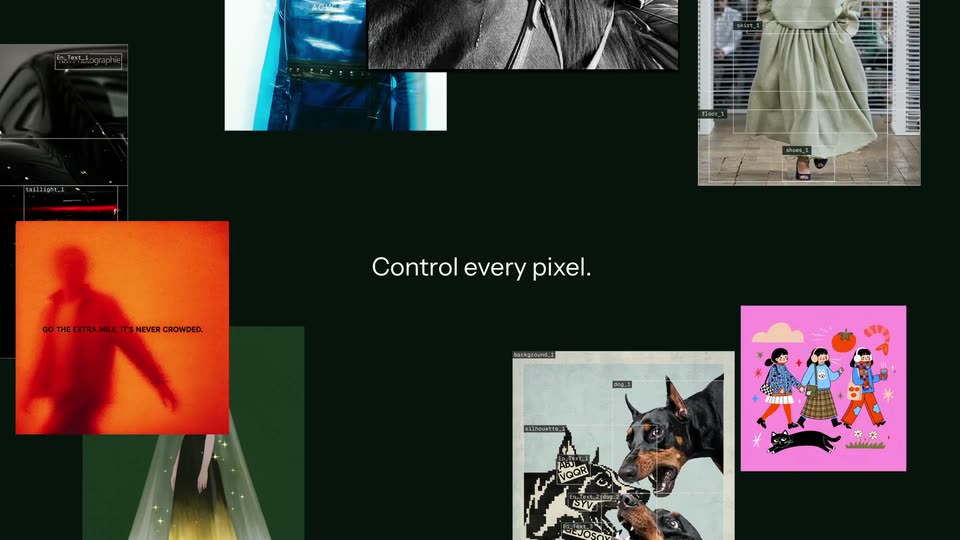
Black Forest Labs - Introducing FLUX 3 Image. Control every pixel. Make precise multi-t
Black Forest Labs · Oct 2026 · 0:48 · AI-annotated
- Length
- 0:48
- Scenes
- 42 · 1.2 s avg
- Product on screen
- 0:00
- Features shown
- 8
- Voiceover
- No
00:00:00 / 00:48:18
Black Forest Labs’s 0:48 launch film runs 42 scenes, about 1.2 s each. The product is on screen from the first frame and 8 features are revealed. There is no explicit call to action. Built as a name-first launch: the FLUX 3 Image title card opens, then a rapid montage of captioned capabilities where each centered white headline is proven by generated stills that swap, tilt and zoom on a near-black green field, closing on the title and the Black Forest Labs logo. Pacing is fast at about 48 cuts per minute with a steady 117 bpm pulse, and the signature moves are the self-typing cream prompt bar, white selection boxes reshaping frames, and drifting collages that resolve into a
Footage neededEstimated needs: 3 capture groups — your screens or recordings · 1 official logo — reused across the film · 15 filmed passages — shoot, supply or replace · 12 graphic passages — draw or supply · 4 3D passages — build or supply
Is this your launch? to your site or press kit.
More like this

1:16
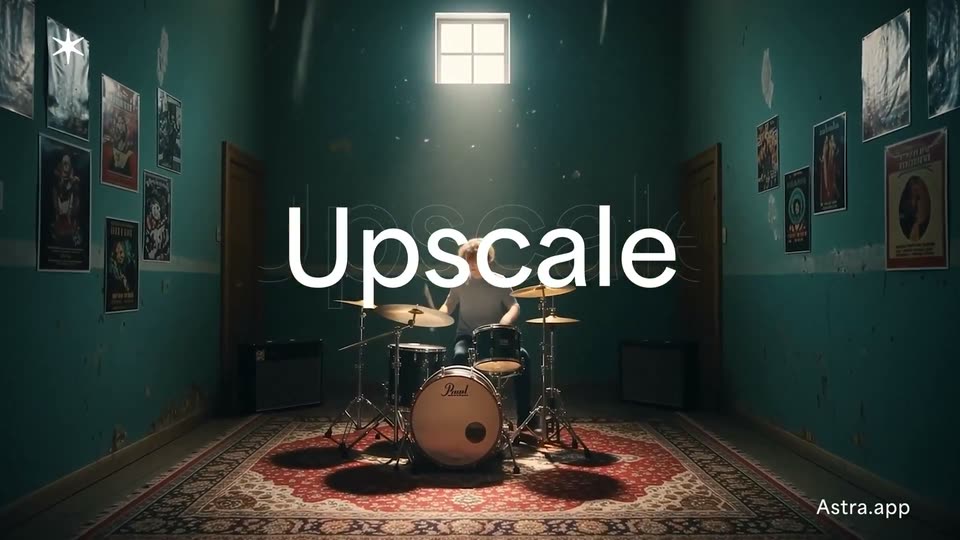
Topaz Labs - 🚀BIG NEWS! We’re launching Astra: the first-ever creative upscaler fo
Topaz Labs · Jun 2025
1:19

All New Uniswap Extension and More Tools for Users to Swap Smarter
Uniswap · Feb 2024
Black Forest Labs - Introducing FLUX 3 Image. Control every pixel. Make precise multi-t, scene by scene
· 42 scenes as text
01 · Product intro · 0:00–0:02
A dark green frame holds an orange silhouette image above a 3x3 grid of thermal thumbnails, with the title FLUX 3 Image between them. The hero image drifts up, then the frame cuts to a scattered collage of varied generated pictures filling the screen while the title stays centered.
On-screen text: “FLUX 3 Image”
Camera: Static
02 · Feature reveal · 0:02–0:03
A white headline “Control every pixel.” sits centered on a near-black green field. Around it, a collage of design work (a blue dress, an orange poster, a pink illustration of three girls, a dog poster) drifts slowly.
On-screen text: “Control every pixel.”
Camera: Pan
03 · Feature reveal · 0:03–0:04
A dark frame holds a centered white headline while a collage of image panels, each tagged with small selection labels, drifts slowly around the edges.
On-screen text: “Control every pixel.”
Camera: Pan
04 · Feature reveal · 0:04–0:04
A dark grid canvas fills the frame as white wireframe boxes with corner handles slide and reshuffle across it. The caption “Set the composition” sits centered in white, static, while the boxes rearrange around it.
On-screen text: “Set the composition”
Camera: Static
05 · Feature reveal · 0:04–0:06
A dim courtyard at night: a saxophonist in a black suit plays center-right, a drummer behind him, a double bassist at the right edge, couples dancing by a bar at left. White corner-bracket selection boxes overlay the frame, then clear. The caption holds centered.
On-screen text: “Set the composition”
Camera: Push in
06 · Feature reveal · 0:06–0:07
A cream poster mockup sits centered on a dark green field, fading up from black. Red rubber boots float above a bold headline, then a photo of two people sitting cross-legged wipes in over the boots while the headline and body copy hold in place.
On-screen text: “Set the composition”, “ZERO GRAVITY.”
Camera: Static
07 · Feature reveal · 0:07–0:09
Two models sit on the floor, low angle on chunky sneakers, framed by thin white selection boxes labeled change the clothing green and change top green. The tan outfit and the woman's top recolor to green inside the boxes while the boxes stay fixed.
On-screen text: “ZERO GRAVITY.”, “Step into the past with City Soda's 80s print poster tutorial.”
Camera: Static
08 · Demo · 0:09–0:10
A cream command bar floats on a dark green field; a prompt types itself out to read change tomato to an apple, then a 3D-tilted photo of a painted hand holding a red tomato slides in to its right.
Techniques: Kinetic type, 3D mockup
Camera: Static
09 · Demo · 0:10–0:11
A painted hand holding a red fruit on a blue card turns in 3D against a black background. As the panel rotates, the fruit changes from a tomato with a green stem to a glossy red apple.
Techniques: 3D mockup
Camera: Static
10 · Demo · 0:11–0:13
On a dark canvas, white wireframe boxes labeled with element names resize and settle into a scene layout. The right panel advances from Boxes to Describe as the layers list and scene prompt text fill in.
Camera: Push in
11 · Demo · 0:13–0:14
A dark tool interface frames a subway clip on the left, overlaid with white bounding boxes and their text labels, while a control panel with a Generate button sits right. The clip slowly zooms in on the blurred figure climbing the stairs as the boxes fade out.
Techniques: UI zoom
Camera: Static
12 · Feature reveal · 0:14–0:17
A diagonal cascade of small reference photos (jacket, dog, car, chair, bag) reflows into a horizontal strip on a dark green screen. A prompt bar slides up from the bottom and types 'Create a character using references.' as a cursor hovers over the send button.
On-screen text: “With up to 10 references”, “Create a character using references.”
Techniques: Kinetic type, Cursor demo
Camera: Push in
13 · Feature reveal · 0:17–0:18
A white headline sits above a prompt bar holding ten reference thumbnails, a plus icon, and a dark button with a triangle mark and cursor. It cuts to a full-frame photo of a man with a greyhound beside a silver car, a dark gradient at the bottom.
On-screen text: “With up to 10 references”
Techniques: Kinetic type, Cursor demo
Camera: Push in
14 · Feature reveal · 0:18–0:18
A man in a brown leather jacket and sunglasses stands with a black dog on a leash in front of a concrete house and a silver car. The shot is framed by a thick dark border and zooms in from a wide view to a close-up of his face.
Camera: Static
15 · Feature reveal · 0:18–0:20
A close-up of a woman with curly hair and black rectangular earrings stares straight at the camera against a plain white background. The caption Native 4K resolution is centered over her face while the shot holds with a slight push-in.
On-screen text: “Native 4K resolution”
Camera: Push in
16 · Feature reveal · 0:20–0:20
A still portrait of a woman with spiky hair buns on a cyan field sits centered on a near-black background, then scales up to fill the frame. A small caption reads “Native 4K resolution” while an oversized “資” character scales alongside it.
On-screen text: “Native 4K resolution”, “資”
Camera: Push in
17 · Feature reveal · 0:20–0:21
A stylized portrait of a model with sculpted black hair and winged liner holds on a cyan backdrop. A rectangular window slides in from the right, revealing a high-detail close-up of her eye and skin. The white word Realism sits at the cut.
On-screen text: “Realism”
Techniques: Masking
Camera: Push in
18 · Feature reveal · 0:21–0:22
A woman's face holds center on a cyan backdrop as four inset panels slide in to frame close-ups of her ear, eyes, and hair. The white word Realism stays fixed in the middle of the collage.
On-screen text: “Realism”
Techniques: Split screen
Camera: Static
19 · Feature reveal · 0:22–0:23
A model in an oversized green suit stands against a textured peach backdrop. The shot opens on a medium close-up of her face as she shifts her gaze, then pulls back to a full-length view with her legs crossed, framed as a centered panel.
On-screen text: “Realism”
Camera: Pull out
20 · Feature reveal · 0:23–0:25
A layered collage of fashion photos and a pencil sketch shuffles on the left as the images slide over one another, while the word Consistent holds still on the right against the dark green field.
On-screen text: “Consistent”
Camera: Static
21 · Feature reveal · 0:25–0:25
A painted still of a woman on a night train platform cuts to a photo of a crowded nightclub, both with white lyric text centered over the figure.
On-screen text: “Again”, “and again”
Camera: Static
22 · Feature reveal · 0:25–0:27
A centered photo of a woman on a blue backdrop holds the caption 'and again', then cuts to a night car shot flanked by 'Same' and 'product' as the image scales up on the black field.
On-screen text: “and again”, “Same”, “product”
Techniques: Kinetic type
Camera: Pull out
23 · Feature reveal · 0:27–0:27
On a near-black background, the white words Same and product sit left and right of a centered two-panel photo montage of a dark car. The front panel crossfades from a snow scene to a car under a flat-roof structure, the back panel swaps to a mountain road, while Same scales up.
On-screen text: “Same”, “product”
Techniques: Kinetic type
Camera: Static
24 · Feature reveal · 0:27–0:28
A dark near-black frame holds a vertical photo card of a man that wipes diagonally from a sweaty close-up to a walking shot to a pool shot. The white word Same on the left scales up while person on the right fades in to full size.
On-screen text: “Same”, “product”, “person”
Techniques: Kinetic type, Masking
Camera: Push in
25 · Feature reveal · 0:28–0:29
On a near-black background, three overlapping photo frames of a man at a gas station, by a pool and at a concert shift in layered parallax. The white words Same and person scale and reveal on either side of the stack.
On-screen text: “Same”, “person”, “brand”
Techniques: Kinetic type, Parallax
Camera: Static
26 · Feature reveal · 0:29–0:29
A square photo of a white sneaker sits between the words Same and brand on a dark green field. The photo zooms into the branded tongue and folds into a 3D FORMA box that forms in the center.
On-screen text: “Same”, “brand”
Techniques: Morph, 3D mockup
Camera: Static
27 · Feature reveal · 0:29–0:30
A dark green field holds three offset square panels that swap images, the center cycling from a laptop mockup to a corner billboard, the sides showing a bag and a person. White words Same and brand sit on the left and right edges.
On-screen text: “Same”, “brand”
Camera: Static
28 · Demo · 0:30–0:31
A layered collage of a magazine cover and sneaker photos sits on a dark field, flanked by the words Same and brand. A cream rounded bar slides in to cover the images while the caption A magazine cover called Handwork types out with a cursor.
On-screen text: “Same”, “brand”, “A magazine cover called Handwork”
Techniques: Kinetic type
Camera: Static
29 · Demo · 0:31–0:32
A cream prompt bar sits centered on a dark green field, its text typing out a magazine-cover request, then a 3D magazine cover with a tower of wooden planks slides out from behind the right edge.
Techniques: Kinetic type, 3D mockup
Camera: Static
30 · Demo · 0:32–0:33
A flat magazine cover mockup titled Handwork, showing a tower built from wooden planks, sits on a dark canvas between two toolbar buttons. The cover zooms in slightly on the canvas while the red masthead slides into place.
Techniques: UI zoom
Camera: Static
31 · Demo · 0:33–0:34
A terracotta “Handwork” title slides into place above a Jenga-like tower of wooden blocks on an off-white background. The small line “Issue 01, To Build” scales in at the top right corner.
On-screen text: “Handwork”, “Issue 01 — To Build”, “The Art of Making: Materials, Methods, Makers.”
Techniques: Kinetic type
Camera: Static
32 · Feature reveal · 0:34–0:35
Overhead view of a desaturated city crosswalk with pedestrians; a green-and-yellow inflatable hamster sits in full color at the center. A corner grid panel shows input and edited swatches. The white wordmark Pixel perfect scales up at center as the shot slowly pushes in.
On-screen text: “Pixel perfect”
Techniques: Kinetic type
Camera: Push in
33 · Feature reveal · 0:35–0:36
A minimalist room with a single beige upholstered armchair before floor-to-ceiling windows; the photograph slowly zooms while the white caption “Pixel perfect” sits centered over the seat and a small “EDITED” label slides in.
On-screen text: “EDITED”, “Pixel perfect”
Techniques: Kinetic type
Camera: Static
34 · Feature reveal · 0:36–0:36
A close-up of a wooden chair armrest with beige fabric. A rectangular window opens over the frame and expands to a macro view of a brushed-metal bracket, while the caption scales in the center.
On-screen text: “Pixel perfect”
Techniques: Masking
Camera: Static
35 · Feature reveal · 0:36–0:38
A headless figure in a blue top and pink pants holds a fixed pose with arms raised as the white 3D room behind it dissolves into a sunlit forest. The centered caption changes from a scaling line to a static one.
On-screen text: “Pixel perfect”, “Change the place”
Techniques: Morph
Camera: Push in
36 · Feature reveal · 0:38–0:39
A rider on a white horse holds center on a wet beach, dark birds scattered across the sky. The grade shifts from deep blue dusk to a pale, washed-out tone as the centered caption swaps from “Change the place” to “Change the light.”
On-screen text: “Change the place”, “Change the light”
Camera: Static
37 · Feature reveal · 0:39–0:40
On a black field, a vertical photo of a man in a blue beanie and orange sunglasses sits at left; two more photos of him at different head angles slide in beside it, the caption 'The angle' fixed at right.
On-screen text: “The angle”, “Change the light”
Techniques: Split screen
Camera: Static
38 · Feature reveal · 0:40–0:42
A collage of three stills on a dark green field: a vintage North Country Lakes poster, a grid of horse illustrations, and a close-up of a person in a neon-green tennis-ball hat. The poster and horse grid drift slowly in opposite directions while the hat photo stays still.
On-screen text: “The angle”, “filth”
Techniques: Parallax
Camera: Static
39 · Feature reveal · 0:42–0:44
A dark green field holds four offset panels: a glitchy green face, a pink flower field with a blue car, a black-and-white set with a woman on a horse, and a white card of 3D cube icons. The panels drift at different speeds as text slides across.
On-screen text: “North Country”, “LAKES”, “And”, “ISSUED BY THE”
Techniques: Split screen, Parallax
Camera: Static
40 · Outro · 0:44–0:46
On a near-black background, a scattered field of small image thumbnails fades in and brightens, drifting outward from the center. The white title FLUX 3 Image settles in the middle as the thumbnails resolve into a loose grid.
On-screen text: “FLUX 3 Image”
Techniques: Particles
Camera: Push in
41 · Outro · 0:46–0:47
A dark field of small generated-image thumbnails, varying in size and opacity, fills the frame around a centered white title. The composition holds steady, the thumbnails and the fixed title resting in place for the beat.
On-screen text: “FLUX 3 Image”
Camera: Static
42 · Outro · 0:47–0:48
A geometric triangle mark and the two-line wordmark Black Forest Labs sit centered on a dark green field. The wordmark scales and slides into place beside the mark, locking the sign-off in a static frame.
On-screen text: “Black Forest Labs”
Techniques: Kinetic type
Camera: Static