1:41

Introducing the Street View snowmobile
Google · AI · Feb 2010
Hobbes · 1:53 · Full motion · AI-annotated
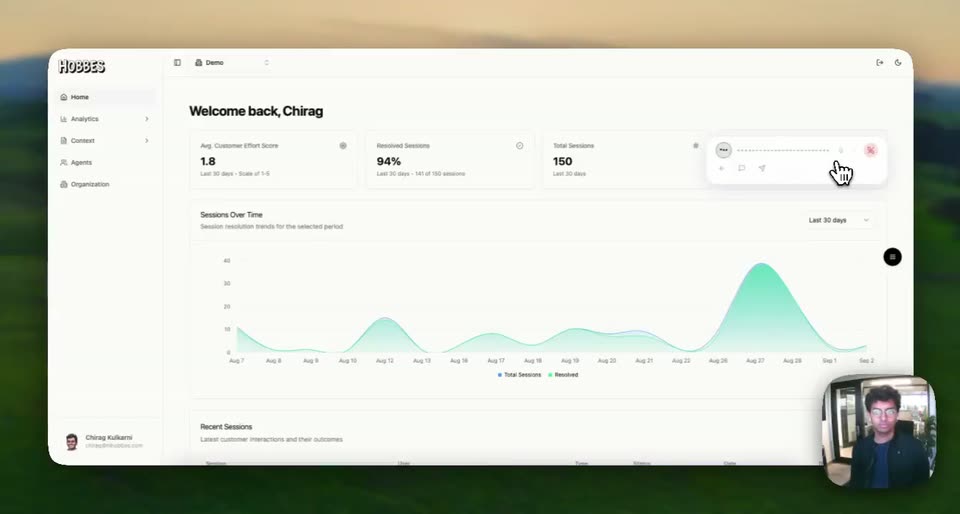
Hobbes’s 1:53 launch film runs 5 scenes, about 23 s each. The product is on screen from the first frame and 1 feature is revealed. There is no explicit call to action; a voiceover carries the film. A single live demo of the voice copilot, shot as a screen capture tilted into 3D over a blurred landscape, with a presenter webcam pinned in the corner. The pacing is conversational and unhurried, using zoom-ins on the voice pill and sidebar clicks to follow a real time voice conversation from greeting to task completion.
Is this your launch? to your site or press kit.
A tilted 3D browser window shows the Hobbes dashboard with metric cards and a sessions chart over a blurred background. A cursor clicks the copilot button, allows microphone access, and ends the voice call as the camera zooms in and out. A presenter's webcam sits in the corner.
Techniques: 3D mockup, Cursor demo, UI zoom
Camera: Pull out
A close-up of a white voice pill sits over a blurred dashboard; the camera pulls back to reveal the Hobbss analytics screen as a tilted 3D mockup while a hand cursor hovers at the widget. It then pushes into the sidebar, where the cursor clicks Context to expand Knowledge Center.
Techniques: UI zoom, 3D mockup, Cursor demo
Camera: Pull out
A light dashboard interface displays the Knowledge Center page. A cursor hovers over the Knowledge Center entry in the left sidebar as the line chart and stat cards in the main panel clear to a blank white area. A webcam video of a presenter appears in the bottom-right corner.
Techniques: Cursor demo
Camera: Static
A white HOBBS dashboard shows the Knowledge Center page with a floating voice bar; a cursor clicks the Files tab, switching to a Document Library upload panel. A presenter webcam sits in the corner, and the view zooms onto the tab and a chat reply.
Techniques: Cursor demo, UI zoom
Camera: Pull out
A tilted 3D mockup of the Hobbex Knowledge Center interface floats over a blurred green-and-blue landscape. A cursor scrolls the right-side chat widget, revealing numbered steps and short replies, while a small rounded webcam inset of a man stays in the bottom right corner.
Techniques: 3D mockup, Cursor demo
Camera: Static