0:42


SHIFT_Improper Payment Detection_Integrated Case Management_Video_V4
Shift Technology · Feb 2023
Hobbes · 2:44 · Full motion · AI-annotated
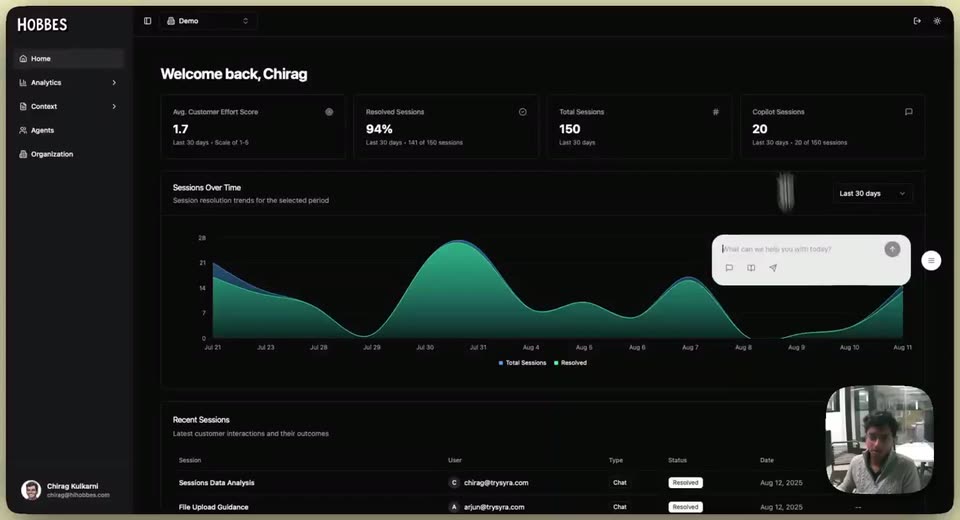
Hobbes’s 2:44 launch film runs 151 scenes, about 1.1 s each. The product is on screen from the first frame and 3 features are revealed. The call to action lands at 2:21 (86% in), over a voiceover. A single continuous screen-recording of a dark analytics dashboard, with the founder's face-cam pinned in the corner and a white hand cursor driving every action. The structure is a linear walkthrough: a short spoken intro, then three back-to-back feature demos (a data question, a file upload, a session filter) each built from the same moves of typing into a floating chat card, clicking a blue button, and zooming into the relevant panel, closing on a static hold while the founder pitches a call.
Is this your launch? to your site or press kit.
Shift Technology · Feb 2023
StackBlitz · Developer tools · Mar 2025
A dark analytics dashboard fills the frame: sidebar navigation, a welcome heading, four metric cards, an area chart and a sessions table. A cursor hovers over the chart. A small video-call tile in the corner shows a man waving.
Techniques: Cursor demo
Camera: Static
A dark analytics dashboard fills the frame, showing a sidebar, four metric cards, a teal area chart and a sessions table. A mouse cursor hovers over the chart while a small video call inset of the presenter sits in the bottom right corner.
Camera: Static
A dark HOBBS analytics dashboard fills the frame, showing a sidebar, four stat cards, a teal area chart and a sessions table. A small webcam feed of the speaker is pinned to the bottom right corner. A cursor rests over the chart as the scene holds still.
Camera: Static
A dark analytics dashboard fills the screen with a left sidebar, a row of stat cards, a green area chart and a sessions table. A white cursor hovers at the center while a small video of the speaker sits in the bottom right corner.
Techniques: Cursor demo
Camera: Static
A dark analytics dashboard fills the frame, showing a sidebar, four metric cards, a teal area chart and a sessions table. A small video call window in the bottom right shows the founder gesturing while a cursor rests over the chart.
Camera: Static
A dark analytics dashboard fills the frame, showing a sidebar, a welcome heading, four metric cards, a teal area chart and a sessions table. A white cursor hovers over the chart. A small video call window in the bottom right shows a man speaking.
Camera: Static
A dark analytics dashboard fills the frame, showing a welcome header, four metric cards, a teal area chart, and a recent sessions table. A white cursor hovers over the chart while a small webcam window in the corner shows a man speaking.
Techniques: Cursor demo
Camera: Static
A dark analytics dashboard fills the frame, showing stat cards, a green area chart and a sessions table. A mouse cursor hovers over the chart while a small video-call window in the corner shows the presenter speaking.
Techniques: Cursor demo
Camera: Static
A dark analytics dashboard fills the frame, showing a left sidebar, four metric cards, a green area chart and a sessions table. A white cursor rests near the center. A rounded webcam clip of a man in a grey sweater plays in the bottom right corner.
Camera: Static
A dark analytics dashboard fills the frame, showing a teal area chart and a row of stat cards. A white cursor hovers over the chart. A small rounded video-call window with a man appears in the lower right corner. The view stays static.
Camera: Static
A dark analytics dashboard fills the frame, showing a welcome header, four metric cards, a teal area chart and a sessions table. A small video call window of a man sits in the bottom right corner while a cursor rests in the center.
Camera: Static
The dark Hobbs dashboard holds still: a welcome line, four metric cards, a teal area chart and a sessions table fill the screen, a cursor rests at center, and a small video-call window shows a man in the lower right corner.
Camera: Static
A dark analytics dashboard fills the frame with a welcome header, four metric cards, a teal area chart and a sessions table. A small video-call window in the lower right shows a man gesturing while he talks. A white cursor hovers over the chart.
Camera: Static
A dark dashboard interface fills the frame with a welcome header, four metric cards, an area chart and a sessions table. A mouse cursor rests at the center. A small webcam inset of a man talking and gesturing sits in the bottom right corner.
Camera: Static
A dark HOBBS dashboard fills the frame: a welcome header, four metric cards, a teal area chart and a sessions table. A white cursor rests over the chart while a small circular video of the presenter plays in the bottom right corner. The interface holds still.
Camera: Static
A dark analytics dashboard fills the frame: a left sidebar, four KPI cards, a green area chart titled Sessions Over Time, and a recent sessions table. A white cursor hovers over the chart. A small rounded video window in the bottom right shows a man speaking. The shot is static.
Camera: Static
A dark analytics dashboard fills the frame: a left sidebar, a welcome headline, four metric cards, a teal area chart, and a sessions table. A live webcam video of a man occupies the bottom right corner while a cursor hovers at the center.
Techniques: Cursor demo
Camera: Static
A dark analytics dashboard fills the frame, showing a left sidebar, four stat cards, a teal area chart and a sessions table. A mouse cursor glides rightward across the chart while a small video call window of a man sits in the bottom right corner.
Techniques: Cursor demo
Camera: Static
A dark analytics dashboard fills the frame, showing a left sidebar, four metric cards, and a green area chart labeled Sessions Over Time. A small rounded video feed of a man sits in the bottom right corner, and a cursor rests at the right edge.
Camera: Static
A dark dashboard with a left sidebar, four stat cards and a teal area chart fills the frame. A cursor taps the round chat button on the right, opening a small input box that fades in, while a webcam video of a man stays in the bottom corner.
Techniques: Cursor demo
Camera: Static
A dark analytics dashboard fills the frame, showing a green area chart, four stat cards and a sessions table. A white chat box on the right holds a cursor that shifts into a typing hand, and a small video call window of a man sits in the bottom right corner.
Techniques: Cursor demo
Camera: Static
A dark support dashboard shows stat cards, a teal area chart and a sessions table, with a video call of a man in a beige sweater in the bottom-right corner. Top-right, a chat widget collapses into a single input field as the cursor moves onto it.
Techniques: Morph, Cursor demo
Camera: Static
A dark analytics dashboard fills the frame, showing a left sidebar, three metric cards, a teal area chart and a sessions table. A small video-call window in the lower right shows a man speaking while a cursor hovers by the search bar.
Techniques: Cursor demo
Camera: Static
A dark analytics dashboard fills the frame, showing a left sidebar, three stat cards, a teal area chart, and a sessions table. A white cursor hovers over the search field at the top right, and a small video call window with a person sits in the bottom right corner.
Techniques: Cursor demo
Camera: Static
A dark analytics dashboard fills the frame, showing a welcome headline, three metric cards, a teal area chart and a sessions table. A mouse cursor hovers over the AI prompt box. A small webcam tile in the bottom corner shows a person talking.
Techniques: Cursor demo
Camera: Static
A dark dashboard fills the frame with stat cards, a teal area chart and a sessions table. A cursor hovers over the chat input box, and a small webcam video of a person plays in the bottom right corner.
Techniques: Cursor demo
Camera: Static
A dark analytics dashboard fills the frame, with a left sidebar, three metric cards, an area chart and a sessions table. A small video call window shows a man in the lower right corner, and a cursor rests in the search box. The view stays static.
Techniques: Cursor demo
Camera: Static
A dark analytics dashboard fills the frame, showing a left sidebar, three stat cards, a green area chart and a sessions table. A large white cursor arrow points at the chat input box, and a small live webcam of a man in a room sits in the bottom-right corner.
Camera: Static
The dark dashboard fills the frame, then the view zooms in on the white command bar at the top right, where a cursor hovers over the input field. A small video call window of a man in a sweater sits in the bottom right corner.
Techniques: UI zoom
Camera: Push in
A dark analytics dashboard fills the frame with stat cards and a green area chart below. A white rounded command bar floats in the center, a large cursor arrow hovers inside it while the letter w is typed. A small webcam feed of a person sits bottom right.
Techniques: Cursor demo
Camera: Static
A dark analytics dashboard shows a white command bar where the word “When” is typed letter by letter, a large white arrow cursor rests over the bar, and a small live webcam feed of a presenter sits in the lower right corner.
Techniques: Cursor demo
Camera: Static
A dark analytics dashboard fills the frame as a white input field types the words When were, a cursor arrow hovering to its right. A small webcam clip of a man occupies the bottom right corner, with teal wave shapes along the bottom edge.
Techniques: Cursor demo
Camera: Static
A dark analytics dashboard holds a white input bar on the right where a cursor types a query, beside a Total Sessions card and a Last 30 days filter. A small webcam video of a presenter sits in the bottom right corner.
Techniques: Cursor demo
Camera: Static
A dark analytics dashboard frames a white rounded prompt bar where a mouse cursor hovers and the query types out letter by letter. A small webcam feed of a presenter in a white shirt sits in the bottom right corner, a teal chart peeks up along the bottom edge.
Techniques: Cursor demo
Camera: Static
A dark analytics dashboard fills the frame with a white rounded input bar center-right. A cursor hovers over it as the query “When were sessions the highest last month” types out letter by letter. A small webcam self-view sits in the bottom right corner.
Techniques: Cursor demo
Camera: Static
A dark analytics dashboard shows a white prompt bar mid-screen. A large white cursor hovers over it while the query 'When were sessions the highest last month?' is typed, finishing with a blinking caret. A small webcam self-view of a person sits in the bottom right corner.
Techniques: Cursor demo
Camera: Static
A dark analytics dashboard fills the left, with a white chat card on the right holding a blue question bubble. A cursor glides over the card and turns into a four-way move icon. A small webcam feed of a presenter stays in the bottom corner.
Techniques: Cursor demo
Camera: Static
A dark analytics dashboard fills the screen behind a white chat widget on the right. A hand cursor grips the widget's top edge and lifts it into place as a blue message bubble and a three-dot typing indicator sit inside. A small webcam self-view holds the corner.
Techniques: Cursor demo
Camera: Static
A white chat widget floats over a dark analytics dashboard showing a sessions card and a green chart. A blue bubble asks about last month's sessions, a three-dot typing indicator pulses on the left, and a small webcam feed of a presenter runs in the bottom right corner.
Camera: Static
A white chat window with a blue question bubble and a hovering hand cursor sits over a blurred dashboard; the view pulls back to reveal the full dark analytics screen with charts and a session table, a webcam selfie pinned in the corner.
Techniques: UI zoom
Camera: Pull out
A dark analytics dashboard fills the screen with a sidebar, stat cards and a green area chart. A chat widget top right holds a blue question bubble; a video call window shows a person bottom right. A hand cursor hovers over the chat panel.
Techniques: Cursor demo
Camera: Static
A dark dashboard fills the frame, showing metrics, a teal area chart, and a table. In the top right, a chat widget receives a blue question bubble, then a reply types out; a hand cursor hovers above it. A small webcam window at bottom right shows a man.
Techniques: Cursor demo
Camera: Static
A dark analytics dashboard fills the frame, charts and stat cards static. A chat widget in the top right shows a question and a bolded answer on session peaks, a hand cursor resting on its top edge. A small video call tile of a man sits in the bottom right.
Techniques: Cursor demo
Camera: Static
A dark HOBBS dashboard with metric cards, a teal area chart and a sessions table. A chat widget top right answers a peak-sessions question. A cursor glides from the widget to the chart, hovering the August 7th peak to pop a tooltip; a presenter video sits bottom right.
Techniques: Cursor demo
Camera: Static
A white cursor hovers over a peak on a teal area chart, holding a tooltip. The view then zooms out to the full dark dashboard, where a chat widget on the right answers a question about the August peak.
Techniques: Cursor demo, UI zoom
Camera: Pull out
A static dark analytics dashboard holds on screen, its green area chart and stat cards visible, while a white chat widget in the top right displays a question and answer about peak sessions. A presenter's webcam sits in the bottom right.
Camera: Static
A dark analytics dashboard fills the frame, showing a green area chart and three stat cards. A white chat widget with a blue question bubble sits top right, a text caret resting in its input field. A small webcam feed of a talking presenter occupies the bottom right corner.
Camera: Static
A dark dashboard fills the frame with a left menu, stat cards and a teal trend chart. A white chat widget top right shows a blue question bubble and an answer, with a cursor in its input. A small webcam feed of a man sits bottom right.
Camera: Static
A dark Hobbs dashboard shows stat cards, a teal area chart and a sessions table. A white chat widget top right holds a question and answer about peak sessions, with a blinking cursor in the input. A video call window with a man sits bottom right.
Camera: Static
A dark analytics dashboard fills the screen with a teal area chart and stat cards. A white chat widget sits top right showing a question and answer, with a blinking text caret in the input. A circular webcam feed of a man talking overlaps the bottom right corner.
Techniques: Cursor demo
Camera: Static
A dark analytics dashboard fills the frame with a white chat widget in the top right. A text field below types “how do I” letter by letter beside a blinking caret. A small video call window with a person sits in the bottom right.
Techniques: Cursor demo
Camera: Static
A dark dashboard shows a teal sessions chart and a chat widget top right. The widget's input field types out 'how do I upload' letter by letter beside a blinking I-beam cursor, while a small webcam feed of a man sits bottom right.
Techniques: Cursor demo
Camera: Static
A dark Hobbes dashboard with metric cards and a teal area chart fills the screen. In a floating white chat widget, the query 'how do I upload files' types itself into the input box, while a small video call of a man sits in the bottom right corner.
Camera: Static
A dark analytics dashboard fills the frame, showing metric cards, a green line chart and a sessions table. A chat widget in the top right corner displays a question about uploading files, with a cursor hovering over its input field. A presenter's webcam feed sits in the bottom right.
Techniques: Cursor demo
Camera: Static
A dark analytics dashboard is displayed with a chat widget in the top right and a video call in the bottom right. A cursor hovers near the chat input field.
Techniques: Cursor demo
Camera: Static
A dark analytics dashboard fills the screen. In the top right, a white chat widget scrolls up as a cursor hovers the Show me button, while a small webcam of the presenter sits in the bottom right corner.
Techniques: Cursor demo
Camera: Static
A dark analytics dashboard fills the screen with a sidebar, stat cards, and an area chart, while a chat widget on the right shows a bot reply and a cursor clicks the Show me button; a small webcam feed sits in the bottom corner.
Techniques: Cursor demo
Camera: Static
A dark analytics dashboard fills the frame with a white chat widget at right. The view zooms into the chat as a hand cursor taps a Show me button, and a blue reply bubble pops in. A small video call inset sits in the corner.
Techniques: UI zoom, Cursor demo
Camera: Push in
A white chat widget floats over a dark analytics dashboard showing a session count. A hand cursor hovers over the Show me button in the chat thread, and a small webcam feed of a presenter sits in the bottom right corner.
Techniques: Cursor demo
Camera: Static
A white chat widget floats over a dark dashboard showing session stats. Inside, a prompt and a blue reply bubble sit above a typing row where a hand cursor hovers. A small webcam feed of the presenter is pinned to the bottom right corner.
Techniques: Cursor demo
Camera: Static
A dark analytics dashboard fills the frame, its sidebar and charts soft at the edges. A white assistant chat panel sits on the right, where a hand cursor hovers over the highlighted word Context. A small webcam self-view of a man anchors the bottom right corner.
Techniques: Cursor demo
Camera: Pull out
A dark analytics dashboard fills the frame with a white chat panel docked at the top right. A hand cursor hovers over the word Context, highlighted in blue inside the chat message, while a small video-call avatar of a man sits in the bottom-right corner. The view holds still.
Techniques: Cursor demo
Camera: Static
A dark dashboard with stat cards and a trend chart holds still while a hand cursor moves across the screen and the Context item in the left sidebar highlights blue.
Techniques: Cursor demo
Camera: Static
A dark analytics dashboard fills the frame, sidebar on the left, stat cards and an area chart in the center. A hand cursor hovers over the Context menu item, which glows blue, while a chat widget and a small video-call window sit in the right corners.
Techniques: Cursor demo
Camera: Static
A dark analytics dashboard fills the frame as a hand cursor moves to the Context item in the left sidebar, which gains a blue outline. A ghosted help popup crossfades out at the start. A small webcam video of the presenter stays in the bottom right corner.
Techniques: Cursor demo
Camera: Push in
A dark product dashboard with a left sidebar. A hand cursor hovers over the Context menu item, expanding it downward to reveal Knowledge Center and Walkthroughs. A small face-cam video of a person sits in the bottom right corner.
Techniques: Cursor demo
Camera: Static
A dark dashboard shows a left sidebar and stat cards. A white hand cursor hovers over the Context menu item as a blue outline highlights it. A small facecam inset of a person sits in the lower right corner.
Techniques: Cursor demo
Camera: Static
A dark analytics dashboard fills the frame, sidebar menu on the left with a white hand cursor resting on the expanded Context item. A small presenter video plays in the bottom right corner. The view holds steady.
Techniques: Cursor demo
Camera: Static
A dark dashboard fills the frame; a hand cursor hovers over the Knowledge Center item in the left sidebar, where the Context menu is expanded with a blue outline. The main panel shows a welcome header, two metric cards, and a chart, with a small video-call tile in the corner.
Techniques: Cursor demo
Camera: Static
A dark analytics dashboard fills the frame with a left sidebar and stat cards. A white hand cursor hovers the Knowledge Center menu item, then the view scrolls up a few pixels as the pointer drifts down. A small video-call window with a man sits in the lower right corner.
Techniques: Cursor demo
Camera: Pull out
A dark analytics dashboard fills the frame; a cursor hovers over the Knowledge Center menu item in the left sidebar as the view sharpens from a blurred zoom into a full dashboard, with a chat panel top right and a webcam feed bottom right.
Techniques: UI zoom, Cursor demo
Camera: Pull out
A dark analytics dashboard fills the frame, a white chat panel sits top right and a small webcam of a man sits bottom right. A cursor rests on the Knowledge Center menu item in the left sidebar.
Techniques: Cursor demo
Camera: Static
A dark dashboard fills the frame with a left sidebar, a chat card top right and a small webcam of a man bottom right. A hand cursor hovers the Knowledge Center item as the central empty state, database icon and button fade from dim to full brightness.
Techniques: Cursor demo
Camera: Static
A dark dashboard shows a Knowledge Center page with an empty-state database icon and an Add Your First Website Source button. A hand cursor hovers the Context menu in the left sidebar while a chat panel and a small video call window sit at the right.
Techniques: Cursor demo
Camera: Static
A dark dashboard shows a Knowledge Center page with an empty state and an add button. A floating chat widget carrying workflow messages slides from the top right toward the center of the screen. A small webcam video of a person sits in the bottom right corner.
Camera: Static
The dark Knowledge Center dashboard holds still, a chat widget listing workflow steps floating at the top right. A cursor rests on the widget's header, and a presenter sits in a small webcam inset at the bottom right corner.
Techniques: Cursor demo
Camera: Static
A dark app interface with a left sidebar and a central chat panel fills the frame. The camera zooms in toward the right, where a cursor rests on a blue Files button. A small webcam video of a man sits in the bottom right corner.
Techniques: UI zoom, Cursor demo
Camera: Push in
A dark product screen shows a white chat panel on the left and a Sites/Files toggle on the right. A white hand cursor points at the Files tab, which is highlighted in blue.
Techniques: Cursor demo
Camera: Static
A dark dashboard holds a light chat widget on the left while a hand cursor taps the Files tab on the right. The panel below switches from an Add Website Source button to a four-document list and a drag-and-drop zone.
Techniques: Cursor demo
Camera: Static
A dark dashboard screen with a light chat panel floating over it. A white hand cursor taps the Files tab, the panel messages update, then the cursor slides down to the Browse Files button as the frame zooms out to reveal the full page and left sidebar.
Techniques: Cursor demo, UI zoom
Camera: Pull out
A dark dashboard shows a Knowledge Center page with a document library, while a chat panel on the right displays workflow instructions. A cursor hovers over a Browse Files button, and a small video call window with a person sits in the lower right corner.
Techniques: Cursor demo
Camera: Static
A dark document library UI shows an open file browser dialog. A cursor glides over the file grid and clicks a document, the dialog then swaps to an upload panel with the cursor resting on the upload button. An instruction chat panel on the right updates its text.
Techniques: Cursor demo
Camera: Static
A dark HOBBS dashboard fills the frame, showing a Document Library with an uploaded PDF and a chat panel top right. A cursor hovers over the file row while a small video call window sits in the bottom right corner.
Techniques: Cursor demo
Camera: Static
A dark interface screen shows a Document Library with an uploaded PDF row and a white chat panel on the right. A cursor hovers over the file row while a small webcam feed of a man sits in the bottom corner.
Techniques: Cursor demo
Camera: Static
A dark dashboard shows a Knowledge Center page with a document upload area and a chat assistant panel on the right. A cursor glides from the uploaded file row to the chat input box, while a small video of a presenter sits in the bottom right corner.
Techniques: Cursor demo
Camera: Static
A dark dashboard shows a document library with an upload panel, while a right-side chat window displays an assistant message and a cursor types the word done into its input field. A small video call inset of a man sits in the bottom right corner.
Techniques: Cursor demo
Camera: Static
A dark dashboard view of the Hobbes app holds static, with an AI chat panel open at top right and a small webcam feed of a man at bottom right. A cursor blinks in the chat input field as the placeholder text clears.
Techniques: Cursor demo
Camera: Static
A dark product interface shows the Knowledge Center and Document Library, with a file listed as ready to upload. A chat widget in the top right displays a typing indicator, and a small live video feed of a man sits in the bottom right corner.
Camera: Static
A dark HOBBS dashboard shows the Knowledge Center page with an uploaded PDF and a list of indexed guides. A white chat panel in the top right displays a typing indicator, and a small webcam feed of a presenter sits in the bottom right corner.
Camera: Static
A dark product interface shows the Knowledge Center with an Upload Document card. A file row lists hobbes_guides.pdf, ready to upload, while a cursor drifts toward the Upload File button. A chat widget with a done button sits top right, and a small presenter video sits bottom right.
Techniques: Cursor demo
Camera: Static
A dark dashboard view of the Knowledge Center shows a document library with a PDF ready to upload. A white cursor rests on the Upload File button. A chat assistant panel floats top right and a small video call window with a man sits bottom right.
Techniques: Cursor demo
Camera: Static
A dark HobbES dashboard shows the Document Library with a PDF row and an Uploading button under a hand cursor. A chat widget floats top right and a small webcam feed of a man sits bottom right.
Techniques: Cursor demo
Camera: Static
A dark dashboard shows a Knowledge Center upload screen. A hand cursor hovers over the drag-and-drop zone above a green success banner. A chat panel at top right displays a workflow message, and a small video call window at bottom right shows the presenter.
Techniques: Cursor demo
Camera: Static
A dark dashboard interface displays a document upload section with a green success message and an open chat widget. A small webcam feed of a man is visible in the bottom right corner.
Camera: Static
A dark dashboard shows a Document Library with an upload success banner, a chat widget open at top right with a blinking cursor in its input, and a small webcam feed of a man at bottom right carrying a caption.
On-screen text: “Upload successful! Your file has been added to the knowledge base”
Techniques: Cursor demo
Camera: Static
A dark Knowledge Center dashboard fills the screen, showing an upload zone with a green success banner and a file list. A white assistant chat panel sits at right, cursor in its input. A small webcam feed of a presenter and a success caption sit at lower right.
On-screen text: “Upload successful! Your file has been added to base”
Techniques: Cursor demo
Camera: Static
A dark dashboard shows a document library with an upload zone and a green success banner. A white AI chat panel occupies the top right, a small video-call window with a presenter sits bottom right, and a cursor hovers in the chat input.
On-screen text: “Upload successful. Your file has been added to the base”
Techniques: Cursor demo
Camera: Static
A dark dashboard shows a Knowledge Center page with an upload panel and a file list. A small AI chat card with a blinking text caret floats top right, and a video call of a man in a beige shirt sits in the bottom right corner.
Camera: Static
A dark dashboard shows a Knowledge Center document library with an upload panel and a green success banner. A white workflow chat card with a blinking caret sits top right, and a small webcam clip of a man plays in the bottom right corner.
Camera: Static
A dark dashboard shows a document library with an upload zone and a green success banner. A white workflow popup with a blinking text caret sits top right, and a small webcam feed of a man appears bottom right.
Camera: Static
A dark dashboard with a left sidebar and an upload panel fills the frame, a white workflow popup sits at right. The view zooms into the popup as a cursor types into its input field; a small webcam feed of a presenter stays in the corner.
Techniques: UI zoom, Cursor demo
Camera: Push in
A white AI assistant panel floats over a dark dashboard. A text cursor types a query into its input field, then the panel shrinks and slides to the top right, revealing the Knowledge Center document library with an upload-success banner behind it.
Techniques: Cursor demo
Camera: Pull out
A dark dashboard interface displays a document library and an open chat widget. A cursor moves to click a blue button labeled 'Filter my sessions by effort score'. A small webcam feed of a man is visible in the bottom right corner.
Techniques: Cursor demo
Camera: Static
A dark dashboard shows a Document Library with an upload drop zone and a green success banner. A white chat widget in the top right updates with new messages as a cursor hovers over it. A small webcam video of a presenter sits in the bottom right corner.
Techniques: Cursor demo
Camera: Static
A dark dashboard screen shows a Knowledge Center page with an upload area and file list. A chat panel on the right displays a workflow message and buttons as a cursor moves toward the Show me option. A small webcam video of a man sits in the corner.
Techniques: Cursor demo
Camera: Static
A dark dashboard with a left sidebar and upload panel holds still; a white chat card on the right shows an assistant message and a blue Show me button that a cursor moves to click. A man appears in a small video call window at the lower right.
Techniques: Cursor demo
Camera: Static
A dark product dashboard shows a Knowledge Center view with an upload panel and a left sidebar. A chat popup in the top right has a hand cursor on a Show me button, while a small live video of a man sits in the bottom right corner.
Techniques: Cursor demo
Camera: Static
A dark HOBBS dashboard fills the frame, showing a Knowledge Center page with an upload area and indexed file list. A chat widget sits top right with a hand cursor over its show me button, while a small video call window of a man anchors the bottom right.
Techniques: Cursor demo
Camera: Static
A dark product dashboard fills the frame, sidebar and document library on the left, a chat widget on the right where a hand cursor clicks and a reply message appears, a small video call window sits in the bottom corner.
Techniques: Cursor demo
Camera: Static
A dark product screen shows a Knowledge Center page with an upload zone and a file list. A white chat panel with a hand cursor sits at the right, and a small webcam clip of a man appears in the lower right corner.
Techniques: Cursor demo
Camera: Static
A dark product dashboard shows a Knowledge Center page with an upload zone and a list of indexed guides. A chat panel sits top right; a small webcam feed of a man fills the bottom corner. A cursor moves to the Analytics item in the left sidebar.
Techniques: Cursor demo
Camera: Static
A dark product dashboard zooms in from a wide view, cropping a chat panel and a video-call window out of frame. A hand cursor hovers over the Analytics item in the left sidebar.
Techniques: UI zoom, Cursor demo
Camera: Push in
A dark dashboard UI with a left sidebar and a Knowledge Center panel. A large white hand cursor hovers over the Analytics menu item. A small presenter webcam appears in the bottom right corner.
Techniques: Cursor demo
Camera: Static
A dark interface displays a sidebar menu where a cursor hovers over the Analytics item. The main area shows a Knowledge Center page with a document upload section.
Techniques: Cursor demo
Camera: Static
A dark dashboard UI with a left navigation sidebar. A white hand cursor hovers over the Analytics menu, then moves down to click Sessions, which highlights with a blue outline. The main panel displays Knowledge Center and Document Library sections with an upload area.
Techniques: Cursor demo
Camera: Static
A dark product dashboard fills the frame, a left sidebar listing Analytics and Context. A white hand cursor hovers over the highlighted Sessions item. A small webcam feed of the presenter sits in the bottom right corner. The cursor shifts up toward the Analytics label.
Techniques: Cursor demo
Camera: Pull out
A dark analytics dashboard fills the frame with a left sidebar and a chat window pinned top right. A cursor clicks the Sessions item, and the main panel loads with session tabs and an empty state.
Techniques: Cursor demo
Camera: Static
A dark dashboard shows a session list beside an empty detail panel. A hand cursor clicks a row, and the panel fills with a chat transcript of blue and gray bubbles. A walkthrough chat widget and a video call window occupy the top-right and bottom-right corners.
Techniques: Cursor demo
Camera: Static
A dark analytics dashboard fills the frame, a session list left and a conversation transcript right. A floating chat panel with a hand cursor sits top right, a small webcam feed of a presenter bottom right. The view holds still.
Camera: Static
A dark analytics dashboard fills the frame with a sidebar, session list and chat panel. A cursor hovers at the top as a chat modal fades in over the center, showing messages and blue show me buttons. A small webcam feed of a presenter sits in the lower right.
Techniques: Cursor demo
Camera: Static
A dark analytics dashboard shows a sessions list on the left and a chat panel on the right. A floating workflow card scales down in the center as a hand pointer hovers over it, and a small facecam of the presenter sits in the lower right corner.
Techniques: Cursor demo
Camera: Static
A dark HOBBS dashboard fills the frame, a session list left and a chat panel right, with a white chat modal centered over them. A hand cursor points at the modal's title, and a small video call bubble of a man sits bottom right.
Techniques: Cursor demo
Camera: Static
A dark-themed analytics dashboard with a central chat widget and a small video feed in the bottom right. A white cursor moves down to the Filters bar and clicks it, triggering a blue highlight around the element. The chat interface behind the cursor updates its text as the interaction occurs.
Techniques: Cursor demo
Camera: Static
A dark Sessions Analytics dashboard shows a list of sessions and a chat thread, with a floating chat widget in the center. A hand cursor moves across the filter dropdowns, and a presenter appears in a small video call window at the bottom right.
Techniques: Cursor demo
Camera: Static
A dark Sessions Analytics dashboard fills the frame, a session list on the left and a chat panel with a live video call on the right. A hand cursor hovers over the effort score filter while a white step-by-step card sits centered.
Techniques: Cursor demo
Camera: Static
A dark Sessions Analytics screen shows a session list on the left and a chat panel on the right, with a white workflow popup centered. A hand cursor hovers over the chat, and a small video call of a man sits in the corner.
Techniques: Cursor demo
Camera: Static
A dark analytics dashboard shows a session list on the left and a chat window in the center. A cursor opens the effort score dropdown, then closes it. A small video call with a man sits in the bottom right corner.
Techniques: Cursor demo
Camera: Static
A dark analytics dashboard shows a session list and a chat panel, with a centered modal popup explaining the scoring workflow. A cursor hovers over the effort scores dropdown while a small webcam feed of a presenter sits in the lower right corner.
Techniques: Cursor demo
Camera: Static
A dark analytics dashboard fills the frame, with a left menu, a session list, and a right chat panel holding a small presenter video. A white helper card sits center. A cursor clicks the top-right filter dropdown, which opens to a numbered list.
Techniques: Cursor demo
Camera: Static
A dark product dashboard shows the Sessions Analytics page with a filters row. The All Effort Scores dropdown is open and a cursor moves down the numbered list. A chat window with a video call inset sits on the right.
Techniques: Cursor demo
Camera: Static
A dark analytics dashboard fills the frame. A white workflow popup sits center, a chat panel runs down the right, and an open effort-score dropdown shows the cursor hovering over the number three. A small presenter video sits in the bottom corner.
Techniques: Cursor demo
Camera: Static
A dark analytics dashboard fills the frame, with a left sidebar and a session list that populates with rows. A chat widget window sits centered, its conversation updating, while a white cursor moves on the right.
Techniques: Cursor demo
Camera: Static
A dark analytics dashboard shows a session list on the left and an open chat window in the center. A cursor hovers in the upper right while a small video call window sits in the bottom right corner.
Techniques: Cursor demo
Camera: Static
A dark analytics dashboard shows a session list on the left and a chat panel on the right. A white chat widget floats in the center with a workflow completion message, a cursor hovers over it, and a small video call window sits in the lower right corner.
Techniques: Cursor demo
Camera: Static
A dark analytics dashboard fills the frame, a session list on the left and a chat session on the right. A white chat popup sits center with a cursor resting over it, while a small video call window shows a person bottom right.
Techniques: Cursor demo
Camera: Static
A dark analytics dashboard fills the frame, a session list on the left and a chat panel with a video thumbnail on the right. A central workflow popup displays a completion message as a cursor hovers and shifts over the text.
Techniques: Cursor demo
Camera: Static
A dark analytics dashboard fills the frame, with a centered chat widget showing a workflow message and input bar. A cursor hovers near the filter dropdowns while the session list and right-side chat panel remain static.
Camera: Static
A dark analytics dashboard fills the screen, a workflow modal sits centered over a session list, and a video call of a man gesturing plays in the bottom right corner.
Camera: Static
A dark analytics dashboard fills the frame, a copilot chat card open in the center and a small video-call tile of a man in the lower right corner. The interface stays still while the man shifts his head and hands slightly.
Camera: Static
A dark analytics dashboard fills the frame. A left sidebar lists navigation items, the main panel shows a Sessions Analytics table, and a chat assistant modal sits centered with a message and input bar. A video call tile with a person sits in the lower right. The shot stays static.
Camera: Static
A dark analytics dashboard fills the frame, with a centered chatbot popup showing a workflow-complete message and a small video call tile in the corner. The shot holds steady.
Camera: Static
A dark dashboard fills the frame: a left sidebar, a sessions list with risk tags, and a central chat widget reporting a completed workflow. On the right, a chat panel shows a blue user bubble and a live video tile of a man. The view holds static.
Camera: Static
A dark analytics dashboard fills the frame. A session list with risk labels sits on the left, a chat popup showing a workflow message floats in the center, and a small video call window of a man in a beige shirt anchors the bottom right corner.
Camera: Static
A dark dashboard interface holds static: a session list with risk labels on the left, a centered chat widget announcing a completed workflow, and a video call tile of a man on the right.
Camera: Static
A dark dashboard fills the frame, showing a session list on the left and a chat panel on the right. A central popup with a crown icon displays a workflow completion message. A small video call window in the bottom right corner shows a man talking. The interface stays static.
Camera: Static
A dark analytics dashboard fills the frame: a left sidebar, a session list with risk tags, a centered chat popup, and a right-hand chat holding a video call tile of a man in a room. The screen holds static with no visible motion.
Camera: Static
A dark analytics dashboard is shown with a chat widget open in the center and a video call window in the bottom right corner. The interface remains static.
Camera: Static
A dark analytics dashboard sits static on screen. A sessions list runs down the left, a centered chat modal reports a completed workflow, and a copilot chat panel with a small video call thumbnail occupies the right.
Camera: Static
A static dark analytics dashboard shows a left sidebar and a session list. A central chat modal displays a workflow completion message, and a video call window with a person sits in the lower right corner.
Camera: Static
A dark analytics dashboard holds static, showing a session list on the left, a floating copilot chat window in the center with a completed workflow message, and a chat panel on the right with a live video feed of a seated person.
Camera: Static
A dark dashboard shows a session list, a centered modal reading 'Workflow completed successfully', and a right-hand chat where a copilot reply appears below the user question. A small video call window with a person sits in the corner.
Camera: Static