0:45
Lamina Labs (YC P26) - Today, we're introducing ChatGPT for Explainer Videos. With just o
Lamina Labs · B2B · May 2026
Soniox · Oct 2026 · 1:05 · Full motion · AI-annotated
Soniox’s 1:05 launch film runs 15 scenes, about 4.4 s each. The product shows up at 0:07 and 3 features are revealed. The call to action lands at 0:55 (84% in), over a voiceover. The video alternates plain gray type cards that build word by word with locked-off product UI demos over full-bleed textured photo backdrops, each feature introduced by a single line before its demo. Pacing is brisk and rhythmic, with blur-in and blur-out transitions and a blue accent marking key words and UI actions.
Is this your launch? to your site or press kit.
Lamina Labs · B2B · May 2026
Pika · AI · Oct 2026
Anything · Dec 2025
On a pale gray background, the headline builds word by word in heavy black sans: 'Do you trust voice AI' then 'benchmarks?' drops to a second line, the last words filled with a dark mottled texture. The line cuts to a centered 'No?'
On-screen text: “Do you trust voice AI benchmarks?”, “No?”
Techniques: Kinetic type, Masking
Camera: Static
A plain light gray background holds the word “No?” centered in bold black type. The text stays static and the frame is locked off for the short clip.
On-screen text: “No?”
Camera: Static
On a plain light gray background, a centered sentence builds word by word with a soft blur-in: black text for 'What if you could test providers', then 'yourself?' lands in blue. The frame stays locked off and static throughout.
On-screen text: “What if you could test providers yourself?”
Techniques: Kinetic type
Camera: Static
A centered two-line headline builds word by word on a plain light gray background, each word fading in from light gray to black, then the whole line blurs and fades out.
On-screen text: “Well, Soniox Compare just got a lot better.”
Techniques: Kinetic type
Camera: Static
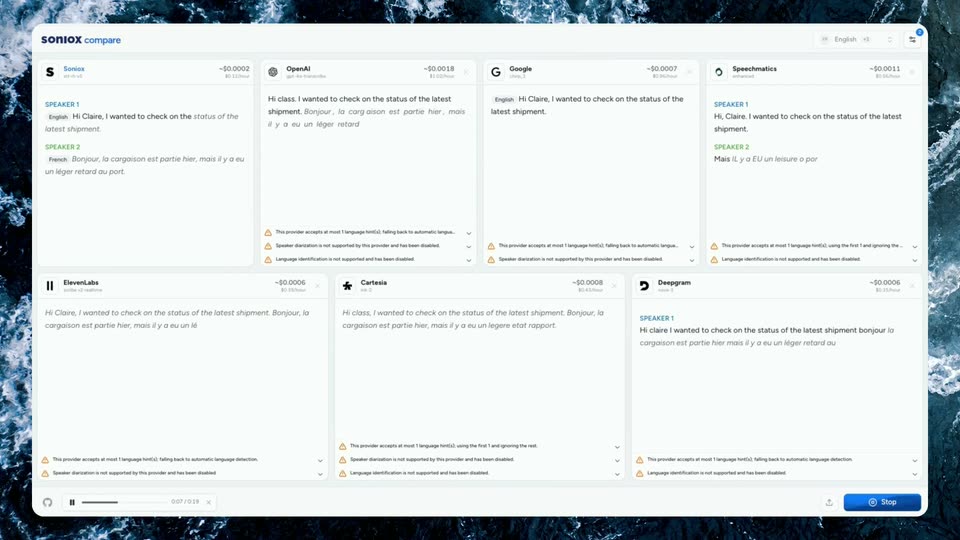
A locked-off view of the soniox compare dashboard on a blue textured background. Seven provider panels fill the frame, each typing out a live transcript word by word as the recording plays, comparing outputs side by side.
Camera: Static
On a pale gray field, the gray line Cool right? holds center, then blurs and drifts right as the smaller line You can do the same for TTS. slides in from the left.
On-screen text: “Cool right?”, “You can do the same for TTS.”
Techniques: Kinetic type
Camera: Static
A plain light gray card holds a centered black sentence. The line reads in with the final word TTS blurring into focus, holds, then the whole line fades to empty.
On-screen text: “You can do the same for TTS.”
Techniques: Kinetic type
Camera: Static
A light comparison panel fades in over a forest backdrop, showing six provider cells in a two by three grid. A blue circular spinner spins in the Soniox cell while the others stay empty. A red button sits at the bottom right.
Camera: Static
A white comparison panel over a dark forest background shows six provider cards in a grid. A cursor clicks the red Stop button, the Soniox card's blue play indicator turns gray, and the OpenAI card shows a spinner labeled Generating. The frame fades to white.
On-screen text: “soniox compare”
Techniques: Cursor demo
Camera: Static
On a flat light-gray background, a centered sentence builds word by word. Each new phrase fades in gray, then settles to solid black, until the full two-line statement is complete before the frame clears.
On-screen text: “You can compare STT and STS translation as well.”
Techniques: Kinetic type
Camera: Static
A flat web app window titled soniox compare sits on an autumn foliage backdrop. Three side-by-side panels for Soniox, OpenAI and Google stream German and English transcription text word by word while small cost counters tick up, and a player bar with a blue Stop button runs along the bottom.
Techniques: Kinetic type
Camera: Static
On a plain light gray background, the centered line “But how can you trust the Soniox Compare?” builds word by word, then fades out. The centered line “It's open source.” then types in the same way, word by word.
On-screen text: “But how can you trust the Soniox Compare?”, “It's open source.”
Techniques: Kinetic type
Camera: Static
A light gray end card. The black GitHub mark and a black URL fade in at center and hold, then give way to a small gray credit line crediting the narrator's text-to-speech voice.
On-screen text: “It's open source.”, “https://github.com/soniox/soniox-compare”, “The narrator was AI, Maya, a voice from Soniox Text-to-Speech.”
Camera: Static
A centered black caption on a plain light gray field holds still, naming the narrator as Maya from Soniox Text-to-Speech, with a small blue circular mark inline. The block blurs and fades out at the end.
On-screen text: “The narrator was Maya, a voice from Soniox Text-to-Speech.”
Camera: Static
A flat light gray field holds the centered wordmark soniox Compare. The mark fades in during the first second, then holds perfectly still for the remainder of the clip.
On-screen text: “soniox Compare”
Camera: Static