0:58
October 2026 Launch: Canvas
Airtable · Productivity · Oct 2026
Relume · Aug 2023 · 0:50 · AI-annotated
Relume’s 0:50 launch film runs 19 scenes, about 2.6 s each. The product shows up at 0:09 and 5 features are revealed. There is no explicit call to action. The video is one running sentence of bold centered headlines that swap key words, interleaved with short UI demos of the wireframe editor and AI generation. Signature moves: hard word swaps on a flat beige field, a gradient arrow cursor, and fast zoom-ins to interface details at a brisk pace.
Is this your launch? to your site or press kit.
Airtable · Productivity · Oct 2026
Framer · Design · Oct 2023
Black sans-serif text builds the line “The fastest way” with a gradient underline, then “to design” drops in on the left. A wireframe sitemap panel slides in from the right while a gradient cursor arrow bobs below the text.
On-screen text: “The fastest way”, “to design”
Techniques: Kinetic type
Camera: Pull out
Two wireframe panels sit left of a large black headline '& build' and a gradient cursor arrow on a beige field. A white editor window slides in and grows, the headline rewrites to 'a website for...', and the wireframe inside scrolls to reveal a bank landing page.
On-screen text: “& build”, “a website for...”
Techniques: Kinetic type
Camera: Pan
A plain light gray background holds the phrase 'for anything', with 'for' in light gray and 'anything' in dark charcoal, scaling up from a small centered line to a full-width headline.
On-screen text: “for anything”
Techniques: Kinetic type
Camera: Push in
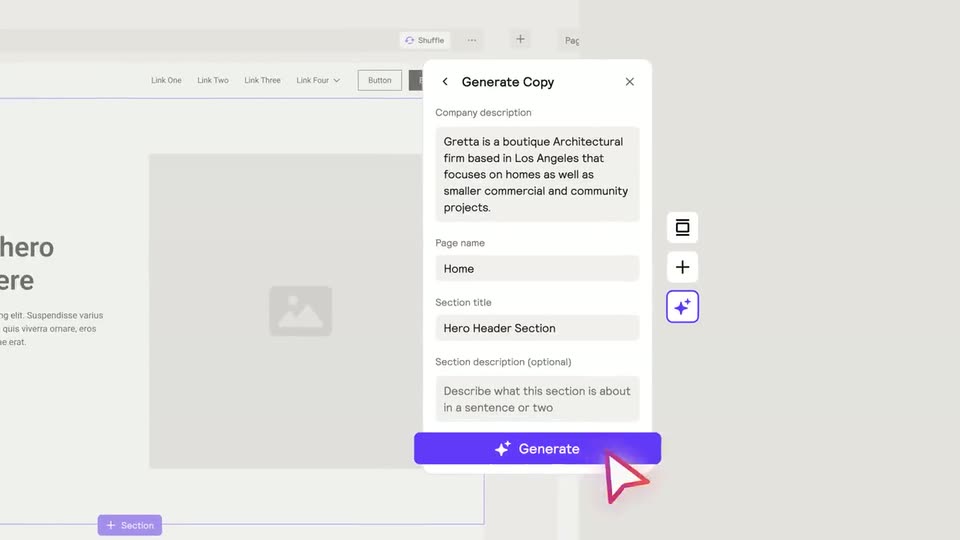
A white Generate Copy dialog scales in over a dimmed page builder, its form fields filling with sample text. A red outlined cursor glides along the bottom edge of the purple Generate button from left to right.
Techniques: Cursor demo
Camera: Push in
A flat website mockup shows a hero section beside a gray image placeholder. The heading types out with an indigo highlight that settles to black, while the nav bar and body copy ease down into place.
Techniques: Kinetic type
Camera: Pull out
A tilted website template mockup fills the beige frame, showing pricing cards and section headers in 3D perspective. The black headline builds word by word in the center, then a hand-drawn red arrow sketches itself to the right of the text.
On-screen text: “With the right foundations”
Techniques: Kinetic type, 3D mockup
Camera: Pull out
A plain light-gray frame holds a centered line of text. The light-gray word “With” stays fixed while the dark phrase “copy” is swapped for “multiple pages,” which scales into place.
On-screen text: “With copy”, “With multiple pages”
Techniques: Kinetic type
Camera: Static
A white Generate Sitemap modal sharpens into focus over a soft gradient background. A gradient arrow cursor slides into the company description field, and a sentence about an architectural firm types out letter by letter, the field border turning purple as it fills.
Techniques: Cursor demo
Camera: Pan
On a flat light-gray field, the gray phrase 'in minutes' fades in at center, then shrinks and drifts up as the bold dark phrase 'not days' scales in below it, the two lines settling into a small-over-large hierarchy.
On-screen text: “in minutes”, “not days”
Techniques: Kinetic type
Camera: Static
A large 'not days' headline anchors the top of a close-up panel showing a pages field set to 5 and a purple Generate button. A red cursor clicks the button, then the panel scrolls down to reveal generated section cards.
On-screen text: “not days”
Techniques: Cursor demo
Camera: Pull out
A flat wireframe of a mobile landing page assembles: overlapping section boxes slide apart and settle into a single stacked column under a dark Home header, then the frame holds on the finished list.
Camera: Static
A light gray editor canvas shows a wireframe hierarchy. A master Home card with stacked section blocks hovers above a row of four identical Home cards, linked by thin connector lines. The top card and the row slide into aligned positions.
Camera: Pull out
On a light gray background, the dark text “With AI” sits centered and still. Below it, a jagged underline in an orange-to-purple gradient draws itself left to right, growing from a short mark into a longer curved stroke.
On-screen text: “With AI”
Camera: Pan
A grid of website wireframes fills the frame and scrolls slowly. The tiles repeat a template layout: a top bar with a 'Logo' box, a feature heading, two buttons, and a footer row of 'webflow' and 'Relume' logos; some tiles display the 'Manage Your Money On-the-Go' heading.
Camera: Push in
A perspective grid of website-builder mockups fills the frame, then the camera zooms into the central window as the others blur. A large dark gray headline, to empower, fades in over the focused interface.
On-screen text: “to empower”
Techniques: 3D mockup, UI zoom, Kinetic type
Camera: Pull out
Centered black text on a plain light gray field. 'to empower you' holds, then 'not replace you' takes its place, then a large bold 'And' fills the frame. Each line is static once it appears, with hard cuts between lines.
On-screen text: “to empower you”, “not replace you”, “And”
Techniques: Kinetic type
Camera: Static
A plain light gray background holds the line it works with the tools you love as it scales up into place, with the Figma and webflow logos centered beneath it.
On-screen text: “And”, “it works with the tools you love”, “Figma webflow”
Techniques: Kinetic type
Camera: Static
A Wix editor holds the left while a large black headline sits on the right; a gradient cursor opens a context menu and the view zooms onto the copy rows, then a black copy icon centers on the gray field.
On-screen text: “just copy and paste”, “it works with the tools you love”, “Figma webflow”
Techniques: Cursor demo, UI zoom
Camera: Pull out
A black rounded square with a white square inside sits centered on a light gray field. A second black square joins it at the bottom right as an orange-to-purple gradient outline draws around the pair. The mark slides left and the wordmark wipes in beside it, then the lockup holds.
On-screen text: “Relume Library”
Techniques: Masking
Camera: Static