2:30

Introducing Ramp for Accounting Firms
Ramp · Finance · Oct 2026
YouArt · Nov 2026 · 1:30 · AI-annotated
YouArt’s 1:30 launch film runs 19 scenes, about 4.8 s each. The product is on screen from the first frame and 6 features are revealed. The call to action lands at 1:27 (97% in), over a voiceover. The video is built as one continuous workflow: a brand card, then a two-pane UI demo that walks from prompt and source fetch through model routing, generation, editing in After Effects and CapCut, client review, color grading and Slack delivery, capped by a live-action Times Square payoff before the closing card and download button. Its signature moves are the simulated 'YouArt's Computer' desktop that swaps real app interfaces, purple outlines that track the active element, and quick zooms that
Is this your launch? to your site or press kit.
Films whose music sounds like this one, voice left out
Engine · Upbeat electronic
Claude · Electronic dance music, future house
Accordio · Upbeat electronic
A light beige background with a faint grid pattern displays the text 'Introducing YouArt Desktop App' in the center, with 'Desktop' in purple.
On-screen text: “Introducing”, “YouArt Desktop App”
Camera: Pull out
A flat macOS desktop fills the frame. App icons settle into a ring around the centered title, which resolves from a horizontal blur. A dock rises from the bottom edge and three notification cards stack in the top right corner.
On-screen text: “Introducing”, “YouArt Desktop App”
Techniques: Kinetic type
Camera: Pull out
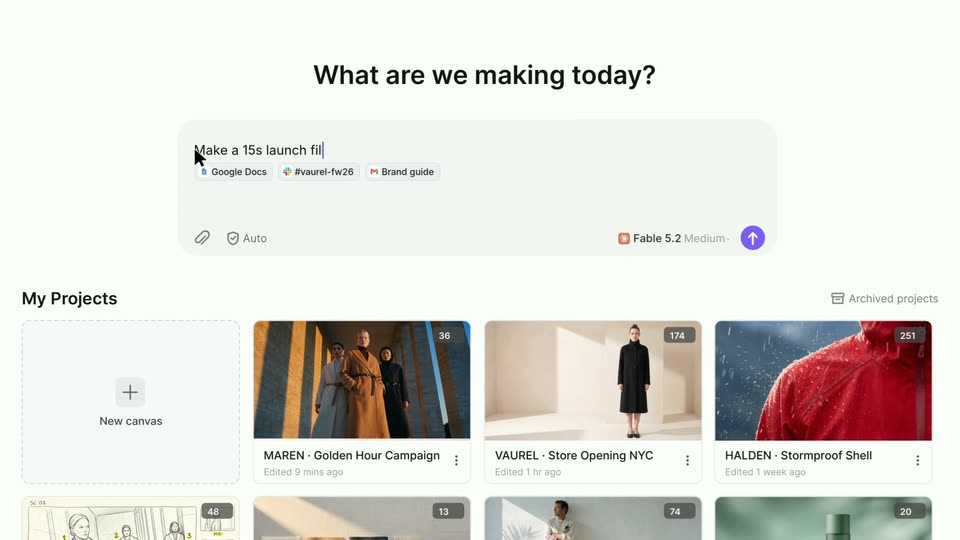
A Mac desktop zooms into a white app screen titled “What are we making today?”. A cursor clicks three source chips into the prompt box, types a brief, and hits the purple send button. Project cards with fashion photos sit below.
Techniques: UI zoom, Cursor demo
Camera: Push in
A two-panel app screen: the left chat shows a permission card, then a source checklist ticks off as a brief card fills with bullets and image thumbnails populate the right canvas. A cursor moves down and clicks the send button.
Techniques: Cursor demo
Camera: Pull out
A two-panel product UI fills the frame: a chat agent on the left lists steps for making a launch film, a storyboard grid of eight empty shots on the right. The left text blurs and the Smart Routing box gains a purple outline as the scene ends.
Camera: Push in
A centered white card titled Smart Router lists ten AI providers with per-clip prices on a beige background. Purple outlines highlight rows in sequence, then the list reorders by price; BytePlus moves to the top with a Lowest badge and the loading spinner becomes a checkmark.
Camera: Pull out
A two-pane browser shows an AI chat left and fashion-film thumbnails right. A cursor types a prompt and sends it; the chat logs new tasks, then the right pane swaps to an After Effects workspace, its black preview carrying the VAUREL wordmark over a populated timeline.
Techniques: Cursor demo
Camera: Pull out
A browser shows YouArt's chat beside its simulated desktop. The agent opens the VAUREL end card in After Effects; a cursor takes control, drags keyframes in the graph editor and recolors the type. The user replies, and the panel switches to CapCut, where a rough cut is built and exported.
Techniques: Cursor demo
Camera: Pan
A two-pane interface: an agent chat on the left, a storyboard of fashion clips on the right. A cursor types and sends a review-link request; named cursors (Maya, Ken, Claire) then glide over the thumbnails as a Slack comment card pops up. The view zooms onto the video preview.
Techniques: Cursor demo, UI zoom
Camera: Static
A three-panel review workspace fills the screen: task list and chat on the left, a video player showing the VAUREL title card in the center, a comments feed on the right. The player switches to a timeline view and a new comment from Claire Moreau appears in the feed.
Techniques: Cursor demo
Camera: Static
A locked-off view of a video review screen: a film still of a woman in a black coat with a comment overlay, a filmstrip of frames with emoji reactions below, and a comments panel on the right. A cursor glides from the filmstrip to the close button at the top right.
Techniques: Cursor demo
Camera: Static
A browser window pairs a fashion film review canvas with an agent chat. A cursor types a resolve command and sends it; the chat streams a task list while canvas checkmarks turn purple and a new dusk-lit frame loads in.
Techniques: Cursor demo
Camera: Static
A browser window shows the YouArt agent interface: a chat log in the left column updates line by line while a 3D-tilted DaVinci Resolve window on the right switches from a timeline preview to its color-wheel page. The Resolve window is set in perspective.
Techniques: 3D mockup
Camera: Static
A split view shows a chat thread on the left and a DaVinci Resolve window on the right. The Resolve panel opens on the color wheels, the highlighted wheel shifts from Light to Global, then reframes out to the full timeline and scopes as the chat updates.
Techniques: Split screen, UI zoom
Camera: Static
A light browser window shows a two-pane product view: a chat log on the left ticks off task checkmarks and a file card, while the right pane, labeled YouArt's Computer, runs DaVinci Resolve. The Resolve interface crossfades from a color-grading layout to a render queue, then a Slack window curls in over it.
Techniques: Morph
Camera: Static
Split-view browser UI: an agent feed on the left appends status lines while a remote Slack window on the right loads through a fading purple veil. A video file and a reply post appear in the channel, a cursor moves in, and a check marks the task complete.
Techniques: Cursor demo
Camera: Static
Wide static shot of a Times Square billboard wall at dusk. The central screen plays a fashion ad: a woman in a black coat turns, the line 'The coat, 30% off.' fades in, then a 'VAUREL BLACK FRIDAY' card appears. Pedestrians and yellow taxis pass in the foreground.
On-screen text: “VAUREL”, “The coat, 30% off.”, “VAUREL”, “BLACK FRIDAY”, “Up to 30% off.”
Camera: Static
On a plain off-white background, the title YouArt Desktop App wipes in from the left, with Desktop set in purple. A purple rounded highlight bar then sweeps left to right across the word, while the gray tagline All your context. One App. fades in beneath.
On-screen text: “YouArt Desktop App”, “All your context. One App.”
Techniques: Masking
Camera: Static
A purple pill button sits centered on a pale grid background, its label settling from a tight 'Desktop' into 'Download for Mac & Windows'. A black cursor rests on the button's lower-right edge, and the gray URL 'youart.ai' fades in beneath it.
On-screen text: “YouArt Desktop App”, “Download for Mac & Windows”, “youart.ai”
Camera: Static