0:59

Ecommerce Product Demo Video for Shopify | SKUVE
SKUVE · Sep 2026
Terracotta AI · Jun 2025 · 1:50 · Code only · AI-annotated
Terracotta AI’s 1:50 launch film runs 21 scenes, about 5.3 s each. The product shows up at 0:45 and 2 features are revealed. The call to action lands at 1:42 (93% in), over a voiceover. Classic pain-to-product arc: a problem montage of stalled reviews and deploy anxiety, a logo reveal, two feature demos (the analysis engine and smart code reviews), a benefit triptych, then a promise card into a Get Started button. The look is flat vector illustration paired with 3D-tilted UI mockups, using torn-edge split screens, pop-in cards and dashed-circle badges that land on a steady 130 bpm pulse.
Is this your launch? to your site or press kit.
SKUVE · Sep 2026
Wabi · Mar 2026
Films whose music sounds like this one, voice left out
Anthropic · Electronic dance music, future house
Aucert · Upbeat corporate electronic
Taste Labs · Upbeat electronic
The purple Terraform mark and black wordmark fade in on a light background. Flat mock UI cards, terminal windows and pull request cards with red exclamation badges pop in on the right, drift slightly, then fade out, leaving the logo.
On-screen text: “Terraform”
Camera: Push in
A GitHub pull request window titled #247 sits on a pale blue gradient, its diff showing red and green lines. Dark callout boxes pop in over the diff, then orange dashed-circle badges with a server, a shield, and a reviewer avatar scale in around the window edges as it tilts slightly.
On-screen text: “Meanwhile, infrastructure drift accumulates and security risks slip through unnoticed.”, “Complex changes”, “• 47 additions, 12 deletions”, “• No clear impact summary”, “Reviewer confusion”, “• Waiting 5 days for review”
Camera: Pan
A browser window showing a code review diff with two dark code snippets and a circular orange avatar with a dashed border slides left out of frame, leaving an empty light background.
Camera: Pan
A dark code window with colored lines on the left is split by a torn edge from a flat illustration of a developer at a desk on the right. The man looks worried as a dark speech bubble pops up beside his head. Panels slide in at the start.
On-screen text: “What's the impact?”
Techniques: Split screen
Camera: Static
A flat illustration opens split: a dark code window on the left, a developer at a desk on the right with a speech bubble reading “What's the impact?”. The layout shifts to one smiling developer whose second monitor fills with code lines, then a white circle wipes the frame.
On-screen text: “What's the impact?”
Techniques: Split screen, Masking
Camera: Push in
On a pale background, four orange circles linked by a dashed line form a workflow row: terminal, document, check-and-cross, and looping arrows with a chat bubble. A stopwatch ticks in the corner. Each circle pulses in turn as a dark pill label pops in below it.
On-screen text: “Init”, “Plan”, “Approval”, “Feedback”
Techniques: Masking, Kinetic type
Camera: Pull out
A flat illustration of a developer typing at a desk. A torn mask wipes in from the right, splitting the frame to reveal a second workspace in peach tones, where a cursor clicks an orange Deploy button on the monitor.
Techniques: Masking, Split screen, Cursor demo
Camera: Pan
A flat illustration splits two developers at desks by a dashed line, the right one's monitor showing an orange Deploy button. The camera zooms in on the left developer as a dark gray speech bubble pops in reading 'Didn't you read the plan?', then pulls back.
On-screen text: “Didn't you read the plan?”
Camera: Static
A flat illustration splits the frame on a dashed line. Left, a worried man at a desk; right, a person from behind hovering over an orange Deploy button. Dark speech bubbles ask 'Didn't you read the plan?' and 'Is it safe?'. The figures idle with small arm shifts.
On-screen text: “Didn't you read the plan?”, “Is it safe?”
Techniques: Split screen
Camera: Static
A split-screen flat illustration shows two developers at desks. The left, frowning, asks in a bubble, the right hovers a cursor over a Deploy button. A dark mask wipes in from the left, revealing the Terracotta AI pot logo and wordmark with a light sweep.
On-screen text: “Didn't you read the plan?”, “Is it safe?”
Techniques: Split screen, Masking, Light sweep
Camera: Static
A flat illustration of a person at a computer with a speech bubble fades out on the right, leaving the orange pot icon and the Terracotta Al wordmark centered on a pale background. The lockup then scales down slightly to settle.
On-screen text: “Terracotta Al”
Techniques: Kinetic type
Camera: Static
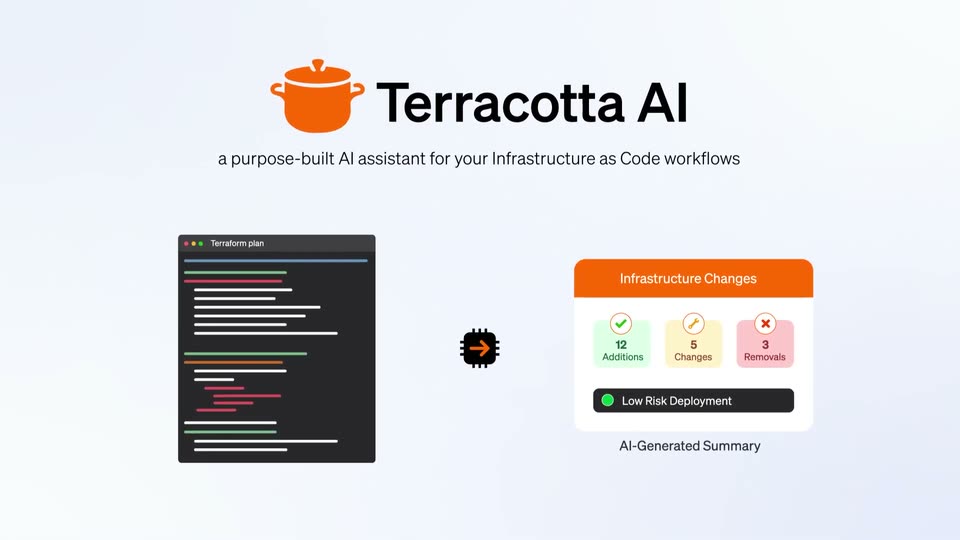
The Terracotta AI logo and gray tagline rise to the top of a light background. Below, a dark code window with colored diff bars slides up beside a chip icon with an arrow, next to an orange Infrastructure Changes card and a white AI-Generated Summary card.
On-screen text: “a purpose-built AI assistant for your infrastructure”
Camera: Pull out
The Terracotta AI logo and tagline sit above a diagram on a light background: a dark code window, an orange arrow chip, and a white summary card whose colored stat tiles and Low Risk pill slide in. The scene zooms in slowly, then scrolls up out of frame.
On-screen text: “Terracotta AI”, “a purpose-built AI assistant for your Infrastructure as Code workflows”, “AI-Generated Summary”
Camera: Pull out
On a pale gradient, an orange pot labeled AI Processing Engine sits center as three tiles, Code, State and Cloud, pop in across the top. Four cards, Drift, Security Risks, Blast Radius and Cost Impact, spring up below while the lid lifts and closes.
On-screen text: “AI Processing Engine”, “Code”, “State”, “Cloud”, “Drift”, “Changes not tracked in Terraform”, “Security Risks”, “Public S3 buckets found”, “Blast Radius”, “12 resources affected by change”
Camera: Push in
A dark code-review window floats on a pale field, tilting in 3D. A message appears, an AI analysis list fills line by line, an orange outline draws around it, then the card slides left as a cartoon reviewer with a 'Nice catch' bubble pops in.
On-screen text: “Nice catch”, “Smart Code Reviews”
Techniques: 3D mockup
Camera: Pull out
Two flat UI cards slide in side by side: a red 'Pull Request Review' card with diff bars and a green 'AI Smart Code Reviews' card with status lines. A red APPROVED stamp rotates onto the left as a green Safe 95% badge pops in on the right.
Techniques: Split screen
Camera: Pull out
Two softly blurred interface cards, a pink pull-request card with red APPROVED stamps and a green code-review card, slide leftward off frame over a pale blue background, leaving the frame empty.
Camera: Pan
Three rounded feature cards enter one after another, left to right, on a pale blue background. Each pairs a flat cartoon avatar in a dashed circle with a dark or white UI panel, and an orange icon (magnifier, lightning, shield) pops in below. The row holds static at the end.
On-screen text: “Clean, readable changes”, “AI-enhanced comments”, “This change improve authentication security by 15%”, “Quick Summary”, “Safe changes detected”, “No performance impact”, “2s”, “APPROVE”, “Drift: None”, “Cost: OK2s Security: Passed Tests: ✓ CONFIDENCE: 96%”
Camera: Static
Three flat UI cards, each with an avatar and an orange icon, sit side by side on a pale blue background. A glossy black 3D sphere scales up from the center, covering the middle card, while a white headline fades in over it.
On-screen text: “Faster reviews. Safer deploys.”
Techniques: Kinetic type
Camera: Static
Dark charcoal card with a faint pot icon watermark behind the text. The white headline sits above a thin white rule, its soft glow fading out, then an orange subline types in below the rule and holds.
On-screen text: “Faster reviews. Safer deploys.”, “Clear, intelligent Infrastructure as Code deployments”
Techniques: Kinetic type
Camera: Static
On a plain off-white background, an orange pot icon with a lifting lid assembles beside the black Terracotta AI wordmark, which sharpens and scales in. A gray tagline fades in below, then an orange Get Started pill button pops in and the frame holds.
On-screen text: “Terracotta AI”, “bring intelligence to your Infrastructure as Code workflows”
Techniques: Kinetic type
Camera: Pull out