0:30

New ways to search: Beetlejuice Beetlejuice (ft. Bob)
Google · AI · Sep 2024
Space’s 1:10 launch film runs 37 scenes, about 1.9 s each. The product shows up at 0:31 and 2 features are revealed. The call to action lands at 1:07 (96% in), over a voiceover. The video cuts roughly every two seconds between live-action office shots, flat white title cards, and purple pixel-art game windows that turn each storage pain into a mini level. Its signature moves are oversized lowercase captions that drop in word by word and retro game-UI pop-ups that punctuate every beat of the story.
Is this your launch? to your site or press kit.
Google · AI · Sep 2024
Particularity · Government · Oct 2026
A hand holds a red portable drive case with a silver drive and black SSDs in a shallow-focus close-up. Large white words build across the frame, ending with the full phrase.
On-screen text: “these are your typical”
Techniques: Kinetic type
Camera: Static
A hand holds a fan of four external drives, red, silver and black, in sharp focus while a blurred person stands behind. Large text words appear over the frame in sequence.
On-screen text: “theseare”, “your”, “typical”
Techniques: Kinetic type
Camera: Static
Four pixel-art portable drives in orange, gray, orange-black, and black start tilted in 3D perspective, rotate upright, and settle into a row on a light gray background. Pixel prices count up beneath each unit, then brand names pop in.
On-screen text: “$200”, “$250”, “$220”, “$275”, “LACIE”, “SAMSUNG T7”, “SANDISK”, “SAMSUNG T9”
Techniques: 3D mockup
Camera: Pan
A man with glasses talks to camera in a softly lit room, a lavalier mic clipped to his sweater. Large white text reading perTB sits locked over his face for the whole shot.
On-screen text: “perTB”
Camera: Pan
A bespectacled speaker in a green sweater talks to camera in a brick office, gesturing with a raised finger, while a coworker works at a desk behind. The white lowercase label arvin and a curved arrow fade in at right, pointing to the coworker.
On-screen text: “arvin”
Camera: Static
A pixel-art storage window on a purple field counts DRIVES from 2 to 3. A gray and a black drive sit at the bottom; an orange drive drops in with a +1 badge, and a dashed slot marked +1? appears to the right.
On-screen text: “arvin”
Camera: Static
A person with curly hair and glasses sits at a desk with editing monitors and a laptop, touching their face as a hand reaches in from the bottom. Large white text overlays the shot, the second line dropping in beneath the first.
On-screen text: “so you're”, “editing”
Techniques: Kinetic type
Camera: Push in
Three lines of bold black text sit static on a plain white background: 'so you're', 'editing', 'right now?'. The frame stays locked off for the full duration, matching the voiceover question.
On-screen text: “so you're”, “editing”, “right now?”
Camera: Static
A vertical clip of a camera rig shooting hydrangeas on a draped table plays on the left. On the right, large lowercase lines, i just finished shooting a project, fade in from gray to black on white.
On-screen text: “i just finished shooting a project”
Techniques: Kinetic type, Split screen
Camera: Push in
A woman with glasses sits at a desk in front of a large monitor running video-editing software, gesturing as she talks. Huge white text
On-screen text: “700GB”, “of footage”
Camera: Static
A man with glasses sits at a desk holding a small black drive, gesturing as he talks, with a video-editing monitor and a camera on a shelf behind him. White caption cards with dark backgrounds pop in one phrase at a time at the bottom center.
On-screen text: “My SSD,”, “I had on me,”, “originally”
Camera: Static
A pixel-art file-copy window floats on a purple field. A camera on a tripod sends small teal squares toward a hard drive while a progress bar fills and the counter climbs to 100 GB. The title bar turns red and an error dialog pops up over the window.
On-screen text: “originally”, “ran out”, “I had to run”, “So in between”, “my shoot,”
Camera: Push in
A pixel-art game window on a purple field shows a character sprinting right past teal buildings as a yellow progress bar fills. It cuts to a man with glasses at a desk, holding a cable-tethered phone, an editing timeline on the monitor behind him.
On-screen text: “RUNNING TO BEST BUY”, “SPRINTING TO BEST BUY”, “MID-SHOOT. CLOCK RUNNING.”, “I had to run”, “to the shop”, “another one.”
Camera: Static
A person with dark hair and glasses sits at a desk in front of a large monitor showing a video editor with a green screen preview. They hold a small black device in one hand while another hand reaches in from the left to point at it. A camera, an orange-cased tablet, and a keyboard sit on the desk. White subtitle text reads at the bottom.
On-screen text: “SPRINTING TO BEST BUY”, “MID-SHOOT. CLOCK RUNNING.”, “How much did it”, “much?”
Camera: Static
A man with glasses and curly hair sits at a desk, smiling as he holds a smartphone tethered by a cable. Behind him, a monitor shows a video editing timeline against a brick wall and window. The caption is locked at the bottom center.
On-screen text: “It ran me”
Camera: Static
A flat pixel-art window titled PRICE CHECK sits on a purple field, holding a black external drive marked with a white dollar sign. A yellow price tag reading $350 drops in above the drive, while a large red $350 stays overlaid on the right.
On-screen text: “It ran me”, “$350”
Camera: Static
A pixel-art window titled PRICE CHECK on a purple field shows a black wallet with a dollar sign and a yellow tag reading $350, with a large red $350 overlaid. A white magnifier circle hovers over the tag, then the scene cuts to a man with glasses in a purple sweater talking in an office.
On-screen text: “PRICE CHECK”, “$350”
Camera: Static
A bespectacled man in a green sweater speaks to camera in a brick-walled office, giving a thumbs-up; a colleague works at a long desk behind him. White lowercase captions, drives, get slower, over time, stack in on the right as he talks.
On-screen text: “drives”, “get slower”, “over time”
Techniques: Kinetic type
Camera: Static
A man in glasses and a green sweater talks to camera in a brick-walled office. On the right, a pixel-art Samsung T7 SSD graphic sits above a segmented bar that fills from green to red while the counter climbs from 56 to 100 / 100 GB, turning red at full.
On-screen text: “SAMSUNG T7 SSD”, “56 / 100 GB”, “79 / 100 GB”, “100 / 100 GB”
Camera: Static
A small black external drive sits on a desk, plugged into a laptop by a cable. The camera moves to the person's hands typing on the keyboard and operating a mouse while the captions relying and physical appear at the bottom.
On-screen text: “relying”, “physical”
Camera: Pan
A locked-off close-up of a red phone resting on a small gray drive unit on a desk shelf, with a camera and cables blurred behind. A white caption line swaps word by word at the bottom while a checkered strap blurs the left foreground.
On-screen text: “drives”, “for his work,”, “we build”
Camera: Static
Over a person's shoulder, a large monitor shows a video-editing timeline and a green-screen preview in a brick-walled room. White subtitle captions swap at the bottom of the frame while the subject and camera stay still.
On-screen text: “something that”, “allows him”, “all of his”
Camera: Static
A laptop rests angled on a desk, its dark screen packed with a grid of file icons. A hand types on the keyboard at the right edge. The locked-off frame keeps shallow focus, blurring the desk and a red phone case behind. White caption words sit in a dark bar at the bottom.
On-screen text: “all of”, “his footage”, “directly off”
Camera: Static
A dark, blurred foreground shape occludes the right side of a monitor showing a video editing timeline with colored clips. White captions appear at the bottom center, reading 'directly off' then 'of the cloud.' The frame stays locked off.
On-screen text: “directly off”, “of the cloud.”
Camera: Static
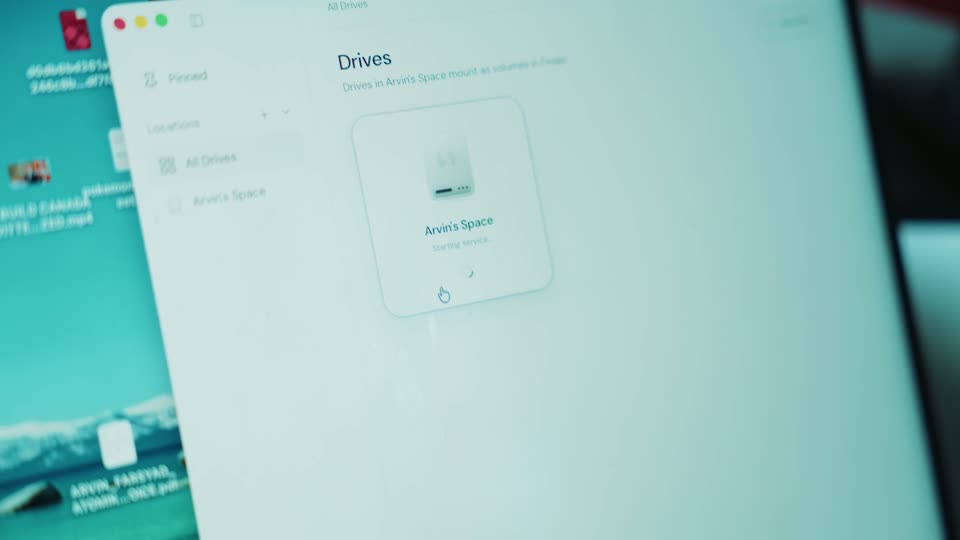
Locked-off shot of a macOS desktop with a Finder window open to the Drives view. A card for Arvin's Space sits left of center with Mount and Open buttons, an update banner rests at the bottom left, and a cursor hovers over All Drives in the sidebar.
On-screen text: “of the cloud.”
Camera: Static
A tilted Finder window floats in 3D over a blurred desktop. A cursor clicks Mount on the Arvin's Space card, the status changes to a loading spinner, and the pane scrolls up.
Techniques: 3D mockup, Cursor demo
Camera: Static
A documentation view titled Drives sits on a white page, with a rounded card holding a drive icon, the name Arvin's Space, its volume path, and Open and Show in Finder buttons. A hand cursor glides to Show in Finder and clicks it, a ripple marking the press.
On-screen text: “All Drives”
Techniques: Cursor demo
Camera: Static
Close-up of a dark Finder window; a white arrow points from the caption to the cloud-synced folder in the sidebar while a cursor hovers over video thumbnails in the CLIP folder. The shot then cuts to a wider view of the monitor on a desk.
On-screen text: “cloud files appear local”
Techniques: Cursor demo
Camera: Static
A person works at a desk with a laptop and a large monitor showing a timeline; one hand rests on a mouse while another reaches toward the laptop screen. The word drag appears in large white letters on the right as the handheld camera drifts slightly.
On-screen text: “drag”
Camera: Pull out
A desk with a large monitor running video editing software and a laptop in front; a hand works the trackpad while large white lowercase words “drag” and “& drop” fade in over the right side of the frame.
On-screen text: “drag”, “& drop”
Techniques: Kinetic type
Camera: Static
A dark macOS file-info panel for C5315.MP4 fills the frame, the phrase (Zero bytes on disk) highlighted in cyan. A large white caption “zero bytes on disk...” fades in across the lower half, while a column of video thumbnails blurs along the right edge.
On-screen text: “zero bytes on disk...”
Techniques: Kinetic type
Camera: Static
A hand points at the editing timeline on a large monitor while a second hand taps the laptop screen below. Large white lowercase text “but you're” overlays the frame, then “able to edit” pops in beneath it.
On-screen text: “but you're”, “able to edit”
Techniques: Kinetic type
Camera: Static
A smiling man in glasses sits at a desk with a laptop and a large monitor showing an editing timeline, against a brick wall. Large white lowercase words appear line by line over him while the camera pans left across the room.
On-screen text: “but you're”, “able to edit”, “how”, “does this”, “work?”
Techniques: Kinetic type
Camera: Pull out
A pixel-art browser window shows a cloud labeled with project files beside a laptop running a video editor. The top headline cycles through three lines while the timeline playhead and timecode advance inside the editor.
On-screen text: “YOUR PROJECT FILES”, “YOUR FILES LIVE IN THE CLOUD”, “OPEN THEM LIKE THEY ARE LOCAL”, “0 BYTES ON YOUR DISK”
Techniques: Kinetic type
Camera: Static
High-angle shot of a white desk. A hand in a green sleeve points at a black power adapter with a coiled cable, while another hand rests on a mouse beside an open laptop showing a green-tinted screen. A white caption holds at the lower right.
On-screen text: “get rid of these...”
Camera: Static
A man with glasses sits at a desk, smiling and gesturing toward a tablet, while a large monitor beside him shows a video editing timeline. Handheld camera with a teal grade, brick pillar and bright window behind.
On-screen text: “get rid of these...”
Camera: Pull out
A static end card on a plain off-white background. Two centered lines of black text hold for the full duration: a smaller light-weight line above a larger bold line, with no motion or camera move.
On-screen text: “sign up:”, “spacefs.com”
Camera: Static